Hacking Configurator for Configurable USB Loader

  • Thread starter Thread starter Dr. Clipper
  • Start date Start date
  • Views Views 427,231
  • Replies Replies 609
@xakmad:

1) I guess. I've really just been waiting for someone to ask that, I think.

2) I'll go with the count column

3 & 4) Both of these would require me to actually program my own sort rather than using the provided sort method. If I figure out a way to do it easily, I'll change it.

5) I'll consider it, but it's difficult to work out where to put it as the playstats are in a totally separate file to settings.cfg.

6) Won't be happening. I might be convinced to make it backup the most recent change (in config_backup.txt?) if it is really wanted, though. In the meantime, you can manage your own backups by manually generating extra config files if you like.

Have you tried downloading images with the Configurator again after your restoration? I'd like to know if you get the dud cover back.

 
Dr. Clipper said:
v51.3 of Configurator is out

download here

Thanks very much to pepxl for spotting the bugs.

Changes:
  • Converted "/" to "\" when auto-filling cover directories in the wizard (some drive mappings disliked them)
  • Fixed reading of write_playstats option
  • Fixed writing of fat_split_size option (it was using download_id_len's code)
No translation changes.

works a charm now Dr Clipper, keep up the good work
 
in the latest version when I draw text in the 16:9 Console Wiz, it is a garbled text display, not the normal english language?
 
bnm81002 said:
in the latest version when I draw text in the 16:9 Console Wiz, it is a garbled text display, not the normal english language?
That's weird. Works fine for me. Do you have a consolewiz.cdb file in the same directory as the executable? That's the only thing that I can think of that would cause the text to display as other characters.

Perhaps it's not registering the font correctly, though, and is choosing a different one on your system. Could you possibly take a screenshot (Alt-Printscreen, then paste into Microsoft Paint and save if you didn't know) and PM it to me or post it in the thread?

You could also try installing this font on your system (it's FixedSys Excelsior, the font used by Cfg) to see if that is needed to make it work (although I doubt it, as I include the font as a resource in the executable).
 
Dr. Clipper said:
1) I guess. I've really just been waiting for someone to ask that, I think.
thanks
2) I'll go with the count column
great, means i can see whats missing! it also gets round the problem of having to get a gamelist on the wii before the cfgr picks it up
unless i'm doing something stupid, which lets face it, isnt beyond the realms of possibility
wink.gif

3 & 4) Both of these would require me to actually program my own sort rather than using the provided sort method. If I figure out a way to do it easily, I'll change it.
NP, ta
5) I'll consider it, but it's difficult to work out where to put it as the playstats are in a totally separate file to settings.cfg.
guessing youd load settings as norm but with a dud colunm and then fill than in crossref the gameID as you read the play_count.
helpful to get rid of games you dont use, but dont kill yourself over it.
6) Won't be happening. I might be convinced to make it backup the most recent change (in config_backup.txt?) if it is really wanted, though. In the meantime, you can manage your own backups by manually generating extra config files if you like.
LOL
Have you tried downloading images with the Configurator again after your restoration? I'd like to know if you get the dud cover back.
i will do it again - on a spare drive thou:)
 
v51.4 of Configurator is out

download here

This one's a biggie
wink2.gif


Changes:
  • Subversion number (e.g., 51.4) will now appear in the title bar of the main form.
  • Added *Count* column to favorite grid to show how many profiles a game exists in.
  • Added Play count and Last time played columns to the options grid. playstats.txt is read and written at the same time as settings.cfg if playstats.txt is present in the same directory.
  • Merged the buttons to add a named game and add an ID to the settings list into a single button.
  • Added an extra button to add games to the settings list via folder (so just load your wbfs folder like with the covers).
  • Added some extra translated fields for dialog box titles et al.
  • Probably something else that I've forgotten
    tongue.gif
Translators: Sample CDBs were updated.
 
Dr. Clipper said:
bnm81002 said:
in the latest version when I draw text in the 16:9 Console Wiz, it is a garbled text display, not the normal english language?
That's weird. Works fine for me. Do you have a consolewiz.cdb file in the same directory as the executable? That's the only thing that I can think of that would cause the text to display as other characters.

Perhaps it's not registering the font correctly, though, and is choosing a different one on your system. Could you possibly take a screenshot (Alt-Printscreen, then paste into Microsoft Paint and save if you didn't know) and PM it to me or post it in the thread?

You could also try installing this font on your system (it's FixedSys Excelsior, the font used by Cfg) to see if that is needed to make it work (although I doubt it, as I include the font as a resource in the executable).


here it is, also the new version has the same thing as well, why does it show v50.4 on the top?
http://s961.photobucket.com/albums/ae95/wm...garbledtext.jpg
 
v51.5 of Configurator is out

download here

Changes:
  • Made sure I got the displayed version number right this time
    rolleyes.gif
  • Changed font loading method
This is mostly just a fix for bnm81002 to try out. I have no clue why the font isn't loading for you, so I tried switching the memory area where I perform the transfer to see if that has an affect.

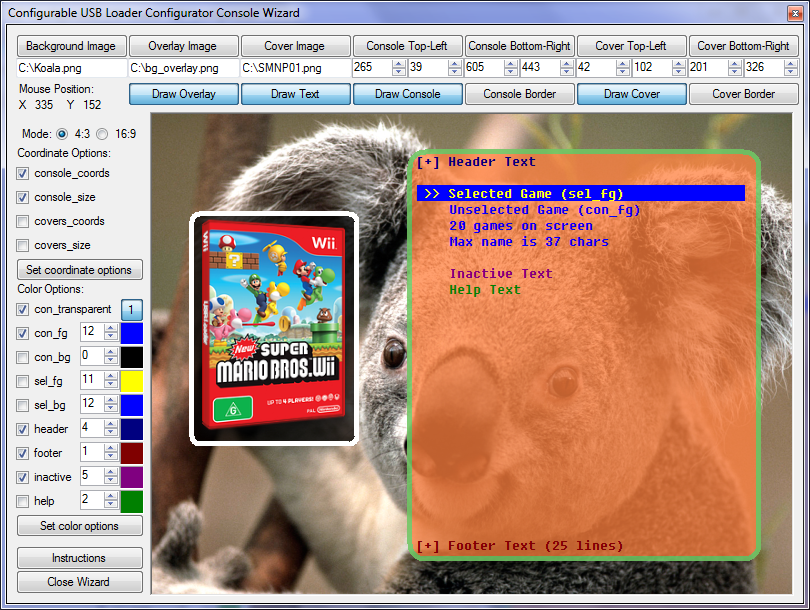
Could people please test this version following these steps:[*]Download and launch Configurator v51.5[*]Push "4:3 Console Wiz"[*]Push "Draw Console"[*]Push "Draw Text"If the text looks like the same font as here, then it is working for you:
conwiz.png


If it looks garbled or is in a different font, please respond listing your OS (e.g., Windows XP) and any information you deem relevant.
 
bnm81002 said:
still same problem, Windows XP SP3, it's strange because your previous versions worked as normal with no garbled text
With which version did it start getting garbled? Can you test one of the old versions again and see if it still works?
 
Dr. Clipper said:
bnm81002 said:
still same problem, Windows XP SP3, it's strange because your previous versions worked as normal with no garbled text
With which version did it start getting garbled? Can you test one of the old versions again and see if it still works?

I don't remember which ones, sorry, if you have any of those old versions I can test them for you?
 
bnm81002 said:
Dr. Clipper said:
bnm81002 said:
still same problem, Windows XP SP3, it's strange because your previous versions worked as normal with no garbled text
With which version did it start getting garbled? Can you test one of the old versions again and see if it still works?

I don't remember which ones, sorry, if you have any of those old versions I can test them for you?
They're all linked in the first post, and you only have to change the version number in the link anyway
tongue.gif
 
the last working text is v49.4, I see that you changed the text with v49.5,
# Configurator v49.5 : Fixed text bug, support for -fat versions, string translations
# Configurator v49.4 : Added full profile management
 
v51.6 of Configurator is out

download here

Changes:
  • Another font change
bnm81002 and anyone else experiencing font issues, this one will hopefully work now. To get it to work you will need to:[*]Download the FixedSys Excelsior 3.01 font from here (yes the filename has 300 in it, but it is 3.01).[*]Install the font by right-clicking the file and selecting Install then following any prompts[*]Run Configurator 41.6 and the text should hopefully work now.If the text was already working for you, then you don't need to install the font first, it will continue to work as it has worked in the past.
 
bnm81002 said:
when I right click the file, there is no install option?
Oh, guess XP didn't give that as an option. Try double-clicking it. If that doesn't work, Go to your Control Panel and select the Fonts option there. There should be a button, link or menu item to add a new font. Failing that, find your fonts directory (probably c:\windows\system32\fonts) and copy the file into there.
 

Site & Scene News

Popular threads in this forum