Hacking Configurable USB Loader

  • Thread starter Thread starter oggzee
  • Start date Start date
  • Views Views 7,865,393
  • Replies Replies 18,482
  • Likes Likes 22
oggzee said:
Sacohen9665 said:
Ever since I updates to v68B4 the cover image for Wit Fit Plus is showing up in the GUI mode and all broken up.
There are digital lines thru out the image, if I go to the console mode and then back it clears up the image.
I don't think it is a corupt file, becasue I deleted my covers and re-downloaded it and it still happens.
If you need a better example fo what is happening I can take a picture of the screen when I get hone tonight.
Thanks.
Yes please make a picture.
Also, in which gui and cover style that happens?
Also, please update to the latest v68 release.

Thanks Oggzee.
I'll get a picture of it tonight.
I use the Carousel GUI and the 3D box, if that's the right terminology, but you'll be able to tell from the picture.

 
Sacohen9665 said:
Thanks Oggzee.
I'll get a picture of it tonight.
I use the Carousel GUI and the 3D box, if that's the right terminology, but you'll be able to tell from the picture.
It's the full cover then (although it could be 2d+noimage if the full cover is missing).
What do you see when you turn the cover to show the back (pressing dpad UP) is it a question mark '?' or the proper cover.
Anyway, yes please do make a screenshot of how the corrupted cover looks like.
And is it corrupted only for this game? Or are others affected too?
What happens when you select the game (with gui menu enabled) and change the cover type to HQ and RGB, still corrupted or not?
 
oggzee said:
miguelbolas said:
I just do it, but still 35 files in the cache folder.
I can see the 47 covers in the cfg and it loads them fast.
Must be some bug.
Probably the remaining 12 covers are 2D (flat) only? - It doesn't create a cache for that.
Or do you have 47 covers in the full directory too?
I have 41 covers in the full directory and 47 covers + no image cover=48 in 3d and 2d directory.
 
Hey guys, I need your help.

I have modded several wiis for my friends and family. Well I am stuck on this one...

I get "partition: fat1 not found" and 4 partitions show up all 0.00 gb.


I followed the softmod for 4.3u wiis from this site.

At first he had a USB 3.0 hard drive, and I found one post saying that that would work you just had to upgrade, so I tried to upgrade cIOS. Well, we it didn't work so I told him to buy a USB 2.0 drive which he did. I still can't get any signs of life from the drive.

If there is any suggestions you may have I'd love to hear them, I tried to start from scratch and still nothing.

I tried his HD and mine both nogo, but both his and mine work fine on my wii so I am confident the HD is okay. I used Wii Backup Manager to set up and copy games on HD. Fat32 formatted with EASEAUS formatter.

Thanks for any help! RandEE
 
bnm81002 said:
oggzee said:
bnm81002 said:
I'm having problems updating, I get the "error downloading update", why is that?
I don't know, maybe retry. Or does it fail every time?
What about themes, covers, titles.txt, can you update those?


yes everything else downloads, I see that it tries to load the update to the SD: path but I used the Configurator to set my USB drive to device as USB, in the meta file it also shows it as device=usb?


oggzee or anyone that can help me out please? thank you
 
oggzee said:
Sacohen9665 said:
Thanks Oggzee.
I'll get a picture of it tonight.
I use the Carousel GUI and the 3D box, if that's the right terminology, but you'll be able to tell from the picture.
It's the full cover then (although it could be 2d+noimage if the full cover is missing).
What do you see when you turn the cover to show the back (pressing dpad UP) is it a question mark '?' or the proper cover.
Anyway, yes please do make a screenshot of how the corrupted cover looks like.
And is it corrupted only for this game? Or are others affected too?
What happens when you select the game (with gui menu enabled) and change the cover type to HQ and RGB, still corrupted or not?

Oggzee here is a screenshoot of the corrupt cover. It only happens to the Wii Fit Plus cover even after I re-downloaded it.

I updated to the final release of 68 and rebooted before I took the screen shot

screenshot1.png


Thanks
 
bnm81002 said:
yes everything else downloads, I see that it tries to load the update to the SD: path but I used the Configurator to set my USB drive to device as USB, in the meta file it also shows it as device=usb?
device is just the games device not the loader device.
Give more details.
From where are you launching the loader?
What does it say under "App. Path:" ? Is it correct?
 
Sacohen9665 said:
Oggzee here is a screenshoot of the corrupt cover. It only happens to the Wii Fit Plus cover even after I re-downloaded it.
I updated to the final release of 68 and rebooted before I took the screen shot
screenshot1.png
Thanks
Thanks the screenshot actually helped
smile.gif

I managed to reproduce it, the key is a small number of games and no music then it shows as corrupted.
I'll fix this.
 
oggzee said:
Sacohen9665 said:
Oggzee here is a screenshoot of the corrupt cover. It only happens to the Wii Fit Plus cover even after I re-downloaded it.
I updated to the final release of 68 and rebooted before I took the screen shot
screenshot1.png
Thanks
Thanks the screenshot actually helped
smile.gif

I managed to reproduce it, the key is a small number of games and no music then it shows as corrupted.
I'll fix this.

Thanks Oggzee
I updated to v68c bugzix and it worked perfectly.
Glad I could help make this the best USB loader out there.
Keep up the great work.
 
Quick questions:

1. Changing theme through GUI will not update config.txt/settings.cfg with the new theme? I changed it and restarted the app, but theme stayed as before the change.
2. Is there an option to reduce the text size on the game cover detail screen? Long titles overlap over other elements in the same line...
3. Is there an option to define the default cover size when in game cover detail? I know it can be zoomed/zoomed out with +/-, but how can I define a default cover size? Current default size overlaps some text below...

TIA.
 
pplucky said:
Quick questions:

1. Changing theme through GUI will not update config.txt/settings.cfg with the new theme? I changed it and restarted the app, but theme stayed as before the change.
2. Is there an option to reduce the text size on the game cover detail screen? Long titles overlap over other elements in the same line...
3. Is there an option to define the default cover size when in game cover detail? I know it can be zoomed/zoomed out with +/-, but how can I define a default cover size? Current default size overlaps some text below...

TIA.
1. The theme was never saved automatically, save settings will do that.
2. There isn't. I will make it automatically scale down further when it is too long.
3. There is no such option.
 
oggzee said:
pplucky said:
Quick questions:

1. Changing theme through GUI will not update config.txt/settings.cfg with the new theme? I changed it and restarted the app, but theme stayed as before the change.
2. Is there an option to reduce the text size on the game cover detail screen? Long titles overlap over other elements in the same line...
3. Is there an option to define the default cover size when in game cover detail? I know it can be zoomed/zoomed out with +/-, but how can I define a default cover size? Current default size overlaps some text below...

TIA.
1. The theme was never saved automatically, save settings will do that.
2. There isn't. I will make it automatically scale down further when it is too long.
3. There is no such option.
1. OK, makes sense.
2. OK, that would be good!
3. Would it make sense or should the default be smaller? Do you want a screenshot to show you what I mean?
 
randee said:
Hey guys, I need your help.

I have modded several wiis for my friends and family. Well I am stuck on this one...

I get "partition: fat1 not found" and 4 partitions show up all 0.00 gb.


I followed the softmod for 4.3u wiis from this site.

At first he had a USB 3.0 hard drive, and I found one post saying that that would work you just had to upgrade, so I tried to upgrade cIOS. Well, we it didn't work so I told him to buy a USB 2.0 drive which he did. I still can't get any signs of life from the drive.

If there is any suggestions you may have I'd love to hear them, I tried to start from scratch and still nothing.

I tried his HD and mine both nogo, but both his and mine work fine on my wii so I am confident the HD is okay. I used Wii Backup Manager to set up and copy games on HD. Fat32 formatted with EASEAUS formatter.

Thanks for any help! RandEE

Still trying to get this figured out, tried to reload all wads from the softmod guide they all copied successfully except a few that I had newer versions of.

I can't access the Hard Drive from any of the emulators as well. Is there a certain IOS or cIOS that controlls the ability to read the hard drive? Perhaps it is corrupted or faulty. You guys are the Pros, anybody got anything to try?
 
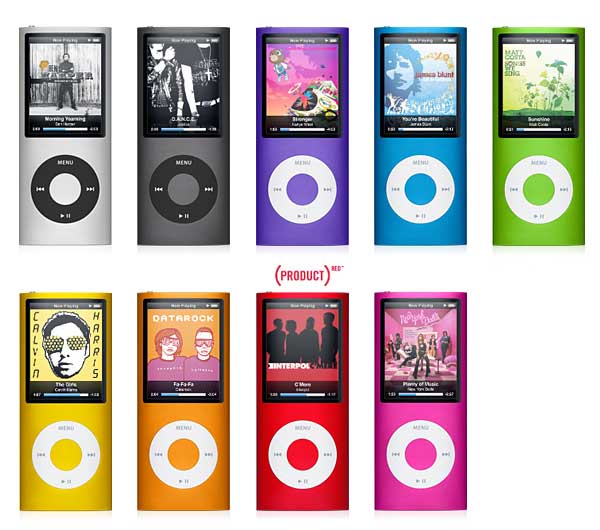
OK, here's the deal. I have an 8GB iPod Nano 4th Gen. I put Smash Bros Brawl on it and I connected it to my Wii. But when I entered CFG USB Loader, the device failed to mount every time. I formatted it to FAT32, NTFS, and none of these work. I can't format the iPod to WBFS because WBFS Manager keeps tossing me an error. Is this a bug or is it that the Wii can't handle this iPod?

ipod_nano_4g.jpg


This is the model in question.
 
oggzee said:
bnm81002 said:
yes everything else downloads, I see that it tries to load the update to the SD: path but I used the Configurator to set my USB drive to device as USB, in the meta file it also shows it as device=usb?
device is just the games device not the loader device.
Give more details.
From where are you launching the loader?
What does it say under "App. Path:" ? Is it correct?


launching it through the fowarder channel on the main menu, the App. Path: sd:/apps/usbloader is shown, which is wrong because I never set the path to the sd, it's always been to the usb, i've never had any trouble updating till now when trying to update to version 68,
how do I change the App. Path: to USB? thanks
 
bnm81002 said:
launching it through the fowarder channel on the main menu, the App. Path: sd:/apps/usbloader is shown, which is wrong because I never set the path to the sd, it's always been to the usb, i've never had any trouble updating till now when trying to update to version 68
This may happen with older forwarder versions and older cfg-loader versions. It also can happen if you have the loader on a NTFS or EXT partition.
 
FIX94 said:
bnm81002 said:
launching it through the fowarder channel on the main menu, the App. Path: sd:/apps/usbloader is shown, which is wrong because I never set the path to the sd, it's always been to the usb, i've never had any trouble updating till now when trying to update to version 68
This may happen with older forwarder versions and older cfg-loader versions. It also can happen if you have the loader on a NTFS or EXT partition.


using FAT partition though
 

Site & Scene News

Popular threads in this forum