Hacking Configurable USB Loader

  • Thread starter Thread starter oggzee
  • Start date Start date
  • Views Views 7,865,783
  • Replies Replies 18,482
  • Likes Likes 22
Dr. Clipper said:
TeenTin said:
I found that in Global Options (page 3), the options at the right hand side does not work properly like all others. (Just clicking on it and you will find out).
Yep, seems like it deleted some of my event handlers when I cut and paste those options from one tab form to another. It's fixed now. There was also a bug in the way I wrote the gui colours which I also fixed.

It works great now. I more suggestion, how about a function to load an old config.txt file ? Because we usually want to make a small change instead of starting from scratch. Thanks !
 
TeenTin said:
It works great now. I more suggestion, how about a function to load an old config.txt file ? Because we usually want to make a small change instead of starting from scratch. Thanks !
That's going in today. Note from the post where I released this thing:
Dr. Clipper... I also plan to add functions to read an existing config.txt and theme.txt...
 
usptactical said:
DXFactor said:
Updated to 40 (release), installed cIOS38 rev 14, redownloaded all the covers, and still no luck. Only difference is I don't seem to get the freeze with the green band anymore...I just get a clean kick-out to the HBC.

Any other suggestions? Would it be helpful if I posted a video showing what's happening?

Did you also try with a different SD card?

Wow...that did it. Thanks for the advice usptactical!

I tried another card, and voila! Then I cleaned off the original, and started it off from scratch with fresh files, and it runs fine now too.

I did however come across a new problem:

When I first installed cIOS38 rev 14, it worked fine for the day. Then the next morning, I couldn't get the loader to mount the drive. It would simply count to 30 and timeout. I reinstalled Rev 10, and and it worked fine. I tried 14 a couple more times, and the problem returns. I installed via network connection with 249. Any ideas?
 
DXFactor said:
usptactical said:
DXFactor said:
Updated to 40 (release), installed cIOS38 rev 14, redownloaded all the covers, and still no luck. Only difference is I don't seem to get the freeze with the green band anymore...I just get a clean kick-out to the HBC.

Any other suggestions? Would it be helpful if I posted a video showing what's happening?

Did you also try with a different SD card?

Wow...that did it. Thanks for the advice usptactical!

I tried another card, and voila! Then I cleaned off the original, and started it off from scratch with fresh files, and it runs fine now too.

I did however come across a new problem:

When I first installed cIOS38 rev 14, it worked fine for the day. Then the next morning, I couldn't get the loader to mount the drive. It would simply count to 30 and timeout. I reinstalled Rev 10, and and it worked fine. I tried 14 a couple more times, and the problem returns. I installed via network connection with 249. Any ideas?

Try offline installation :

http://www1.fdbox.com/download.php?uid=1B15MR1L

If the problem persists, try IOS223 Hermes :

http://www1.fdbox.com/download.php?uid=JJL6LNSM
 
Get ahold of IOS38-64-3610.wad. If you don't trust Mediafire uploads or something, generate it with NUS Downloader. Put that WAD in your SD card's root directory. Run the cIOS rev14 installer, but select "WAD Installation" this time.
 
I have an issue making me want to go back to using Neogamma, I hope you can help me get the most out of this wonderful loader.

As the provided covers resource is down, I downloaded covers from wiiboxart.com
The covers are all in the correct folders, but when I go to view the covers in the GUI (Can't recall its name at the moment) with front-back flipping, there is only the front. I assumed this used the "full" covers and I checked for the necessary image which was present in the correct folder. Am I naming the covers wrong or making some other mistake on my part?
 
New Version of the Configurator including reading of config.txt and theme.txt.

I think I'm done with this for now. I will add tool tips to explain the option values soon, but I need to take a break for now. Here's a look at the new interface:

Edit: I've created a new thread for the Configurator. Please add any comments or suggestions there.

v40_1.0.PNG


DXFactor said:
When I first installed cIOS38 rev 14, it worked fine for the day. Then the next morning, I couldn't get the loader to mount the drive. It would simply count to 30 and timeout. I reinstalled Rev 10, and and it worked fine. I tried 14 a couple more times, and the problem returns. I installed via network connection with 249. Any ideas?

Whereas the other help here is valid (and available in my tutorial in my sig), I am pretty certain you are just using a different USB port to last time. With rev12 and up, you must be using the USB port closer to the edge of your Wii (on the bottom when the Wii is flat).E
 
Dialexio & Teentin, thanks for the advice! Turns out tho that Dr. Clipper was right...I had copied over a few new games, and then used the wrong port (not realizing at the time of course, that there was a "wrong" port) Kinda makes sense tho since 12 and up allow the use of USB attachments... But I switched it up and now I'm golden.

Thanks to all of you for the help.
 
cfg v41a (alpha)

http://sharebee.com/673f0323

* Improved theming:

* Background overlay support
additional images can be supplied that will be overlaid over the background:
- bg_overlay.png or bg_overlay_w.png for console background
- bg_gui_over.png or bg_gui_over_w.png for gui background
New options:
background_base
wbackground_base
background_gui
wbackground_gui
Used to specify the background base over which the overlays are applied.

* background width can be larger than 640 and will be either
- scaled if widescreen
- cropped if not widescreen
down to 640x480. Note: height must still be 480.

* Option layout no longer re-sets the covers_size and wcovers_size
So that a cover_style or [w]cover_size in front of layout works as expected.

Also, here:
http://sharebee.com/5cdf8096
(cfg_overlay_test.zip)
Is an simple demo of how the new theming can be used and how to make themes that are backward and forward compatible.

edit: forgot to mention, this functionality has been suggested by Blue-K, so thanks goes to him for the idea.
 
oggzee said:
cfg v41a (alpha)

http://sharebee.com/673f0323

* Improved theming:

* Background overlay support
additional images can be supplied that will be overlaid over the background:
- bg_overlay.png or bg_overlay_w.png for console background
- bg_gui_over.png or bg_gui_over_w.png for gui background
New options:
background_base
wbackground_base
background_gui
wbackground_gui
Used to specify the background base over which the overlays are applied.

* background width can be larger than 640 and will be either
- scaled if widescreen
- cropped if not widescreen
down to 640x480. Note: height must still be 480.

* Option layout no longer re-sets the covers_size and wcovers_size
So that a cover_style or [w]cover_size in front of layout works as expected.

Also, here:
http://sharebee.com/5cdf8096
(cfg_overlay_test.zip)
Is an simple demo of how the new theming can be used and how to make themes that are backward and forward compatible.

edit: forgot to mention, this functionality has been suggested by Blue-K, so thanks goes to him for the idea.
So the overlay files don't have associated options? What is the default value of the new options (to indicate you want a normal background)? For the full release, why don't we make the options this:

background_base = [] ; background_filename ; background_filename,overlay_filename

with semicolons separating the option formats. Basically:

Leaving the option blank will use the old background option and files and is the default so that old themes are supported.
Specifying one filename provides a file to use without an overlay.
Specifying two filenames separated by a comma gives both the background and the overlay.
 
Dr. Clipper said:
New Version of the Configurator including reading of config.txt and theme.txt.

I think I'm done with this for now. I will add tool tips to explain the option values soon, but I need to take a break for now. Here's a look at the new interface:

Edit: I've created a new thread for the Configurator. Please add any comments or suggestions there.

v40_1.0.PNG


DXFactor said:
When I first installed cIOS38 rev 14, it worked fine for the day. Then the next morning, I couldn't get the loader to mount the drive. It would simply count to 30 and timeout. I reinstalled Rev 10, and and it worked fine. I tried 14 a couple more times, and the problem returns. I installed via network connection with 249. Any ideas?

Whereas the other help here is valid (and available in my tutorial in my sig), I am pretty certain you are just using a different USB port to last time. With rev12 and up, you must be using the USB port closer to the edge of your Wii (on the bottom when the Wii is flat).E


Is it possible to have a preview image of the changes made before writing/updating the new config? Just so we had a visual of how it will look.

either way nice app. thanks,

sg
 
SomeGuy2009 said:
Is it possible to have a preview image of the changes made before writing/updating the new config? Just so we had a visual of how it will look.
either way nice app. thanks,
sg

Great app ... Also I agree, visual preview would be fantastic ... I do find it painful clumsy currently having to edit config file on pc and coping it back to sd card and loading it up on the wii with each edit to preview/see changes! ... makes creating and fine tuning a theme a lot more work
frown.gif
 
oggzee said:
cfg v41a (alpha)

http://sharebee.com/673f0323

* Improved theming:

* Background overlay support
additional images can be supplied that will be overlaid over the background:
- bg_overlay.png or bg_overlay_w.png for console background
- bg_gui_over.png or bg_gui_over_w.png for gui background
New options:
background_base
wbackground_base
background_gui
wbackground_gui
Used to specify the background base over which the overlays are applied.

* background width can be larger than 640 and will be either
- scaled if widescreen
- cropped if not widescreen
down to 640x480. Note: height must still be 480.

* Option layout no longer re-sets the covers_size and wcovers_size
So that a cover_style or [w]cover_size in front of layout works as expected.

edit: forgot to mention, this functionality has been suggested by Blue-K, so thanks goes to him for the idea.

This sounds like the things you do with photoshop or fireworks. Working with layers. I don't see it as extra help / feature myself but for others it can be helpfull.
 
SomeGuy2009 said:
Is it possible to have a preview image of the changes made before writing/updating the new config? Just so we had a visual of how it will look.

either way nice app. thanks,

sg
I just released a version which includes the console mockups, so yes it is certainly possible, as it is already done
yay.gif
. Check the new thread for the new version. I don't want to clutter the Loader thread with Configurator stuff.

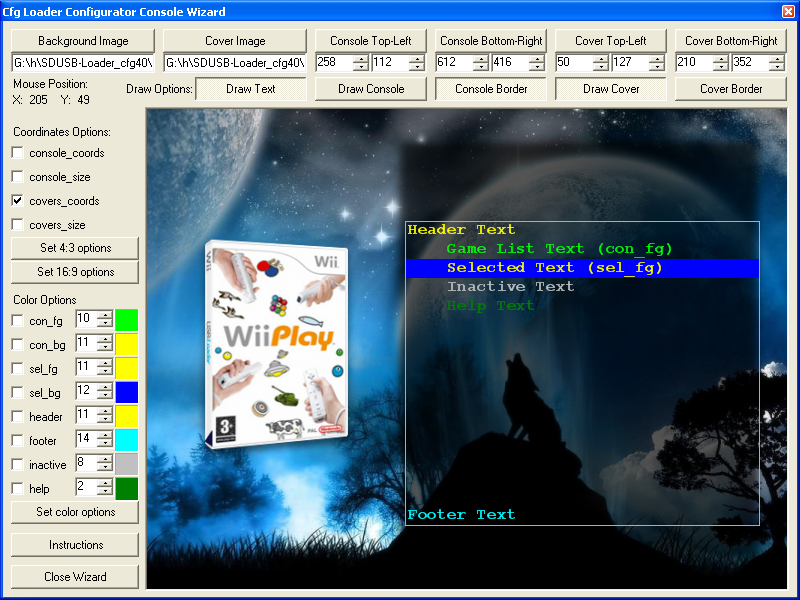
Here's how it looks:
wizard.png
 
Alright, as usual, I love the progress on this loader but I do have a small question I do not know if this pertains to the loader or pre-loader, but I know how to make the wii boot to this loader from off but how do I make it that when I am in a game, pause and hit the button to return to the wii menu that it returns to this loader? Is this even possible?
 
DaFees said:
Alright, as usual, I love the progress on this loader but I do have a small question I do not know if this pertains to the loader or pre-loader, but I know how to make the wii boot to this loader from off but how do I make it that when I am in a game, pause and hit the button to return to the wii menu that it returns to this loader? Is this even possible?

You can do this with preloader, there's an option of where to return to although I can't remember where it is now. I originally had mine setup to do this but found it a bit annoying not being able to get back to the Wii menu without having to hold the reset button down whilst rebooting.
 
DaFees said:
Alright, as usual, I love the progress on this loader but I do have a small question I do not know if this pertains to the loader or pre-loader, but I know how to make the wii boot to this loader from off but how do I make it that when I am in a game, pause and hit the button to return to the wii menu that it returns to this loader? Is this even possible?
Yeah, it's got nothing to do with the Loader.

Try the different methods of quitting a game (Home...Reset, Hold Power Button on Wiimote, etc.) to see if Preloader takes hold of the startup sequence on any of them. If not, you could definitely do it by going back to the menu through any method and power cycling the Wii via the Wiimote Power button, although that probably takes longer than just reselecting the loader from the menu
tongue.gif
.
 
@ oggzee: Well, I was late home, and when I noticed it, I started to finish the Package for my Theme for this Edition
wink.gif
. What can I say more than many, many, many thanks for taking the time to do this
bow.gif
. It works now perfect, like it should. Thanks for doing this, realy. Great work!!!

@milcoi: You got it
smile.gif
. Kinda like the DSi Top-Screen or XBMC. Main point is that people can now easier customize the Theme, and give it a personal touch.

Btw: You can download the Theme for this rev HERE. I think it should give you a small example how this works...it's great, I love it
smile.gif
.
 

Site & Scene News

Popular threads in this forum