Gaming Can't play minecraft

  • Thread starter Thread starter R4Liam
  • Start date Start date
  • Views Views 8,328
  • Replies Replies 57
/\ lol you are lucky you can even get on the game, i can't and the aero themes don't work which i know for sure is a linked problem with my driver not usign its full capabitlity as it did on xp, rydian i have tried the 8 series but it come up with this message:

the graphics driver could not find compatible graphics hardware.

my computer is not a latpot either so i can rule that out.

i just need to know of a way of identifying the exact model of my driver to see if it is even possible to have compatibility with windows seven. if anyone knows such a program let me know.

 
R4Liam said:
i just need to know of a way of identifying the exact model of my driver to see if it is even possible to have compatibility with windows seven. if anyone knows such a program let me know.
GPU-Z should be able to help you with that
smile.gif
 
this is useless, i tried intalling the 8 series driver version 266.58 and it wont let me, it says can't find compatible graphics hardware...

what am i supposed to do?
 
R4Liam said:
this is useless, i tried intalling the 8 series driver version 266.58 and it wont let me, it says can't find compatible graphics hardware...

what am i supposed to do?
Are you SURE about your card? Look, if you go to start, go to the "execute bar where you can type". Type "dxdiag"

Your direct X thing will pop up. There you must stroll around to find your video card. Find it, go to Nvidia and download appropreiate drivers.

NOTE: Make sure you have 64 or 32 bit OS.
NOTE2: If your card has the right drivers, but still no Aero, then it might be because of the video card, not having the WDDM support, (wich makes it Glassy, transparent). If this is the case, give up. It also might be because of your CPU speed and/or Ram speed.
 
thanks for the help but you have made me realise another problem i'm having. the searchbar on the start menu won't work properly. when i search for anything; any file or program and of course dxdiag it won't show up, it just shows as "Program" with no icon next to it.
frown.gif
 
here is the results for dxdiag ( i had to find the program through the search in my compute, not startmenu) It is coming up as a standard vga when it is actually not. i still cantt fully determine the exact model from this either.

(i cant show you the screenshot as it isnt a url and for some reason im not allowed to upload from my comp)
 
thanks for that imgur website link! here is the screenshot:

2pMIN.png


notice how there isn't clear info and apparently it is working properly. no it isnt.

ill check that gpuz program now.
 
Looks like you need to install drivers for your GPU. Find out what model of nVidia GPU you have and download and install the correct drivers manually.
 
Jamstruth said:
Looks like you need to install drivers for your GPU. Find out what model of nVidia GPU you have and download and install the correct drivers manually.
I gave him the link for GPU-z which should hopefully show a little more info on what series/model his GPU is
 
R4Liam said:
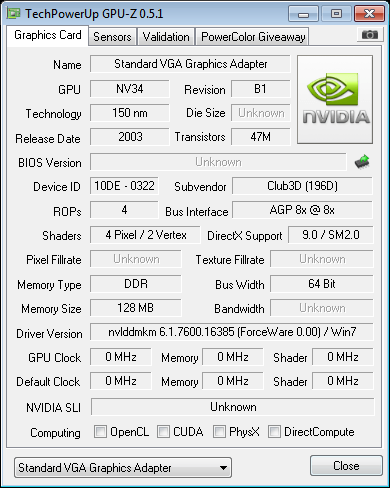
here is the screenshot from gpuz i'm still not sure what to download...

hw2.png
if i read that right your GPU is the (NV34) which is nVidia GeForce FX5200 which is ancient and doesnt even have proper driver support for windows 7

i did manage to find a driver that "might" work so it cant hurt to give it a try
BE WARNED THIS IS A VERY OLD DRIVER AND MAY NOT WORK AT ALL Fx5200 support ended with windows vista RC2 (run it in compatibility mode for vista if it refuses to install)
http://www.nvidia.co.uk/content/license/dr...tional_whql.exe

Edit: Fixed the link i managed to break it somehow lol
 
thank you. I understand that the driver is likely to be old; it was used in windows xp prior to me installing windows 7, however it did manage to play minecraft perfectly on windows xp so there must be a way of getting around the os. im gonna try the driver you reccomend frostshocker.

Posts merged

thank you. I understand that the driver is likely to be old; it was used in windows xp prior to me installing windows 7, however it did manage to play minecraft perfectly on windows xp so there must be a way of getting around the os. im gonna try the driver you reccomend frostshocker.
 
Edit: Trashed for fact that things are being addressed already.

Good luck. Since Vista and 7 are based on the same kernel the drivers should work (most Vista drivers worked in 7 at release)
 
Jamstruth said:
Edit: Trashed for fact that things are being addressed already.

Good luck. Since Vista and 7 are based on the same kernel the drivers should work (most Vista drivers worked in 7 at release)
hopefully he gets it fixed quick i need to grab some sleep i have been running on about 2 hours for the past 2 days and it's killing me (so used to my millions of hours of sleep
tongue.gif
)
 

Site & Scene News

Popular threads in this forum