Gaming Can`t boot into Windows

  • Thread starter Thread starter MarioBrotha
  • Start date Start date
  • Views Views 18,339
  • Replies Replies 37
MarioBrotha said:
Hakoda said:
MarioBrotha said:
Ok, I read through your last edited post and you`re telling me I can download the windows 7 repair disc from the internet, burn in onto a USB stick, and fix my boot problems.
Sounds good, though you didn`t tell me how I can put the .iso file with the windiws 7 repair stuff onto my USB stick, how can I do that?
Using EasyBCD on you WIn 2000 computer. Install it on Win 2000 and under the "Add New Entries" button you'll find a tab that says "ISO Boot". Load the Win 7 Recovery Disc and select your USB. Also check "Force Portable Entry" if possible. It should create a bootable Win 7 Recovery Disc. Boot from that onto your netbook and follow the guide linked in my last post.
Ok I`m going to try this, thought with my uber slow network (now the one on my sig) its going to take a while to download the .iso file
Nah the Recovery Discs are hosted by the NeoSmart servers so it should be pretty fast.
 
I am getting some errors when I start EasyBCD.
First it sayd something about a mising mscoree.dll file. After I went to dll-files.com and downloaded it, I got an error saying that I needed windows .net framework. After I finished installing that, I get these errors:

The procedure entry point GetRequested RuntimeInfo could not be located in the dynamic link library mscoree.dll

After I click ok on that error, I get another one:

C:/WINNT/Microsoft.NET/Framework/v.2.0.50737/mscorwks.dll could not be loaded

Now, I could download the mscorwks.dll from dll-files.com, but how can I fix the first error?

EDIT: Crap, I just tried reinstalling and it is now not even loading, it says that it is not a valid system32 file...

 
MarioBrotha said:
I am getting some errors when I start EasyBCD.
First it sayd something about a mising mscoree.dll file. After I went to dll-files.com and downloaded it, I got an error saying that I needed windows .net framework. After I finished installing that, I get these errors:

The procedure entry point GetRequested RuntimeInfo could not be located in the dynamic link library mscoree.dll

After I click ok on that error, I get another one:

C:/WINNT/Microsoft.NET/Framework/v.2.0.50737/mscorwks.dll could not be loaded

Now, I could download the mscorwks.dll from dll-files.com, but how can I fix the first error?

EDIT: Crap, I just tried reinstalling and it is now not even loading, it says that it is not a valid system32 file...
Okay so forget EasyBCD for using it to make the ISO bootable on a USB. You'll use it to add XP to the boot manager once your in Win 7. I've found a very-easily overlooked way of getting the ISO to boot. Install some sort of archive tool like 7-Zip or WinRAR. Extract the contents of the ISO and copy it into a FAT32 formatted USB and then boot via USB. I've tried this and it worked.
 
Dude, I posted a way to make a bootable Windows 7 USB a couple of posts back. If you have the Win 7 ISO use that tool and make a bootable USB.

The boot.ini for XP and 2000 do not work with Windows 7. Those are the boot parameters that are set only for XP and 2000.
 
Jiggah said:
Dude, I posted a way to make a bootable Windows 7 USB a couple of posts back. If you have the Win 7 ISO use that tool and make a bootable USB.

The boot.ini for XP and 2000 do not work with Windows 7. Those are the boot parameters that are set only for XP and 2000.
Did you actually try your own method? I used that tool with the Win 7 Recovery Disc and the program declared it as an invalid Windows ISO. I'm petty sure it only accepts installation ISOs which take forever to "obtain" while the Recovery Discs are small, legal, and hosted by servers via BitTorrent.
 
Hakoda said:
MarioBrotha said:
I am getting some errors when I start EasyBCD.
First it sayd something about a mising mscoree.dll file. After I went to dll-files.com and downloaded it, I got an error saying that I needed windows .net framework. After I finished installing that, I get these errors:

The procedure entry point GetRequested RuntimeInfo could not be located in the dynamic link library mscoree.dll

After I click ok on that error, I get another one:

C:/WINNT/Microsoft.NET/Framework/v.2.0.50737/mscorwks.dll could not be loaded

Now, I could download the mscorwks.dll from dll-files.com, but how can I fix the first error?

EDIT: Crap, I just tried reinstalling and it is now not even loading, it says that it is not a valid system32 file...

Okay so forget EasyBCD for using it to make the ISO bootable on a USB. You'll use it to add XP to the boot manager once your in Win 7. I've found a very-easily overlooked way of getting the ISO to boot. Install some sort of archive tool like 7-Zip or WinRAR. Extract the contents of the ISO and copy it into a FAT32 formatted USB and then boot via USB. I've tried this and it worked.
That doesnt work for me, could it be because I`m using Windows 2000?

edit: just tried on my windows XP computer, that didn´t work either...
 
MarioBrotha said:
Hakoda said:
MarioBrotha said:
I am getting some errors when I start EasyBCD.
First it sayd something about a mising mscoree.dll file. After I went to dll-files.com and downloaded it, I got an error saying that I needed windows .net framework. After I finished installing that, I get these errors:

The procedure entry point GetRequested RuntimeInfo could not be located in the dynamic link library mscoree.dll

After I click ok on that error, I get another one:

C:/WINNT/Microsoft.NET/Framework/v.2.0.50737/mscorwks.dll could not be loaded

Now, I could download the mscorwks.dll from dll-files.com, but how can I fix the first error?

EDIT: Crap, I just tried reinstalling and it is now not even loading, it says that it is not a valid system32 file...
Okay so forget EasyBCD for using it to make the ISO bootable on a USB. You'll use it to add XP to the boot manager once your in Win 7. I've found a very-easily overlooked way of getting the ISO to boot. Install some sort of archive tool like 7-Zip or WinRAR. Extract the contents of the ISO and copy it into a FAT32 formatted USB and then boot via USB. I've tried this and it worked.
That doesnt work for me, could it be because I`m using Windows 2000?

edit: just tried on my windows XP computer, that didn´t work either...
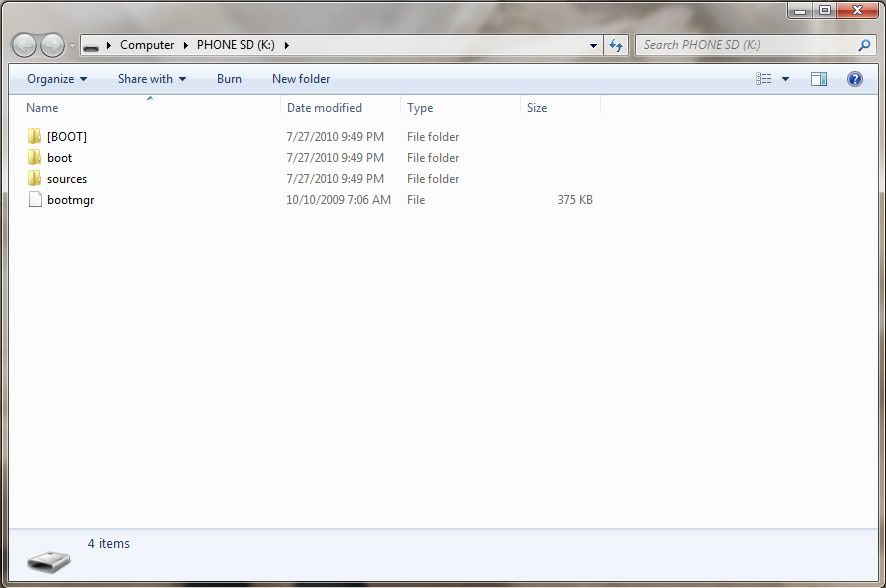
Works perfectly for me. I just tried it on a spare XP computer. It booted just fine. Did you set the boot menu in the BIOS to boot USB? if so, what happens on the screen? Can I see a screenshot of your USB in Windows Explorer?
 
When I choose to boot from the USB, it just shows a blinking cursor, and my USB drive starts to blink, meaning its being read from, but then it just goes to GRUB, which means I guess that it doesn´t find anything to boot from.

I tried twice, the first time I formatted with the windows explorer format option, the second time I tried with an HP format tool I got from the internet

edit:how do I show my pic here? photobucket doesnt work
Pic
 
MarioBrotha said:
When I choose to boot from the USB, it just shows a blinking cursor, and my USB drive starts to blink, meaning its being read from, but then it just goes to GRUB, which means I guess that it doesn´t find anything to boot from.

I tried twice, the first time I formatted with the windows explorer format option, the second time I tried with an HP format tool I got from the internet
Post a screen shot of your USB and what archive utility are you using? I'm using 7-Zip.
 
Hakoda said:
MarioBrotha said:
When I choose to boot from the USB, it just shows a blinking cursor, and my USB drive starts to blink, meaning its being read from, but then it just goes to GRUB, which means I guess that it doesn´t find anything to boot from.

I tried twice, the first time I formatted with the windows explorer format option, the second time I tried with an HP format tool I got from the internet
Post a screen shot of your USB and what archive utility are you using? I'm using 7-Zip.
Im using this tool
 
MarioBrotha said:
Hakoda said:
MarioBrotha said:
When I choose to boot from the USB, it just shows a blinking cursor, and my USB drive starts to blink, meaning its being read from, but then it just goes to GRUB, which means I guess that it doesn´t find anything to boot from.

I tried twice, the first time I formatted with the windows explorer format option, the second time I tried with an HP format tool I got from the internet
Post a screen shot of your USB and what archive utility are you using? I'm using 7-Zip.
Im using this tool
Nonono, not to format it. I don't give about what tool you use to format the USB, I mean what did you use to extract the contents of the ISO? You're suppose to extract the contents of the ISO using 7-Zip or WinRAR and copy it to the root of the USB. Should get something around this:

USB.jpg
 
Lol sorry I misread your post. I used both PowerISO and Winrar to extract the .iso, and there was no [BOOT] folder. Ima download 7-zip to see if that works

EDIT: downloadede 7-zip, and there IS a [BOOT] folder yay! lemme extract them and see if itll boot now

EDIT2: It still doesn´t want to boot. I´ve tried it on an USB stick and on a SD card reader with 2 different SD cards. On the USB it doesn´t show anything, it just goes to the GRUB loader. On the SD cards, they both said "Error de disco. Prestione una tecla" which means that there was an error on the SD card. I figured that the error was in spanish because my Windows XP that I´m using right now is in spanish, so I formatted the card with the HP format tool, and it didn´t even read it, it just went to GRUB like my usb.
 
MarioBrotha said:
What do you mean?? I use 32-bit, for all of the OSes that I use, and thats the type of files that I downlaoded
Okay just checking. I'm stumped now.

EDIT: Well I mean you could try "obtaining" a Win 7 Installation Disc (32-bit) and try Jiggah's way. Just click "Repair Computer" instead of "Install now" when you get the disc booted via USB.
 
Hakoda said:
MarioBrotha said:
What do you mean?? I use 32-bit, for all of the OSes that I use, and thats the type of files that I downlaoded
Okay just checking. I'm stumped now.

EDIT: Well I mean you could try "obtaining" a Win 7 Installation Disc (32-bit) and try Jiggah's way. Just click "Repair Computer" instead of "Install now" when you get the disc booted via USB.
Wont I need a BIG USB drive for that?
 
MarioBrotha said:
Hakoda said:
MarioBrotha said:
What do you mean?? I use 32-bit, for all of the OSes that I use, and thats the type of files that I downlaoded
Okay just checking. I'm stumped now.

EDIT: Well I mean you could try "obtaining" a Win 7 Installation Disc (32-bit) and try Jiggah's way. Just click "Repair Computer" instead of "Install now" when you get the disc booted via USB.
Wont I need a BIG USB drive for that?
Just a 4GB USB. The 32-Bit ISO is about 2.4GB.
 
I only have 2GB USBs
ohnoes.png


I tried using my trustful 2GB USB that I had used to boot into Linux from, and that didn´t work either. So I can tell that either the .iso I got was corrupt, or I´m doing something wrong with copying the files over. I downloaded Super Grub Disk, and I am able to boot from it. I´m checking right now if SGD can help me now.

edit: I can now open EasyBCD from my backup computer, and I have tried to install the .iso files onto the USB, but there is no option to choose my USB drive
dry.gif
 

Site & Scene News

Popular threads in this forum