Badupdate + Aurora + TUs = The games not start

  • Thread starter Thread starter xalfie
  • Start date Start date
  • Views Views 8,074
  • Replies Replies 29

xalfie

Well-Known Member
Member
Joined
Oct 3, 2019
Messages
1,953
Reaction score
2,260
Trophies
2
Age
96
XP
4,668
Country
Armenia
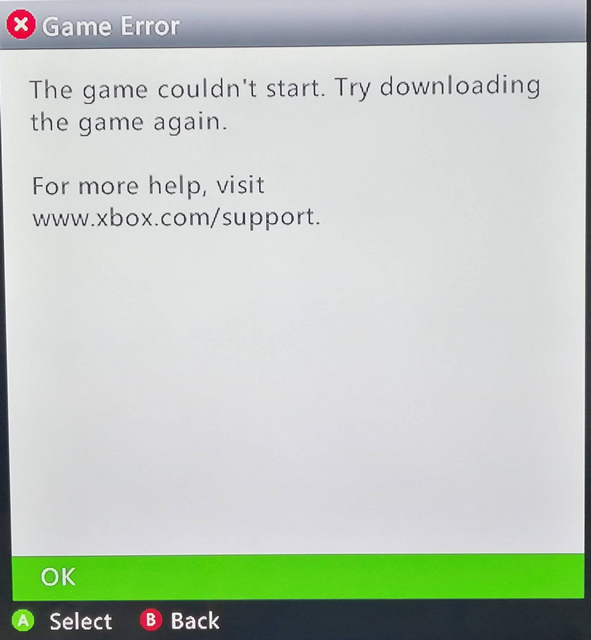
The problem I'm facing is that any game will not start if previously I enable some TU for it with Aurora. And the only way to have the game again starting and working is disabling the title update, that means to run the base again only. Showed error is this:
error.jpg


I need help to understand what is working bad because certain dlcs need the games to be updated in order to take effect.

Basically when starting the games from Aurora con Title Update enabled, the console is saying about to 'download again the game'. And this is happening with all the games I tried, all of them.

thx in advance
Post automatically merged:

I have found the exactly same problem here: https://www.realmodscene.com/index....wnloading-again/&do=findComment&comment=91695 and here https://www.reddit.com/r/360hacks/comments/oeuhyx/every_time_i_enable_title_updates_on_some_games/ and in a few sites more, but no solution was gave...

And also I have found just messing with the problem, that the only games that I can launch with the Title Updates applied with Aurora are the XBLA games, only. But the ones that are games based on discs, for example Halo 3, as soon as I enable the Title Update, they won't load anymore.

Help :(
 
Last edited by xalfie,
I'm using extracted ISOs and I was able to update Fallout 3 (retail, not XBLA or GOD) to title update v3 and then made the DLC folder, copied all the DLC from the GOTY disc 2 into it, and have no problems. You can clear out all the title updates in the settings of Aurora by pressing the select button and going through the options menu. Then you can download them again (clean slate). I've never used GOD I think extracted ISOs are better so far no problems...
 
also i tried Fallout 3 GOTY with the DLCs manually copied into content, usb part. The same problem, the same message. Without title updates all the games are working, with them activated, none of the games are starting.
I begin to thing that is some kind of problem attached to this badupdate-retail exploit.... But if I can confirm that fact, more ppl should have the same problem...
 
also i tried Fallout 3 GOTY with the DLCs manually copied into content, usb part. The same problem, the same message. Without title updates all the games are working, with them activated, none of the games are starting.
I begin to thing that is some kind of problem attached to this badupdate-retail exploit.... But if I can confirm that fact, more ppl should have the same problem...
I'm plaiyng Fallout 3 GOTY with all DLC via aroura via extracted ISOs. I made the 00000002 folder and copied all the dlc from disc 2 there and then downloaded the title update. Needs to be HDD for older games like Fallout 3. Aurora handles that for title updates tho. Let me know if I can help more because it's one of my favorite games and I'm having a blast re-playing as very hard mode with all DLC like it was 2015 all over again
 
Last edited by alexfree,
I know, but it is Aurora who copy the title updates where it should. But anyways I tried to do it by hand in all the possible paths. The result was always the same. But the most disturbing fact on this, all the games work perfect without title updates. I really can't understand the problem :(

And like I said before, only the XBLA games start with title updates enabled from Aurora. A fact that is most strange..
 
I know, but it is Aurora who copy the title updates where it should. But anyways I tried to do it by hand in all the possible paths. The result was always the same. But the most disturbing fact on this, all the games work perfect without title updates. I really can't understand the problem :(

And like I said before, only the XBLA games start with title updates enabled from Aurora. A fact that is most strange..
Are you using extracted isos?
 
yes, but the problem should be other detail, since the game is working out of title updates. But what detail, and what is the problem. It is Aurora who bring the title updates and their moving path when they are activated.
 
Last edited by xalfie,
yes, but the problem should be other detail, since the game is working out of title updates. But what detail, and what is the problem. It is Aurora who bring the title updates and their moving path when they are activated.
Post automatically merged:

If I am understand this well there is some problem with FreemyXE and the Title Updates, this video is saying something:


But If that is the question, why my console continue won't loading games with Title Updates activated but using not FreemyXe ?
Because that guy is saying the follow:

^is that meaning that a console hacked with Badupdate exploit is not capable to use Titles Updates ?

idk about that video but title updates work fine. Are you activating them in aurora?
Post automatically merged:

Also for older games like Fallout 3 it needs to be in the HDD Cache folder. You can not put the title updates manually in the game files for Fallout 3 (000B000 folder) because the title updates are designed for that game are for the HDD/are named in all upper case. I was able to use Aurora the normal way, and I was able to use the title update backups it downloaded to my USB drive manually by placing it in the HDD Cache folder. It Depends on the game . Newer games apparently do use that 000B0000 folder (if the title upate is named in all lowercase rather then uppercase). Again if your having any problems with title updates I'd delete all of them in Aurora, disable auto-scan of title updates if that is enabled, restart Aurora, and then download+activate it in aurora once you launch it again.

Also you need BadUpdate to use any Title Updates installed outside of Xbox Live,
 
Last edited by alexfree,
Any solution to this? I'm trying the same thing on a RGH console but getting the same error message as what you have posted, even without title updates.
 
XeUnshackle or FreeMyXenon? If XeUnshackle, what's your launch.ini? Sorry for the RGH guy, for you is your NAND and wires soldered correctly?
Should be soldered correct. I did a NAND dump and loaded on J-Runner. No bad blocks were reported. Most other games work (including XBLA titles). It's only 3 games I'm having issues with (GTA IV, GTA EFLC and Dante's Inferno). No matter what format it is (Games on Demand, Disc Rip Xex), it doesn't boot and gives the error message in the first post.
 
The problem I'm facing is that any game will not start if previously I enable some TU for it with Aurora. And the only way to have the game again starting and working is disabling the title update, that means to run the base again only. Showed error is this:

error.jpg


I need help to understand what is working bad because certain dlcs need the games to be updated in order to take effect.

Basically when starting the games from Aurora con Title Update enabled, the console is saying about to 'download again the game'. And this is happening with all the games I tried, all of them.

thx in advance
Post automatically merged:

I have found the exactly same problem here: https://www.realmodscene.com/index....wnloading-again/&do=findComment&comment=91695 and here https://www.reddit.com/r/360hacks/comments/oeuhyx/every_time_i_enable_title_updates_on_some_games/ and in a few sites more, but no solution was gave...

And also I have found just messing with the problem, that the only games that I can launch with the Title Updates applied with Aurora are the XBLA games, only. But the ones that are games based on discs, for example Halo 3, as soon as I enable the Title Update, they won't load anymore.

Help :(
For those of us with BadUpdate, the solution is to use the new XeUnshackle.
And problem solved.
 
Should be soldered correct. I did a NAND dump and loaded on J-Runner. No bad blocks were reported. Most other games work (including XBLA titles). It's only 3 games I'm having issues with (GTA IV, GTA EFLC and Dante's Inferno). No matter what format it is (Games on Demand, Disc Rip Xex), it doesn't boot and gives the error message in the first post.
wait, are those like dual-layer or multi-disc?
 
Single-disc dumps. Thanks snake_8 for helping me out, copying the files to USB and booting it directly from there worked. For some reason copying the files to HDD and booting those three games directly from there did not work.

 
If I want to manually place the title update exactly where on the HDD does it go?
Quite honestly it’s easiest to see where Aurora downloads them since it’s game specific. There is some logic with it like older games put it somewhere and newer place it somewhere else but I can’t remember how. But once you know where it goes you can totally manually do it (I’ve done it) and not have to use any internet even if you don’t want to/can’t which is nice.

Edit: SHOULD be lower case title update = newer format in game folder in content. Upper case = in cache folder like in my original post. Extracted ISOs are therefore the best format (also for doing weird stuff like manually installing DLC).
Post automatically merged:

@nmagod like some of these are title updates (at least the TU* one is for fallout 3, an older style game IIRC):
1753155269398.png

This is DLC for Fallout 3 (manually extracted from disc 2 goty iso iirc since that does not work normally even in aurora:
1753155360174.png

and then here is a horrible example of the other place it could be (this is a 'title update' for the xbox 360 video player for h.264 codecs)... I quite honestly just run almost everything as unpatched for the most 'authentic' day one nostalgic experience unless I have to apply one for i.e. fallout 3 dlc to work I guess. But its the same format for real games that are newer use this type of syntax:
1753155445205.png
 
Last edited by alexfree,
  • Like
Reactions: Blythe93
see, I don't have home internet, so the fallout 3 DLC is explicitly the one I want to copy over manually but it requires a TU to load it properly, as I understand it
 
see, I don't have home internet, so the fallout 3 DLC is explicitly the one I want to copy over manually but it requires a TU to load it properly, as I understand it
I can help with that. Do you have GOTY disc 1 and 2 "acquired in ISO format"?

* Extract both disc 1 and disc 2 GOTY with Nextract-XISO

* Name Fallout 3 Disc 1 extracted as HDD1\Content\0000000000000000\425307D5 (like you should see Fallout.ini in 425307D5 folder visable...

* Create Content\0000000000000000\425307D5\00000002 folder,

* COPY ALL OF THESE INTO Content\0000000000000000\425307D5\00000002:
045674ED426A195154CDABBE34D8F83F571C329442
110FD9E2B1FDDD987308655D15EDC0E8C0704FD942
13A23F52544334979EF84F1EB6863E3FAF65ABAF42
3E966B4C6F6097086F393A7B749ACACC4A5BB55E42
D1A54BFA36C8B26C9219FC13B0DDC0069424E9C942
I am so sorry I can not be more specific, they are somewhere in game disc 2 of GOTY I promise....

Download TU_11561UL_0000004000000 (fallout 3 title update 3). Put in HDD1\Cache...

Enable the title updatte in aurora... If you still have trouble lmk
 
  • Like
Reactions: Blythe93

Site & Scene News

Popular threads in this forum