ROM Hack Animal Crossing: New Leaf Save Editor

  • Thread starter Thread starter marc_max
  • Start date Start date
  • Views Views 1,689,205
  • Replies Replies 6,709
  • Likes Likes 78
Hi! Just wondering how the villager numbers in the 'buildings' tab corresponds with those in the 'villagers' tab? I keep on moving the wrong villager's house ;-;


I think that way is really complicated, you need to know coordinates. I think it's like Villager 1=the first villager listed on your map.
The way I do it is this: Go in game, and open your map. See how the villagers are in a certain order? Lets say we want to move Blanche, and she's villager #4. Open up the Building IDs page: http://pastebin.com/WGHYFy88
Villager #4 is 0B. You probably know this, but the first number/letter determines how many bells will go in the first slot, and the second goes for the second slot. Now, our first digit is 0, so there will be 0 bells. The second is B. Count how many numbers into the alphabet the letter is. In this case, it's 2. Now add 9 to that, this gives us 11. Put 11,000 bells in slot 2. If you ever have a number, let's say 5, you would put in 5,000 bells in the corresponding slot.
IMPORTANT. IF A VILLAGER IS MOVING IN, THEIR PLOT WILL BE MOVED INSTEAD, IF THERE HOUSE WILL BE IN THE SLOT YOU ARE TRYING TO MOVE.
Example: Currently, you have less than 9 villagers. You want to move Blanche. You follow the above steps, only to find a house plot has moved instead. TT 1 day, and open your map. Blanche is probably number 5 now. Now just follow the steps, but this time moving villager 5. Basically, if you know a camper or invited villager isn't moving in, do this when you have 9 villagers.

 
Can you open a new thread for all these discoveries, please? I would like to keep this topic just for the RAM editor discussions.

So I think we need a new thread now. (where would it go, etc) Like this is for Ram questions, the new one is for things such as changing your house exterior. And I have no idea to go about doing this but I have some ideas:
Table of contents on first post, like it has the page numbers for the location of each tutorial on how to do something. This would be updated by the topic creator, and others could say when it needs an update, and provide the page number.
Also it would be smart to have links to the Map editor (the one with a working link), Leaftools, and of course, this topic, for the RAM editor and files. This would make it easier to find things for people.
 
im thinking of doing something huge that involves switching the save files of my digital and physical versions and includes injecting a dream town.


someone who's successfully injected dream towns, please verify my steps.
  1. update dream town of digital copy
  2. dump an updated .bin file of physical copy, save it to my computer
  3. visit dream town of digital copy with physical copy
  4. while in dream town, dump .bin
  5. exit dream town, save .bin or digital's dream on computer
  6. use save data transfer tool to transfer data on physical copy to digital copy
  7. start new game on physical copy
  8. get to tree planting ceremony
  9. inject .bin of dream town
  10. walk into train station
  11. walk out of train station
  12. save & quit
  13. data on physical copy will be replaced with that of the dream town
  14. can hack dream data


please someone verify this. i want to make 1000% sure that i know what i'm doing because i want to hack my digital town, however it's on a new 3DS XL

time is not an issue
complexity is not an issue.

if i am wrong, please tell me where and what i should do instead


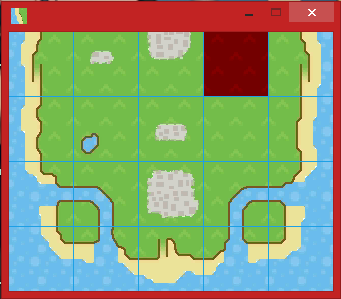
OK so i did this and everything worked great, however, i tried editing my town to look like this
tumblr_nlqpr5KCSZ1r63z39o1_400.png


i was able to inject it and save/quit, but upon trying to reload the game, it crashed.
like it wont start at all

is there a way to flash my cart?
 
OK so i did this and everything worked great, however, i tried editing my town to look like this
tumblr_nlqpr5KCSZ1r63z39o1_400.png


i was able to inject it and save/quit, but upon trying to reload the game, it crashed.
like it wont start at all

is there a way to flash my cart?

This is what I did when i broke my game (like i made one of those cute islands but the game was like NOPE) I had to delete. If you have a physical copy and powersaves, you could back up your good save, and then when it corrupts just restore the good save...
 
luckily i have both but my last backup to a powersave was like last year so


thankfully it's not like i cant edit my town lol

thank you!
 
luckily i have both but my last backup to a powersave was like last year so


thankfully it's not like i cant edit my town lol

thank you!

You're welcome!
(This is why I only use my physical copy now...in case of stuff like this)
 
This is what I did when i broke my game (like i made one of those cute islands but the game was like NOPE) I had to delete. If you have a physical copy and powersaves, you could back up your good save, and then when it corrupts just restore the good save...

Someone said a while back that the game won't allow more than two cliff ramps. Try remove one.

Also, keep in mind that even if you add a beach to one side, that editor doesn't allow you to edit the side-cliff with the waterfall, and that may be causing your problems as well.

Let me try something...
 
So I've got a funny thing doing on. My town has rocks placed on pavement (town square area) and it was fine, but now that it's the next day, the rocks went away. I tried to re-inject the data, and when I walk out of the train station, I can see the rocks, but the game immediately welcomes the new day, saves, and the rocks disappear again.
 
Someone said a while back that the game won't allow more than two cliff ramps. Try remove one.

Also, keep in mind that even if you add a beach to one side, that editor doesn't allow you to edit the side-cliff with the waterfall, and that may be causing your problems as well.

Let me try something...

Ah. I managed to make an "Island" by making a river go around a piece of land, with one side being the mountainside.
 
Has anyone figured out how to add perfect fruit trees to their town?
All I can get planted is regular fruit and I don't want to wait days for it to grow.
Thanks for all the help<3
 
Has anyone figured out how to add perfect fruit trees to their town?
All I can get planted is regular fruit and I don't want to wait days for it to grow.
Thanks for all the help<3
Yeah, I noticed that it didn't have perfect fruit trees in the editor.:sad:
There is a way to skip days in the game, just change the date and time, but it always puts weeds everywhere witch they can be removed by the editor.
 
Yeah, I noticed that it didn't have perfect fruit trees in the editor.:sad:
There is a way to skip days in the game, just change the date and time, but it always puts weeds everywhere witch they can be removed by the editor.

I think I remember seeing a hacked dream town with more than one type of perfect fruit, so it should be possible
 
In the editor, I looked in the buildings area and I saw something that said "undefined". I think its one of the things I put into my town using leaftools. Help!
 
In the editor, I looked in the buildings area and I saw something that said "undefined". I think its one of the things I put into my town using leaftools. Help!

If the game works, I wouldn't worry about it. It might be because you placed a pwp you don't have unlocked yet. But I'm not sure.
 
I did some searching to find where it was and it was a st. Patricks day standee, I put it down as if it was a PWP.
 
Yeah, I noticed that it didn't have perfect fruit trees in the editor.:sad:
There is a way to skip days in the game, just change the date and time, but it always puts weeds everywhere witch they can be removed by the editor.

Change the flag when you select a tree

Perfect 08 = gives one perfect fruit with two normal fruit, if I remember right

Perfect 18 = gives three perfect fruits

Perfect 48 = gives two perfect fruits and a rotten, dies after
 
  • Like
Reactions: usagimon and Goshi
I keep trying to use this but it says, "Invalid type of file", what am I doing wrong? As far as I know have followed all of the directions. I have tried at least 10 times and still nothing. Thanks!
 
I keep trying to use this but it says, "Invalid type of file", what am I doing wrong? As far as I know have followed all of the directions. I have tried at least 10 times and still nothing. Thanks!
how far do you get before it says that, like what step are you on?


is it only saying that when you're trying to inject? or when you're trying to upload the .bin to the editor?
 

Site & Scene News

Popular threads in this forum