Hacking a 'real' wbfs windows port

  • Thread starter Thread starter gibbed
  • Start date Start date
  • Views Views 115,646
  • Replies Replies 217
Fixed a small bug, and added show list when being asked what ISO to dump or remove, as well as more instructions to make it easier
WBFS Tool v0.2b
remember that wbfs_win.exe has to be in the same folder in order for it to run properly

 
kyogc said:
kongsnutz said:
I know what you meant.

my ios's are in the same folder as the app which is wbfsgui.

i also tried putting them in a folder called WiiISO just too see and still nothing


would help if you said where you actually keep the gui like what folder and where on the pc maybe

folder layout: "wbfs" folder on desktop->wbfsgui.exe, wbfs_win.exe; F:/WiiISO->isoes.

Done this. Still not working.
 
Sweet!
Thanks very much
smileipb2.png
 
I have this working fine on vista but can not get it to work properly on xp.
Any ideas guys?
Also what is the boot.dol file for? Can i put it on wii and run it using hbc?

Cheers
 
Segatron:

The .bat fails to run after drive is entered.........

not sure why as other .bats i make work fine.

It's in same folder as wbfs_win.exe also so i dunno
 
Great job man, appreciate the fast port. Tip if you have a lot of games to port rename the file to w.exe saves you a few keystrokes... also holding F1 on your keyboard in DOS will repeat the last keystrokes so when your done with one, you can hold F1 and back it up to insert only the new name of the ISO.

RS Mirror
 
spaces in names doesn't matter just use "super mario.iso" and it will work fine

I added the following games without problems
MarioTennisGC(Wii Version).iso
Rayman Raving Rabbids TV Party.iso
Rune Factory Frontier NTSC-U.iso
SUPER MARIO GALAXY.iso
SUPER PAPER MARIO.iso

example : wbfs_win w add "e:\burn\SUPER MARIO GALAXY.iso"
and it works without any problems
 
VISTA fix by the way: run cmd as administrator! Otherwise wbfs-win might not work
smile.gif
(everything works for me now yay)
 
as I've said over and over, run cmd as admin, how else do you think windows is gonna let you modify a partition? ...

And about the GUI, I'm guessing the author has to rewrite the commandline to include "", and then it'll work as planned.
 
TeenTin said:
Very nice !

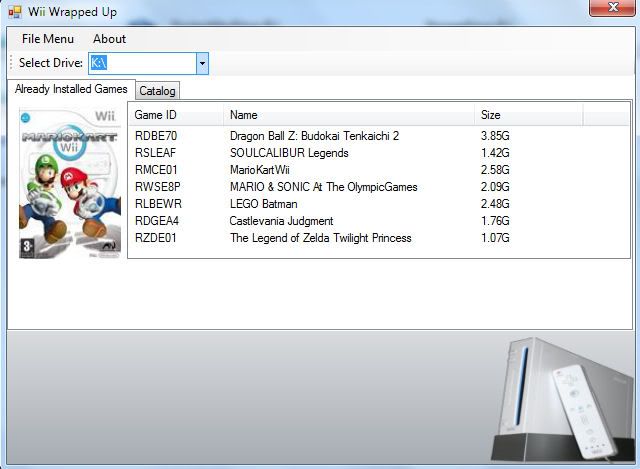
Background2.jpg


Thanks, I have added most of the Commands for adding games into it, using my catalog option I plan to be able to just stick my isos in a folder and add and remove at will lol. Man I know, lazy right lol. Plus give a chance to testing coding in Windows 7.
 
the.g.raf said:
FOR VISTA USERS, MAKE SURE YOU'VE TURNED OFF UAC!!!
I tried this for like 2 hours, with no luck, until I turned UAC off. This is the setup that worked for me:
1. Created a partition with EASEUS. Made the partition PRIMARY, not logical, and FAT32.
2. Plugged usb into wii, let the USB Loader app format it.
3. Plugged usb into my pc, with UAC off, and ran the .BAT that's floating around [this one: http://www.filedropper.com/wbfstool] from a folder with ALL of the files from the wbfs_win.exe delta zip file in it.

Now I'm playing SSBB thru USB!

EDIT: this is what fixed that "No error" thing for me.

Disabling UAC was the solution i needed thanks!
 
Hey guys I've got this error:


Can you help me?
With wbfs I can't do it :S It can't open the partition formated with WBFS in USBLoader 1.1
Maybe if you could list all the steps you do, I'll be able to fix it :S Thx!

Got the solution thx to this program
JuC!
 
Thanks for this windows port and the GUI.
smile.gif


Anyway, when extracting an iso from the wbfs partition, it stops the extraction of the iso.
frown.gif


Any chance of fixing this please?

Many thanks...
 
The export is NOT stopped. It just jumps some percent (the useless data that can be "scrubbed") and then takes some time to write this data. The percentage won't go to 100% even when the process is finished but the resulting isos are ok.
 

Site & Scene News