
Homebrew Homebrew app [3DS] Random Game Launcher - Finally, something to solve the "what should I play?" problem

  • Thread starter Thread starter selloa
  • Start date Start date
  • Views Views 2,031
  • Replies Replies 10
  • Likes Likes 5

selloa

Member
Newcomer
Joined
Sep 7, 2025
Messages
8
Reaction score
10
Trophies
1
Age
66
XP
63
Country
Netherlands Antilles
Hey everyone!
banner-cropped.png

Update in 2026: ~32k views and ~10k downloads of the files. This is quite incredible to me, since this was one of my first ever coding projects. A new v0.2.1 has been released.

Original Post (2025)

So, I've been working on this little homebrew that I think some of you might find useful. It's called the 3DS Random Game Launcher, and basically it scans your SD card, filters out all the system junk, and just picks a random game for you. Hit A to launch it, Y to reroll for something else, or START to exit. Simple as that.

Has anyone else had this "decision paralysis" problem with their 3DS? I'm curious if this is actually useful to other people or if I'm just weird for spending 10 minutes scrolling through games I never play.

I'm putting this out there because:
  1. It actually solves a real problem I had
  2. The codebase is clean and well-commented, so it's perfect for anyone who wants to jump in and add features
  3. There's tons of potential here - proper GUI, game covers, favorites system, etc.
If anyone wants to contribute or has ideas for features, the repo is open and ready for it!
If you want to check it out, everything is on GitHub and Universal-DB.

releases
github
https://github.com/selloa/3DS-Random-Game-Launcher/releases/
universal-DB

https://db.universal-team.net/3ds/3ds-random-game-launcher
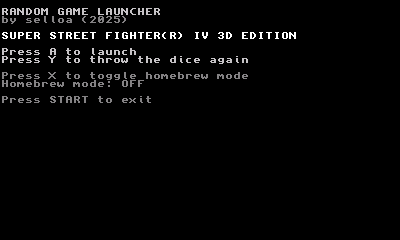
old version screenshot
weblinks

github source
https://github.com/selloa/3DS-Random-Game-Launcher/
gamebrew wiki

https://www.gamebrew.org/wiki/3DS_Random_Game_Launcher
gbatemp forum thread
https://gbatemp.net/threads/3ds-random-game-launcher-finally-something-to-solve-the-what-should-i-play-problem.675053/
reddit
https://www.reddit.com/r/3dshacks/comments/1nazswi/3ds_random_game_launcher_3dsx_new_homebrew/
youtube - see it in action (old version)
Nintendo 3DS Hacks You Should Try!

changelog
Oct 25: We are up on Universal Updater. Search for 3DS-Random-Game-Launcher.
Sep 24: Homebrew Mode; ADDED WORKING CIA - please test on your devices; added toggle to disable filtering, so every titleID is part of the draw; not just the ones in the database (thx @cearp); added greyscale color scheme;
 
Last edited by selloa,
https://github.com/selloa/3DS-Random-Game-Launcher For those who don't know how to type the full URL. New gbatemp users can't send links.

I often had this problem of choosing a game, and despite taking long to sort games into two folder from the usual ones I'm playing and the backlog ones, I still often hesitate. Still looking forward someone to fix the CIA, as it is beyond my abilities.
 
  • Like
Reactions: selloa
A very cool idea! Nice if you could also make it so you can hold a button / configure it to auto load, you open the launcher and it loads a random game automatically, no need to press A etc.

Instead of hardcoding all of the game title ids, it might be easier to just hardcode all of the system titles instead?
(blacklist instead of whitelist)
Then any custom romhacks etc that have been given a different title id, will still be able to be launched.
 
  • Like
Reactions: selloa and r5xscn
Hey you guys. Thanks for replying, and thank you for posting the link.
I will get to work on the CIA File next. Without it, the app is kind of worthless.

@cearp: if you want a version that doesnt have the databasea and just shows/launches any title on the sd from titleid alone, you can the prototype version of this idea by einso here: https://github.com/einso/3ds-randomtitlepicker
This version does exclude system apps, but it will launch any Homebrew and Custom Game on the system, without showing the Titles.

I've decided to set my app to only display titles from the (vast and multi-regional) database, to keep it clean for now. Since I can't think of an easy way to discern Custom Games from Homebrew Apps (like ftpd, godmode, etc) and einso's picker keeps starting unimportant Homebrew Apps, that arent games. But once figured out I eventually can add a system, that checks for apps that are not in the database and are not systems app, with a X toggle to either include or exclude them from the draw.

As for auto loading, I personally don't think thats necessary. If you start the app, and just continously press A, you will have a hard time even seeing the app, since it loads so fast. But I'll think about. There are some apps like the VirtualConsole apps, that start with a different border, when Select is pressed while starting it. Maybe something like that could work in the future for this app. So Select+Start just chooses the first game and launches it for example. I wont do that until the end of the year though. I'll get to work on the CIA before that.

Keep the feedback and support coming please! It's gold for me and at the moment, nobody knows about this app
If someone could help me putting it up on the Universal Updater. I still havent understood how to do that properly.

Thanks for your support!
selloa
 
  • Like
Reactions: cearp
Might be possible to read the ticket or the tmd, and get some information from that.
https://www.3dbrew.org/wiki/Ticket
https://www.3dbrew.org/wiki/Title_metadata

Maybe verifying the signature of the tmd, and if it can't be verified, it's homebrew / custom?
Or some other telltale value.

A custom blacklist / whitelist at the very least would be cool, so users can manually prevent / include titles.
Anyway, your project, your decision :D Thanks for the work
 
  • Like
Reactions: selloa
@cearp Ive added a Homebrew toggle, that when turned on ignores any filtering. it then reads every single installed titleID from SD Card and only outputs a name in case it finds it in the database. I will think more about the filtering. But it works pretty well for now. Please give it a try and let me know. making the CIA work is hard. itll take me a bit more time, so I did this at least

edit: i checked and you can just press and hold A after launching the app, and will just continue to start the first game it draws. you wont be able to see the app.

as for reading the title ids from the files. there is afaik no simple way of doing it AND I'm thinking the 3DS is way too slow to do all this extraction, doesn't seem like the right approach for a start and go kind of app like this. The code is optimized enough, that reading out the titleIDs and comparing them to the database is basically instant.

It would be nice to be able decide which category of apps one wants to include into the draw. But that would only make sense, if acutally more people would use it.

I delved into how to get it to show on Universal Updater once, but I forgot all about it, and don't want to jump back into it. Maybe some day

edit: ive attached the file to the header post
 
Last edited by selloa,
  • Like
Reactions: cearp
https://github.com/selloa/3DS-Random-Game-Launcher For those who don't know how to type the full URL. New gbatemp users can't send links.

I often had this problem of choosing a game, and despite taking long to sort games into two folder from the usual ones I'm playing and the backlog ones, I still often hesitate. Still looking forward someone to fix the CIA, as it is beyond my abilities.
I got the CIA working!!!

Thanks to this young beautiful little repo called CBuilder3DS, made only about a month ago
https://github.com/slalomsquid/CBuilder3DS

My fork of it with extensive documentation: https://github.com/selloa/CBuilder3DS/tree/documentation-improvements

It was very straight forward and it just spat out a working CIA file. It can handle other file formats as well.
I cannot find anything about it on GbaTemp. I suppose it wouldnt be bad form if I made a post about it? So many people struggle with CIA file creation...


tags: compiling working cia file from c code,
 
Last edited by selloa,
  • Like
Reactions: cearp
II cannot find anything about it on GbaTemp. I suppose it wouldnt be bad form if I made a post about it? So many people struggle with CIA file creation...
I don't think it would hurt to post about it, but I remember when making CIAngel that getting it to output as cia wasn't difficult
(because I just copied what other people were doing lol, looking at their makefile etc)
But probably the build process is a little different now I guess
 
v0.2.0 is ready and should be available soon as an update through Universal Updater. If not, check the U-DB status page. If it mentions the new version being ready, but the U-DB app doesnt show the update, you may need to re-install once. This might happen because I went from v18 -> v0.2.0 which might lead to U-Db not picking it up as an update.

Thank you for 10k downloads of my early coding project! Leave a comment or like here if you like this kind of content and want to see more. I'll be back eventually to check in.

Cheers


3DS Random Game Launcher v0.2.1

Major update over v0.1.8 / v18 with better title names, filtering options and UI overhaul

Highlights

  • SMDH-first title names — reads display names from installed title icons when available
  • Expanded title database — merged eShop and community catalog data for better fallback names
  • Options menu (SELECT) — filter by category, toggle SD/NAND scanning, homebrew/unlisted mode, and long-name preference
  • Persistent settings — options saved to SD card; restore defaults from the options menu
  • Paginated title info screens — browse metadata across multiple pages (A/B to page, Y to reroll)
  • CIA + 3DSX builds — install from Universal Updater or Homebrew Launcher
 
Last edited by selloa,
  • Like
Reactions: cearp

Site & Scene News

Popular threads in this forum