Post your setup June

  • Thread starter Thread starter FAST6191
  • Start date Start date
  • Views Views 5,235
  • Replies Replies 30

FAST6191

Techromancer
Editorial Team
Joined
Nov 21, 2005
Messages
36,794
Solutions
21
Reaction score
29,764
Trophies
6
XP
28,722
Country
United Kingdom
I returned to my hometown and found a bunch of equipment I acquired over the last few years and figured I would make a monster, I would like to believe I succeeded (the only thing missing was a throw switch, I had to make do with a labcoat).

What you see is my setup from a few months back:
http://gbatemp.net/index.php?showtopic=42858&st=0
A ps2 wired in via a VGA box with assorted speakers and my 4 monitors.

My only problem is I am at my mums house for this gig and chances or me still being in possession of breathing privileges come morning are:
vegas odds: no bet
magic 8 ball: exploded in my face.

Pictures (I was lazy and used paint to downsize so apologies for quality):
1000006lowep3.jpg

1000008lowhq3.jpg

1000009lowdz5.jpg

1000010lowjk5.jpg

1000011lowvp1.jpg
 
Nice man! i like the crt goodness XD
Are they all 15inch and the lcd 17inch?
May i ask whether you used a particular software for your setup or the default software?

I took some pics the other day of my current setup using my aunts cam, but unfortunately THE USB CABLE WASN'T IN SIGHT! ARGH

and then i just checked but the camera has been returned to her with the photos on it. lol.

Some other time i'll manage to post a pic. (maybe i should buy a camera?)

Anyways, i have a 17inch LCD and a 19inch CRT using dualview setup, not alot of peripherals around it, just some cables, an external HDD, and the usual modems, printer speakers etc.
 
The little one on the right is an old 14 I have had for about 10 years now, the one next to it is 15 and the LCD 19. The other crt is 16/17

My big crt died not so long ago unfortunately.

As for camera I only managed to post in this one (first time in about 6 of these threads because I borrowed my sisters.
 
@RAM try having multiple monitors for a few days and then you will see, 4 is overkill though.

My biggest gripe is I had to disable SLI which is probably going to mean a nice performance hit on games.
 
Nice! I'm always putting together systems from parts laying around as well. No pictures but here's all the pc's that I have currently in the house that are working:

Main system P4 2.67ghz Soyo PE845 ISA system dual boot Win98/XP - Nothing state of the art but currently the best mobo I can find that supports ISA cards. Still have a lot of old hw attached to this, Roland SCC-1/MT32, SB16, E-merger/Flash Advance/EZ Reader, etc

IBM T42 Laptop WinXP - used for work to support one account

IBM X31 Laptop WinXP - used for work to support another account

HP P4 1.6 WinXP - Setup for my wife to use

HP AMD XP 3200+ WinXP - Setup for my youngest daughter

IBM R50 laptop WinXP - Setup for my oldest daugther

PIII 800 Mhz WinXP - Setup as shared file storage

PIII 600 Mhz W2K - Setup as a backup server to backup other computer on network

Celeron 550Mhz Win98 - Hooked to TV as an emulation station

Gateway 486-66DX2 Dos/Win3.1 - Used for old game support, currently having some drive issues. My old SCSI HDs died and the BIOS won't support more than 8192cyl for IDE. Currently using an IDE to CF adapter and using a 2GB CF card as the primary HD but having some problems with data corruption, maybe a problem with smartdrive.

Future projects call for upgrading the PIII 800 to a quad core processor MB/processors as soon as the prices drop a bit (I think they are scheduled to come down in July)
 
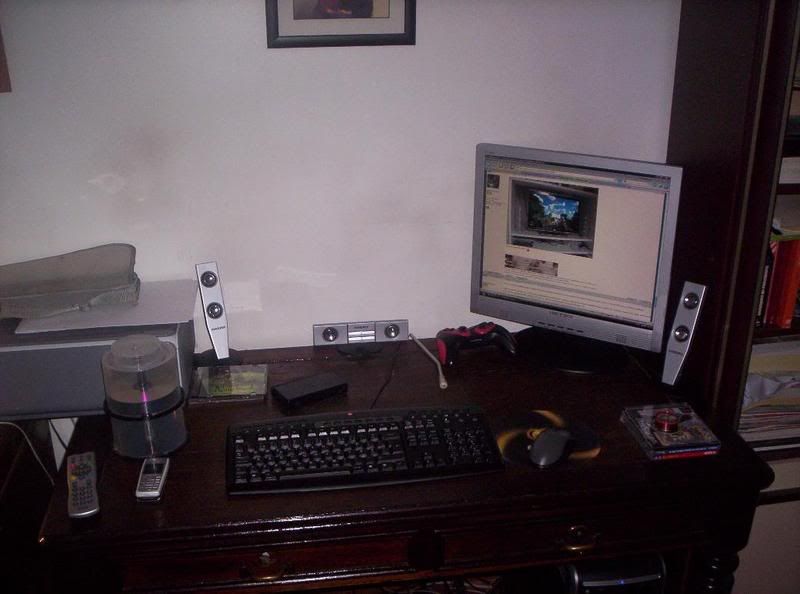
100_2309.jpg


Before you say it's very tidy, let me tell you that this is not my room.
nyanya.gif
 
maybe you can try defragging you HDD? deleting old programs?

Recently my suburb had junk collection, and there were CRT monitors everywhere! I picked up a 19inch (more info on another topic i created)
but i saw at least SIX 15inch CRTs within about 5 streets around my house.

I didn't think about it but i could have built a monster setup just to beat fast's number of monitors haha
happy.gif


As for multiple screens, i've my dual screen setup great, although not quite as aesthetically pleasing as i might like, given on is a 17inch LCD and one is a 19 inch CRT.
I find it useful having the ability to display more documents at once without so much clutter. It also makes multitasking easier.
 
@RAM try having multiple monitors for a few days and then you will see, 4 is overkill though.

My biggest gripe is I had to disable SLI which is probably going to mean a nice performance hit on games.


but doesnt it just stretch the destop over 2 monitoes, which will look kinda sh!t?

does it allow you to play unreal or a racing game, multiplayer instead on slpit screen, btu on player on one screen, and one of the other?
 
No it gives you however many desktops you have for the monitors, you can get the same display on one or more of the screens as well.

As for games they would have to be programmed to do that (VBAlink works nicely with such a setup) but it is fairly rare for such a thing to happen, there is the odd tech demo for racing games that act a bit like a cockpit as well. Having a manual/reference (work or play) on one screen is nice though.

@jelbo that is a nice looking screen.


_______PC and 360 area________|__________TV area_____________|_________Kewl posters_____________|

Who can spot all the game consoles/handhelds?
tongue.gif


Sorry about the crappiness of the photos but I had to use my phone as my camera's broke
sleep.gif
 

Site & Scene News

Popular threads in this forum