

 Nintendo Switch 2 GameCube Controller GBAtemp review
Hardware
Product Information:
Ah, the humble GameCube; to many, one of Nintendo’s finest and most nostalgic of consoles. With its lineup of iconic and wildly fun games, it's a console thats had quite a bit of staying power in both the retro collecting and emulation scenes, and long have fans clammored for remakes, remasters, or official ports of some of their favorite games. And now with a selection of GameCube games being added to Nintendo Switch Online for the Switch 2, Nintendo's finally giving their fans what they asked for in a way. The only problem? The experience just isn't the same on a pro controller or set of JoyCons. Enter Nintendo's solution, a wireless GameCube controller for use exclusively with the new console, much in the vein of their wireless NES and N64 options. Does the controller hold up as a great way to play, or is this piece of nostalgia best left in the past? Let's find out!


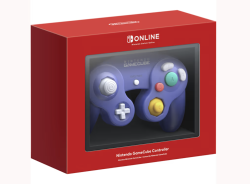
Starting off with first impressions and I have to admit I’m left wanting in the area of packaging. The controller comes in a flimsy-feeling cardboard box, and isn’t secured at all beyond the molded insert. When taking it out, the front window for the box revealed itself to even just be a slide of plastic that isn’t attached to the cardboard at all. For the controller itself, the only protection it received inside the box is a thin sheet of plastic that doesn’t even wrap all the way around it. Luckily mine came undamaged, and from an area of lowering the carbon footprint of the product, I see why a few of these decisions were made. But for those who like to keep hold of their boxes, or who wanted to keep their controller sealed, you’ll want to invest in a casing to protect the box as soon as possible.
In terms of the controller itself, this is where I started to be properly impressed. The controller feels sturdy and quality in my hands. The buttons are all perfectly clicky, and the whole thing feels just like the GameCube controllers of days past. From a size perspective, it matches up perfectly with my third party controllers for my traditional GameCube, and it lines up with my WaveBird almost perfectly, but admittedly? It feels odd to be using a wireless controller that doesn’t have the additional hang-off from the WaveBird. It includes all of the buttons that the traditional GameCube controller has, with the addition of the Switch’s sync, capture, home, and GameChat buttons, and a hilariously small, second Z button on the right of the controller, giving it both a ZL and a ZR to bring it in line with modern Nintendo controllers, though the new ZL button is almost too small to be functional. Right where the cord would connect now exists a USB-C port, to be used with the included USB-C to USB-A cable for charging and initial setup. Overall? While the packaging may leave me wanting, the controller itself is a work of nostalgic art that leaves me feeling just as excited as the day I got my first GameCube way back when.


As both advertised, and expected, the primary intended use for this controller is to be used with Nintendo Switch Online’s new library of GameCube games that can be played exclusively on Switch 2, just as the N64, SNES, NES, and Genesis emulators all have their own dedicated controllers. From here, there really isn’t much to say; it just works. All three NSO GameCube games run wonderfully with the GameCube controller without issue, as I would expect them to do so; this is the product that it was built for, after all. It would be bordering on embarrassing if the controller failed here. It just works (save for a few general issues with NSO’s GameCube emulator that we’ll speak on later), and not only that, but it feels right at home to be playing these games again on a brand new, official Nintendo GameCube controller. From a function standpoint, the microscopic ZL button serves as access to your in-game suspension menu that allows you to use save states, reset, or return to game selection. Not only that, but the button remapping options exist for the GameCube controller as well, allowing you to customize the experience to be as comfortable for you as possible, while feeling right at home on an official piece of hardware. I’ll have a more general writeup on NSO’s GameCube selection in a couple of days, but in terms of the controller’s use for its intended audience? It literally just works as expected, and that’s all I need from it.
As nice as it is to have the controller work as intended for the NSO GameCube stock, that really wasn’t my biggest hope for the controller; ideally, my goal is to push it as far as I can into being my replacement for a more traditional pro controller. Despite Nintendo’s coyness in revealing so (likely to not cannibalize their own pro controller and joycon sales), the GameCube controller does indeed work as a standard pro controller with minimal issues; the biggest problems I’ve run into is the lack of a minus button, the ZL button not being functional in some games, and the lack of the analog and c-stick being clickable as extra buttons themselves. Right off the bat, this means it won’t be a great solution for every game, but there’s still plenty of games that it should work just fine for. Right off the bat, I started my testing with Mario Kart World, and found it to work flawlessly, while being significantly more comfortable to hold than a single joycon, which seems to be a best case scenario when using the controller; any situation where one would use a single sideways joycon, the GameCube controller can step in without issue.


One of the more surprising additions to the controller is definitely gyro support, allowing some surprising compatibility in a whole host of games, in a few ways one may not expect; through the gyro support, one can actually use the controller to aim Link’s bow in Breath of the Wild, use it as a stand-in for the cursor in Super Mario Galaxy, via the 3D All-Stars collection, and I was even able to use it for some driving controls in Mario Kart World. Now, none of this is to claim that these are the ideal ways to play these games or utilize these features - but when gyro support wasn’t even on most folks’ mind, it’s incredible to see these bonus features included in something Nintendo wasn’t even wanting to admit would work outside of its designed niche.
To finish my testing on other Switch games, I wanted to put the controller through its paces on some familiar suspects from the GameCube era; the remasters of Paper Mario: The Thousand Year Door and Metroid Prime, 3D All-Star’s port of Super Mario Sunshine, and finally, the franchise that’s kept the GameCube controller alive for the past 17 years, Super Smash Bros. Ultimate. Starting with what worked, in Smash Ultimate? The controller was exactly what I expected, and the game worked flawlessly with it, just as all Smash games since Melee have. The game even recognizes it as a GameCube controller, giving folks a first party wireless option for those who don’t still have their WaveBirds around, or who don’t want to spend the time setting up the GameCube adapter. Super Mario Sunshine on the 3D All-Stars collection was another that worked just as I expected, including support for the GameCube’s adaptive triggers to control the flow of water when spraying with F.L.U.D.D., a feature that notably didn’t work when playing the games with JoyCons. Admittedly the adaptive trigger functions were a lot more finicky on this version than I remember them being on the GameCube original - which may be up to memory, or it may be an imperfection of the port. But either way, the fact that the feature is back is just wonderful.


Now we get into what didn’t quite work as expected - specifically with two GameCube darlings turned Switch Remasters, Metroid Prime and Paper Mario: The Thousand Year Door. The issue with both games comes down to two major missing factors - no Minus button, and no rumble support. Now, rumble support is far from a deal-breaker I know, but with how good the rumble is on the controller, it’s a serious bummer to see it missing. As far as what we lose by not having a Minus button? In Paper Mario, we lose the ability to access the Tattle Log, and thus the ability to check major information about the games enemies. In Metroid Prime Remastered, the minus button is connected to the Inventory screen, locking away information on Samus’ various power-ups if you decide to play with the GameCube controller. While neither of these omissions are what I would consider dealbreakers, they’re certainly both reasons to opt for a more traditional pro-controller, or a set of JoyCons.


Now, as I ended up getting my controller before I got my Switch 2, so I decided to run a few tests to see if it really was “compatible only with Switch 2” as advertised. The first test was to, obviously, try pairing it to my original Switch; as expected, there was a whole lot of nothing there, both when trying to pair wirelessly and when trying to connect it via USB. I also tried to connect it to my PC, which gave me much more interesting results; when trying to pair it via bluetooth sync, the PC would recognize the controller for a split second, but would not be able to connect. When connected via USB, the controller was fully recognized by my PC, but when I tried to get it working on Dolphin, button inputs would not be recognized, despite the controller being recognized and connected. I’m sure that, just like the N64 Switch controller, there will exist supplementary software for this GameCube controller eventually - but for the time being, it truly is compatible with only Switch 2.
Overall, to say I’m impressed with this GameCube controller would be an understatement. It provides a huge boost of nostalgia to the NSO collection, and is a serviceable replacement for a pro controller in a bunch of circumstances, and even has a few unexpected but welcome features! While its limitations are clear, and in some cases disappointing, this is still a controller I can highly recommend for any Switch 2 owners who want a bit of nostalgia, or just a damn good controller to add to their collection… assuming you can find it in stock, of course.
Verdict
- Beautiful and nostalgic design
- Sturdy build
- Surprise gyro support
- Works with a surprising amount of games
- Flimsier triggers than older models
- No rumble support on some games
- Lack of modern buttons hinders support


