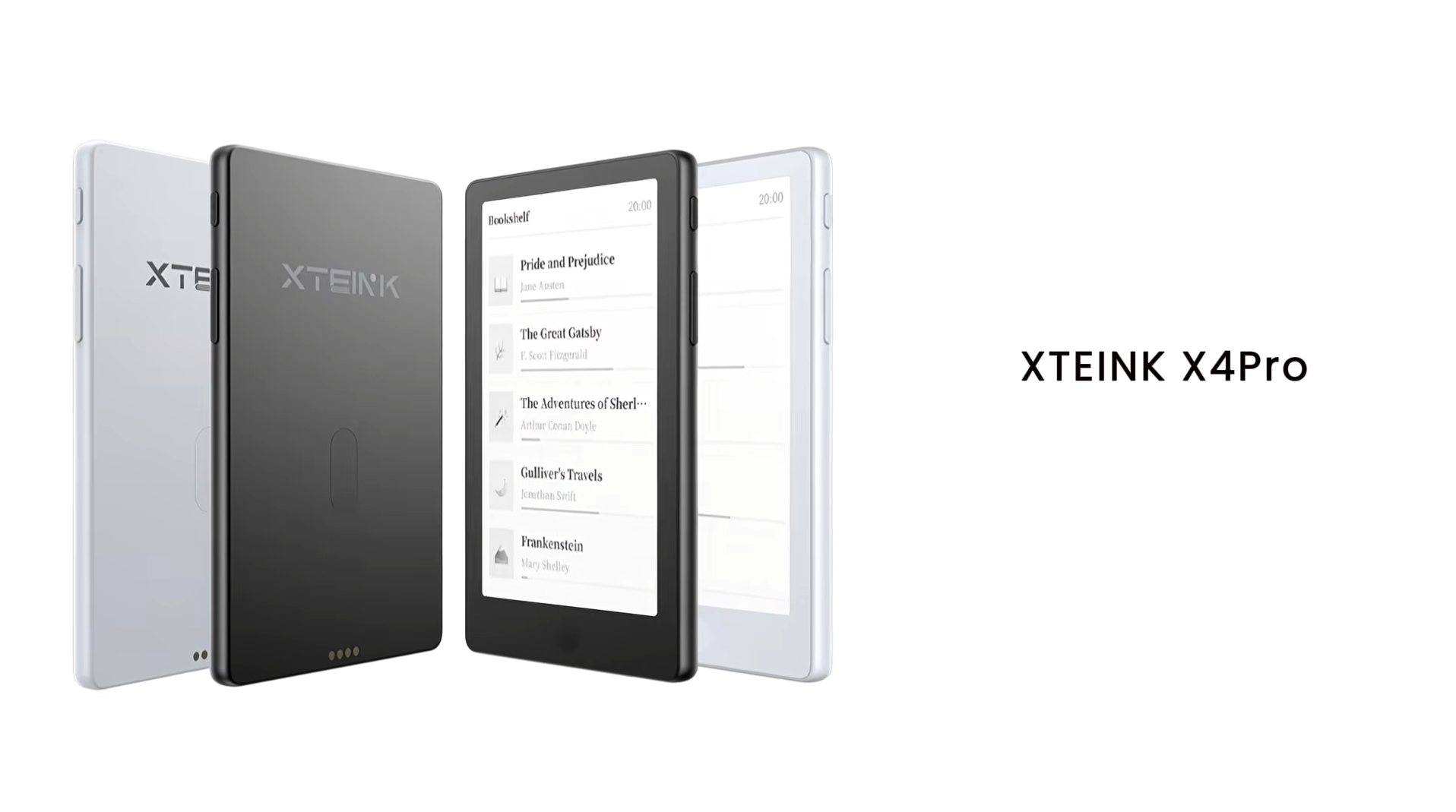
 Xteink X4 Pro GBAtemp review
Hardware
Product Information:
- Official Store: https://www.xteink.com/products/xteink-x4pro
Earlier this year, newcomer to the e-reader market, Xteink, made waves by releasing tiny e-readers. Their pocket size, simplicity and affordability made them popular gadgets and even smartphone add-ons. However, the highly minimalist ethos embodied by these devices was divisive, and some useful features felt left out. The company has taken the feedback on board and has addressed it in their latest product, the Xteink X4 Pro. We’ll take a look at it in this review.
Xteink X4 Pro contents and specs
The Xteink X4 Pro is currently priced at $99 on the official Xteink store. Of note, at launch, the device will not be available on other platforms (such as Amazon). It comes with the following:
- 1 × X4 Pro E-Reader
- 1× Quick Start Guide
- 1× MicroSD Card
- 1× Matte Screen Protector
- 2× E-Reader Adhesive Metal Ring
- 1× Magnetic Charging Adapter
The company also notes that customers who purchase the X4 Pro will receive a free X4 Pro magnetic case in a random colour.
Specs of this e-reader are as follows:
- Display: 4.3 inch e-ink
- Resolution: 219 PPI
- CPU: ESP32-S3R8
- Dimensions: 111 × 69 × 5.95 mm
- Weight: 72g
- Storage: Comes with 16 GB microSD card, supports expansion up to 256 GB
- Connectivity: Wi-Fi 2.4 GHz & Bluetooth wireless technology
- Ports: Pogo Pin
- Battery: 1100 mAh
- Supported Formats
- Document: EPUB, TXT / Image: JPG
- BMP / Fonts: BIN / XTF
- Front light: Yes
- Touchscreen:Yes
The Pro hardware upgrades
As its name suggests, the Xteink X4 Pro is an upgrade to the previously released Xteink X4. At a glance, the two devices might look the same and even share very similar dimensions. However, the Pro has quite a few noticeable upgrades.
Notably, the X4 Pro does not rely solely on physical buttons for navigation. Xteink integrated a touch panel, allowing for touch, tap and swipe controls on the device’s display. I personally don’t feel the need for touch controls, but I do get that it is more familiar for navigating on smart devices. In addition, having more options to operate the device is welcome.
The physical buttons are also different, with the forward and back buttons on each side of the device (rather than both being on one side). This makes for more ergonomic controls and, being remappable, allows for personalisation.
There’s also a touch-sensitive ‘Home Button’ under the X4 Pro’s screen. Tapping it takes you back to the home screen. It’s a nice-to-have feature, rather than a necessary one.
Xteink also included a much-needed front light in this iteration of its e-reader. By swiping down, you can control the brightness and temperature of the light to suit your reading preferences. This is my personal favourite upgrade as it makes the device much more versatile to use in virtually any lighting condition. The only downside is that having a front light induces the “sunken screen effect” where the screen is depressed to accommodate space for the lighting components, resulting in some shadows around the edges. It is minor but noticeable, and a necessary tradeoff for this useful feature.
Another hardware change has to do with the charging of the X4 Pro. It does not feature a USB-C port but, rather, pogo pins. A magnetic adapter is included, which needs to be plugged into a USB-C cable (not included). It is not ideal, and a universal USB-C port, as opposed to an easily misplaced proprietary adapter, would have been more welcome.
Despite the front light and touchscreen upgrades, Xteink somehow managed to make the X4 Pro lighter than the regular X4 (72g vs 74g). The thickness is virtually the same (5.95mm vs 5.9mm). Oh, and did I mention that the battery is also bigger (1100mAh vs 650mAh)? The result is a lightweight and palm-sized device that is ergonomic and comfortable to use.
An improved user experience
Xteink did not stop at hardware upgrades with the X4 Pro, but also put effort into revamping the software. The user interface is more informative and user-friendly. You can now find useful information like the time and battery percentage by simply tapping on the screen. Unlike the regular X4, the Pro variant allows users to change font type and size on the device itself.
Xteink now has a smartphone companion app that lets you upload documents to the device as well as mini “apps”. For example, there’s a To-do list and a virtual fortune cookie that you can push to the device. There’s also a social element with downloadable wallpapers and books from the Xteink user community. These are nice features, and I hope more useful “apps” are available, such as a dictionary.


The overall user experience is more streamlined and less finicky than with the original X4. Simply being able to adjust the font settings on the device itself is a boon. There is some need for updates, such as book images not properly loading and the orientation of some PDF files. These can hopefully be adjusted with future updates.
Notably, Xteink reiterates that the X4 Pro, as well as all of its past models, supports third-party firmware. As with the X4, I expect that the X4 Pro will also receive community support and custom firmware that will provide more features and customisation options.


It’s very encouraging to see that Xteink has taken community feedback constructively and has addressed user needs in its new product. However, I am wary of this leading to feature creep in its future devices. Already, I feel like the X4 Pro has lost some of the ultra-minimalist appeal of the OG X4. However, this is my personal feeling, and I am still glad that the X4 Pro exists as it is a net upgrade over the former model. The X4 Pro remains a niche device, but the added features can appeal to more people.
Verdict
- Host of welcome hardware and software upgrades
- Improved user experience
- Same great pocket-friendly e-reader experience
- Supports third-party firmwares
- Switch to pogo pin charging
- Some minor software hiccups
- Somewhat diminished minimalist appeal