 BOSGAME M5 Mini PC GBAtemp review
Hardware
Product Information:
- Official Store: https://tinyurl.com/3urthkyh
Review Approach:
A few weeks ago we took a look at the P6 from BOSGAME. An affordable system suited for everyday use, it was a fairly simple thing to recommend to people wanting a PC to get them through these trying times. But what lies on the other end of the spectrum? If you’ve got cash to burn and want a compact system that can do it all, is there an option worth considering? Let me introduce you to the M5.
A Towering System
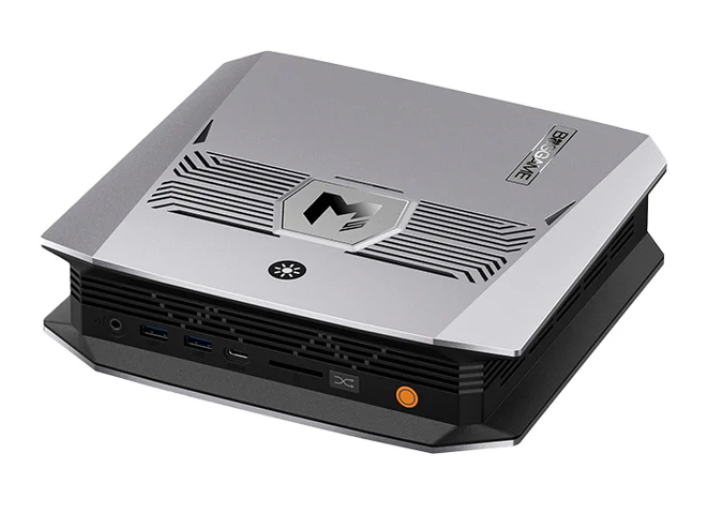
Even out of the box this system is a different beast compared to what we’ve looked at before. It’s a good chunk bigger and features one of the most unique designs I’ve seen, looking more like a router than a PC at a glance. Included in the box is an easy to assemble stand, giving you the option to use it either vertically or horizontally; in my time using it I’ve found the vertical positioning much more appealing. It sits really nicely next to the consoles on my desk, though is quite amusingly dwarfed by the PS5.
To get them out of the way early, the port offerings on the M5 are solid. With the system designed to be positioned in one of two ways, it’s only really feasible to have ports on the front and back face, with the top and bottom used for cooling. On the front we see the power button, a button to move between performance modes, a full-sized SD card reader, a USB C (4.0), two USB A (3.2), and a 3.5mm headphone jack. On the back we get a further three USB A (2x 2.0 + 1x 3.2), a HDMI (2.1), a DisplayPort (1.4), another USB C (4.0), an Ethernet port (2.5G), a second 3.5mm headphone jack, and finally a DC input for power.


It’s a decent haul of ports, though interestingly does fall slightly short of something like Geekom’s Max shells when comparing like for like. The major oddity to me is the inclusion of two 3.5mm headphone jacks though. I’ve never seen that on a Mini PC, and I can’t fathom why that would be a priority here. Either way, I can see some use with the back being routed into some speakers, saving the front for headphones. There is also one extra button on the shell itself, this one toggling the RGB lighting that can be seen on the front panel of the system. I’m not usually one for RGB, but I’ve quite enjoyed the rainbow lighting. It’s been a pleasant change.
Though I do like what’s on the outside here, the real star of the show is what’s lurking within. The M5 houses what is AMD’s best mobile APU: the AI Max+ 395. I’ve covered a few of AMD’s AI-branded systems, but this one stands leaps and bounds above the rest. The part we’re most interested in is the integrated GPU, the 8060S. Before getting this system, I’d read about it being on par with a discrete RTX 4060 graphics card, but I really wasn’t prepared for just how well it would run in person. We'll revisit that later though, let’s finish off covering the basics. The system I have comes with a 2TB SSD and a colossal 128GB of RAM, with up to 96GB of that being allocatable to VRAM thanks to the Unified Memory Architecture. Sadly that RAM is soldered, as is the case with other AI Max+ 395 systems out there to get the best performance, but I’d be very surprised if you were wanting to upgrade from the starting amount. The model with 128GB of RAM is the only one currently available from BOSGAME, though they have previously sold a 96GB model too. For gaming either would be fine, but obviously there are other use cases that could appreciate that bit more on top.
Even though you’re stuck with the RAM you pick at checkout, I am at least happy to report that upgrading the SSD is a trivial affair. Accessible by just unscrewing a panel on the bottom of the system, it’s one of the easiest upgrades I’ve come across with a Mini PC. You even get a second M.2 2280 slot to fill yourself. Hard to complain at that.
Attack on Benchmark
Running through my typical assortment of benchmarks, the M5 stands at the top of the systems I’ve tested. It’s worth noting that these benchmarks were ran on the Performance profile, so should represent the best of what the system is capable of. I also have the system configured with 32GB of RAM and 96GB of VRAM throughout the review, including these benchmarks.
Cinebench 2026.1.0
- Multi Thread - 5939
- Single Core - 614
- Single Thread - 452
Geekbench 6
- Multi Core - 16509
- Single Core - 2881
PCMark 10
- Overall Score - 10131
- Essentials Score - 10623
- Productivity Score - 17045
- Digital Content Creation Score - 15582
3DMark
- Steel Nomad Light - 8769
- Steel Nomad Light Stress Test - 97.3% (Pass)
If you don’t read these numbers regularly, let me tell you they are good numbers. The Steel Nomad Light test is the one that stands out the most to me. It’s the first Mini PC I’ve looked at that was able to maintain an average above 60fps for the benchmark run, coming in at 64.96. There were still some dips below 60, dropping to the mid-50s, but for what is an integrated graphics card, it really is something to get excited about.
Playing with Local AI
Now I’m not a huge AI fan. I think it’s absolutely remarkable what some of the enterprise models are capable of, recently having given Anthropic’s Fable 5 a go to see for myself, but with the impact on markets combined with the larger environmental disaster that’s brewing, it just doesn’t seem worth it. What does sound interesting however is running this stuff locally. You don’t need a data centre, nothing gets trained on your data, and… Well, running these things locally probably won’t help market conditions. That one feels a little out of our control.
Prior to the M5 I hadn’t even considered running these things locally, and from my month or so of playing on and off, I’ve discovered it’s remarkably easy. Grab an app like LM Studio, download a model that’ll fit in your VRAM, and you have your own local chat bot. And it’s here I feel local AI does a smashing job. What makes the M5 particularly nice, as well as other Strix Halo systems, is that 128GB of unified memory. Being able to throw up to 96GB of VRAM at the problem means you can run some of the largest models out there with room to spare. These larger models are slower, but are good for things that might require a bit more thought. There’s definitely a degree of finding the right model for the right task, with some smaller ones being a better fit when you just want fast responses.
Where I found things tripping up was in trying something like OpenCode. This is essentially an open source version of Claude Code where you can load in your own local models, and then prompt it to complete programming tasks. It was distinctly fine, but it’s here where you’ll really start to see the gap between a local model and the larger enterprise models. For the simple things it would do them without issue. You can watch the reasoning play out live and see it taking action. Anything complex though? Don’t count on it. Very quickly it becomes a loop of it putting down a comment explaining the problem, before washing its hands and calling it a day. I won’t say that I did the best job here, and my lack of experience in writing good prompts likely did contribute to the frustrating experience. Even so, it’s not something I’d really recommend for the time being.
I’m not going to bother with AI benchmarks here because frankly I’m still very green on the larger topic. There are plenty of reviews and videos out there looking at Strix Halo as a whole, and I’d encourage you to dive deeper if local AI is something you are interested in. From my time playing I certainly see the potential though, and am somewhat looking forward to watching how it develops in the coming months and years.
An Actual Gaming Mini PC?
Let’s get onto the main event. The Ryzen AI Max 395+ is obviously good for more than just AI. It does, in fact, house the strongest iGPU AMD have ever put out; I’ve eluded to it throughout the review, but I was genuinely blown away by how it performed. As a bit of a preview for this review, I put together a little showcase of games, and it should hopefully give you a good idea of what we’re looking at.
If you take nothing else from that video, understand that this is an iGPU that can play Monster Hunter Wilds. A game that gave the best discrete cards a run for their money at launch. There's obviously been some optimisation since then, but I remain baffled and amazed. Since recording that performance video, I’ve also spent roughly 30 hours playing through a fresh save on Baldur’s Gate 3. It's been fantastic. Sure there’s the occasional frame hitch from time to time, but this is something I’ve just come to expect as somebody who’s never splurged on an 80 or 90 tier card. The fact I'm forcing the poor thing to play on a 3440x1440 monitor probably doesn't help either.
I will add a note here that it wasn’t all perfect though, with Unreal games relying on DirectX 11 refusing to cooperate. It seems to be that specific combination, with me first noticing this trying to troubleshoot the Pokemon fan game Gamma Emerald (or at least its demo), but the same issues did occur across other Unreal Engine titles such as Triangle Strategy and Octopath Traveler 2. Adding a “-dx12” flag to the launch settings resolved the problem here, but may not elsewhere if the problem does extend beyond this small set I've identified. It’s the kind of thing I’d expect to be fixed with driver updates, but it was surprising to find given the Strix Halo platform has been available for around a year now.
For its form factor it’s hard to be anything but impressed with the performance on show. Though this might not be the system most people will be picking up, it does provide a glimpse of what is hopefully to come as the technology progresses. If AMD can get the 8060S into more systems, particularly at those more mid-range price points, we really could have something great on the horizon.
A Stellar System
Let’s not beat around the bush, this is not a system that will be worth picking up for the vast majority of people out there. For the roughly £2100 it costs at the time of writing, you’ll be able to get better performance and more flexibility from building your own system, even in the current market. That is if gaming is your goal. This system really has one niche, and that’s in its ability to run huge AI models locally with that colossal maximum of 96GB of VRAM for its powerhouse of an iGPU. If you’ve been wanting to play with AI, and you’ve been wanting a system that can cover every base, this absolutely is that system. It’s a high price of entry, granted, but manages to remain one of the cheapest systems to offer the lucrative AI Max+ 395. If you have the cash and you need everything it can offer, I have no issues recommending it. If all you care about is gaming though, you can and should seek out something more affordable.
For those that want to check out the M5, BOSGAME have provided us with a unique tracking link. Note that this link is only there to measure traffic from this review, and will not provide us with any revenue should you decide to buy the system after clicking it.
Verdict
- Unique shell
- Ample IO offerings
- Simple RGB lighting
- Colossal 128GB of Unified Memory
- Gaming performance that rivals systems with discrete graphics cards
- Priced well for a Strix Halo system
- Remains prohibitively expensive for most despite being priced well for its APU
- Some weird interactions with Unreal games running DirectX 11