Hardware Homebrew Emulation How to fix _gba folder in Twilightmenu?

possumeaterofficial

Member
Newcomer
Joined
Oct 18, 2022
Messages
22
Reaction score
4
Trophies
0
Age
26
XP
140
Country
Canada
Sorry if the prefixes are wrong or I write this oddly, I'm new here, I just made the account to ask about this in fact. So, there was a GBA game I wanted and as I already had TwilightMenu downloaded and thought I had a fairly good sense of how it worked, I decided to download it. I foolishly placed it in the "_gba" folder, thinking it would be similar to placing a DS ROM in the "roms" folder. Ichecked my SD card again and went into the _gba folder, and now it just shows me this.
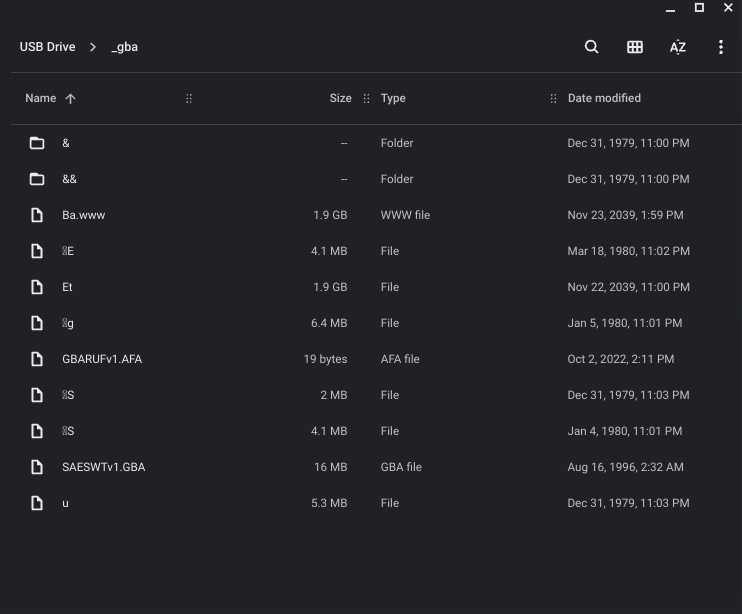
Screenshot 2022-10-17 9.19.11 PM.png


Just a mess of odd garbled files and symbols. Going into the first folder yielded this result, the second didn't have anything in it however.
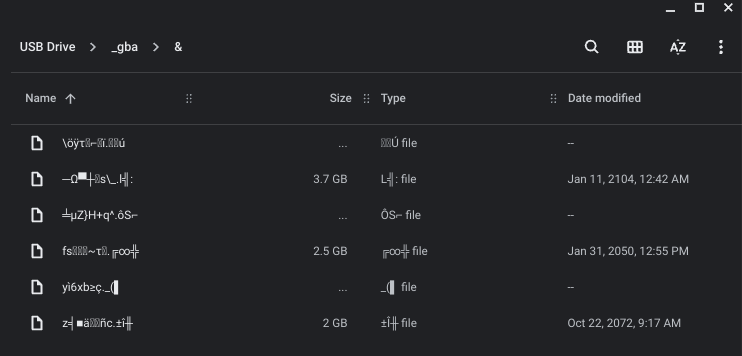
Screenshot 2022-10-17 9.19.22 PM.png


Even more nonsense! I've clearly done something wrong related to the ROM I tossed in there, does anyone know how I could fix this? And on top of that, does anyone have a good tutorial on how to play GBA games on this thing? Thank you!

 
Sorry if the prefixes are wrong or I write this oddly, I'm new here, I just made the account to ask about this in fact. So, there was a GBA game I wanted and as I already had TwilightMenu downloaded and thought I had a fairly good sense of how it worked, I decided to download it. I foolishly placed it in the "_gba" folder, thinking it would be similar to placing a DS ROM in the "roms" folder. Ichecked my SD card again and went into the _gba folder, and now it just shows me this.

View attachment 332484

Just a mess of odd garbled files and symbols. Going into the first folder yielded this result, the second didn't have anything in it however.

View attachment 332487

Even more nonsense! I've clearly done something wrong related to the ROM I tossed in there, does anyone know how I could fix this? And on top of that, does anyone have a good tutorial on how to play GBA games on this thing? Thank you!
Sd card is Corrupted
 
it doesn't seem like anything else on the sd card is acting strangely, just the _gba folder. everything else looks fine...
Post automatically merged:

plus, it seemed to work fine when i put it back into the 3ds. not sure if that matters.
Post automatically merged:

okk it still seems to be working fine, guess the gba portion of the card is screwed but that just means i cant play the game. oh well.
 
Last edited by possumeaterofficial,
it could be a fake o damage memory.

copy all files to a folder on you pc.

remove all partitions and create a new one using fat32, then use H2testW to test all the extent of the device. if all is OK, copy back the good files to de memory and start over with the game.
 
I don't have any better advice than what has already been given on the corrupted folder/SD card front.

However, I wouldn't recommend TWiLight Menu/GBA Runner as the optimal way/emulator to play GBA games on your 3DS, simply because TWiLight Menu essentially turns your 3DS into a DS, and the DS has a pretty low screen resolution. I also found GBA Runner to be a pretty shoddy emulator.

mGBA is fairly serviceable, for the most part. But it's not perfect, and I would say it's honestly more useful for GB/GBC emulation than the GBA itself. But it does have fairly robust features and customization options.

I would say the best option for playing GBA on 3DS would be using Nintendo's own built-in, native GBA emulation on 3DS, as it isn't really emulation at all, and all the ROMs run perfectly. There are two ways you can do this: Either "injecting" the ROMs on your 3DS as Virtual Console games/apps on your 3DS Home Menu using a forwarder program such as "New Super Ultimate Injector", or downloading "open_agb_firm", which can then be accessed by holding start while booting/turning on your hacked 3DS, and selecting it from the Luma Chainloader. However, this method is severely lacking in options/features/customization. What you see is what you get. I believe you can tweak certain things via godmode9 -- such as screen brightness -- using the open_agb method, but it's pretty esoteric to the layman, and not at all user/n00b-friendly.
 
I don't have any better advice than what has already been given on the corrupted folder/SD card front.

However, I wouldn't recommend TWiLight Menu/GBA Runner as the optimal way/emulator to play GBA games on your 3DS, simply because TWiLight Menu essentially turns your 3DS into a DS, and the DS has a pretty low screen resolution. I also found GBA Runner to be a pretty shoddy emulator.

mGBA is fairly serviceable, for the most part. But it's not perfect, and I would say it's honestly more useful for GB/GBC emulation than the GBA itself. But it does have fairly robust features and customization options.

I would say the best option for playing GBA on 3DS would be using Nintendo's own built-in, native GBA emulation on 3DS, as it isn't really emulation at all, and all the ROMs run perfectly. There are two ways you can do this: Either "injecting" the ROMs on your 3DS as Virtual Console games/apps on your 3DS Home Menu using a forwarder program such as "New Super Ultimate Injector", or downloading "open_agb_firm", which can then be accessed by holding start while booting/turning on your hacked 3DS, and selecting it from the Luma Chainloader. However, this method is severely lacking in options/features/customization. What you see is what you get. I believe you can tweak certain things via godmode9 -- such as screen brightness -- using the open_agb method, but it's pretty esoteric to the layman, and not at all user/n00b-friendly.
ahh, makes sense. i just figured twilight would be the easiest but it seems i can't do that anymore, lmao. thanks for the ideas
 
  • Like
Reactions: Thee_Stranger

Site & Scene News

Popular threads in this forum