Hacking Possible to Disable the Wii's (De)Flicker Filter?

  • Thread starter Thread starter Razor83
  • Start date Start date
  • Views Views 199,206
  • Replies Replies 754
  • Likes Likes 2
I looked at it myself and the PAL is exactly the same colors as the NTSC version. Paper Mario is just like that it seems. The offset in 01.app for the non-vfilter methord is 44A54, but changing it makes no difference. There's only one string of "00 00 15 16 15 00 00". I haven't tried to change 16 to 20 though. the offset is 18D61E if you want to try, SaulFabre.

I tried with PAL Mario Kart 64 out of curiosity. Offset is 46DB8. It works just like for NTSC.

Edit: Look, in Mobygames they seem to have screenshots of the N64 and Wii (Wii U does not have, but we know already it's much, much darker).

N64:
https://www.mobygames.com/game/n64/paper-mario/screenshots

Wii:
https://www.mobygames.com/game/wii/paper-mario/screenshots

More specifically, here:
N64 Title Screen
https://www.mobygames.com/images/shots/l/173594-paper-mario-nintendo-64-screenshot-title-screen.jpg

Wii Title Screen (badly scaled because probably the person played it on Widescreen)
https://www.mobygames.com/game/wii/paper-mario/screenshots/gameShotId,610169/

The colors are basically the same. It's how the game is then...
 
Last edited by Maeson,
  • Like
Reactions: SaulFabre
well, the captures I did were with a cheat code activated, not hacking the game and modifying it outright. I could try editing the game and seeing...
 
  • Like
Reactions: SaulFabre
I looked at it myself and the PAL is exactly the same colors as the NTSC version. Paper Mario is just like that it seems. The offset in 01.app for the non-vfilter methord is 44A54, but changing it makes no difference. There's only one string of "00 00 15 16 15 00 00". I haven't tried to change 16 to 20 though. the offset is 18D61E if you want to try, SaulFabre.

I tried with PAL Mario Kart 64 out of curiosity. Offset is 46DB8. It works just like for NTSC.

Edit: Look, in Mobygames they seem to have screenshots of the N64 and Wii (Wii U does not have, but we know already it's much, much darker).

N64:
https://www.mobygames.com/game/n64/paper-mario/screenshots

Wii:
https://www.mobygames.com/game/wii/paper-mario/screenshots

More specifically, here:
N64 Title Screen
https://www.mobygames.com/images/shots/l/173594-paper-mario-nintendo-64-screenshot-title-screen.jpg

Wii Title Screen (badly scaled because probably the person played it on Widescreen)
https://www.mobygames.com/game/wii/paper-mario/screenshots/gameShotId,610169/

The colors are basically the same. It's how the game is then...
I've tried to remove the dark filter to Paper Mario 64 PAL VC Wii with your suggestions...But it didn't work

Any other ideas? :(
 
well, the captures I did were with a cheat code activated, not hacking the game and modifying it outright. I could try editing the game and seeing...

If the OSSC capture you posted here has max brightness pixels then it should be fine.

It does indeed have max brightness pixels, but the midtones are way darker compared to screenshots from Dolphin and Mobygames screenshots. Maybe it's a characteristic of your capture card, as OSSC's output levels are supposed to be very good.
 
  • Like
Reactions: SaulFabre
Okay, sorry for the double post, but I'm getting a bit tired of this.

I went ahead and tried, on hardware, three different versions:

Paper Mario USA, with a 01.app modified the 15 20 15 "trick", so the game *is* like that.
Paper Mario USA, normal. Just as if you just downloaded it from the Wii Shop.
Paper Mario USA, but with the cheat code made by SuperrSonic turned on, launched through USB Loader from my real nand.

All of this captured with my console, through OSSC. All the same settings picture wise.

Group 1: Modified with the 15 20 15 trick.
Paper 20 Hacked 1.jpg Paper 20 Hacked 2.jpg Paper 20 Hacked 3.jpg Paper 20 Hacked 4.jpg Paper 20 Hacked 5.jpg

Group two: Unmodified game with the Cheat Code turned on.
Paper Cheat 1.jpg Paper Cheat 2.jpg Paper Cheat 3.jpg Paper Cheat 4.jpg Paper Cheat 5.jpg

Group 3: Unmodified game.
Paper Normal 1.jpg Paper Normal 2.jpg Paper Normal 3.jpg Paper Normal 4.jpg Paper Normal 5.jpg

So... It seems like if you modify the game, you still get the brighter picture. Meaning, Dolphin is not getting something the real hardware does, it's not something that can only be achieved with Gecko Codes turned on, and certainly, is not something we can call fix or restoration, just modifying what's there to get something different from the real thing. And can only be appreciated on real hardware and not emulation... At least in my case, it doesn't matter what do I change on Dolphin's settings, it never shows a difference.

SaulFabre, sorry but we can't remove a dark filter that doesn't exist. What the cheat does is basically ramp up the brightness, but not "fix" or "disable" anything. The original N64 game looks like the group 3. Groups 1 and 2 are basically "not real" and unofficial edits.

You can like them, of course. I might play with it too, in this particular case it seems to look pretty good, but that's a different conversation. This VC release has nothing wrong with it, unlike Mario Kart or SM64.

Oh, and MIND YOU ALL: These screenshots look DARKER than how the game actually looks. They are darker because of the settings on the application I'm using, which is very nitpicky with the brightness setting and how the image coming from the capture looks and how the actual photos I take look different so it's really annoying to find the right spot, not because of the game being like that.
 
Last edited by Maeson,
Superrsonic's cheat code for Paper Mario is the same as manually editing the dol to 152015 except it patches it in memory while the game is running instead of the dol beforehand. Either way the value ends up in memory the same, so it makes sense that both produced the same result.

Patching all GXRenderModeObjs in the dol to 152015 shows a brightness increase in Dolphin for me, albeit with clipping. Even with Dolphin's 'disable copy filter' ticked it still works as Dolphin's implementation is clever in that it still allows brightness effects like the Soul Calibur menu fades etc. I suspect it works by only disabling the vfilter if the coefficients sum to 64, otherwise it would be a brightness effect and Dolphin allows it through. 152015 doesn't sum to 64 so Dolphin thinks it's a brightness effect and lets it through. [edit: on second thought, that would mean the picture would become vfiltered during the brightness effects. A workaround may be to take the sum of the 7 coefficients, divide by 3, and set the middle 3 coefficients to those values, with the rest 0's.]

In any case, all screenshots of the unmodified game are showing full dynamic range without any hard limiter on pixel brightness that we observe with other games like Mario Tennis and Wave Race, so I am confident it is not using the dark/epilepsy filter. The dark midtones from the OSSC screen caps is due to the capture device not mapping the midtones correctly, but it's not a hard limiter.

ZZ3ER0.png
 
Last edited by NoobletCheese,
Yes, which does mean, again, that the VC release has nothing wrong with it. It's good to have the option to have the game brighter, but that's all it is, a made up option through modding.

The reason of why I went and check all three is because SaulFabre said he couldn't get the 15 20 15 modification to work. But it does on my end, at least on the USA version. No idea about PAL, as I don't have space on real nand nor a uneek pal at handy to try, and again, these changes don't show on my end on dolphin...

But the bytes to edit on the pal version's 01.app are very close to the ones on the ntsc one.
The PAL offset is 18D61E, the NTSC one is 18B4BE.
 
The reason of why I went and check all three is because SaulFabre said he couldn't get the 15 20 15 modification to work. But it does on my end, at least on the USA version. No idea about PAL, as I don't have space on real nand nor a uneek pal at handy to try, and again, these changes don't show on my end on dolphin...

I'm sure it would work if he patches all GXRenderModeObjs, not just that one instance of 151615 which is for the NTSC mode.

But he shouldn't do that as it will cause clipping -- better to increase peak luminance at the TV/monitor.
 
Last edited by NoobletCheese,
  • Like
Reactions: SaulFabre
Yes, which does mean, again, that the VC release has nothing wrong with it. It's good to have the option to have the game brighter, but that's all it is, a made up option through modding.

The reason of why I went and check all three is because SaulFabre said he couldn't get the 15 20 15 modification to work. But it does on my end, at least on the USA version. No idea about PAL, as I don't have space on real nand nor a uneek pal at handy to try, and again, these changes don't show on my end on dolphin...

But the bytes to edit on the pal version's 01.app are very close to the ones on the ntsc one.
The PAL offset is 18D61E, the NTSC one is 18B4BE.
Removing dark filter in the NTSC release of Paper Mario (Wii VC) with 00 00 15 20 15 00 00 was successful.
But i couldn't remove the dark filter in the PAL version of it.
Anyone have been done it? :P
 
  • Like
Reactions: iGom
But you're not removing anything, there's no dark filter, you're changing something to be more bright than normal.

If what NoobletCheese says is on the money, then you need to look for another VFilter for the PAL mode, or try the GXRenderModeObjs, but again, this game has no dark filter built into it, changing the correct 94 21 FF E0 string has no effect at all.

I was going to suggest to create a new cheat code for the PAL version based on SuperrSonic's, but if the 15 20 15 trick is of no use, we have nothing to go by and try.
 
  • Like
Reactions: SaulFabre
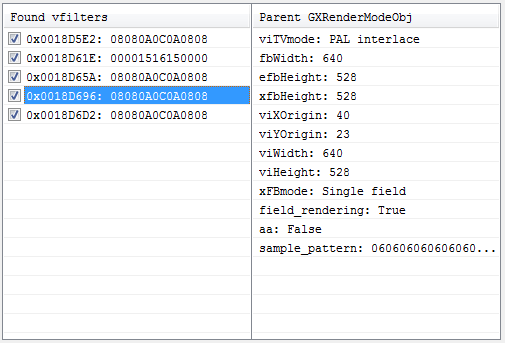
@SaulFabre these are the vfilter offsets for Paper Mario PAL, so you can try modifying all of them to 00001520150000

ZZDugK.png


But again, this will cause clipping and also hue/saturation shifts like the clouds in Pokemon Snap.

You can avoid this and still get a brightness boost by increasing the peak brightness on your display instead.


Now I am confused about something... the function we're editing to disable the epilepsy filter is PowerPC 32-bit code, but N64 games aren't written in this code. I can only think of 2 explanations:

a) the epilepsy filter is written specifically for Wii console, or
b) Nintendo precompiled the N64 ROMs into PowerPC code

I seem to recall the original console had the filter too, so I'm leaning towards (b), but does anyone know the answer?
 
Last edited by NoobletCheese,
So... The PAL version has a filter applied to it? Kinda surprising, honestly, no wonder I didn't find it, I was looking for something else. I do not exactly why, we're talking about emulation, not running things natively where the filtering would make sense.

The original, N64 games did not have darkening filters, that's introduced on re-releases only. What the console did have is a filter similar to what we've been removing from Wii games, with the BIG difference of course that smoothering a 3D, 240p picture might be seen as beneficial generally speaking, while doing so for a 480p picture is pretty much always worsening what's there, specially things like icons or text.

The VC Re-releases have no smooth filtering, plus they have double internal resolution, so there's even less of a need for filters. That link above was pretty useful for me, by the way, because apparently the HUD elements on games like SM64 being smoothed out is intentional and not result of a filter or whatever, and on 480p look pretty much the same as 240p, I always had the suspicion that they put some bilinear filtering on those or whatever, but nope, it's how they are.

Interesting to know that turning that filter off improves the frame rate on 64 games, even if slightly. The VC releases of N64 games generally have better frame rate than the originals, but of course that might be explained by being emulation.

Oh and by the way, without the darkening filter, SM64 VC looks exactly like those screenshots color-wise.

In any case, great job finding that, NoobletCheese, I hope SaulFabre has what it wants at last.
 
Last edited by Maeson,
  • Like
Reactions: SaulFabre
The original, N64 games did not have darkening filters, that's introduced on re-releases only.

Very strange. The only explanation I can think of right now is maybe they got sued back in the 90's and are worried those games have some flashing patterns that some people are sensitive to. I've got an original N64 console with carts of SM64, Paper Mario, Mario Tennis and Zeldas, but no capture card.
 
  • Like
Reactions: SaulFabre
@SaulFabre these are the vfilter offsets for Paper Mario PAL, so you can try modifying all of them to 00001520150000

ZZDugK.png


But again, this will cause clipping and also hue/saturation shifts like the clouds in Pokemon Snap.

You can avoid this and still get a brightness boost by increasing the peak brightness on your display instead.


Now I am confused about something... the function we're editing to disable the epilepsy filter is PowerPC 32-bit code, but N64 games aren't written in this code. I can only think of 2 explanations:

a) the epilepsy filter is written specifically for Wii console, or
b) Nintendo precompiled the N64 ROMs into PowerPC code

I seem to recall the original console had the filter too, so I'm leaning towards (b), but does anyone know the answer?
@NoobletCheese So, I've managed to do all your suggestions on increasing brightness in the European (PAL) release of Wii VC of Paper Mario (Nintendo 64). (I'm not very bothered by the clipping and hue/saturation effect, i'm only interested in make the brightness similar to original N64 hardware)

So i edited all the indicated offsets where the "vfilters" are stored in the 00000001.app file with HxD Hex Editor. I modified all its original values with the hex values 00 00 15 20 15 00 00, saved the resulting edited file and repacked the resulting WAD.

And here's the results in this comparison:

Paper Mario EUR DARK2.PNG Paper Mario EUR NO DARK yay.PNG

So I was wondering if this process can be done with all the other N64 VC games for Wii released in Europe (PAL)... Can this be done?

Well, maybe @Zorg1996 will be happy with this result ;)

Greetings to all :D
 
Last edited by SaulFabre,
  • Like
Reactions: iGom
Well, you can try the same process you did with other games, all of them should behave similarly.

You can remove the real, existing dark filter from Super Mario 64, Mario Kart 64, Mario Tennis or Wave Race 64 with the same process I mentioned and NoobletCheese made easier to find. Just remember Mario Tennis 01.app requires decompressing.

Look for the string "80 04 00 04 2C 00 00 FF 40 82 00 10 80 04 00 08 2C 00 00 FF", then go backwards and find "94 21 FF E0" which should be close, and change it to 4E 80 00 20.

Heck, on Wave Race 64 PAL version, the offset for PAL and NTSC are the exact same one, I wouldn't be surprised if the others are also sharing the same offset.
 
  • Like
Reactions: SaulFabre
Well, you can try the same process you did with other games, all of them should behave similarly.

You can remove the real, existing dark filter from Super Mario 64, Mario Kart 64, Mario Tennis or Wave Race 64 with the same process I mentioned and NoobletCheese made easier to find. Just remember Mario Tennis 01.app requires decompressing.

Look for the string "80 04 00 04 2C 00 00 FF 40 82 00 10 80 04 00 08 2C 00 00 FF", then go backwards and find "94 21 FF E0" which should be close, and change it to 4E 80 00 20.

Heck, on Wave Race 64 PAL version, the offset for PAL and NTSC are the exact same one, I wouldn't be surprised if the others are also sharing the same offset.
Thanks I will try it in more PAL VC releases of N64 Wii VC later! :)

PD: Have you seen about the dark color pallete in NES Wii VC games and how I can replace the color pallete?
 
So I was wondering if this process can be done with all the other N64 VC games for Wii released in Europe (PAL)... Can this be done?


It's not a PAL-specific thing or related to the N64 ROM code in any way; the vfilters are part of Wii's GX library.

From what I can tell by reading the Wii SDK manual and playing around with the numbers in Dolphin, the vfilter string is a sequence of multipliers applied to each pixel in the embedded framebuffer when copied to the external framebuffer.

For a vfilter of 0,0,21,32,21,0,0 (0x00001520150000) the resulting pixel is something like

Code:
  pixel above   x (0/64)
+ pixel above   x (0/64)
+ current pixel x (21/64)
+ current pixel x (32/64)
+ current pixel x (21/64)
+ pixel below   x (0/64)
= current pixel x 1.15
= red x 1.15, green x 1.15, blue x 1.15


At first I thought the middle three values must be individual RGB multipliers but they aren't -- setting a value like 0,0,21,0,0,0,0 doesn't tint the picture red it's just dimmed to 21/64. There is no difference in pixel alignment either, so I'm not sure why there are multiple multipliers for each pixel. The SDK says something vague about it working in tandem with antialiasing when enabled, so maybe that only comes into effect for games which use aa.
 
Last edited by NoobletCheese,
It's not a PAL-specific thing or related to the N64 ROM code in any way; the vfilters are part of Wii's GX library.

From what I can tell by reading the Wii SDK manual and playing around with the numbers in Dolphin, the vfilter string is a sequence of multipliers applied to each pixel in the embedded framebuffer when copied to the external framebuffer.

For a vfilter of 0,0,21,32,21,0,0 (0x00001520150000) the resulting pixel is something like

Code:
  pixel above   x (0/64)
+ pixel above   x (0/64)
+ current pixel x (21/64)
+ current pixel x (32/64)
+ current pixel x (21/64)
+ pixel below   x (0/64)
= current pixel x 1.15
= red x 1.15, green x 1.15, blue x 1.15


At first I thought the middle three values must be individual RGB multipliers but they aren't -- setting a value like 0,0,21,0,0,0,0 doesn't tint the picture red it's just dimmed to 21/64. There is no difference in pixel alignment either, so I'm not sure why there are multiple multipliers for each pixel. The SDK says something vague about it working in tandem with antialiasing when enabled, so maybe that only comes into effect for games which use aa.
That info is so interesting and useful for modify vfilters of PAL N64 VC games for Wii ;)

Any investigation on the dark color pallete of the VC NES games for Wii and how to find it and replace it? @NoobletCheese @MaeseJesus
 
Last edited by SaulFabre,
  • Like
Reactions: Zorg07

Site & Scene News

Popular threads in this forum