Hardware Debugging faulty BCM4356 / orange screen / boot loop

  • Thread starter Thread starter GrimDim
  • Start date Start date
  • Views Views 50,155
  • Replies Replies 167
  • Likes Likes 1

GrimDim

Well-Known Member
Newcomer
Joined
Aug 16, 2019
Messages
77
Reaction score
27
Trophies
0
Age
36
XP
225
Country
Germany
Hi, I've previously made a post here which helped me determine the likely cause of my booting issues to be the BCM4356. Since then I saw other people linking the orange screen and boot issues to the wifi chip as well. So my hopes were high to finally fix this.

Since then I've first reflowed, and then replaced the wifi chip twice, but I'm not getting anywhere.
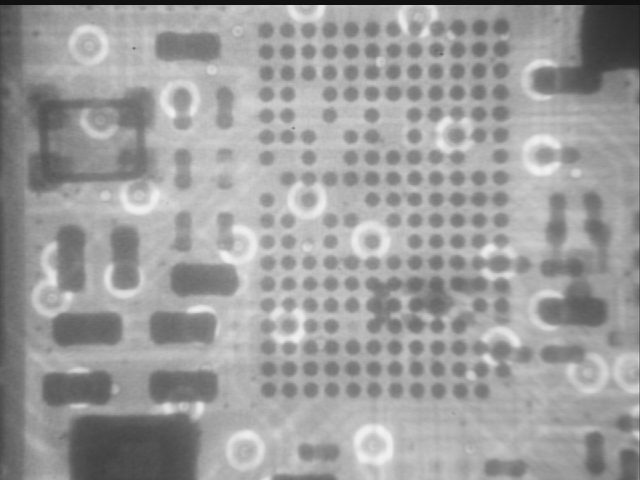
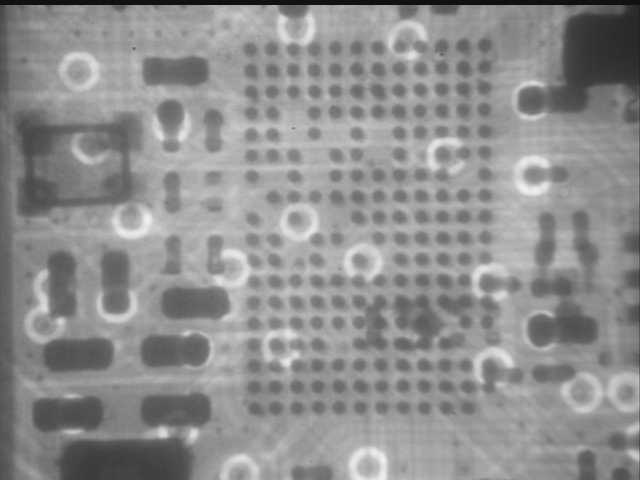
To make sure the soldering went alright, I took some X-ray images of the chip and to me it looks good now. (The bottom one is a reference image from another board.)
BCM4356_v2.png
BCM4356_ref.png


Note that in my first (botched) attempt below you could clearly see some bridged solder balls. (In this state the switch wouldn't even power on.)
BCM4356_v1.png

But I guess I don't know enough to clearly say if the chip is on correctly. Yes there are no bridges, but does the image indicate that all solder balls made proper contact with the pads? Or would that look slightly different? The current symptom is back to being stuck on the boot logo. As I've stated in my first post, the rest of symptoms are: everything works hardware wise in Linux, except WiFi (but Bluetooth does).

If you have any idea on how to proceed from here, I'd massively appreciate it.
 
  • Like
Reactions: FXDX
Stuck on the boot logo has nothing to do with BCM4356, but rather with M92T36. I solved the orange screen with reflow on BCM4356. Did you have an orange screen and now after you replace BCM4356 is stuck on the boot logo?

yy.jpg
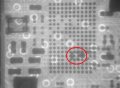
I find something blurry in the red area........
 
Last edited by FXDX,
Stuck on the boot logo has nothing to do with BCM4356, but rather with M92T36.
Thanks for your reply, but I don't think that's true. Stuck on boot CAN be due to M92T36, but that usually comes with charging problems right?
Either way there are more people who have made the connection between boot issues and BCM (see my original thread), or this guy whose switch flip flops between orange screen (when it does boot) and stuck on boot logo (). I think because the wifi chip issue is so intermittent for many people, it either craps out during boot (in which case you get stuck), or while it's running (in which case you get the orange screen).

Did you have an orange screen and now after you replace BCM4356 is stuck on the boot logo?
I had the orange screen in the very beginning when it first stopped working, after which it's always been stuck on boot. Then I started replacing the chip.
 
  • Like
Reactions: FXDX
1. How tf can you take X Ray photos of your switch?
2. On which logo does it hang on?
3. Does WiFi/Bluetooth work when you're running Android?
 
  • Like
Reactions: FXDX
1. How tf can you take X Ray photos of your switch?
2. On which logo does it hang on?
3. Does WiFi/Bluetooth work when you're running Android?
:lol: There is an old X-ray inspection machine at my university. I think PCB assembly factories normally use those to check their boards.

It hangs on the Nintendo Switch logo (not the first Nintendo one).

As mentioned, Bluetooth worked when I tested it a while ago, while WiFi did not!
 
  • Like
Reactions: ds34 and FXDX

I find something blurry in the red area........
Yes good catch, but this seems to be always present (maybe from stuff underneath?) if you compare to the reference board (first image is mine, second is reference).

--------------------- MERGED ---------------------------

Does it work when you're running Android?
I did try android originally as well, same deal WiFi was not working.
 
Oof. You already mentioned that it's working when you're running Linux. What's up with that fuse above P13USB? A friend of mine told me that those cause this issue.
 
Oof. You already mentioned that it's working when you're running Linux. What's up with that fuse above P13USB? A friend of mine told me that those cause this issue.
Nono, WiFi does not work in any OS, at all. (everything else does though)
Thanks for the tip, I'll try to find that one since I have never looked at it.
 
  • Like
Reactions: FXDX
What about the components around the BCM chip? Where did your get the replacement chip?
 
Indeed. They might be able to help. Could this also be related to the SoC?
I think it might be personally. I would go to the forum for Tronics Fix and ask. This is some really cool thing with the X-ray.
 
That's impossible. As far as I know screen the orange screen is caused by an kernel panic indicating a fault with the WiFi/Bluetooth chip.
RCM mode doesn't require Horizon OS's kernel.
Am I right?
 
Last edited by ds34,

Site & Scene News

Popular threads in this forum