Status
Not open for further replies.

Team-Xecuter Releases SX OS v1.4

TX Releases Another Update To Their SX OS, with lots of nice improvements in v1.4
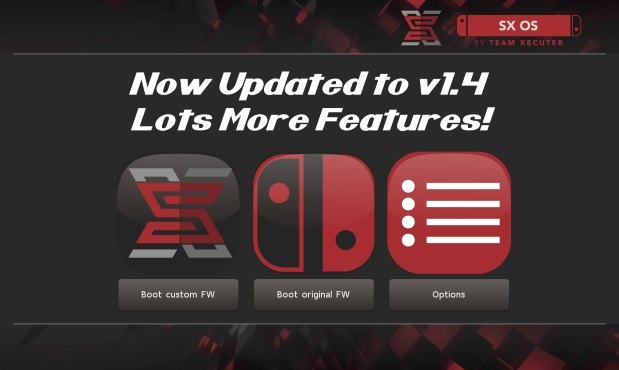
txos14.jpg

We have not heard from TX for a while, but don't worry, they back with nice new update to their SX OS, check out v1.4 below:

SX OS v1.4 Announcement
Good day, loyal users!

While we chip away at many different features for SX OS and additions to our SX hardware family we took a break to prepare an update for SX OS with some exciting new functionality and outstanding bug fixes.

Let's have a look at what's new and fixed in this release:
  • Integrated NSP installer
    With our last update we introduced the possibility of installing eShop NSP titles. However, this relied on using external tools and wasn't very user friendly. In this release we bring our own integrated NSP installer as part of our menu system. This is the neatest and easiest way of installing NSP titles, enjoy!
  • Integrated homebrew launcher
    Launching homebrew used to be done by launching NX HBMenu by holding R when entering the album. While we kept this possibility (mostly for developers), you can now also launch your favorite homebrew directly from our own menu!
  • IR / motion plus issue fixed
    A few games (like 1-2-Switch and Resident Evil) were suffering from freezes when enabling the joycon IR camera or motion controls.
  • Allow unsigned NCA
    People asked us if we could get rid of the NCA integrity checks, so we did! Custom NCA files, modified NCA files and repackaged NCA files should all work fine now.
  • Display SX OS version in menu
    To better distinguish the different versions of SX OS we introduced a small version number display in our menu.
  • LayeredFS fixes for 4.1.0
    There were certain issues with 'LayeredFS' for people on firmware 4.1.0. If you use 'LayeredFS' on that specific firmware there's good news for you: these issues have been identified and fixed!
And that's that for this release. We have quite the backlog of feature requests and todo's on our plate, but trust we'll get there!

-- Team-Xecuter - Rocking the Switch in 2018 and beyond! --
:arrow: Source: MaxConsole
 
Ever since I started using SX OS, I have my backups on the SD card and go into the album, select my game, etc., etc. With SX OS 1.4 now, when you install an NSP to the SD card, they show up on the main Switch screen and are playable from right there. (No need to go into the album to select them....like you have to with XCI backups).

Maybe a dumb question BUT, if I were to install the NSP versions of all those backups, will I never have to go back into the album to select a select a different game? Not that my kids don't understand to go into the album to switch games but having everything on the main screen (like the Wii U had with the WUP installer stuff), that would be really nice.

This should work, right? Then nuke the XCI files (since the game saves are all on the internal memory anyways) and profit?
 
  • Like
Reactions: morrison22
damnit gene you're making me wanna switch to NSP after what you just said about not having to switch games from the album. Everything about NSP's sounds better :( hopefully they get split support on fat32 soon. Or if i can just find a way to manage a 128gb card with lakka+fat32 and split nsp's either that or lakka gets exfat support or i get another micro sd rip lol
 
Does anybody have problems with .XCI scanning? It simply freezes for me. I have tried Lakka previously, but with other SD card.
 
Tries to boot "something" and return to home screen?
I think that has always been the normal behaviour when you didn't have the hb nro on root.
Tries to run nro.. doesn't find the file...returns.

Even if it's possible now to hb on sx os menu, they're still allowing the other method, and that's why it still tries do boot it:
"Launching homebrew used to be done by launching NX HBMenu by holding R when entering the album. While we kept this possibility (mostly for developers), you can now also launch your favorite homebrew directly from our own menu!"

Right fair enough i thought it replaced it, my bad. thanks for the reply!

@longxa762 i knew holding R gave that result, i just was under the impression that shouldnt happen since it got implented into sx os itself, but the option to boot up with R is still available, so that explains it. thanks for your reply aswell :)
 
Just wondering does dlc also update? I tried pokken tournament dlc and when I launch the game asked for an update for the dlc, I updated in ofw and it works, but it happens often? like for botw?
I just ignore the update requests and start software and they don't come back.
 
Ever since I started using SX OS, I have my backups on the SD card and go into the album, select my game, etc., etc. With SX OS 1.4 now, when you install an NSP to the SD card, they show up on the main Switch screen and are playable from right there. (No need to go into the album to select them....like you have to with XCI backups).

Maybe a dumb question BUT, if I were to install the NSP versions of all those backups, will I never have to go back into the album to select a select a different game? Not that my kids don't understand to go into the album to switch games but having everything on the main screen (like the Wii U had with the WUP installer stuff), that would be really nice.

This should work, right? Then nuke the XCI files (since the game saves are all on the internal memory anyways) and profit?
That is correct. Any NSP will launch from Main Menu without having to load it from the SX OS Loader. Loading is for Cart emulation only.
 
  • Like
Reactions: Ty_
So couple questions related and partially related to using SX.
1. How are people getting game updates in .nsp format that you find online? I mean, is it ripping from their own Switch or are they extracting it from some ninty server using a tool? Just curious how they get these files out into the wild, to be installed with a .nsp installer tool.

2. Regarding updating from 4.0 to 5.x fw, so the only real negative at this point to updating is losing the 'possibly someday' cold-boot option right? I've kinda given up on a perm coldboot option being available anytime soon. Maybe in another year something will be available for fw 1.0-3.0, but i'm guessing longer than that for 4.0+ users, and i'm ok with that.

3. Related to the above, and this is my biggest worry regarding using SX. If SX users get a full CDN ban, is there a method (besides retail carts) of extracting ofw updates from a cart (or online) and manually installing it? (like how ps4 updates can be done via usb drive, etc. If there is not, icould Ninty ever have a future retail cart somehow 'know' you've had a CDN ban/used SX, and not allow an update through the cart??
I don't ever plan on playing multiplayer stuff or going online except to update ofw as needed, as long as users are able to dump and provide game update .nsp files. Just worried about the CDN ban happening and no feasible way around if it does.

4. After updating to 5.x, if I do NOT do the whole 'preserve efuse' method, what is the negative to not going that route? Just not being able to downgrade in the future if necessary? If I have a 4.0 nand backup, that won't mean anything if the efuses are blown or am I missing something?

Thanks for any helpful answers!
 
So couple questions related and partially related to using SX.
1. How are people getting game updates in .nsp format that you find online? I mean, is it ripping from their own Switch or are they extracting it from some ninty server using a tool? Just curious how they get these files out into the wild, to be installed with a .nsp installer tool.

2. Regarding updating from 4.0 to 5.x fw, so the only real negative at this point to updating is losing the 'possibly someday' cold-boot option right? I've kinda given up on a perm coldboot option being available anytime soon. Maybe in another year something will be available for fw 1.0-3.0, but i'm guessing longer than that for 4.0+ users, and i'm ok with that.

3. Related to the above, and this is my biggest worry regarding using SX. If SX users get a full CDN ban, is there a method (besides retail carts) of extracting ofw updates from a cart (or online) and manually installing it? (like how ps4 updates can be done via usb drive, etc. If there is not, icould Ninty ever have a future retail cart somehow 'know' you've had a CDN ban/used SX, and not allow an update through the cart??
I don't ever plan on playing multiplayer stuff or going online except to update ofw as needed, as long as users are able to dump and provide game update .nsp files. Just worried about the CDN ban happening and no feasible way around if it does.

4. After updating to 5.x, if I do NOT do the whole 'preserve efuse' method, what is the negative to not going that route? Just not being able to downgrade in the future if necessary? If I have a 4.0 nand backup, that won't mean anything if the efuses are blown or am I missing something?

Thanks for any helpful answers!

I'm new to this, so take everything I say with a grain of salt.

1) There's some Free Shop equivalent for the switch, check the releases for it (You will certainly be banned if you use it), I suggest just finding a good source to supply them to you. (Pretty sure naming any is against the rules)
2) Yes, that's the only negative.
3) I have no answer to this
4) Yes, burning fuses by updating only prevents you from booting ofw on lower firmwares. (I think you can still boot some cfw's on lower firmwares)

EDIT: Changed number 3, my previous answer was incorrect.
 
Last edited by bobbio,
The ADVANTAGE of using XCI format is that you can see what games you have on the SD card for multiple SD card users. If you have everything as NSP installed then its a crap shoot when you fill multiple SD cards full of them.

Here is a question. What happens to the icon on the dash if the NSP was installed to another SD card than the one currently inserted? Does it show up or anything?
 
I put all my nsp's on my sd card and had some trouble with SX OS 1.4 freezing when I opened my album. I renamed them all to simple, short filenames and that didnt work, it still froze when opening the album.

I removed them all except for one game and was able to install it with updates. Maybe one of the nsp's was corrupt? Anyone know what is wrong or how could I find out which one might be corrupt?
 
Installing NSP is still very buggy but it could be the quality of the rips too... I just tried installing Pinball FX 3 with Update and DLC, it worked but crashed as soon as it tried loading the table. And a few other things I tried either didn't work right or crashed, so I guess it really is still a WIP.

Best to keep a copy of dev menu installed until the bugs are ironed out with their installer.
 
  • Like
Reactions: Albytrozz
damnit gene you're making me wanna switch to NSP after what you just said about not having to switch games from the album. Everything about NSP's sounds better :( hopefully they get split support on fat32 soon. Or if i can just find a way to manage a 128gb card with lakka+fat32 and split nsp's either that or lakka gets exfat support or i get another micro sd rip lol
Silly question but why not just do the exfat update?

Edit: sorry I see the answer.can you use a fat32 partition for lakka and use the rest as exfat

Put the fat32 partition last.I've done that with Macrium before,saving images on the same USB drive I had the boot files on.Even though they say you can't,if the device reads the partition I don't see why not
 
Last edited by PatchTuesday,
  • Like
Reactions: Albytrozz
Found a consistent issue with LA Noire. If I restart the console and load LA Noire, I can close it with no issues. However if I load a homebrew app first (specifically RetroNX) and then load up LA Noire, everything is fine until I try to close it, then it freezes the Switch.

This happens consistently, had it happen around half a dozen times now. Doesn't matter whether I load the homebrew app the old way or via the SX loader. Also doesn't seem to affect any other games from LA Noire for now.
 
  • Like
Reactions: veddermandan
So couple questions related and partially related to using SX.
1. How are people getting game updates in .nsp format that you find online? I mean, is it ripping from their own Switch or are they extracting it from some ninty server using a tool? Just curious how they get these files out into the wild, to be installed with a .nsp installer tool.

2. Regarding updating from 4.0 to 5.x fw, so the only real negative at this point to updating is losing the 'possibly someday' cold-boot option right? I've kinda given up on a perm coldboot option being available anytime soon. Maybe in another year something will be available for fw 1.0-3.0, but i'm guessing longer than that for 4.0+ users, and i'm ok with that.

3. Related to the above, and this is my biggest worry regarding using SX. If SX users get a full CDN ban, is there a method (besides retail carts) of extracting ofw updates from a cart (or online) and manually installing it? (like how ps4 updates can be done via usb drive, etc. If there is not, icould Ninty ever have a future retail cart somehow 'know' you've had a CDN ban/used SX, and not allow an update through the cart??
I don't ever plan on playing multiplayer stuff or going online except to update ofw as needed, as long as users are able to dump and provide game update .nsp files. Just worried about the CDN ban happening and no feasible way around if it does.

4. After updating to 5.x, if I do NOT do the whole 'preserve efuse' method, what is the negative to not going that route? Just not being able to downgrade in the future if necessary? If I have a 4.0 nand backup, that won't mean anything if the efuses are blown or am I missing something?

Thanks for any helpful answers!
1. Directly from Nintendo servers with various tools.

2.Correct,however you can upgrade without burning fuses if you don't mind using AutoRCM.meaning never actually turning the switch off,just using sleep mode.

3.yes,the same guide I referred to for point 2

4.aside from what you've listed(not being able to downgrade and remove autorcm,because you can go from any fw to any other fw with hekate,your base firmware would be 5.xx so no coldboot) there aren't any other negatives.
At this stage we don't know if lower firmware will even get coldboot
 
Last edited by PatchTuesday,
Ever since I started using SX OS, I have my backups on the SD card and go into the album, select my game, etc., etc. With SX OS 1.4 now, when you install an NSP to the SD card, they show up on the main Switch screen and are playable from right there. (No need to go into the album to select them....like you have to with XCI backups).

Maybe a dumb question BUT, if I were to install the NSP versions of all those backups, will I never have to go back into the album to select a select a different game? Not that my kids don't understand to go into the album to switch games but having everything on the main screen (like the Wii U had with the WUP installer stuff), that would be really nice.

This should work, right? Then nuke the XCI files (since the game saves are all on the internal memory anyways) and profit?

The xci are only relevant to you if you like it easy drag and drop like I do. With nsp you Need to put the nsp on the SD install it and delete the nsp from the SD. Seems quite the huddle to me..
 
Found a consistent issue with LA Noire. If I restart the console and load LA Noire, I can close it with no issues. However if I load a homebrew app first (specifically RetroNX) and then load up LA Noire, everything is fine until I try to close it, then it freezes the Switch.

This happens consistently, had it happen around half a dozen times now. Doesn't matter whether I load the homebrew app the old way or via the SX loader. Also doesn't seem to affect any other games from LA Noire for now.
Time to finish LA Noire then xD and delete
 
I put all my nsp's on my sd card and had some trouble with SX OS 1.4 freezing when I opened my album. I renamed them all to simple, short filenames and that didnt work, it still froze when opening the album.

I removed them all except for one game and was able to install it with updates. Maybe one of the nsp's was corrupt? Anyone know what is wrong or how could I find out which one might be corrupt?
You pretty much answered your own question.
Keep adding them onto your SD card until you find the problem. Maybe in batches of 5 or 10(then it narrows down which it may be)

--------------------- MERGED ---------------------------

So wait... There's an available method to extract system firmware updates, and install them offline to a CDN banned Switch?

Also, thanks for the replies too.
Yup, pretty sure you can with this

https://gbatemp.net/threads/how-to-...nofficially-without-burning-any-fuses.507461/

Unless they somehow generate a list of blacklisted switches in the firmware files themselves, that method should be available to use for the foreseeable future

Its not its intended purpose,but should work all the same.The switch never communicates with the server
 
Last edited by PatchTuesday,
Status
Not open for further replies.

Site & Scene News

Popular threads in this forum