Status
Not open for further replies.

Team-Xecuter Releases SX OS v1.4

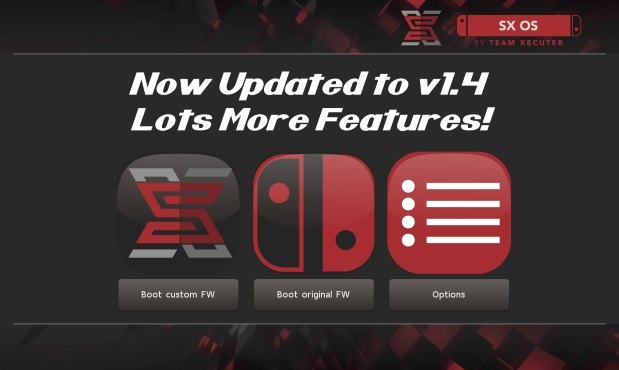
TX Releases Another Update To Their SX OS, with lots of nice improvements in v1.4
txos14.jpg

We have not heard from TX for a while, but don't worry, they back with nice new update to their SX OS, check out v1.4 below:

SX OS v1.4 Announcement
Good day, loyal users!

While we chip away at many different features for SX OS and additions to our SX hardware family we took a break to prepare an update for SX OS with some exciting new functionality and outstanding bug fixes.

Let's have a look at what's new and fixed in this release:
  • Integrated NSP installer
    With our last update we introduced the possibility of installing eShop NSP titles. However, this relied on using external tools and wasn't very user friendly. In this release we bring our own integrated NSP installer as part of our menu system. This is the neatest and easiest way of installing NSP titles, enjoy!
  • Integrated homebrew launcher
    Launching homebrew used to be done by launching NX HBMenu by holding R when entering the album. While we kept this possibility (mostly for developers), you can now also launch your favorite homebrew directly from our own menu!
  • IR / motion plus issue fixed
    A few games (like 1-2-Switch and Resident Evil) were suffering from freezes when enabling the joycon IR camera or motion controls.
  • Allow unsigned NCA
    People asked us if we could get rid of the NCA integrity checks, so we did! Custom NCA files, modified NCA files and repackaged NCA files should all work fine now.
  • Display SX OS version in menu
    To better distinguish the different versions of SX OS we introduced a small version number display in our menu.
  • LayeredFS fixes for 4.1.0
    There were certain issues with 'LayeredFS' for people on firmware 4.1.0. If you use 'LayeredFS' on that specific firmware there's good news for you: these issues have been identified and fixed!
And that's that for this release. We have quite the backlog of feature requests and todo's on our plate, but trust we'll get there!

-- Team-Xecuter - Rocking the Switch in 2018 and beyond! --
:arrow: Source: MaxConsole
 
mine wil arrive in agustus but 500gb sd card is stil to small and expensive hope for external hdd support !
 
With the new hb menu is the support of hb better than on 1.3? I tried to run zelda solarus a few times but it always crashes after the file select or shortly after the intro started.

(tried in docked mode)
 
I'm having an issue on sx os 1.4, while I'm playing an installed nsp game, I try to go into sx menu (without closing the game), the switch freezes on a black screen, have to turn it off, any body experiencing this issue? If I close the game, I can go into the menu without a problem.
 
I'm having an issue on sx os 1.4, while I'm playing an installed nsp game, I try to go into sx menu (without closing the game), the switch freezes on a black screen, have to turn it off, any body experiencing this issue? If I close the game, I can go into the menu without a problem.
I haven't had that issue yet.
 
I'm having an issue on sx os 1.4, while I'm playing an installed nsp game, I try to go into sx menu (without closing the game), the switch freezes on a black screen, have to turn it off, any body experiencing this issue? If I close the game, I can go into the menu without a problem.
Just close the game first and you have more issue.
 
Last edited by nikeymikey,
Installed 2 .nsp and WOW, is really fast.

Update: Celeste work but Golf Story not, probably the .nsp but i need to check. Both updated in OFW.
 
Last edited by Chizko,
Installing NSP is still very buggy but it could be the quality of the rips too... I just tried installing Pinball FX 3 with Update and DLC, it worked but crashed as soon as it tried loading the table. And a few other things I tried either didn't work right or crashed, so I guess it really is still a WIP.
 
Installing NSP is still very buggy but it could be the quality of the rips too... I just tried installing Pinball FX 3 with Update and DLC, it worked but crashed as soon as it tried loading the table. And a few other things I tried either didn't work right or crashed, so I guess it really is still a WIP.
there are a few incompatible games i bet. I never got stardew valley to run.
 
Just wondering does dlc also update? I tried pokken tournament dlc and when I launch the game asked for an update for the dlc, I updated in ofw and it works, but it happens often? like for botw?
 
I'm having an issue on sx os 1.4, while I'm playing an installed nsp game, I try to go into sx menu (without closing the game), the switch freezes on a black screen, have to turn it off, any body experiencing this issue? If I close the game, I can go into the menu without a problem.

I've had that issue with LA Noire as the Switch freezes when I try to close it from the home menu. Other games I tried, don't have this issue. Didn't try anymore IR camera games yet, about to though.
 
Apologies if it isnt the place to ask.

I deleted the homebrewmenu.nro from my sd root (since SX os support brew apps now) but when i hold R and click the album it still tries to boot into something, is this normal or should i deleted another file/folder on my sd?
 
Nice, just transferred an 800MB NSP with no issues. Thanks for the suggestion
You are welcome. The person that posted that modified FTPd.nro for switch, @m4xw did a great job with it so we have a usable FTPd. IDK if he has an updated version of FTPd that continues to work like the one he posted in that thread that also shows the correct IP address and/or perhaps even has some speed optimizations. Would be interesting to ask him about it.
 
Last edited by morrison22,
  • Like
Reactions: Ty_
I've had that issue with LA Noire as the Switch freezes when I try to close it from the home menu. Other games I tried, don't have this issue. Didn't try anymore IR camera games yet, about to though.

Literally just been experimenting with this exact problem. It's inconsistent, but seems to happen most for me if I try to skip the opening cutscene of !armed and dangerous" too early. You see the "press A to skip" and "press 2 fingers on the screen to skip" at the same time, and if I try to close from the home screen it freezes the switch. However it doesn't do it every time, and I wonder if it's related to opening homebrew apps etc.

--------------------- MERGED ---------------------------

You are welcome. The person that posted that modified FTPd.nro for switch, @m4xw did a great job with it so we have a usable FTPd. IDK if he has an updated version of FTPd that continues to work like the one he posted in that thread that also shows the correct IP address and/or perhaps even has some speed optimizations. Would be interesting to ask him about it.

Thanks of course to @m4xw :).

Yeah speed optimisations would be great, but I was getting about 3.4 Mb/s, I can live with that for the most part and if there's any 15GB games I'll just remove the SD card
 
  • Like
Reactions: morrison22
No idea if they stole Tinfoil code, but the fact that it can install to internal memory is impressive.
 
  • Like
Reactions: Ty_
Apologies if it isnt the place to ask.

I deleted the homebrewmenu.nro from my sd root (since SX os support brew apps now) but when i hold R and click the album it still tries to boot into something, is this normal or should i deleted another file/folder on my sd?

Tries to boot "something" and return to home screen?
I think that has always been the normal behaviour when you didn't have the hb nro on root.
Tries to run nro.. doesn't find the file...returns.

Even if it's possible now to hb on sx os menu, they're still allowing the other method, and that's why it still tries do boot it:
"Launching homebrew used to be done by launching NX HBMenu by holding R when entering the album. While we kept this possibility (mostly for developers), you can now also launch your favorite homebrew directly from our own menu!"
 
  • Like
Reactions: zerohealinzz
Apologies if it isnt the place to ask.

I deleted the homebrewmenu.nro from my sd root (since SX os support brew apps now) but when i hold R and click the album it still tries to boot into something, is this normal or should i deleted another file/folder on my sd?

Holding R is the problem, just tap on the Album then use L/R to navigate over to the new Homebrew tab
 
  • Like
Reactions: zerohealinzz
Status
Not open for further replies.

Site & Scene News

Popular threads in this forum