ROM Hack [Release] Ultimate GBA VC Injector for 3DS

  • Thread starter Thread starter Asdolo
  • Start date Start date
  • Views Views 1,475,790
  • Replies Replies 1,519
  • Likes Likes 135

Add the feature to patch already existing GBA CIAs to modify ghosting and color options?

  • Yes

    Votes: 73 82.0%
  • No

    Votes: 2 2.2%
  • I don't care!

    Votes: 14 15.7%

  • Total voters
    89
  • Poll closed .
I'll try searching for more information tomorrow. :) I just figured that this is a VC problem, but I probably don't fully understand what the SRAM patch does or how it's supposed to affect Pokémon games. Was just wondering if anyone has done it successfully before.
 
I'll try searching for more information tomorrow. :) I just figured that this is a VC problem, but I probably don't fully understand what the SRAM patch does or how it's supposed to affect Pokémon games. Was just wondering if anyone has done it successfully before.

Hi! Thanks for using my tool.

I did this steps and now I have perfectly working FR/LG, R/S/E (all of them) with sleep patch included (that's optional). The only "annoying" thing is that FR/LG have the "The save file is corrupted. The previous save file will be load" message after the main screen, but the game saves and loads just right (I mean, the message appears, but the save file works):

1. Grab the untouched roms and follow this guide.
2. Grab the patched roms created at step 1 and put them on my injector. My injector will say that the roms are not in the database, because we have modified them at step 1. Attention: when injecting R/S/E, CHECK RTC option at step 1.
3. Fill all the steps. Game name, publisher, create the icon and banner that you want.
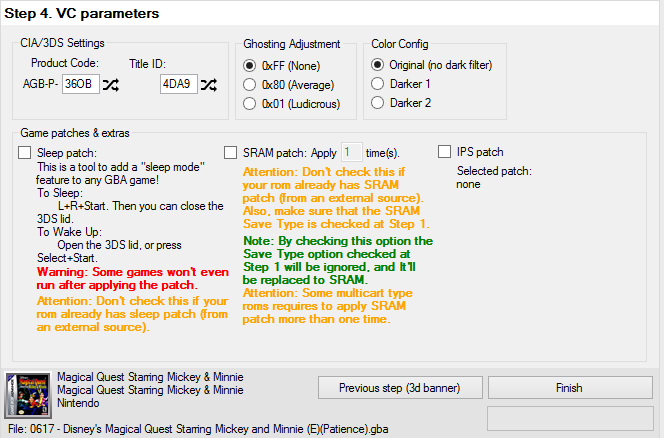
4. In step 4 of the injector, generate a random Product code and a random Title ID. Make sure the Title ID don't match with an eshop one (use 3dsdb to do that). Set Ghosting Adjustment to 0xFF (None), Color Config to Original (no dark filter) and check Sleep patch (if you want. this is optional).
5. Export the CIAs and install them. They should work as mines does.

 
I'll try searching for more information tomorrow. :) I just figured that this is a VC problem, but I probably don't fully understand what the SRAM patch does or how it's supposed to affect Pokémon games. Was just wondering if anyone has done it successfully before.
Sram patches is required by most games. Virtual console uses a specific save type for games. Because not all games was made for virtual console, a patch to convert the game to save a specific way on VC is required to make it save properly. Otherwise the game will never save and you won't be able to continue after you turn it off.

The save patch fix the save issue (For most games) and allow you to save the game to continue later. That is why some games require it. Different kinds of games uses specific save formats depending on game. So is needed to patch to work on VC. If using a emulator, is not required as emulator is meant to ajust and function with all games. VC was not. Is only designed to work with handful of games that is already available, since no more has been released yet (preferbaly ones people want like pokemon) there isn't any easy way make it work.
 
Hi! Thanks for using my tool.

I did this steps and now I have perfectly working FR/LG, R/S/E (all of them) with sleep patch included (that's optional). The only "annoying" thing is that FR/LG have the "The save file is corrupted. The previous save file will be load" message after the main screen, but the game saves and loads just right (I mean, the message appears, but the save file works):

1. Grab the untouched roms and follow this guide.
2. Grab the patched roms created at step 1 and put them on my injector. My injector will say that the roms are not in the database, because we have modified them at step 1. Attention: when injecting R/S/E, CHECK RTC option at step 1.
3. Fill all the steps. Game name, publisher, create the icon and banner that you want.
4. In step 4 of the injector, generate a random Product code and a random Title ID. Make sure the Title ID don't match with an eshop one (use 3dsdb to do that). Set Ghosting Adjustment to 0xFF (None), Color Config to Original (no dark filter) and check Sleep patch (if you want. this is optional).
5. Export the CIAs and install them. They should work as mines does.

Does this process also work with F-Zero Climax, which uses a Flash 128KB save format?
 
I did this steps and now I have perfectly working FR/LG, R/S/E (all of them) with sleep patch included (that's optional). The only "annoying" thing is that FR/LG have the "The save file is corrupted. The previous save file will be load" message after the main screen, but the game saves and loads just right (I mean, the message appears, but the save file works):

Thanks for your help! I followed the instructions and Leaf Green works perfectly now. :)
 
  • Like
Reactions: Asdolo
I need help i'm trying to do this on Windows 7. I can install the .cia just fine but when i boot it up i just get an error.
 
For one of my injected GBA games I noticed that the 3DS thinks there's an update available. I tried to update it just to see what happens and unsurprisingly it displayed some error.

It's no big deal considering I'm still able to play the game but I just wanted to know if there's a logical explanation for it.
 
743dcc89b35b7260492f585a49d060e2.png


Doesn't look like it, right?

If I select the option to download the update via eShop I get a 011-3021 error and it says something like "the selected software isn't available currently"
 
Could someone try to get Comic Book Reader DS working on the 3ds , I tried injecting the gba file but all I get is a white screen , thanks .... I will upload the release version 3.0 of the homebrew application , it does not work on VBA either , same thing..................rcamp48

--------------------- MERGED ---------------------------

I removed the zip file but you can find it free on google, there is a GBA file included, but I think it refers to the ds.....................rcamp48
 
Sorry if this is a silly question, but is it worth adding the SRAM patch to all GBA games, regardless of how they save or not? As far as I'm aware all (or at least a good majority) of GBA games in some fashion so I'd assume adding it would always be of benefit?
 
Here is my renamer and copyer program source code will someone look at it and explain to me why it creates a space when the text file created has no spaces in it sorry if I posted in the wrong area but I wanted to catch som attention on this matter..the program is written in qb64 you can download the program freely..............rcamp48

--------------------- MERGED ---------------------------

It is for Manga cia program
Rcamp48

--------------------- MERGED ---------------------------

--------------------- MERGED ---------------------------

If someone could put me in touch with the right persons about writing programs for the 3ds cias on the PC it would be appreciated I am fluent in Quick Basic and am learning C and am adaptable to new programming languages I do have experience with a hex editor look at my source code I am abandoning the project as Fotosizer will resize all types of pictures and save them in the format you want, it makes my 50 hours of writing and testing this program that I uploaded useless but maybe someone can use the menu structure to do something different maybe apply patches to GBA files automatically I dunno........... rcamp48
 

Attachments

I tried pokemon fire red and it comes across this save error and I have tried fixing it by doing the save patches pls help
 
I tried pokemon fire red and it comes across this save error and I have tried fixing it by doing the save patches pls help

Hi! Thanks for using my tool.

I did this steps and now I have perfectly working FR/LG, R/S/E (all of them) with sleep patch included (that's optional). The only "annoying" thing is that FR/LG have the "The save file is corrupted. The previous save file will be load" message after the main screen, but the game saves and loads just right (I mean, the message appears, but the save file works):

1. Grab the untouched roms and follow this guide.
2. Grab the patched roms created at step 1 and put them on my injector. My injector will say that the roms are not in the database, because we have modified them at step 1. Attention: when injecting R/S/E, CHECK RTC option at step 1.
3. Fill all the steps. Game name, publisher, create the icon and banner that you want.
4. In step 4 of the injector, generate a random Product code and a random Title ID. Make sure the Title ID don't match with an eshop one (use 3dsdb to do that). Set Ghosting Adjustment to 0xFF (None), Color Config to Original (no dark filter) and check Sleep patch (if you want. this is optional).
5. Export the CIAs and install them. They should work as mines does.
 
I apologize if this is a stupid question, I just managed to get my first few GBA games working (extremely excited).

Is it possible to alter the control schemes? i.e. B/A to Y/B? It's awkward as hell to play games like Metroid: Zero Mission using B to shoot and A to jump : /
 
I apologize if this is a stupid question, I just managed to get my first few GBA games working (extremely excited).

Is it possible to alter the control schemes? i.e. B/A to Y/B? It's awkward as hell to play games like Metroid: Zero Mission using B to shoot and A to jump : /
Sadly no, but the X button acts as the B button.
 
So sorry if this is redundant but before I make a .cia for Pokemon Fire Red.. which settings should I do to ensure that saving will work correctly?
 
So sorry if this is redundant but before I make a .cia for Pokemon Fire Red.. which settings should I do to ensure that saving will work correctly?
Hi! Thanks for using my tool.

I did this steps and now I have perfectly working FR/LG, R/S/E (all of them) with sleep patch included (that's optional). The only "annoying" thing is that FR/LG have the "The save file is corrupted. The previous save file will be load" message after the main screen, but the game saves and loads just right (I mean, the message appears, but the save file works):

1. Grab the untouched roms and follow this guide.
2. Grab the patched roms created at step 1 and put them on my injector. My injector will say that the roms are not in the database, because we have modified them at step 1. Attention: when injecting R/S/E, CHECK RTC option at step 1.
3. Fill all the steps. Game name, publisher, create the icon and banner that you want.
4. In step 4 of the injector, generate a random Product code and a random Title ID. Make sure the Title ID don't match with an eshop one (use 3dsdb to do that). Set Ghosting Adjustment to 0xFF (None), Color Config to Original (no dark filter) and check Sleep patch (if you want. this is optional).
5. Export the CIAs and install them. They should work as mines does.
 
  • Like
Reactions: Asdolo

Site & Scene News

Popular threads in this forum