Hardware What gpu can this handle?

  • Thread starter Thread starter jDSX
  • Start date Start date
  • Views Views 2,580
  • Replies Replies 28

jDSX

Well-Known Member
Member
Joined
Jun 15, 2015
Messages
1,202
Reaction score
2,411
Trophies
2
Age
35
Location
Lost woods
XP
1,818
Country
United States
Got a bunch of free pc stuff, nothing really good except for the intel xeon I found apparently it's the 5120 xeon, I have three gpus that I got with it too the geforce 8400 gs, a geforce 660gtx (I don't think this one works anymore looks beat up) and the radeon hd 3350 xfx (I didn't like the 3000 series ati cards) and yes I am looking to make some old pc with these parts got so much box of stuff with ram and components.

 
Got a bunch of free pc stuff, nothing really good except for the intel xeon I found apparently it's the 5120 xeon, I have three gpus that I got with it too the geforce 8400 gs, a geforce 660gtx (I don't think this one works anymore looks beat up) and the radeon hd 3350 xfx (I didn't like the 3000 series ati cards) and yes I am looking to make some old pc with these parts got so much box of stuff with ram and components.
Depends on the PSU, and whether the motherboard has PCIe slots on it or not.
 
It's some 650w psu OEM one from HP, the mobo is Intel 5000V Chipset.
650W should be enough for any modern single GPU, the question is how much do you want to spend on a GPU when the rest of the hardware is outdated?
Just make sure it has a PCIe x16 slot as that's what most GPUs use. AGP is the older standard and modern cards don't support it but I think that hardware is new enough to have PCIe.
 
  • Like
Reactions: TotalInsanity4
You're going to want to use the PCI-e x8 slot. If you're asking which GPU it will work best with, try switching them out and seeing which one works best for what you need. If you need advice on what GPUs you're looking at buying, give us some examples of cards that you're looking for
 
  • Like
Reactions: jDSX
Okay now where the heck are the sata cables to hook up my ssd to?

img_0541_517.jpg

Please help here.
 
Okay so it also has dvd drive connected with IDE, could I take out the dvd drive and connect a IDE hdd to it?
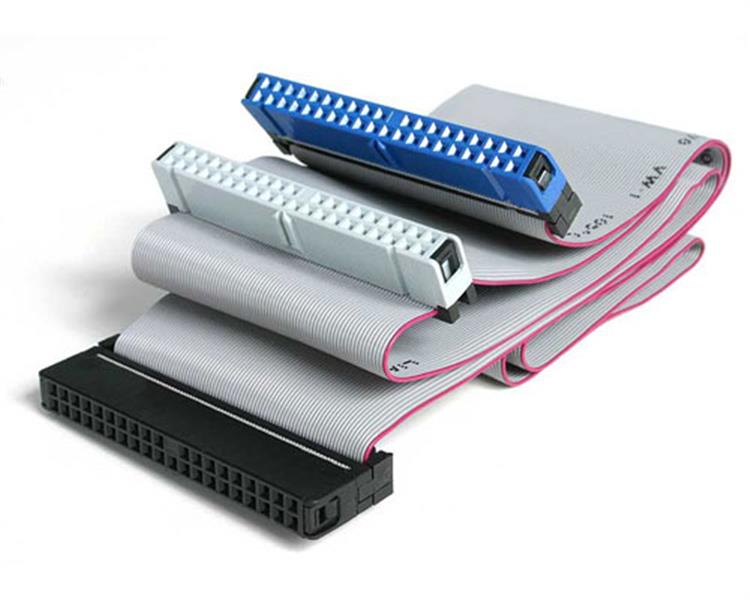
If it has one IDE port you should just be able to plug in multiple things with one cable. Most cables have two ports, like this one:
IDE66.Main.jpg
(Edit: As a side note, I'm glad that I wasn't a computer assembler in the early 90s. Cable management must've been a biiiiiiiitch)

Alternatively, you could also get something like this if you want to use the newer SSD in your system. Keep in mind that it will run nowhere near SATA III speeds, and probably not even anywhere close to SATA II if we're being honest. I'd really only get this if you already have the SSD, since at IDE speeds there's really not much of a benefit of having an SSD over a quality HDD
 
Last edited by TotalInsanity4,
  • Like
Reactions: ILuvGames
It 'might' be to your advantage to get one of these (or something similar) :-

https://www.amazon.co.uk/CSL-Express-SATAII-interface-controller/dp/B00MOHHR12
Ah, good point! I hadn't even thought of add-in cards lol

However, I think that this one would be better, just so that no extra PCI-E bandwidth is being used and he can use up one of the less precious PCI slots on his board: https://www.amazon.com/IOCrest-SATA...d=1470773212&sr=8-5&keywords=pci+sata+ii+card
 
  • Like
Reactions: ILuvGames
  • Like
Reactions: ILuvGames

Site & Scene News

Popular threads in this forum