Homebrew Masher's Homebrew Launcher Mod Custom Themes Thread

  • Thread starter Thread starter JJTapia19
  • Start date Start date
  • Views Views 202,615
  • Replies Replies 669
  • Likes Likes 20
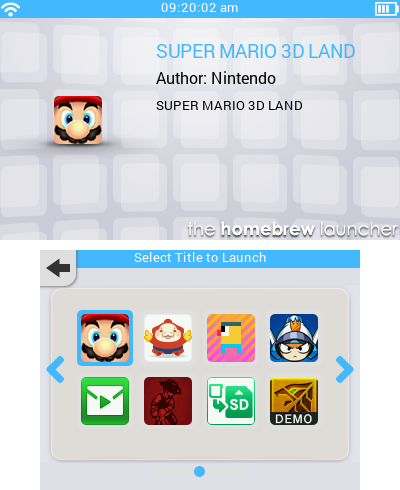
Whoah! That bottom screen looks great. You have skills! Can't wait for the 3 rows of icons version.
Edit: You should share you hbltheme.cfg file too :)
the hbltheme.cfg I'm using in the screenshot is just the default values. Just set everything to default and it'll look the same (also turn off water). The theme works great with other colors as well so play around with it :)

@mashers I've notice that the status bar color does not change despite me changing the color values of the tint in the latest version. I also got a suggestion. Could we get the option to make the interface fully transparent? That way themers have a wider range of option when it comes to changing not only the background, but the interface as well.
 
Last edited by link6155,
  • Like
Reactions: JJTapia19
@mashers I've notice that the status bar color does not change despite me changing the color values of the tint in the latest version. I also got a suggestion. Could we get the option to make the interface fully transparent? That way themers have a wider range of option when it comes to changing not only the background, but the interface as well.
I've just fixed that bug :) It wasn't that the colour didn't change, it's that it didn't update. If you change the tint colour then quit/re-open the launcher then you will see the change. Also if you toggle the UI transparency then they will update. However, in the latest beta which I'll release later they will change as soon as you drag the slider.

I've been thinking of making the level of transparency adjustable. Definitely possible - I'll add it to the todo list.
 
@JJTapia19 How do you get that rainbow-like pattern on the grid layout? It would look great on the Rosalina theme I'm going to do
To make the rainbow like pattern I put part of this photo on top of the official icon and then set the layer transparency.
http://i.imgur.com/1o9VDj0.png

To extract the original smdh picture use this tool http://gbatemp.net/threads/release-the-smdh-creator-make-your-own-icon-pack.396765/

@Phanton the rainbow pattern JJ has is from a custom item pack that someone posted on gbatemp can't remember who made it might even have been JJTapia19 himself
Yeah I made a similar icon pack for the Retroarch emulators :) http://gbatemp.net/threads/retroarch-colors-icon-pack.398972/
 
default 3DS theme
hbl-grid-screenshot-3653716802.png

This doesn't look so nice in the settings and it doesn't really work if you have 3 rows enabled.
wallpapertop.png
wallpaperbottom.png

@mashers could we have a separate color for the title name and tints? I want to make the tint white, but doing so also makes the title text white.
Now this only needs a hbltheme.cfg file to get spot on colors!
 
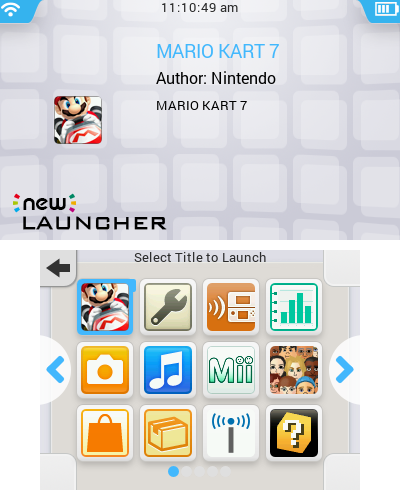
New 3DS Launcher theme, now with support for 3 rows!
hbl-grid-screenshot-3653896249.png


Top screen is slightly refined now.

If you want only have 2 rows, delete the "wallpaperbottom.png" and rename "wallpaperbottom2row.png" to "wallpaperbottom.png".

@mashers Hope I'm not bombarding you with suggestions, but I notice that on certain themes the page indicator is barely visible. Could we have the ability to change that?
 

Attachments

New 3DS Launcher theme, now with support for 3 rows!
hbl-grid-screenshot-3653896249.png


Top screen is slightly refined now.

If you want only have 2 rows, delete the "wallpaperbottom.png" and rename "wallpaperbottom2row.png" to "wallpaperbottom.png".

@mashers Hope I'm not bombarding you with suggestions, but I notice that on certain themes the page indicator is barely visible. Could we have the ability to change that?
Do you have a version without the new launcher logo?
 
@mashers Hope I'm not bombarding you with suggestions, but I notice that on certain themes the page indicator is barely visible. Could we have the ability to change that?
Good idea. I'll draw some backgrounds for them and make them draw with the same alpha value as the text background panels.
 
Thanks a lot! BTW, a minor suggestion: you should make a hbltheme3rows.cfg file! ;) It's not hard for me to set it, but for newcomers it may be.
I did include a hbltheme.cfg file that was set to 3 rows by default if I'm not mistaken.
 

Site & Scene News

Popular threads in this forum