Hacking DSTWO No Find System Files

  • Thread starter Thread starter Jiehfeng
  • Start date Start date
  • Views Views 26,913
  • Replies Replies 45

Jiehfeng

Born in Denmark
Member
Joined
Aug 15, 2012
Messages
5,503
Reaction score
20,796
Trophies
4
Location
ur mum's arse
XP
5,295
Country
Japan
I have done everything to get my dstwo work on my ds lite and it always says no find system files! I downloaded the latest OS, taken the dstwo and dstwoboot.dat files and put it to the root of my kingston 4GB Memeory card! PLZ Help! (in the dstwo folder it has all the system files in it {1,2,3,11})

 
I'm a newbie to this site so how do I attach a picture ? (I have already taken a screenshot of it using PRINTSCREEN)

Ok, I made a new photobucket profile so here are the pics:

http://i1240.photobucket.com/albums/gg496/Jiehfeng/f6c777e1.png
http://i1240.photobucket.com/albums/gg496/Jiehfeng/84fb520b.png

Oh and another thing is that I tried using Panasonic SDFormatter and it still says NO FIND SYSTEM FILES!!! :(
 
Does your DSTT work in your DSLite?
If so, it sounds like a possible contact issue between your DSTWO and DSLite
 
It works and the dstwo has worked with my nds lite... this is wat happened!

I bought my dstwo from china, they set it up and it worked. I put all the files into my computer just in case something happens.Then After a few months I got a virus on my sd card and had to format it, then i went to the place on my computer where I stored all the files and to see than my sis deleted them, so I downloaded all the necessary data for the dstwo, from that day, it said NO FIND SYSTEM FILES! :(
 
  • Like
Reactions: 2 people
Oh plz send me the link for the latest firmware! I have a 3DS too but its version is 4.3.0-1OU.

Hey! I went to the dstwo website and got the latest firmware update, put it on the root of my memory card and when I put in the dstwo to my dslite, nothing happened!
 
Hey! I went to the dstwo website and got the latest firmware update, put it on the root of my memory card and when I put in the dstwo to my dslite, nothing happened!

which is why i asked what files worked for you

unless you anwser i cannot link you to the correct firmware

was it the Chinese ones or the Japanese ones?
 
  • Like
Reactions: 1 person
Hey! I went to the dstwo website and got the latest firmware update, put it on the root of my memory card and when I put in the dstwo to my dslite, nothing happened!

which is why i asked what files worked for you

unless you anwser i cannot link you to the correct firmware

was it the Chinese ones or the Japanese ones?

You see cause I bought it from china so it obviously means the Chinese worked and thnx so much for the eos and plus plz help me for the update!

OMG!
 
Hey! I went to the dstwo website and got the latest firmware update, put it on the root of my memory card and when I put in the dstwo to my dslite, nothing happened!

which is why i asked what files worked for you

unless you anwser i cannot link you to the correct firmware

was it the Chinese ones or the Japanese ones?

You see cause I bought it from china so it obviously means the Chinese worked and thnx so much for the eos and plus plz help me for the update!

OMG!

mine came from China but i got a English one
it all dependant from what stocks the shops buy in
but now you know

future 3DS update i will post the Chinese update in my thread also for you tho
 
Your'e the best man!

mine came from China but i got a English one
it all dependant from what stocks the shops buy in
but now you know

future 3DS update i will post the Chinese update in my thread also for you tho
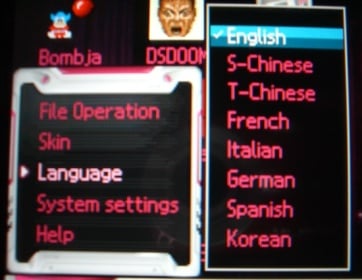
Hey... Now that it works could you tell me how to change the language?
Plus I see you have a 3DS, could you tell me in your'e opinion what are the best games you've played on the 3ds?
 
Your'e the best man!

no problem, least you know what to do now tho to make your card work


to change the language
when on the Rom selection menu press the Start button in the bottom left

28_supercardds2_review_eos_software_05.jpg
 
Your'e the best man!

no problem, least you know what to do now tho to make your card work


to change the language
when on the Rom selection menu press the Start button in the bottom left

28_supercardds2_review_eos_software_05.jpg
In the chinese eos there is only the language chinese so sould I take the english language from a english EOS and put it to the language folder?
 
Hmmm, I put the languages but they don't appear! I just found something that the chinese language had several files but the english language folder and only one file (language.txt)
 

Site & Scene News

Popular threads in this forum