Hacking USB Loader GX

  • Thread starter Thread starter blackb0x
  • Start date Start date
  • Views Views 8,068,002
  • Replies Replies 30,226
  • Likes Likes 74
I've been using WiiFlow, but just now tried the latest USBLoaderGX 2.3 to have the NANDEmu working with saves. Working great, so I'm gonna stick with USBLGX. However, I can't rename my game titles. When I click them and enter a name, it goes back to original. Any help on this?? (It lists "The Conduit" and "Conduit 2" so the 2 games aren't even together.)
 
I've been using WiiFlow, but just now tried the latest USBLoaderGX 2.3 to have the NANDEmu working with saves. Working great, so I'm gonna stick with USBLGX. However, I can't rename my game titles. When I click them and enter a name, it goes back to original. Any help on this?? (It lists "The Conduit" and "Conduit 2" so the 2 games aren't even together.)

I have had this issue, in the loader options I turn off, use wiitdb names and then rename all the games to the titles I want using backup manager.
 
I never used Crap, but I think it doesn't work with GX.

In fact I don't know how Crap is working, if it's a forwarder with an argument (gameID), then it should work.
Dimok talked about modifying our Forwarder to auto-load a game, so it should be compatible.

Maybe, just try?
they work, made a kirby return to dreamland for gx, an loaded right away, just like if it was a disk.
time to redo all my channels seeing they all point to a loader i'm not using anymore.
 
One question about emulatedNAND:

using "full emulation", if I want to use my nand on another Wii, I can remkae the internet connection from GX.


But I can only use my wiimote, or I can re-synchronize the wiimote of the other wii?
 
When you use your NAND on another Wii, you can dump the sysconf from the friend Wii into your Emulated NAND.
You need to dump this path : /shared2/sys/sysconf

it will copy all the Friend's wii configuration (Wiimotes synched, and all the settings like WiiMotion+ video already shown, network settings, etc.)

There's no button to automate it, so you'll have to input the path manually.
 
When you use your NAND on another Wii, you can dump the sysconf from the friend Wii into your Emulated NAND.
You need to dump this path : /shared2/sys/sysconf

it will copy all the Friend's wii configuration (Wiimotes synched, and all the settings like WiiMotion+ video already shown, network settings, etc.)

There's no button to automate it, so you'll have to input the path manually.
OK. Thanks very much! ;)
 
I never used Crap, but I think it doesn't work with GX.

In fact I don't know how Crap is working, if it's a forwarder with an argument (gameID), then it should work.
Dimok talked about modifying our Forwarder to auto-load a game, so it should be compatible.

Maybe, just try?

Craps work like a charm with GX because they add a new option in the program (craps 3.3b) which is USB Loader GX Forwarder. The channel take the configuration of your GX, it's very cool !!!! If it's work with GX, it's work with Craps too...
 
Hey guys, short question: The nand emulation works well, I did a full nand dump out of gx (backup created by bootmii earlier) and it works well. I set the path to "/nand" which means "sd:/nand" in the config file. Can I also move the folder to usb and set the path to usb or is only sd path supported? I want to play a bit with nand emulation and could not find a quick answer in the changelog. Thanks in advance. My wii setup is in the signature.
 
Hello guys! So I'm having a few problems using USB Loader GX. Heres my situation.

My Nintendo Wii was modded about a year and a half ago, and at the time, I burned copys of the games I wanted to back up. I never tried to use a USB loader because the only external hard drive I had needed its own power source, and my thumb drives were too small. But the disc thing worked, so I was ok with that.

I came back to the scene, with brand new shiny external hard drive. Its a Western Digital My Passport hard drive. 1TB. I
 
megaxzeo is your fat partition where your apps is on your hard drive set to primary , if not that is your problem .

I dont think that it is, but I DID format the thumb drive as FAT, the entire thing, and it cant read from there either. Well, USB Loader GX cant =/
 
@norbyte:
Yes, you can use USB for NAND emu path too :)

Maybe it require FAT32 and not NTFS? (I'm not sure, but it's best with FAT32)


@megaxzeo:
You need FAT32 or NTFS.
Same as above, FAT32 is better as it can be used by every other homebrew too.
I guess when you say "FAT" it's "FAT32" ("FAT" without a number = "FAT16", it's not good)

When you say "nothing", what's happening and where?
Does it boot? Do you see the booting logo? Do you see some text on screen?
When you start GX for the first time, it should ask you which partition you want to use (if you have more than one).
Does it load, show the interface but doesn't list any game?

It can't be "nothing", if you want help, you have to explain everything in details.


Which program did you use to convert the game to .wbfs files?
Where are stored your files on your drive? which folder and subfolder? (tell me the name of the subfolder, some subfolder name are not supported)
Working:
x:/wbfs/GAMEID.wbfs
x:/wbfs/TITLE[GAMEID]/GAMEID.wbfs
x:/wbfs/GAMEID_TITLE/GAMEID.wbfs

Not working:
x:/wbfs/GAMEID/GAMEID.wbfs

Though, this path works in other loaders.
So, it's certainly why it's not working for you.
Use another folder's format and it will be fixed. If you used WiiBackupManager, then go to the setting and select a different folder format, then check "update path on mount", re-load your drive in WiiBackupManager and your folder's will be renamed automatically.

 
@norbyte:
Yes, you can use USB for NAND emu path too :)

Maybe it require FAT32 and not NTFS? (I'm not sure, but it's best with FAT32)
Ok, thanks. My HDD is formatted as FAT32. Then I try to use "usb:/nand" in config. Btw this should be added in the changelog as option. You should also be able to choose the device in the gui dialog.
 
The changelog is just fine :
Added NAND emulation to redirect Wii NAND access to SD or USB. Default NandEmu path set to sd:/nand/ (Requires d2x cIOS v7 alpha or later).

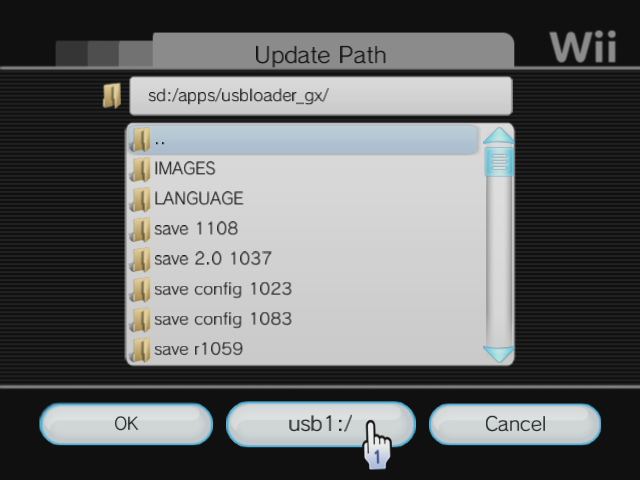
And it's already possible to select the device from the GUI :

Click on the middle button to access that device and partition.


if you edit the config manually, it's not usb:/ but usb1:/ for the first partition, usb2:/ for the second partition, etc. up to 8.
 
megaxzeo is your fat partition where your apps is on your hard drive set to primary , if not that is your problem .

I dont think that it is, but I DID format the thumb drive as FAT, the entire thing, and it cant read from there either. Well, USB Loader GX cant =/

You can use partition magic or another hard drive formatting tool , and set it as primary .. to be used for homebrew apps and other stuff ,
 
@norbyte:
Yes, you can use USB for NAND emu path too :)

Maybe it require FAT32 and not NTFS? (I'm not sure, but it's best with FAT32)


@megaxzeo:
You need FAT32 or NTFS.
Same as above, FAT32 is better as it can be used by every other homebrew too.
I guess when you say "FAT" it's "FAT32" ("FAT" without a number = "FAT16", it's not good)

When you say "nothing", what's happening and where?
Does it boot? Do you see the booting logo? Do you see some text on screen?
When you start GX for the first time, it should ask you which partition you want to use (if you have more than one).
Does it load, show the interface but doesn't list any game?

It can't be "nothing", if you want help, you have to explain everything in details.


Which program did you use to convert the game to .wbfs files?
Where are stored your files on your drive? which folder and subfolder? (tell me the name of the subfolder, some subfolder name are not supported)
Working:
x:/wbfs/GAMEID.wbfs
x:/wbfs/TITLE[GAMEID]/GAMEID.wbfs
x:/wbfs/GAMEID_TITLE/GAMEID.wbfs

Not working:
x:/wbfs/GAMEID/GAMEID.wbfs

Though, this path works in other loaders.
So, it's certainly why it's not working for you.
Use another folder's format and it will be fixed. If you used WiiBackupManager, then go to the setting and select a different folder format, then check "update path on mount", re-load your drive in WiiBackupManager and your folder's will be renamed automatically.

Wow, I'm usually more detailed then that. Your right. It doesn't just "do nothing." I do get a loading screen. Sometimes, it seems with different versions, i get different results. Right now, it tells me that its "waiting for my slow USB drive" and gives me a countdown. when the countdown is done, it tries to load up some cIOS files, and freezes at 222 r65535.

Also, the program I used was Wii Backup Manager. I told me it created everything correctly.

Now, the external hard drive IS formatted in NTFS, but that one dident work at all, with any program. My thumb drive is formatted in FAT32, and works with configurable USB loader, but not USB Loader GX.

I did check my file routes to see how it worked out. Its formatted x:\\wbfs\Original-ISO-Name\GAMEID.wbfs. This works with Configurable USB Loader, but not USB Loader GX. Again, only on the thumb drive, not on the external hard drive.

One thing I can think of, when I initially bought the hard drive, it booted up this stupid custom program that I cant for the life of me get it to recreate. maybe thats causing a problem with it?

I have to go to work here soon ( i work 12 hours at a time >
 
Trying to USB Loader GX to run WiiWare from an Emulated NAND. I am running USB Loader GX (from SD card) Rev.1129 IOS249 d2x v7alpha5 base56 (from the credits screen).

I have 2 NANDS I am trying to use. One I made using ModMii, which the wiiware works with using uneek-di. The 2nd NAND is a backup of my Wii System using USB Loader GX. Both NANDS are on my USB HDD FAT32 partition.

My USB Loader GX settings are as follows:

NAND Emu Path = USB1:/NANDS/WiiWare/ (which has the import,meta,shared1,shared2,etc)
NAND Emu Channels Path = USB1:/NANDS/WiiWare/

Loader Mode = Channels

NAND Saved Emulation = Off/Partial/Full
NAND Channel Emulation = Partial/Full
I've tried all combinations of the NAND Emulations. When I load a WiiWare title, it just resets the wii, or gives a black screen (tested many titles)
Can anyone think of what I might have missed? I've used SysCheck with ModMii and have my Wii up-to-date (except for cios, I've tried d2x v6, v7alpha5, and v7b1d)
 
Bryce, tell me if your bootmii extracted dump is working.
Like I said on googlecode, for me it worked only with this dump, no "clean NAND" created manually worked with the loader while they are working fine in Sneek.

I used Sneek to first boot the clean nand, so maybe sneek creates files it needs but omit some files in the process, or doesn't name it correctly.
 
can the emulated nand be on the root of the hdd? pls tell me it can! i may need to get back into GX again. gonna try it anyway.

does d2xv7alpha have to be in 249? that would suck. i kind of need cios38rev17 in 249.

edit one more question. will gx show any installed wad titles on the emunand in the game list? if so that would be the shit!
 

Site & Scene News

Popular threads in this forum