Hi everyone!
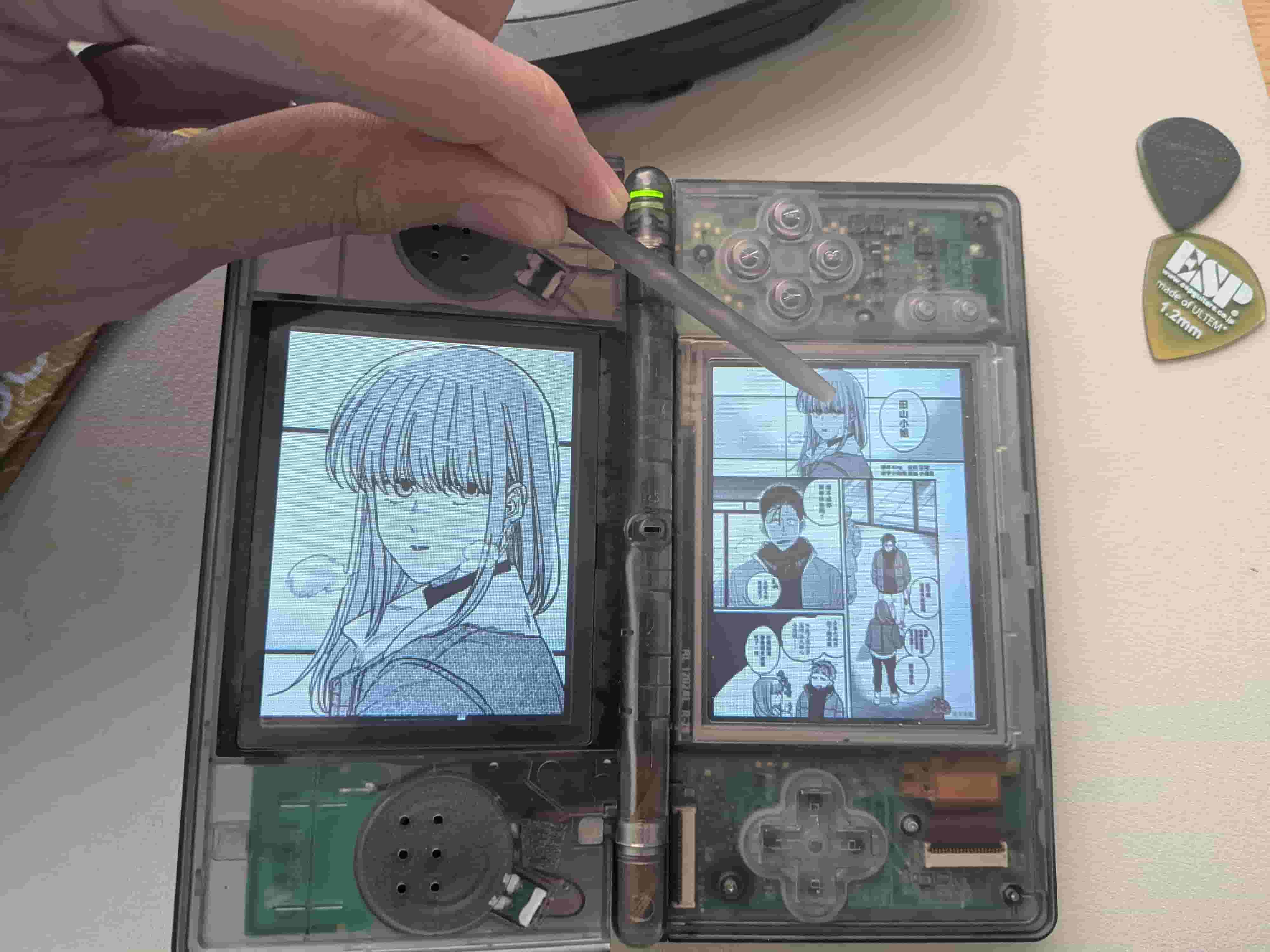
I’ve always felt that the Nintendo DS is criminally underrated when it comes to being a dedicated manga reader. Think about it: it has two screens built right into the form factor, a precise touchscreen, and when you rotate the console 90 degrees counter-clockwise, it perfectly mimics the ergonomics of holding a real physical tankobon (manga volume).
When held vertically, the D-pad sits perfectly on the bottom, and the shoulder keys (L/R) are in the ideal position for switching chapters. Plus, the touchscreen can be used as a dynamic radar magnifier for reading small text or inspecting details. Such interactions offer a form factor that modern smartphones just can't match.
To prove this, I built ds_mangaman — an open-source, hardware-accelerated 3x Ultra-HD comic book reader for the NDS/NDSL.
New Features & Major Update
We have completely overhauled the asset preprocessing pipeline to make building your custom manga ROMs incredibly simple. You no longer need to manually configure Python, pip, or global environment variables via the command line!
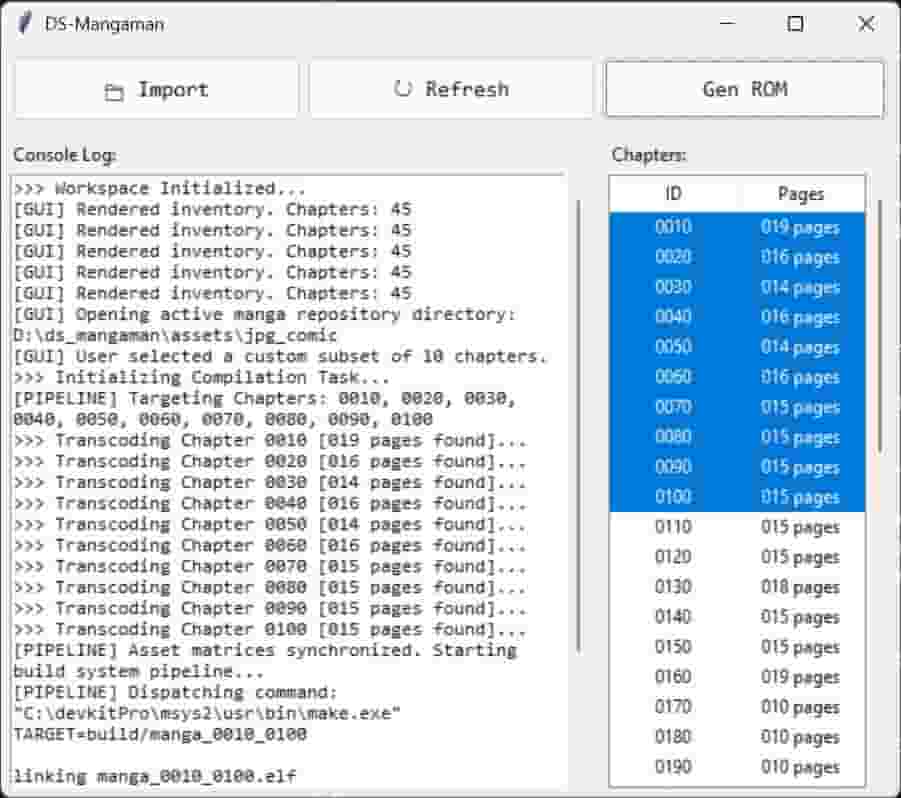
Standalone Desktop GUI Tool: The project now includes a pre-compiled main_gui.exe desktop interface. You can manage your chapters, refresh your library, and compile everything through a clean graphical layout.
Automated Toolchain Setup: The application now actively scans your local environment footprints. If the required devkitPro compilation toolchain is missing, the application will automatically pop up a guided dialog to configure and stitch the ecosystem together behind the scenes.
Automated Closed-Loop Packaging: The builder silently handles NumPy-accelerated image rotation, downscaling, hardware-native 16-bit RGB555 transcoding, and NitroFS filesystem structuring with a single click.
How to Use
Toolchain Setup: Run main_gui.exe. If you don't have devkitPro, let the app guide you through the setup (make sure to keep the mandatory default installation path: C:\devkitPro).
Import Assets: Click Import in the GUI to open assets/jpg_comic/. Create subfolders named with 4-digit integers for your chapters (e.g., 0010 for Chapter 1) and drop your sequential images (.jpg, .png, .webp) inside.
Generate ROM: Hit Refresh in the GUI to view your chapters, select the ones you want to package, and click Gen ROM. Your finished .nds file will be generated instantly in the build/ folder, ready for your flashcard or emulator!
Note: The underlying GNU make toolchain cannot handle directory paths containing spaces. Ensure your root project folder is placed in a clean directory path like C:\ds_mangaman\ or D:\ds_mangaman\.
GitHub Repository: https://github.com/hwfish-error408/ds-mangaman
GitHub Release & Binary Download: https://github.com/hwfish-error408/ds-mangaman/releases
I’ve always felt that the Nintendo DS is criminally underrated when it comes to being a dedicated manga reader. Think about it: it has two screens built right into the form factor, a precise touchscreen, and when you rotate the console 90 degrees counter-clockwise, it perfectly mimics the ergonomics of holding a real physical tankobon (manga volume).
When held vertically, the D-pad sits perfectly on the bottom, and the shoulder keys (L/R) are in the ideal position for switching chapters. Plus, the touchscreen can be used as a dynamic radar magnifier for reading small text or inspecting details. Such interactions offer a form factor that modern smartphones just can't match.
To prove this, I built ds_mangaman — an open-source, hardware-accelerated 3x Ultra-HD comic book reader for the NDS/NDSL.
New Features & Major Update
We have completely overhauled the asset preprocessing pipeline to make building your custom manga ROMs incredibly simple. You no longer need to manually configure Python, pip, or global environment variables via the command line!
Standalone Desktop GUI Tool: The project now includes a pre-compiled main_gui.exe desktop interface. You can manage your chapters, refresh your library, and compile everything through a clean graphical layout.
Automated Toolchain Setup: The application now actively scans your local environment footprints. If the required devkitPro compilation toolchain is missing, the application will automatically pop up a guided dialog to configure and stitch the ecosystem together behind the scenes.
Automated Closed-Loop Packaging: The builder silently handles NumPy-accelerated image rotation, downscaling, hardware-native 16-bit RGB555 transcoding, and NitroFS filesystem structuring with a single click.
How to Use
Toolchain Setup: Run main_gui.exe. If you don't have devkitPro, let the app guide you through the setup (make sure to keep the mandatory default installation path: C:\devkitPro).
Import Assets: Click Import in the GUI to open assets/jpg_comic/. Create subfolders named with 4-digit integers for your chapters (e.g., 0010 for Chapter 1) and drop your sequential images (.jpg, .png, .webp) inside.
Generate ROM: Hit Refresh in the GUI to view your chapters, select the ones you want to package, and click Gen ROM. Your finished .nds file will be generated instantly in the build/ folder, ready for your flashcard or emulator!
Note: The underlying GNU make toolchain cannot handle directory paths containing spaces. Ensure your root project folder is placed in a clean directory path like C:\ds_mangaman\ or D:\ds_mangaman\.
GitHub Repository: https://github.com/hwfish-error408/ds-mangaman
GitHub Release & Binary Download: https://github.com/hwfish-error408/ds-mangaman/releases