SuperChis Prime: How I Fixed the SuperCard SD's Flaws on a Budget

Hello players, I'm one of the designers behind the SuperChis project. I’d like to share, from an engineer’s perspective, the thinking and execution behind our new GBA flash cartridge, the SuperChis Prime.

Our goal was clear: to create a genuinely "good" budget cartridge within a $15~$25(depends on tax and shipping) price range by solving the core issues that plague the classic SuperCard SD.
This wasn't just about patching an old design; It's a reconfiguration for a better future.
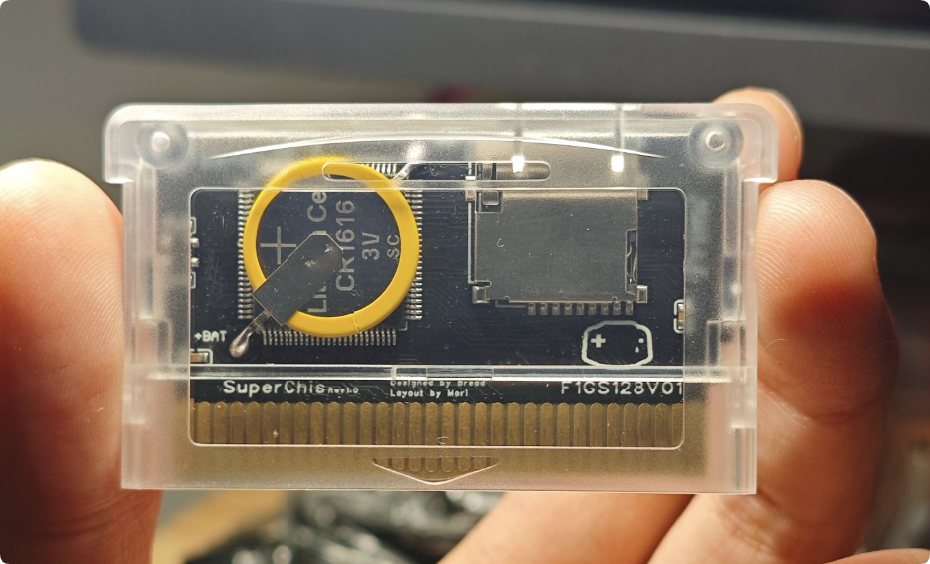
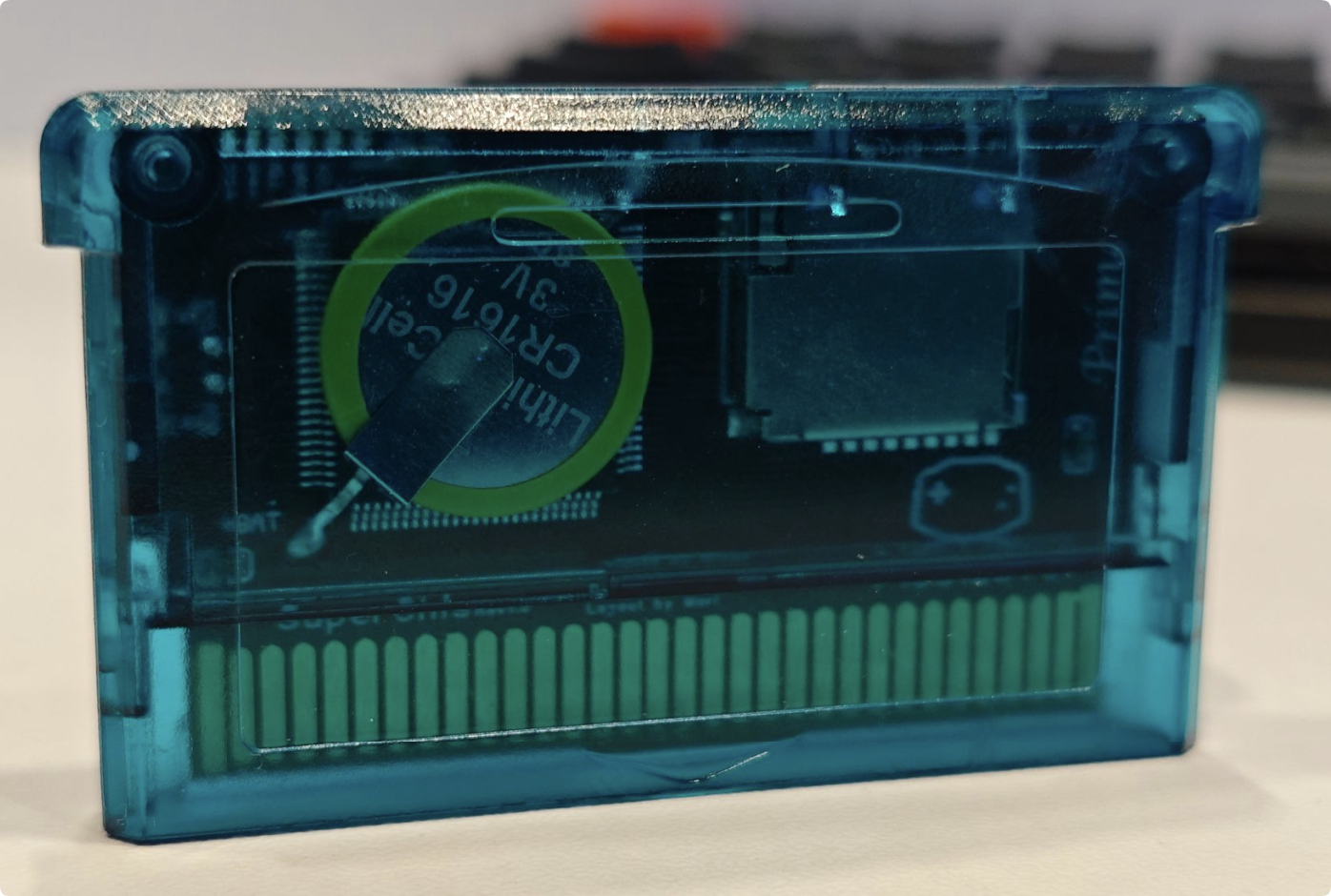
1768192599542.png
1768192570785.png

1. Hardware: Targeted Solutions​

The root causes of the classic SuperCard's problems—"slowdown" and "white screens"—lie in its SDRAM timing compatibility and the need for "slowdown patches" for every game. Our approach was twofold:

  1. Using Large NOR Flash to Bypass SDRAM Issues: I replaced the NOR Flash with a larger-capacity chip. When a game is written to the Flash, the GBA CPU reads directly from it, completely bypassing the problematic SDRAM access timings. This eliminates "slowdown" and the "white screen/freeze" caused by failed patches at a fundamental level. We also deeply optimized the write speed. Burning a 32MB game takes about 105 seconds on the standard version, and only about 85 seconds on the "Micron" version with higher-performance Flash.
  2. Premium PCB Process: To ensure long-term reliability, especially for the contact fingers, we use a 2U Immersion Gold (ENIG) process for our PCB manufacturing. It's an invisible upgrade, but we believe it's essential.
  3. Standardized and elegant PCB layout: It can improve product stability and avoid some anomalies that are not caused by component quality. Thanks to Mori, for his perfectionism.

2. CPLD Firemware: A Clean-Slate Approach for a Better Future​

The original SuperCard's CPLD firmware was "black box". So, we made a decision: we started from scratch with a completely new, forward-designed firmware. Thanks to davidgf for the many suggestions, which have benefited me a lot.

  • More Developer-Friendly: The new firmware has clear logic, avoiding potential register conflicts and other hidden issues. This provides a much better foundation for long-term support and feature development for excellent third-party kernels like SuperFW.
  • Multiple compatibility interfaces: We are compatible with SuperCard SD's SD Write/Read, and also support SuperCard Lite's SD Read. This helps to quickly migrate existing excellent software.

3. "Hybrid Architecture" and Fragmented Flash Management​

Making a simple NOR Flash cart isn't hard. The challenge was balancing flexibility and features at a low cost.

  • Fragmented Flash Management: Users don't need to worry about a game's physical location on the Flash. You can add or delete games as easily as managing files on your phone, and the system handles the space allocation automatically.
  • Retaining SDRAM for Unique Value: We didn't discard the SDRAM just because we added Flash. We repurposed the SDRAM as a "preview/launch area" and, crucially, as the memory for some feature. This "Flash + SDRAM" hybrid architecture allows us, at a low cost, to offer both "instant game launch with no slowdown" (from Flash) and "advanced features like Instant Saves" (from SDRAM).

4. GBA Firmware​

At present, SuperFW has fully supported SuperChis and may be released in next version. Because SuperChis are forward compatible, there will be more custom firmware support in the future. It's worth noting that the time to enter the SuperFW was reduced from 6 seconds to 1 second because we had a larger Flash and avoided asset decompression. davidgf's rotating meta data design largely avoids uneven flash writes.

5. The Necessary Trade-Offs​

Within our strict cost targets, we had to make some compromises:

  1. No RTC/Rumble/... Support: This was to control core chip complexity and cost. The software clock in the SuperFW kernel keeps time while in-game.
  2. Standard Battery-Backed Save: The standard version uses a CR1616 battery with low-power SRAM, offering a theoretical save retention of up to 20+ years (conservatively estimated at 10). We solved the problem of SuperCard batteries dying prematurely by using low-power SRAM and designing strictly according to the manual.
  3. Compatibility issues: We have found that the some GBAs on the motherboards labeled 02 have power supply issues, and cannot use the common NOR Flash, and need to use the more expensive low-power, high-performance NOR Flash, for which I have already funded research, and hope that the 02 motherboards can be resolved in the future with a simple mod. Or you can replace it yourself with a more expensive flash like the MT28.
  4. Save Game Handling: Support for games with EEPROM/Flash saves relies on the SuperFW database and patching engine. While this covers virtually all commercial games, some homebrew titles (e.g., certain Pokémon ROM hacks) may require manual intervention.
  5. Use recycled ICs: Whether it is mass production or DIY, for GBA game scenarios I recommend using tested recycled ICs. Especially for those NOR Flash that still have more than half of their life left. This is more economical and environmentally friendly. Of course, the test process includes full erasure, writing, stress testing, etc. Of course, you can also replace it with a new NOR Flash by yourself, which will cost $20~$30. As long as the speed is faster than S29GL01GS12, it will be a good Flash choice.

6. Acknowledgments and Planning​

Thanks to Mori, and Davidgf for supporting this project. More versions of the SuperChis series will be released in the future, and the core ideas will be open-sourced to encourage more interesting innovations. The CPLD implementation of the original SuperCard can be found at SuperChis.
 
wow that site is a great resource, especially the program they list.

i'll just get a 32gb today and see how it holds up.
Post automatically merged:

very happy with my chis prime.

Just got my 32gb and it loads with proper speeds, less than 8 secs for a game to load.
No issues saving and rtc found until now.

a couple romhacks tested for a while:
Pokemon yellow adventure
expert emerald

And no issues found whatsoever.

i even tested that gbatemp rom that loads the gba as a Gamecube controller so i can use my gba as a controller for PC mGba, worked flawlessly.


Is anyone aware of any games or romhacks that are infamous for running poorly/not loading on flashcarts?


Mind testing with Pokémon Unbound? It didn't work the greatest on Supercart and RTC functions didn't work at all
 
Hello friends, i am generally new to the whole gba scene, i got interested in this since it seems to make life easier having my games on a single cart instead of carrying multiple with me, however i am interested to know does this cart work for 3rd gen pokemon transfer to the ds lite? i ordered a nds specifically so i can move my pokemon between generations and this seems nice to make backups of my saves, so has anyone tested transferring via poke park? does the ds see the FR/LG save? Thank you and sorry if this has been asked already, i tried searching but i mostly see people mentioning romhacks
 
Hello friends, i am generally new to the whole gba scene, i got interested in this since it seems to make life easier having my games on a single cart instead of carrying multiple with me, however i am interested to know does this cart work for 3rd gen pokemon transfer to the ds lite? i ordered a nds specifically so i can move my pokemon between generations and this seems nice to make backups of my saves, so has anyone tested transferring via poke park? does the ds see the FR/LG save? Thank you and sorry if this has been asked already, i tried searching but i mostly see people mentioning romhacks
This won't work. You can use an EZ Flash Omega Definitive Edition for this. I believe the new Everdrive will support it too.
 
Yeah, EZFlash called that feature "mode B" on the Omega DE , but it's basically having it boot straight to a single ROM (in this case Pokémon) from internal flash, instead of the menu. Otherwise, the DS won't recognize the cart as a valid Pokémon cart.

Could also use a flashcart like the ChisFlash 1.1, which has RTC, but then you'd be carrying an extra cart for a single game anyway.
 
The game will tell you immediately upon booting into the menu if the RTC is working
I have not been able to get it running at all whatsoever.
i get a white screen and it won't load, this thread on reddit seems to imply that it's a common issue:

"For future people: when playing on DS LITE (eg not the DSi or 3DS), there is a known issue with GBARunner2 where it cannot load/boot into the game. Speculation is because the ROM hacks are just too long. You can play original GBA games, but GBA ROM hacks are too big and the DS Lite won't start the game (freezes on white screen after GBA start up page).

If you figure out a solution reply and let me know lol"

though i also have this issue when using the cart on gba, how did you get it to run on flash cart before?

edit: i also cannot get the cart to recognize the game as eligible for RTC functionality in the menu, so regardless, i don't think it's gonna happen.

FYI, the rom i patched works flawlessly on mGba
 
Last edited by MrMannn,
  • Like
Reactions: jsurico656
Just received my SuperChis Prime, it works wonderfully, thank you very much @ChisBread for the wonderful work !! Works better than my EZ Flash Air, and davidgf's SuperFW works also superbly well.

@jsurico656
For future reference, I tried with Pokémon Unbound, which does seem to work fine (you do have to generate superfw's specific patches for it using davidgf's online patcher tool), however it does start up with a "Warning ! The correct system time could not be read". As @MrMannn said in his message, there were no option to activate RTC emulation whatsoever... Tried by direct booting the game and writing it to flash, same behavior.

I have the same issue concerning another ROM Hack I way to play, "Pokémon Heart & Soul", it does have the option for RTC patching however the game doesn't seem to recognise the emulated RTC and displays "The internal battery has ran dry" message...

If you have any other ideas/things you want to test, I'm in. :)
 
  • Like
Reactions: jsurico656
@MrMannn @Victorum really appreciate you both doing this testing for me.

I really think the next point of improvement with Superfw/SuperChis Prime is to really get RTC emulation working for some of these popular Pokémon rom hacks.

Completely understand that getting this feature working for every single rom hack ever made may be an unrealistic undertaking, but Pokémon Unbound for example is a massively popular rom hack that many will be utilizing this product for.

As long as the battery doesn't die/corrupt my saves on SuperChis Prime like it did on Supercart, I'll still be happier than I was at least!
Post automatically merged:

I have not been able to get it running at all whatsoever.
i get a white screen and it won't load, this thread on reddit seems to imply that it's a common issue:

"For future people: when playing on DS LITE (eg not the DSi or 3DS), there is a known issue with GBARunner2 where it cannot load/boot into the game. Speculation is because the ROM hacks are just too long. You can play original GBA games, but GBA ROM hacks are too big and the DS Lite won't start the game (freezes on white screen after GBA start up page).

If you figure out a solution reply and let me know lol"

though i also have this issue when using the cart on gba, how did you get it to run on flash cart before?

edit: i also cannot get the cart to recognize the game as eligible for RTC functionality in the menu, so regardless, i don't think it's gonna happen.

FYI, the rom i patched works flawlessly on mGba

I have only used GBA flash carts on GBA. I have an 03 motherboard version GBA and was able to boot the game quite reliably when I turned off fast boot

When I had fast boot on, it would either make the game show a white screen, present graphical/audio glitches or make the game eventually crash

Turning off fast boot didn't increase my load time too much but made the game at least reliably start almost every single time
 
@MrMannn @Victorum really appreciate you both doing this testing for me.

I really think the next point of improvement with Superfw/SuperChis Prime is to really get RTC emulation working for some of these popular Pokémon rom hacks.

Completely understand that getting this feature working for every single rom hack ever made may be an unrealistic undertaking, but Pokémon Unbound for example is a massively popular rom hack that many will be utilizing this product for.

As long as the battery doesn't die/corrupt my saves on SuperChis Prime like it did on Supercart, I'll still be happier than I was at least!
Post automatically merged:


I have only used GBA flash carts on GBA. I have an 03 motherboard version GBA and was able to boot the game quite reliably when I turned off fast boot

When I had fast boot on, it would either make the game show a white screen, present graphical/audio glitches or make the game eventually crash

Turning off fast boot didn't increase my load time too much but made the game at least reliably start almost every single time
i've been reading up a little and i think flash carts by default do not have the ability to add RTC to a base game that doesn't come supported by default and firered isn't...

also, i could indeed get it to run without fastboot.
 
Just received my superchis prime from chisfamily store and it came with .18 firmware on it. I have tried every possible method of upgrading it to .19 and am getting badchecksum error. And yes, I am going based off of the firmware flashing instructions on the superfw site which I know you must follow for this upgrade

Anyone else getting the same error?
 
Just received my superchis prime from chisfamily store and it came with .18 firmware on it. I have tried every possible method of upgrading it to .19 and am getting badchecksum error. And yes, I am going based off of the firmware flashing instructions on the superfw site which I know you must follow for this upgrade

Anyone else getting the same error?
One thing I can think of, if you copied it twice on the SD card, once with .gba and once with .fw and then flash while booted into the.gba file - Did you download the correct firmware? This should be the correct one for the SuperChis: https://github.com/davidgfnet/superfw/releases/download/v0.19/superfw-chis.fw

Other than that, if you have a DS/DSLite and a slot-1 card you could also try with the DS flash tool: https://github.com/davidgfnet/superfw-nds-flasher-tool/releases
 
One thing I can think of, if you copied it twice on the SD card, once with .gba and once with .fw and then flash while booted into the.gba file - Did you download the correct firmware? This should be the correct one for the SuperChis: https://github.com/davidgfnet/superfw/releases/download/v0.19/superfw-chis.fw

Other than that, if you have a DS/DSLite and a slot-1 card you could also try with the DS flash tool: https://github.com/davidgfnet/superfw-nds-flasher-tool/releases
Yup. Ensured that it was the chis version. And tried redownloading the file again to see if that changes anything and it unfortunately doesn't
 
Yup. Ensured that it was the chis version. And tried redownloading the file again to see if that changes anything and it unfortunately doesn't
that's very weird, I had no problem updating my SuperChis from the previously installed version by following the flashing-instructions, no idea what else could be the problem...
 
Yikes. I had Pokemon Unbound loaded into flash on the SuperChis and after the 2nd save the save file corrupted itself. Really displeased with the experience so far :(
Post automatically merged:

that's very weird, I had no problem updating my SuperChis from the previously installed version by following the flashing-instructions, no idea what else could be the problem...
Update. Guess the solution was to just brute force it? After failing once, I clicked on the fw file again after it failed to try the flash process and it ended up working. Didn't need to shutdown, restart or anything
 
Last edited by jsurico656,
  • Wow
Reactions: cearp
Update. Guess the solution was to just brute force it? After failing once, I clicked on the fw file again after it failed to try the flash process and it ended up working. Didn't need to shutdown, restart or anything
Lol. I had the same thing happen to me. Didn't work the first time. Just kept throwing checksum errors despite booting into .19 first. I rebooted and tried again, no changes, and it just worked.
 
  • Like
Reactions: jsurico656
I was thinking of waiting for a fancier version with tilt and rumble and whatnot, but AliExpress reductions brought this one down to the point where I figured I might as well get it - at least I won't have to keep swapping the Omega between my GBA and my Micro! Looking forward to trying it out when it arrives
 
I'm hyped so much since i wanted to change my supercard and been looking forward to use SuperChis.
However, kinda confused sellers who ships to Germany. From which seller should i get and i guess i do not need fram one.
 
Yikes. I had Pokemon Unbound loaded into flash on the SuperChis and after the 2nd save the save file corrupted itself. Really displeased with the experience so far :(
Post automatically merged:


Update. Guess the solution was to just brute force it? After failing once, I clicked on the fw file again after it failed to try the flash process and it ended up working. Didn't need to shutdown, restart or anything

Can confirm that as long as you wait about 10 seconds to turn off your GBA after saving, that you shouldn't have to worry about corrupt save (5 hours into a new save and haven't had one yet)
 
Anyone know if this cart will work on GameBoy Player through GameBoy Interface? I'm using Gamecube with GBP through GBI.
 

Site & Scene News

Popular threads in this forum