Hacking Games not starting up with 20.1.0

  • Thread starter Thread starter UsualVII
  • Start date Start date
  • Views Views 4,770
  • Replies Replies 16

UsualVII

Member
Newcomer
Joined
Jun 7, 2025
Messages
8
Reaction score
9
Trophies
0
Age
24
XP
38
Country
Italy
Hi everyone, I'm having a lot of issues after installing 20.0.0 on my Switch
(nothing has changed even with 20.1.0 and the now installed 20.1.1)

I regularly updated:
- Atmosphere to 1.9.1 + fusee.bin
- Hekate to the v6.3.1
- Changed hekate_ipl.ini (changed fss0 to pkg3 + removed kip1patch=nosigchk, .ini in the bottom)
- Replaced sigpatches (deleted patches.ini, kip and exfs folders) with sys-patch 1.5.6

I've tested new sigpatches aswell with the modified fusee.bin, no effect whatsoever, same issue...

Sys-patch shows 'noncasigchk_new, nocntchk2, noacidsigchk, es3, ctest2, nim and disablecaverification1/2/3' all Patched in green, but, only a couple games actually works without giving the error: "The software was closed because an error occurred".

The games were all installed with Tinfoil, but, even by using the Newest DBI or NUT, nothing changes.
Out of 19 games only 3 works now with one having an almost CREEPY behavior:

Balatro (installed after updating, works)
Stray (installed prior updating, works)
Super Mario U Deluxe (prior updating, "works"?)

In particular Super Mario U Deluxe will start with the title screen not showing the title, just the forest, and when you get in the game, your PG moves by himself, almost like it tries to escape but will still be stuck in the very first "block" at the bottom left of the screen, after couple seconds the PG dies and doesn't lose the life, I played this game prior updating and I can assure it was working normally.

When I had the 19.0.0 and Sigpatches instead of Sys-patch everything was fine...
Any idea of what could cause this issue?

Here's a screenshot of my folders in the SDCard:
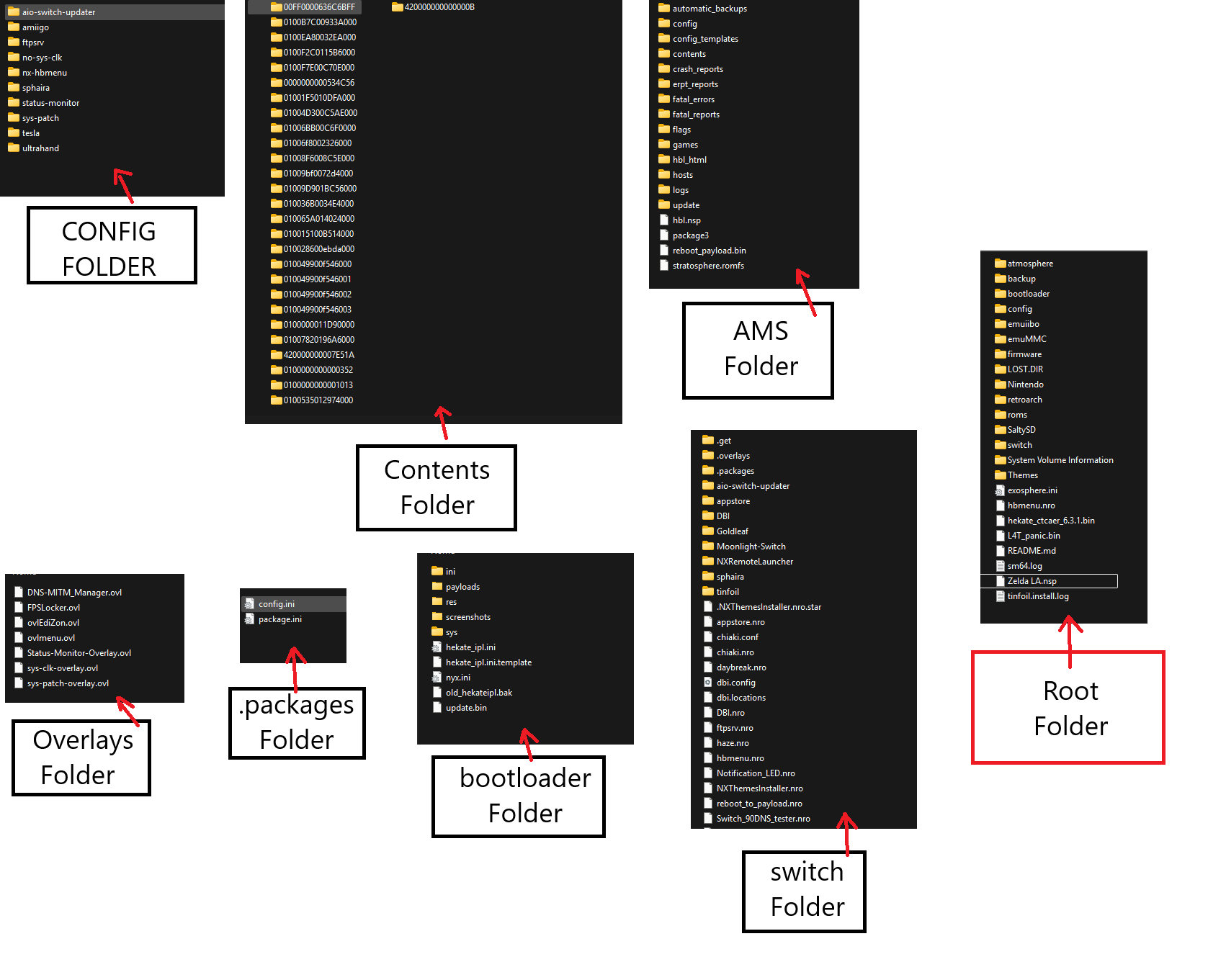
folders.png


hekate_ipl.ini:
Code:
[config]
autoboot=0
autoboot_list=0
bootwait=1
noticker=0
autohosoff=1
autonogc=1
bootprotect=0
updater2p=1
backlight=80

{hekate}
{}

[EmuMMC]
emummcforce=1
pkg3=atmosphere/package3
icon=bootloader/res/icon_payload.bmp
usb3force=1
{}

{--- Stock ---}
[Stock SysMMC]
pkg3=atmosphere/package3
emummc_force_disable=1
stock=1
icon=bootloader/res/icon_switch.bmp
{}

 
Update, the problem has been solved:
I'll leave the post up for someone that might need it:
The issue was solved by renaming the "atmosphere/contents" folder to "oldcontents", then, by excluding things, I found out that the issue was the "0000000000534C56" folder which was SaltyNX.

I then updated SaltyNX and FPSLocker.ovl causing everything to start working again.
 
Last edited by UsualVII,
I had the same issue but ended up destroying my sd card now I have to start from scratch getting all my games back and redownloading them all. Owell live and learn
 
  • Like
Reactions: UsualVII
I had the same issue but ended up destroying my sd card now I have to start from scratch getting all my games back and redownloading them all. Owell live and learn
Yep, yeah, I guess, well for me this is a lesson learned, I started adding too much things to work with.
When something like this occurs and sys-patch says they're working, it's always a matter of something extra messing up with your games.
Post automatically merged:
 
Hi everyone, I'm having a lot of issues after installing 20.0.0 on my Switch
(nothing has changed even with 20.1.0 and the now installed 20.1.1)

I regularly updated:

- Changed hekate_ipl.ini (changed fss0 to pkg3 + removed kip1patch=nosigchk, .ini in the bottom)
- Replaced sigpatches (deleted patches.ini, kip and exfs folders) with sys-patch 1.5.6

I've tested new sigpatches aswell with the modified fusee.bin, no effect whatsoever, same issue...

Sys-patch shows 'noncasigchk_new, nocntchk2, noacidsigchk, es3, ctest2, nim and disablecaverification1/2/3' all Patched in green, but, only a couple games actually works without giving the error: "The software was closed because an error occurred".


[/CODE]

was away long time from the scene

how and where do you see the colors for sys module is there any guide? how do i know if it is working well. I applied 1.56

did you change your exosphere.ini for prodinfo or system_settings.ini for dnd mitm ?

i was able to make it work, fixed several errors but i will remove sigpatches like suggested and i fear it will mess up and can't find a centralized guide.

and the changes you mention about hekate.ini can u check my ini files below do i need to change it?

[config]
autoboot=0
autoboot_list=0
bootwait=3
backlight=100
autohosoff=0
autonogc=1
updater2p=1
bootprotect=0

{------ Atmosphere ------}

[Atmosphere FSS0 EmuMMC]
fss0=atmosphere/package3
cal0blank=1
kip1patch=nosigchk
emummcforce=1
icon=bootloader/res/AtmoA.bmp
logopath=bootloader/res/atmogold.bmp
id=emummc
{}

[Atmosphere FSS0 SYS]
fss0=atmosphere/package3
kip1patch=nosigchk
emummc_force_disable=1
icon=bootloader/res/AtmoC2.bmp
logopath=bootloader/res/atmored.bmp
id=sysnand
{}

[Fusee - Alt Boot]
payload=/bootloader/payloads/fusee.bin
icon=bootloader/res/AtmoC.bmp
logopath=bootloader/res/atmogreen.bmp
id=fusee
{}

{-------- Stock ---------}

[Stock SYS]
fss0=atmosphere/package3
stock=1
emummc_force_disable=1
icon=bootloader/res/stock.bmp
id=stock
{}
 
was away long time from the scene

how and where do you see the colors for sys module is there any guide? how do i know if it is working well. I applied 1.56

did you change your exosphere.ini for prodinfo or system_settings.ini for dnd mitm ?

i was able to make it work, fixed several errors but i will remove sigpatches like suggested and i fear it will mess up and can't find a centralized guide.

and the changes you mention about hekate.ini can u check my ini files below do i need to change it?

[config]
autoboot=0
autoboot_list=0
bootwait=3
backlight=100
autohosoff=0
autonogc=1
updater2p=1
bootprotect=0

{------ Atmosphere ------}

[Atmosphere FSS0 EmuMMC]
fss0=atmosphere/package3
cal0blank=1
kip1patch=nosigchk
emummcforce=1
icon=bootloader/res/AtmoA.bmp
logopath=bootloader/res/atmogold.bmp
id=emummc
{}

[Atmosphere FSS0 SYS]
fss0=atmosphere/package3
kip1patch=nosigchk
emummc_force_disable=1
icon=bootloader/res/AtmoC2.bmp
logopath=bootloader/res/atmored.bmp
id=sysnand
{}

[Fusee - Alt Boot]
payload=/bootloader/payloads/fusee.bin
icon=bootloader/res/AtmoC.bmp
logopath=bootloader/res/atmogreen.bmp
id=fusee
{}

{-------- Stock ---------}

[Stock SYS]
fss0=atmosphere/package3
stock=1
emummc_force_disable=1
icon=bootloader/res/stock.bmp
id=stock
{}
Hello, I haven't touched Exosphere or System_settings.ini for DNS MiTM, you can always check if connection to Nintendo are reachable with this NSO (or quickly, by seeing if the eShop opens), for the Prod Key to check if it's blank after the update, just go in the system settings.

If you want to update to the 20+ FW, first update your Hekate and Atmosphere, remove any theme you might have installed and delete anything that could create conflicts due to old version (SaltyNX and similar), you also have to replace sigpatches with sys-patch (recommended)

As for the file hekate.ini I would use yours like this
NOTE: All fss0 are now PKG3 to work with the latest Atmosphere.

Code:
[config]
autoboot=0
autoboot_list=0
bootwait=3
backlight=100
autohosoff=0
autonogc=1
updater2p=1
bootprotect=0

{------ Atmosphere ------}

[Atmosphere PKG3 EmuMMC]
pkg3=atmosphere/package3
cal0blank=1 (I personally never used this string)
kip1patch=nosigchk (REMOVE THIS LINE FOR SYS-PATCH)
emummcforce=1
icon=bootloader/res/AtmoA.bmp
logopath=bootloader/res/atmogold.bmp
id=emummc
{}

[Atmosphere PKG3 SYS]
pkg3=atmosphere/package3
kip1patch=nosigchk (REMOVE THIS LINE FOR SYS-PATCH)
emummc_force_disable=1
icon=bootloader/res/AtmoC2.bmp
logopath=bootloader/res/atmored.bmp
id=sysnand
{}

[Fusee - Alt Boot]
payload=/bootloader/payloads/fusee.bin
icon=bootloader/res/AtmoC.bmp
logopath=bootloader/res/atmogreen.bmp
id=fusee
{}

{-------- Stock ---------}

[Stock SYS]
pkg3=atmosphere/package3
stock=1
emummc_force_disable=1
icon=bootloader/res/stock.bmp
id=stock
{}

To install sys-patch download them from here and remove sigpatches
Installed sigpatches should be removed from the SD card:
/atmosphere/exefs_patches/es_patches
/atmosphere/exefs_patches/nfim_ctest
/atmosphere/exefs_patches/nim-prodinfo-blank-fix
/atmosphere/kip_patches/fs_patches
/atmosphere/kip_patches/loader_patches
/bootloader/patches.ini

A clean hekate_ipl.ini file must be placed in /bootloader/ (i.e., one without the "nosigchk" lines).
 
This also happens to me, for boomerang fu, i get this error The software was closed because an error occured.

But other games works fine.

I'm using FW 20, AMS 1.9, Hekate, Sys-Patch

I use a clean atmosphere, switch, and bootloader directory from github mlemiam/Vanillatmosphere

Tried deleting the game and save file, reinstalling, still not working
 
This also happens to me, for boomerang fu, i get this error The software was closed because an error occured.

But other games works fine.

I'm using FW 20, AMS 1.9, Hekate, Sys-Patch

I use a clean atmosphere, switch, and bootloader directory from github mlemiam/Vanillatmosphere

Tried deleting the game and save file, reinstalling, still not working
Redump your game and use the new diferente dump to install it again
 

Site & Scene News

Popular threads in this forum