Misc Project
Updated
Xenoblade Easy Extract / Pack BDAT + Translation Tool
Hello!
After months of thinking how to finally get down to the Xenoblade 2 project (which was my goal since the game release), where a significant problem was always the correct repackaging of BDAT files, I’m excited to share two tools designed to simplify modding and especially translation efforts for Xenoblade 2.
- Xenoblade BDAT Batch Extract Pack GUI
- Xenoblade BDAT Translation Tool
You'll need Python 3.9+
More info how to use (if you don't know how to use python scripts) in the wiki on github.
I will add compiled exe versions in the near future.
Both, BDAT batch extractor/packer and Translation Tool should be compatible with all Xenoblade games.
Updates:
Update 16.01.26
Translation:
- Added copy/paste support
- Numerous stability fixes for every Xenoblade release on Nintendo Switch
- Added support for Nier Automata files
- Added support for light/dark theme
BDAT repack:
- Added support for automatically packing Xenoblade 3 files and moving them to the appropriate folders required by the game engine (you must select the option to pack Xenoblade 3).
Update 29.03.25
- Translation tool compatible with all Nintendo Switch Xenoblade games.
- New UI (Translation tool)
- The BDAT batch extractor now remembers last used paths
Update 14.03.25
- Character counter for each new line separated by \n
- Lines exceeding the allowed character limit are colored in red
Update 14.02.25
- BDAT pack/unpack now supports single file extracting and packing too
- Translation app got a massive update with many QOL options. Now you can display original Japanese lines alongside the translation.
The Problem with BDAT Files
For years, working with Xenoblade 2’s BDAT files—binary tables containing game text, stats, and mechanics—was a convoluted process. Manual extraction, repacking, and editing required multiple tools and technical expertise, which stalled previous projects delocalization efforts. This complexity left many modders frustrated and projects unfinished .
The Solution
Thanks to RoccoDev, which provides a robust foundation for parsing BDAT files. For unknown reasons almost no one knows about this project and I found it myself by the accident when I was searching the internet again trying to find some tips on how to properly pack tables into BDAT files (I had a working decryptor/extractor that I had been writing for a long time) I found this rather inconspicuous looking project.
I’ve streamlined the workflow with two user-friendly tools (second one is supposed to be used with files extracted by first one):
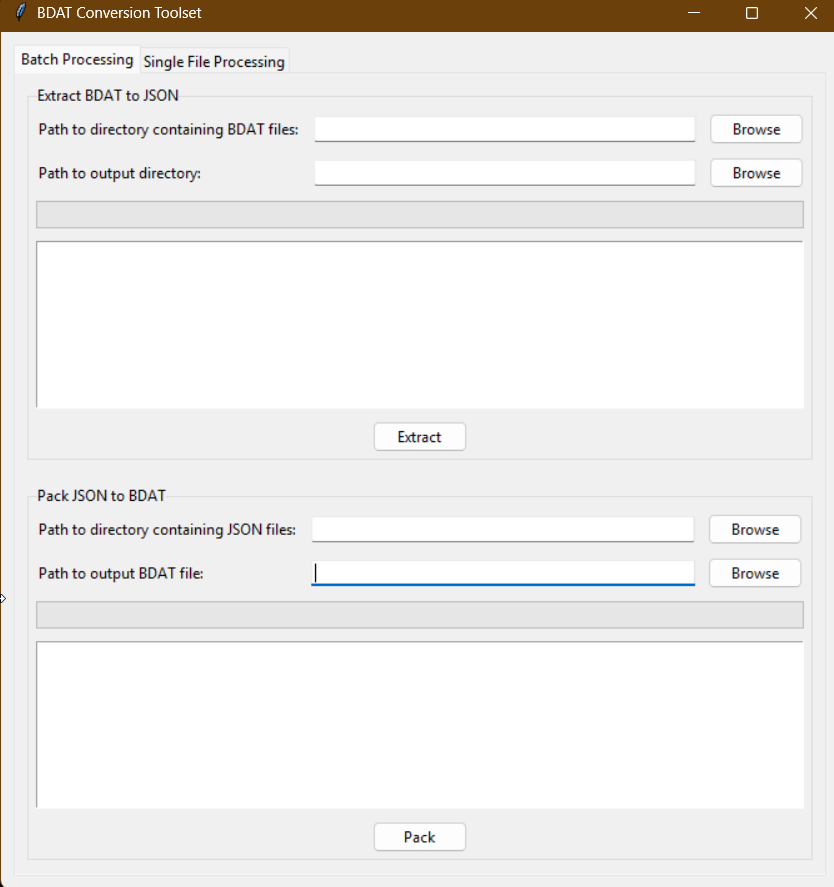
1. Xenoblade 2 BDAT Batch Extract/Unpack GUI
- What it does: Automates batch extraction and unpacking of BDAT files from Xenoblade 2’s archives.
- How to use:
1. Select folder with bdat files.
2. Select an output folder.
3. Click “Extract” to generate editable `.json` files.
Packing back to bdats works in reverse - select folder with unpacked bdats, select output folder, click on pack. Done.
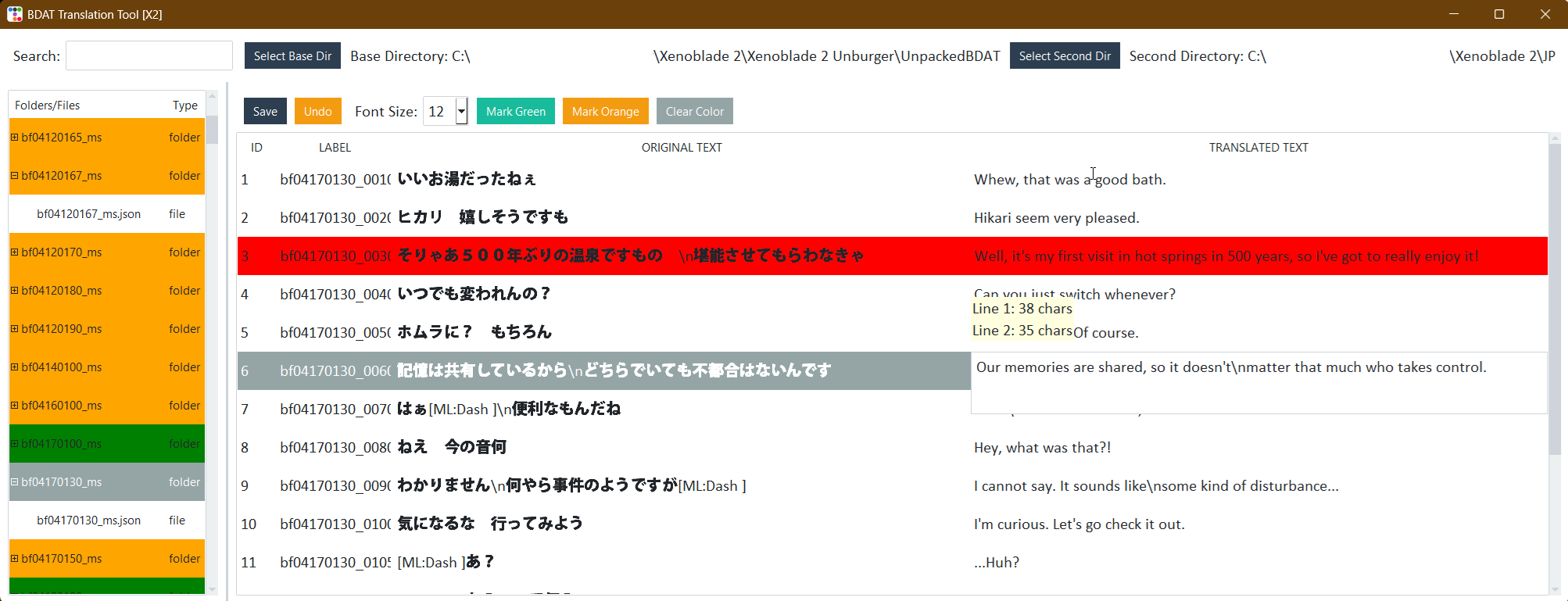
2. Xenoblade 2 BDAT Translation Tool
- What it does: Simplifies editing extracted BDAT files.
- Features:
- Visual interface for text editing.
- Tree-view.
- File filter option
- Color-marking directories
- Validation to prevent formatting errors.
- How to use:
1. Open extracted BDAT files.
2. Edit text or values directly.
3. Repack into game-ready formats.
---
Future Plans: Delocalization Revival
After my recent Star Ocean: The Second Story R Translation Mod, I’m reviving the Xenoblade 2 delocalization project. This will involve restoring many things lost by localizers, correcting terminology, and aligning the script closer to the original Japanese. The project will be a continuation of several other projects, including this one which has been the basis of all others by archerboy. My project will make many more changes than just the names of the characters. I'm planning to finally do a NewGame+ after many years. I played the original entirely in Japanese, so I will try to improve as much as possible by playing from the beginning. A dedicated thread will follow soon!
After months of thinking how to finally get down to the Xenoblade 2 project (which was my goal since the game release), where a significant problem was always the correct repackaging of BDAT files, I’m excited to share two tools designed to simplify modding and especially translation efforts for Xenoblade 2.
- Xenoblade BDAT Batch Extract Pack GUI
- Xenoblade BDAT Translation Tool
You'll need Python 3.9+
More info how to use (if you don't know how to use python scripts) in the wiki on github.
I will add compiled exe versions in the near future.
Both, BDAT batch extractor/packer and Translation Tool should be compatible with all Xenoblade games.
Updates:
Update 16.01.26
Translation:
- Added copy/paste support
- Numerous stability fixes for every Xenoblade release on Nintendo Switch
- Added support for Nier Automata files
- Added support for light/dark theme
BDAT repack:
- Added support for automatically packing Xenoblade 3 files and moving them to the appropriate folders required by the game engine (you must select the option to pack Xenoblade 3).
Update 29.03.25
- Translation tool compatible with all Nintendo Switch Xenoblade games.
- New UI (Translation tool)
- The BDAT batch extractor now remembers last used paths
Update 14.03.25
- Character counter for each new line separated by \n
- Lines exceeding the allowed character limit are colored in red
Update 14.02.25
- BDAT pack/unpack now supports single file extracting and packing too
- Translation app got a massive update with many QOL options. Now you can display original Japanese lines alongside the translation.
The Problem with BDAT Files
For years, working with Xenoblade 2’s BDAT files—binary tables containing game text, stats, and mechanics—was a convoluted process. Manual extraction, repacking, and editing required multiple tools and technical expertise, which stalled previous projects delocalization efforts. This complexity left many modders frustrated and projects unfinished .
The Solution
Thanks to RoccoDev, which provides a robust foundation for parsing BDAT files. For unknown reasons almost no one knows about this project and I found it myself by the accident when I was searching the internet again trying to find some tips on how to properly pack tables into BDAT files (I had a working decryptor/extractor that I had been writing for a long time) I found this rather inconspicuous looking project.
I’ve streamlined the workflow with two user-friendly tools (second one is supposed to be used with files extracted by first one):
1. Xenoblade 2 BDAT Batch Extract/Unpack GUI
- What it does: Automates batch extraction and unpacking of BDAT files from Xenoblade 2’s archives.
- How to use:
1. Select folder with bdat files.
2. Select an output folder.
3. Click “Extract” to generate editable `.json` files.
Packing back to bdats works in reverse - select folder with unpacked bdats, select output folder, click on pack. Done.
2. Xenoblade 2 BDAT Translation Tool
- What it does: Simplifies editing extracted BDAT files.
- Features:
- Visual interface for text editing.
- Tree-view.
- File filter option
- Color-marking directories
- Validation to prevent formatting errors.
- How to use:
1. Open extracted BDAT files.
2. Edit text or values directly.
3. Repack into game-ready formats.
---
Future Plans: Delocalization Revival
After my recent Star Ocean: The Second Story R Translation Mod, I’m reviving the Xenoblade 2 delocalization project. This will involve restoring many things lost by localizers, correcting terminology, and aligning the script closer to the original Japanese. The project will be a continuation of several other projects, including this one which has been the basis of all others by archerboy. My project will make many more changes than just the names of the characters. I'm planning to finally do a NewGame+ after many years. I played the original entirely in Japanese, so I will try to improve as much as possible by playing from the beginning. A dedicated thread will follow soon!
Attachments
Last edited by rsc-pl,