Hacking SWITCH NOOB PARADISE - Ask questions here

  • Thread starter Thread starter APartOfMe
  • Start date Start date
  • Views Views 6,141,412
  • Replies Replies 47,990
  • Likes Likes 66
hmm so today i just update amotsphere
use AIO , download amotsphere update
install firmware 17
download sigpatch in : https://gbatemp.net/attachments/hekate-ams-package3-sigpatches-1-6-2-cfw-17-0-0-zip.401482/

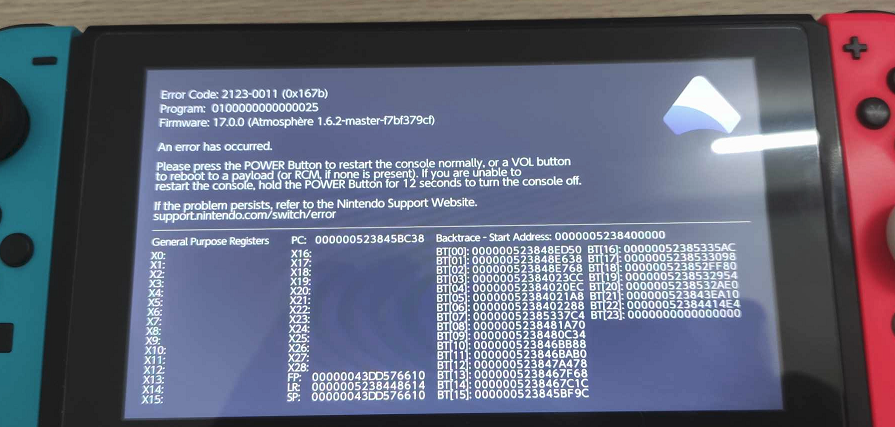
when i boot into amotsphere, after awhile it just crashed
1699933269373.png
 
  • Like
Reactions: PopcornSweetie
Do you have a donor/rebuilded nand or it is original nand/prodinfo?
i dont know what are you talking about,
btw now it's have fatal : 010041544d530000

no matter i remove old atmosphere folder and replaced with new one

EMUNAND now no longer hidden, it show when i put micro sd into SD card reader

when i boot into OFW now it just asking for format micro sd card
 
Last edited by warriosbest,
Strange that some people learned how to use a shop (which is kind of involved), but never learned how to download and install a nsp file. @animuz1 we can't provide any links, but the usual procedure would be to download a nsp or xci file from somewhere on the web, then install it with an app like DBI or Tinwoo. Nothing too complicated. If you knew how to use a shop, I'm sure you'll manage just fine.
I consider myself still a noob and used some guides to use a shop. I never learned to do it via USB.
Thank you for pointing me to the right tools. Out of the 2 apps, which one would you say is the best/most used?
 
I have a quick question and I'll probably have more. I discovered that my switch was an unpatched model. So I followed a tutorial so that I could run homebrew through Atmosphere. For the most part everything is hunky dory. I have it set up with and use a EmuMMC (partition) right now.

When I'm done I've been swapping out the SD card with my usual SD card and just shutting down/restarting the switch. Well today I forgot to switch the SD cards and when the Switch rebooted it said that the SD card was bad and that it would erase the bad data/partition and then reboot. :blink: Luckily I noticed that and removed the card before it did anything bad.

I've also noticed that when I put the SD card in my PC when I want to manually copy stuff over the Windows 10 complains about drive D: being bad and wanting to format it. Luckily that message is easy enough to avoid. Drive E: shows up fine.. this is the normal FAT32 partition.

Anywho... is there a way I can stop this? The last thing I need it to be b0rking my setup because the switch decides to be smart for me. :mellow:

I figured out why my switch was saying the data on the SD card was bad. At first I thought it was the EmuMMC partition. But it turned out there was a "Nintendo" folder in the root for some strange reason. Even after I hade moved it into the proper folder for the EmuMMC.

Anyways I just deleted that "Nintendo" folder after making sure nothing important was in there and now I don't get the message. :D
 
  • Like
Reactions: Blythe93
I consider myself still a noob and used some guides to use a shop. I never learned to do it via USB.
Thank you for pointing me to the right tools. Out of the 2 apps, which one would you say is the best/most used?
I use DBI personally, but I hear good things about the other one too. You can try both and then choose which one you prefer, nothing wrong with that.
 
btw now it's have fatal : 010041544d530000
Maybe this will work for you. Note that I haven't tested it out myself so do it at your own risk!

Go into RCM mode and inject your Hekate payload. Once in Hekate, go to Tools > Arch bit . RCM . Touch . Pkg1/2 > Fix Archive Bit. It should take a while so please be patient.
 
  • Wow
Reactions: Blythe93
You surely have a lot of things going on there on you microSD card. ^^
I hope that someone helps you pinpoint the issue. Unfortunately, this is way out of my league. ^^"
pretty fucked up, play normal at morning, decided to update to lastest firmware and end up like this lol
 
  • Sad
Reactions: Blythe93
hmm so today i just update amotsphere
use AIO , download amotsphere update
install firmware 17
download sigpatch in : https://gbatemp.net/attachments/hekate-ams-package3-sigpatches-1-6-2-cfw-17-0-0-zip.401482/

when i boot into amotsphere, after awhile it just crashed View attachment 404184

On first glance this looks like the error the nim system module throws now, when you use prodinfo blanking and it reaches out to nintendos servers and gets an error from it because of prodinfo blanking.
Only thing that helps is either not using prodinfo blanking, in case this is your online nand without any nsp or xci installations, or block nintendos servers via hosts file. I think if you check the recent atmosphere issues on github there was one that had the required hosts file for that.
 
Looking to mod my first switch, think it's a V2, it certainly isn't old enough to be unpatched, but it's also not OLED.

I know I need a modchip, I have someone able to do the soldering etc without issues, but I keep reading that some chips are bad and some things can cause corrupt NAND and it has me concerned.

Which chip do I need? what would be the best option? if there is a guide on where to get the parts and get Hekate etc up and running please point me in the right direction, looking to get the hardware to do the mod but read that many clones can be problematic, could be misinformation but I don't really know enough to make a decision based on that so thought I'd ask those who know!

Thinking if going with the 2040/mosfet/resistor route as that seems to be in the definitive guide.
 
Last edited by UKIkarus,
On first glance this looks like the error the nim system module throws now, when you use prodinfo blanking and it reaches out to nintendos servers and gets an error from it because of prodinfo blanking.
Only thing that helps is either not using prodinfo blanking, in case this is your online nand without any nsp or xci installations, or block nintendos servers via hosts file. I think if you check the recent atmosphere issues on github there was one that had the required hosts file for that.
yep i heard it gone if i go to airplane mode or use hosts file but now problem is even far more than it, look like i messed it up


replaced bootloader, hetake, use new atmosphere from github, sigpatch from rentry and on gbatemp thread
and even insert sd card into laptop,
https://gbatemp.net/threads/problems-after-update-to-newer-firmware-amotsphere.642936/
 
A switch turns on and it shows the nintendo logo and then the logo turns red and shuts off, what would be the cause/whats going on? The interesting thing for me is that the logo turns red, i have seen videos of other switch stuck on boot loops but the nintendo logo dosnt turn red. I think the battery was depleted and charged again but the same happens.
 
Super Mario Odyssey doesn't boot on Emunand. When i try to launch it, it shows that Nintendo Switch logo and after that it crashes with this error: The software has closed because a error occured.

How can i fix this? Not only Super Mario Odyssey has this problem.
 
Super Mario Odyssey doesn't boot on Emunand. When i try to launch it, it shows that Nintendo Switch logo and after that it crashes with this error: The software has closed because a error occured.

How can i fix this? Not only Super Mario Odyssey has this problem.

You mean more than one games have this problem?
 

Site & Scene News

Popular threads in this forum