Hardware Wired internet for switch via iphone?

  • Thread starter Thread starter moneychild
  • Start date Start date
  • Views Views 14,571
  • Replies Replies 11

moneychild

Well-Known Member
Member
Joined
Oct 5, 2013
Messages
206
Reaction score
167
Trophies
1
XP
2,754
Country
United States
I'm trying to share my internet connection from my iPhone via the USB port on the dock (edit: switch dock) by using the iPhone charger but it does not work.

I was wondering if I buy a iPhone to Ethernet adapter, and the official switch Ethernet adapter (or any generic brand) and connect the two, would it work?

If someone who happens to have all the stuff, try it please or provide some insite on if my theory would or would not work.
 
Last edited by moneychild,

If the iPhone to ethernet adapter is designed for tethering and not for connecting an iPhone to a wired LAN then I see no reason why it wouldn't work.
 
I'm trying to share my internet connection from my iPhone via the USB port on the dock by using the iPhone charger but I does not work.

I was wondering if I buy a iPhone to Ethernet adapter, and the official switch Ethernet adapter (or any generic brand) and connect the two, would it work?

If someone who happens to have all the stuff, try it please or provide some insite on if my theory would or would not work.

First, you do not give enough information to give you the help you need.
Second,it appears your first sentence is not possible for many reasons.

''I'm trying to share my internet connection from my iPhone via the USB port on the dock by using the iPhone charger but I does not work."
Assuming "the dock" is the switch dock, directly connecting the 2 devices together without some software "glue" would give you the same results as if you connected an iPhone to a laptop or pc and expecting it to work "out of the box".
Also using a iPhone charger (cable) without the data wires connected would result in failure even if everything was setup properly.

Back to the first part:
Have you ever shared your iPhone's internet with any other device,successfully?
What iPhone model?
What iOS version?
Is it jailBroken?
What carrier do you use?
Do you pay them for hotspot or internet sharing?
Do you have access to a pc or laptop?

There are probably a lot more questions but that is a good start.
 
  • Like
Reactions: TotalInsanity4
First, you do not give enough information to give you the help you need.
Second,it appears your first sentence is not possible for many reasons.

''I'm trying to share my internet connection from my iPhone via the USB port on the dock by using the iPhone charger but I does not work."
Assuming "the dock" is the switch dock, directly connecting the 2 devices together without some software "glue" would give you the same results as if you connected an iPhone to a laptop or pc and expecting it to work "out of the box".
Also using a iPhone charger (cable) without the data wires connected would result in failure even if everything was setup properly.

Back to the first part:
Have you ever shared your iPhone's internet with any other device,successfully?
What iPhone model?
What iOS version?
Is it jailBroken?
What carrier do you use?
Do you pay them for hotspot or internet sharing?
Do you have access to a pc or laptop?

There are probably a lot more questions but that is a good start.


Answering some of your questions:

I have a iPhone SE and I have done USB tethering to a PC already with only the iPhone charger. My network is Boost Mobile which runs in the Sprint Network. I have unlimited highspeed data on my phone but only 8GB of hotspot all included in my $45 plan plus taxes (really good deal) iPhone is not jailbroken and is on the latest iOS as if writing this.
 
Seems a lot easier to just do it via wifi. Just set up a "Personal Hotspot" and hook up your switch to it. Unless you are hooking it up to Cable/DSL/Fiber you aren't going to see anymore latency using wifi hotspot from your mobile phone.
 
Last edited by WolfSaviorZX,
Seems a lot easier to just do it via wifi. Just set up a "Personal Hotspot" and hook up your switch to it. Unless you are hooking it up to Cable/DSL/Fiber you aren't going to see anymore latency using wifi hotspot from your mobile phone.

I know it's easier to just do wifi but just for the sake of experimenting, I wanted to know if I can do it.
Also, my hotspot sometimes goes inactive and shuts off, so I'm wondering if I used a wired connection, would this prevent it.


Do you know what is a charger?

I have used the iphone charger to do USB tethering on my PC already. It works with the right drivers installed. So just because it is a charger does not means the only thing it can do is charge a phone.
 
I have used the iphone charger to do USB tethering on my PC already. It works with the right drivers installed. So just because it is a charger does not means the only thing it can do is charge a phone.
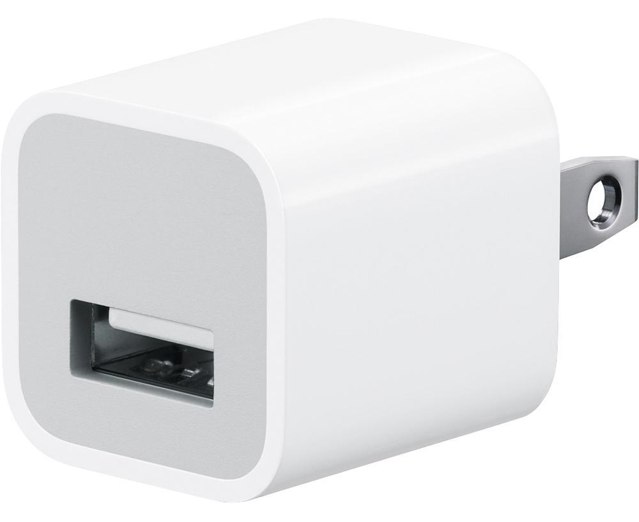
The iPhone charger presented in Figure 1 is used to charge an iPhone.
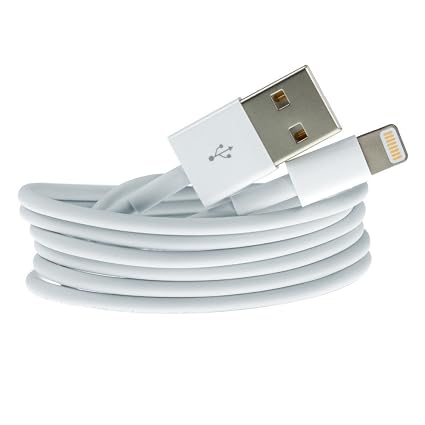
Please, note the difference between a charger, and the USB data cable that connects the charger with the iPhone. The data cable is presented in Figure 2.

221694178.jpg
61yV3350wcL._SX425_.jpg
 
Last edited by sarkwalvein,
The iPhone charger presented in Figure 1 is used to charge an iPhone.
Please, note the difference between a charger, and the USB data cable that connects the charger with the iPhone. The data cable is presented in Figure 2.

221694178.jpg
61yV3350wcL._SX425_.jpg

I see what you mean.
I should have said data cable.
 
I have the same question. Have you been able to do that? Plz I need to know it because my smartphone ping is very low but when I use it with the switch by Hotspot wifi ping goes over 100. I need to connect my Nintendo switch with USB cable data and lan cable adapter but I want be sure that I'm not going to throw my money
 

Site & Scene News

Popular threads in this forum