Hacking WBFS Manager 2.0

  • Thread starter Thread starter AlexDP
  • Start date Start date
  • Views Views 35,259
  • Replies Replies 99

AlexDP

Well-Known Member
Member
Joined
Jun 17, 2007
Messages
133
Reaction score
0
Trophies
1
XP
53
Country
Italy
I know theres plenty of great WBFS Mangaer tools out there, but I noticed mine somehow wasn't picked up on in the GBATemp forums, so I though I'd mention it, and if people have suggestions or need support provide some support...
You can read the whole post here: http://wiinewz.com/forums/backup-loaders/9...ager-2-0-a.html
The basic points of it are:
Features:
-Listing of games with titles, sizes and codes.
-Drag-and-drop support for adding multiple files at once to the WBFS drive.
-Easy to use interface which also reports available, total and used disk space at a glance.
-Batch processing of multiple ISOs.
-Rename discs on the WBFS drive.

Make sure to get version 2.1 (the second and third links, depending on whether your using Windows 32 bit or 64 bit).
And here's a screenshot:
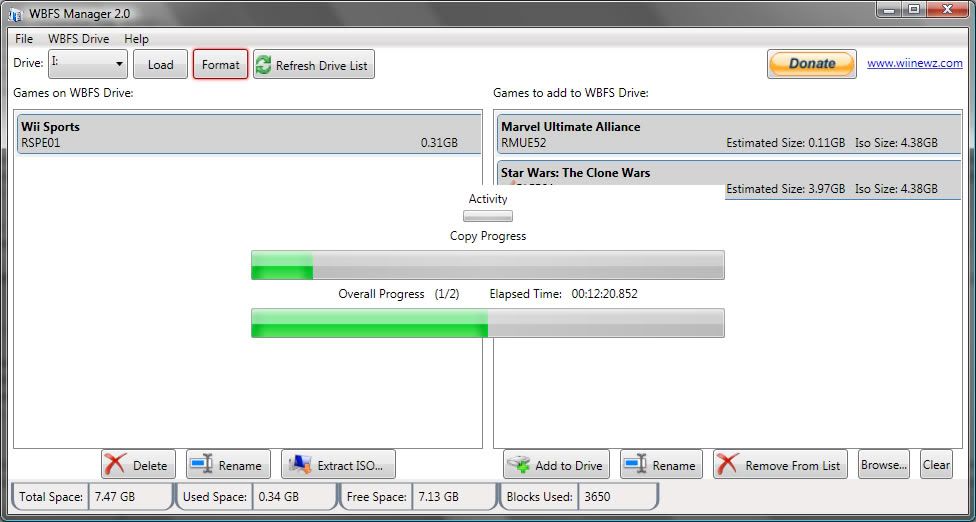
WBFSManager20.jpg
 
Can you put together a no-install package for x86? I already have .NET 3.5 and the installer stalls when it tries to install it.
 
AXYPB said:
Can you put together a no-install package for x86? I already have .NET 3.5 and the installer stalls when it tries to install it.
The .NET 3.5 SP1 installer takes a while to finish... have you tried waiting for it a bit? and do you already have 3.5 SP1 or just 3.5? There's some differences.
The reason I ask is because I'd like to avoid posting a no-install package to avoid confusing people who don't have .NET 3.5 SP1 installed. The last time I distributed a no-install I ran into that issue (people thinking they didn't need .NET and ending up not being able to use the app).
 
it's definitely one of the best guis out there. most features, good layout, etc. the only thing that bugs me a little is that it is coded in .net and needs the runtime to work properly.
 
Thanks Screemer. I was initially considering doing it in native code, but it's a hassle for something simple like this...
 
Found this over at Tehskeen.com not too long ago. Great work man. This is the only one that works for me and it works beautifully. Thank you and great job.
 
aardvarks said:
doesnt work for me on vista 64
Are you using the 2.1 x64 version?

I've not had a chance to try it yet, but it's supposed to sort the problems out.

Check the Wiinewz link in the first post.
 
This is the only one im using now.Before i was using two seperate guis.
One to do all the main stuff and the 2nd one to rename files

Yours does it all

Great work.
 
Works well. It would be nice to automate it further and autoload the first available WBFS partition (most people have only one anyway).
 
absoutely great work mate, now my main and only transfer tool and love how it lists everything on the drive so clearly.

now if you could just get a channel maker in there
tongue.gif
 
So is this pretty much the best WBFS tool out there? I only want to get one, but all of them look OK. This one looks much better though...

There's a version 2.1 out BTW.
 
I encountered a problem, which has to do with both the WBFS tool and the partition on HDD.

I'm sure this has been said before, but after some testing, i found some corrupt iso's, and deleted those games from the HD (WBFS).

After installing other games on the same WBFS, some of my previous games immediately stopped working as in code dumping out. These games DID work before.
Could this be due to fragmentation of games? If another game is added in place of one deleted game, could it be some data gets overwritten in a block?

Is there a way to defragment WBFS? if not, is it something that could be looked into?
I for one am very bothered by the fact that if a game gets "installed", and doesn't work due to corruption, i have to delete it and reinstall another game in its place, thus risking more games not working.

X
 

Site & Scene News

Popular threads in this forum