



Hello,
I' ve received my damaged Switch and was curious to see what was the problem.
No power, no charge at all.
Started to open it and nothing suspicious on the B-side. No classical shorts with multimeter.
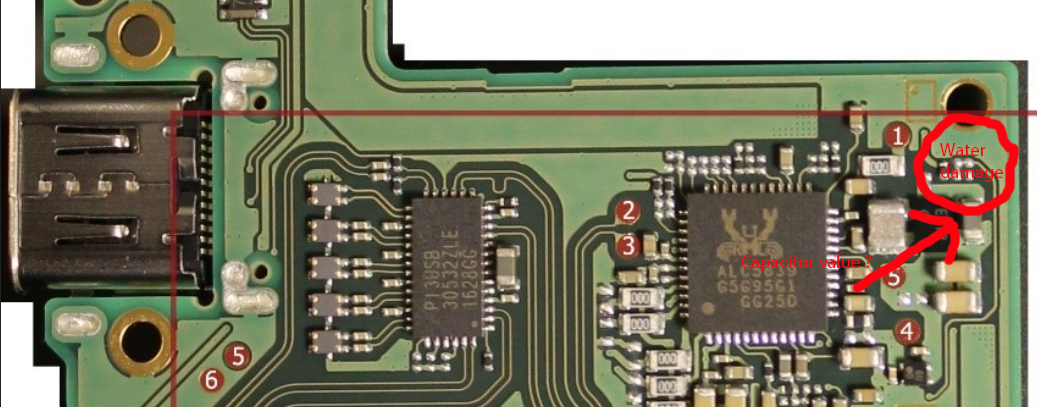
So I dissasembled it to see the other side and saw a small water damage on the top of the board.
Started to clean up to see the damage more clearly and a capacitor looks not very good but has no shorts with my multimeter.
I put test charger into USB-C and see 0.47a. So it's started.
After reassembly here was my investigation:
- Power : OK
- Screen : Start with Nintendo and logo but after black screen
- Backlight : On
- Touchscreen : OK
- Sound : OK
On the dock I've got the image but it is not stable and image is only an a half screen of TV.
So I will try to swap capacitor on a working Switch to see if improvement...
I' ve received my damaged Switch and was curious to see what was the problem.
No power, no charge at all.
Started to open it and nothing suspicious on the B-side. No classical shorts with multimeter.
So I dissasembled it to see the other side and saw a small water damage on the top of the board.
Started to clean up to see the damage more clearly and a capacitor looks not very good but has no shorts with my multimeter.
I put test charger into USB-C and see 0.47a. So it's started.
After reassembly here was my investigation:
- Power : OK
- Screen : Start with Nintendo and logo but after black screen
- Backlight : On
- Touchscreen : OK
- Sound : OK
On the dock I've got the image but it is not stable and image is only an a half screen of TV.
So I will try to swap capacitor on a working Switch to see if improvement...


