Hacking USB Loader... my turn ;)

  • Thread starter Thread starter WiiShizzza
  • Start date Start date
  • Views Views 817,814
  • Replies Replies 4,239
kamakaze said:
SkankyYankee said:
kamakaze said:
HELP!

Is the config.txt is blank. Does it get populated once you install? Or do I need to edit it before I install? If so, what needs to be tinkered with? Do I take the content of the config_example.txt included in the download and edit it accordingly?

Thanks.

You need to get the config.txt. Try Here

The Example that came with it works too, remember only the lines that don't start with # actually are executed. Taking the time to read that will explain what the settings do.


Thanks on the advice on config.txt.

Another Question though....wimage folder included in the download was empty. Where do I get these? If I turn on the widescreen option and don't have any wide screen images in the wimage folder, what happens?

You can get the images from here

http://www.theotherzone.com/wii/ntsc.php

or if you dont want ntsc use the link at the top to find the appropriate region, or you can turn download to 1 in your config.txt, that should automatically download each cover as a game is selected in the console to the wimages folder (assuming you are in widescreen mode). If you already have a pic in wimages for that gameid, it of course will not re-download
 
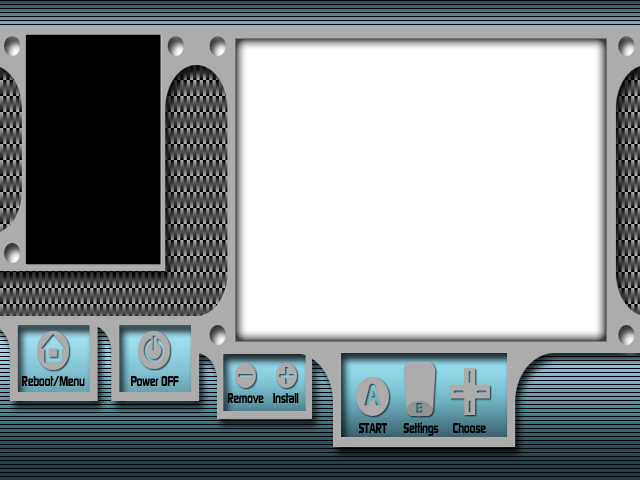
I noticed that the last .psd I uploaded for my background was after I resized it to 640x480, so here's the original 16x9 .psd in case anyone wants to mess with it. Here's the background with coordinates for those who missed it (tested on NTSC widescreen in 480p).

Blue Carbon 16x9.psd

Code:
console_color=0,15
console_coords=244,50,352,280
covers_coords=28,38

BlueCarbon.png
 
Is the automatic download of covers not working? I can download individual covers by pressing 1. But if i try to set it to automatic it wont do it. Here's my config:

images_path = SD:/wimages/
background = wbg.png
covers = 1
download = 1
layout = ultimatew
simple = 0
home = reboot
console_coords = 40,71,340,290
covers_coords = 446,109
console_color = 0,15
entry_lines = 15
max_characters = 37
savesettings = 0
video = system
ocarina = 0
language = console
parentalcontrol = 0
downloadinstall = 1
hidesettingmenu = 0
widescreen = 1
 
kamakaze said:
bnm81002 said:
is there a way to uninstall the channel or for that matter any channel that I don't want? thanks


Go to Data Management in wii and select Wii Channel and delete the channel in question.

Umm, it's better to delete custom channels with Wad Manager so you don't leave stray tickets around.
 
Terrulin said:
kamakaze said:
SkankyYankee said:
kamakaze said:
HELP!

Is the config.txt is blank. Does it get populated once you install? Or do I need to edit it before I install? If so, what needs to be tinkered with? Do I take the content of the config_example.txt included in the download and edit it accordingly?

Thanks.

You need to get the config.txt. Try Here

The Example that came with it works too, remember only the lines that don't start with # actually are executed. Taking the time to read that will explain what the settings do.


Thanks on the advice on config.txt.

Another Question though....wimage folder included in the download was empty. Where do I get these? If I turn on the widescreen option and don't have any wide screen images in the wimage folder, what happens?

You can get the images from here

http://www.theotherzone.com/wii/ntsc.php

or if you dont want ntsc use the link at the top to find the appropriate region, or you can turn download to 1 in your config.txt, that should automatically download each cover as a game is selected in the console to the wimages folder (assuming you are in widescreen mode). If you already have a pic in wimages for that gameid, it of course will not re-download

Thanks for the mirror on the game cover arts.

My original question went toward how and where to find the background images for the widescreen option (destined for the "wimages" folder).

Any thoughts?
 
Dueler said:
For the updating, you should probably add a pre downloaded check to see what version the dol currently is.
Like make it so it says something like:

Current Version: 7.4
Press 2 to check newest version.
- Checks
Most recent version: 7.x
Press 2 to install.

Hmmm, that might be possible, but would take a bit of code to process the downloaded text file. I'll look into and see how task intensive it is..
 
kamakaze said:
Thanks for the mirror on the game cover arts.

My original question went toward how and where to find the background images for the widescreen option (destined for the "wimages" folder).

Any thoughts?

(EDIT) Nevermind, I didn't realize you meant backgrounds, not covers. You could try mine (just a few posts back on this page)
tongue.gif
 
EDIT - PLEASE READ
There's a description of all the additions to the config.txt here: http://gbatemp.net/index.php?showtopic=147...t&p=1923338


Alright, made some small changes and updates for my v2 release. I added a new config option to the config.txt file, but it is completely optional.

Code:
infodelay = x
ÂÂÂÂ(Where "x" is number of seconds to wait after the message "Downloading Complete" when cover art downloading is enabled)
This will allow people to troubleshoot URL testing better so the screen doesn't whip by.

Also changed the network initialization code calling a little bit, seemed to make my connections reliable. But really looking at that part of the code I think it needs to be overhauled with a different init system like the one used in ftpii or something. The current one makes the system code dump if the connection isn't available.

If you installed v1, go ahead and do the update and it will download the latest version. The update will work if you use the default string in my provided config.txt help file, or if you just don't have that variable defined in your config.txt

Otherwise for those that would like to download it to their computer or check out the source code:
http://www.mediafire.com/?sharekey=a6af63a...8eada0a1ae8665a
 
lithium210 said:
Is the automatic download of covers not working? I can download individual covers by pressing 1. But if i try to set it to automatic it wont do it. Here's my config:

images_path = SD:/wimages/
background = wbg.png
covers = 1
download = 1
layout = ultimatew
simple = 0
home = reboot
console_coords = 40,71,340,290
covers_coords = 446,109
console_color = 0,15
entry_lines = 15
max_characters = 37
savesettings = 0
video = system
ocarina = 0
language = console
parentalcontrol = 0
downloadinstall = 1
hidesettingmenu = 0
widescreen = 1

try changing the top line to

wimages_path=SD:/wimages/

you were missing the leading w, and unlike all the other options which should have the = surrounded by spaces, the path options seem to require you to not have spaces
hope that helps you
 
kamakaze said:
Terrulin said:
kamakaze said:
SkankyYankee said:
kamakaze said:
HELP!

Is the config.txt is blank. Does it get populated once you install? Or do I need to edit it before I install? If so, what needs to be tinkered with? Do I take the content of the config_example.txt included in the download and edit it accordingly?

Thanks.

You need to get the config.txt. Try Here

The Example that came with it works too, remember only the lines that don't start with # actually are executed. Taking the time to read that will explain what the settings do.


Thanks on the advice on config.txt.

Another Question though....wimage folder included in the download was empty. Where do I get these? If I turn on the widescreen option and don't have any wide screen images in the wimage folder, what happens?

You can get the images from here

http://www.theotherzone.com/wii/ntsc.php

or if you dont want ntsc use the link at the top to find the appropriate region, or you can turn download to 1 in your config.txt, that should automatically download each cover as a game is selected in the console to the wimages folder (assuming you are in widescreen mode). If you already have a pic in wimages for that gameid, it of course will not re-download

Thanks for the mirror on the game cover arts.

My original question went toward how and where to find the background images for the widescreen option (destined for the "wimages" folder).

Any thoughts?

on that site you can click the 16x9 icon and it will give you the widescreen versions (they look thinner)

or

you can make sure you have your wimages_path set to some folder that exists (if the folder is not on your SD card then nothing happens)
Then get them one of the three following ways
1) change the download = 0 option to download = 1 to auto download missing covers as you select them in the console
2) press b to go to options and press 1 to download
3) change downloadinstall = 0 to downloadinstall = 1 to have it automatically download when the game is copied from the wii drive

EDIT:
upon realizing you were looking for the backgrounds and not covers (maybe i should learn to read) try here

http://usob.cjb.net/

and click on the top middle button where is says "Skins" there should be some labeled widescreen
 
Terrulin said:
lithium210 said:
Is the automatic download of covers not working? I can download individual covers by pressing 1. But if i try to set it to automatic it wont do it. Here's my config:

images_path = SD:/wimages/
background = wbg.png
covers = 1
download = 1
layout = ultimatew
simple = 0
home = reboot
console_coords = 40,71,340,290
covers_coords = 446,109
console_color = 0,15
entry_lines = 15
max_characters = 37
savesettings = 0
video = system
ocarina = 0
language = console
parentalcontrol = 0
downloadinstall = 1
hidesettingmenu = 0
widescreen = 1

try changing the top line to

wimages_path=SD:/wimages/

you were missing the leading w, and unlike all the other options which should have the = surrounded by spaces, the path options seem to require you to not have spaces
hope that helps you


ok tried it this way and still no go. Btw.. im on 7.4 Ive tried different combinations of the config with multiple lines for both full and widescreen and i still cant get to auto download covers.

wimages_path=SD:/wimages/
wbackground = wbg.png
covers = 1
download = 1
layout = ultimatew
simple = 0
home = reboot
wconsole_coords = 40,71,340,290
wcovers_coords = 482,110
console_color = 0,15
entry_lines = 15
max_characters = 37
savesettings = 0
video = system
ocarina = 0
language = console
parentalcontrol = 0
downloadinstall = 1
hidesettingmenu = 0
widescreen = 1
 
lithium210 said:
ok tried it this way and still no go. Btw.. im on 7.4 Ive tried different combinations of the config with multiple lines for both full and widescreen and i still cant get to auto download covers.

Here's what I've got in my config.txt, maybe you'd like to compare?
CODE# USBLoader config
images_path=SD:/usb-loader/COVERS/
wimages_path=SD:/usb-loader/WCOVERS/
background = bg.png
wbackground = wbg.png
layout = ultimatew
home = exit
covers = 1
simple = 0
download = 1
console_color=15,0
console_coords=40,71,340,290
covers_coords=446,109
wconsole_coords = 40,71,340,290
wcovers_coords = 482,110
entry_lines = 13
parentalcontrol = 0
downloadinstall = 1
savesettings = 1
video = system
ocarina = 0
language = console
hidesettingmenu = 0
widescreen = 1
infodelay = 1
images_dl_url = http://www.theotherzone.com/wii
wimages_dl_url = http://www.theotherzone.com/wii/widescreen
update_dl_url = http://home.comcast.net/~hatax/wii/ultimate_usb_dl/boot.dol
#

I see you're missing the wconsole_coords and wcovers_coords in there for starters.
 
Threw these together a bit earlier

4x3
white_wii_4x3_NTSC.png

Add this to config.txt
Code:
background = white_wii_4x3_NTSC.png
console_coords = 36,36,340,290
covers_coords = 452,72

16x9
white_wii_16x9_NTSC.png

Add this to config.txt
Code:
wbackground = white_wii_16x9_NTSC.png
wconsole_coords = 28,36,348,400
wcovers_coords = 488,72
entry_lines = 21
max_characters = 38
 
I set my;

images_path=SD:/usb-loader/COVERS/
wimages_path=SD:/usb-loader/WCOVERS/

So that the covers that are downloaded work with Waninkoko's loader, I keep it on there to compare against bugs and because that's the orig loader. And the second path to the widescreen images is just located there so that all the covers are in one folder.
 
lithium210 said:
ok tried it this way and still no go. Btw.. im on 7.4 Ive tried different combinations of the config with multiple lines for both full and widescreen and i still cant get to auto download covers.

wimages_path=SD:/wimages/
wbackground = wbg.png
covers = 1
download = 1
layout = ultimatew
simple = 0
home = reboot
wconsole_coords = 40,71,340,290
wcovers_coords = 482,110
console_color = 0,15
entry_lines = 15
max_characters = 37
savesettings = 0
video = system
ocarina = 0
language = console
parentalcontrol = 0
downloadinstall = 1
hidesettingmenu = 0
widescreen = 1

images_path=SD:/apps/usbloader/images/
wimages_path=SD:/apps/usbloader/wimages/
background = white_wii_4x3_NTSC.png
wbackground = white_wii_16x9_NTSC.png
covers = 1
download = 1
#layout = ultimatew
simple = 0
home = reboot
console_coords = 36,36,340,290
wconsole_coords = 28,36,348,400
covers_coords = 452,72
wcovers_coords = 488,72
console_color = 0,15
entry_lines = 21
max_characters = 38
savesettings = 0
video = game
ocarina = 0
language = console
parentalcontrol = 0
downloadinstall = 0
hidesettingmenu = 0
widescreen = 1

I just tested mine by deleting some of my widescreen covers and they re-downloaded just fine. The only thing i see that's significantly different is downloadinstall i have set to 0, and my images are in a different folder than yours.
 

Site & Scene News

Popular threads in this forum