Hacking USB Loader... my turn ;)

  • Thread starter Thread starter WiiShizzza
  • Start date Start date
  • Views Views 817,584
  • Replies Replies 4,239
Little suggestion : can someone (not necessary Hunyip84) make a META.XML + ICON.PNG pack ?
smile.gif


To hungyip844 : what are your next improvment
smile.gif

auto update ?
change of downloadr url for cover ?
LED work ?

Sleeping ?
biggrin.gif
 
@hungyip84

Would you please consider adding the recently played (5) games list (and, may be, 5 most popular games list) in the next version ? I suppose this is quite useful. Thanks a lot !

^^
 
OuahOuah said:
Little suggestion : can someone (not necessary Hunyip84) make a META.XML + ICON.PNG pack ?
smile.gif


dggr4w.png
148psu0.png


meta.xml
CODE

ÂÂ UltimateEdition 1.5 v7.4
ÂÂWaninkoko
ÂÂ1.5
ÂÂ20090417
ÂÂLoad Games From USB
ÂÂModified by Hungyip84/Forsaekn and many others.

Feel free to edit as you wish.
 
I don't know when the next release will be. There should not be a new release for a while. Maybe someone could take my role?

LED mod was actually implemented in 7.4
 
Anime4me said:
im having a problem with the box art of cooking mama pal RCCPGT.
it dowloads a blank image.

even if i replace image with a proper one,it doesnt detect it and redownloads the blank image again.
when i turn off downloads it wont show the picture i replaced it with it just says no image.

Is there around this?
BTW eveything else works good on it.
Are you using widescreen settings? Because I'm having the same problems.
 
I think someone requested a widescreen version of this a few pages back... so i tweaked it a bit.. should be perfect on 7.4

DarkNTSC7416x9.png


Dark NTSC WS 16x9
console_color =15,0
 
i dont know whats going on. been having this same problem since 7.2. my config is as follows:

wimages_path=SD:/wimages/
wbackground = wbg.png
wconsole_coords = 40,71,340,290
wcovers_coords = 482,110
wisdscreen = 1

i have a widescreen tv, i have the folders in the right place, config is in with the dol, but its like its not seeing the wimages folder. i ve heard some people say that its "wimage_path=SD:/wimages/" as opposed to ""wimages_path=SD:/wimages/" but ive tried that and it doesnt work either. with 7.2 and 7.3 all i got were wrong sized no image box art on the wrong background, but now i have the right background, correct boxart size, but no boxart...just "no image". images are scaled to 130x225 which im assuming is correct for widescreen, no?
 
the mario said:
Anime4me said:
im having a problem with the box art of cooking mama pal RCCPGT.
it dowloads a blank image.

even if i replace image with a proper one,it doesnt detect it and redownloads the blank image again.
when i turn off downloads it wont show the picture i replaced it with it just says no image.

Is there around this?
BTW eveything else works good on it.
Are you using widescreen settings? Because I'm having the same problems.

yes i am,but all other box art works good,its just this particular game.
the others gets downloaded correctly and the ones that dont i can just replace it manually and it works.
for some reason this game doesnt.
 
i dont know whats going on. been having this same problem since 7.2. my config is as follows:

wimages_path=SD:/wimages/
wbackground = wbg.png
wconsole_coords = 40,71,340,290
wcovers_coords = 482,110
wisdscreen = 1

i have a widescreen tv, i have the folders in the right place, config is in with the dol, but its like its not seeing the wimages folder. i ve heard some people say that its "wimage_path=SD:/wimages/" as opposed to ""wimages_path=SD:/wimages/" but ive tried that and it doesnt work either. with 7.2 and 7.3 all i got were wrong sized no image box art on the wrong background, but now i have the right background, correct boxart size, but no boxart...just "no image". images are scaled to 130x225 which im assuming is correct for widescreen, no?

ooppss....sorry for the double post
 
Anime4me said:
the mario said:
Anime4me said:
im having a problem with the box art of cooking mama pal RCCPGT.
it dowloads a blank image.

even if i replace image with a proper one,it doesnt detect it and redownloads the blank image again.
when i turn off downloads it wont show the picture i replaced it with it just says no image.

Is there around this?
BTW eveything else works good on it.
Are you using widescreen settings? Because I'm having the same problems.

yes i am,but all other box art works good,its just this particular game.
the others gets downloaded correctly and the ones that dont i can just replace it manually and it works.
for some reason this game doesnt.


It´s a png prob from the GameImage. When you use a working one and cut cooking mama with photoshop and put it in the working one all works fine. Bad Image png more not.
Conctact Site Website-Admin to fix this .
 
stonetempler said:
Anime4me said:
the mario said:
Anime4me said:
im having a problem with the box art of cooking mama pal RCCPGT.
it dowloads a blank image.

even if i replace image with a proper one,it doesnt detect it and redownloads the blank image again.
when i turn off downloads it wont show the picture i replaced it with it just says no image.

Is there around this?
BTW eveything else works good on it.
Are you using widescreen settings? Because I'm having the same problems.

yes i am,but all other box art works good,its just this particular game.
the others gets downloaded correctly and the ones that dont i can just replace it manually and it works.
for some reason this game doesnt.


It´s a png prob from the GameImage. When you use a working one and cut cooking mama with photoshop and put it in the working one all works fine. Bad Image png more not.
Conctact Site Website-Admin to fix this .

OMFG your right,
even the one i downloaded manually from here
http://www.theotherzone.com/wii/pal.php
was an incorrect PNG ,even though this one shows an image, it was invalid when i tried to open it up with paintshop.
so it was both files that was invalid not just the one that the wii downloaded.

thanks alot.
 
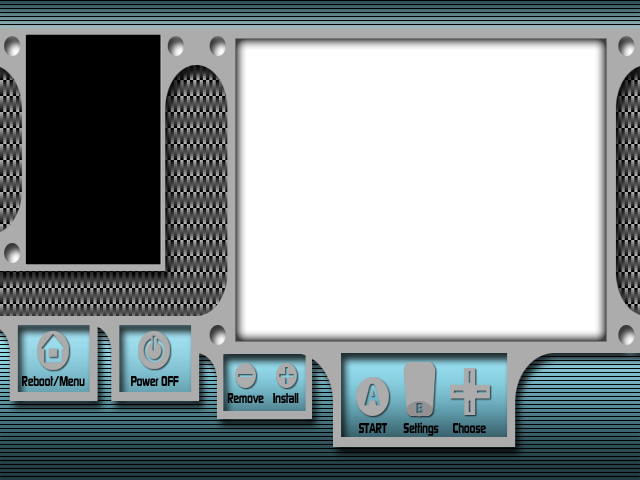
So I spent my evening making this new background for 16x9 displays, but I can't figure out the coordinates at all. When I try to load it I get a black screen. I worked hard on it, and I'd appreciate if someone would look at the .psd I included and help me get it to work. I really want to know the proper way to obtain the coordinates. When working, it should accept the 130x225 covers that auto-download when in widescreen mode.

(EDIT) These are the working coordinates for this background
console_color=0,15
console_coords=244,50,352,280
covers_coords=28,38


Here's the .png (please re-upload)
Please re-upload this

This is what it looks like
BlueCarbon.png
 
dsfanatic5 said:
So I spent my evening making this new background for 16x9 displays, but I can't figure out the coordinates at all. When I try to load it I get a black screen. I worked hard on it, and I'd appreciate if someone would look at the .psd I included and help me get it to work. I really want to know the proper way to obtain the coordinates. When working, it should accept the 130x225 covers that auto-download when in widescreen mode.

Here's the .png (please re-upload)
Please re-upload this

This is what it looks like
BlueCarbon.png


Here's my obviously flawed coordinates:

console_coords=245,50,352,280
covers_coords=27,37

Try these coords

Code:
console_coords=244,50,352,280
CODEcover_coords=26,36

Let me know what happens
 
ok no more dsi problem, finally got it working totally with the black bg
long live coders
biggrin.gif
 
Could someone please upload the widescreen backround "Ultimate2" (Wii-Covers left, Games to choose right). Couldn't find it on the last 30 pages :/
 
Takoru said:
Legah said:
Takoru - you got a widescreen tv?

I get a network error with 7.3 when it tries to download covers, and after that pressing '1' doesn't do anything and I get no covers at all.

I'm running 7.3 on a widescreen with component 480p cables.

Yes, I'm using a widescreen tv.
But I'm not getting a network error; it's checking for my connection, but not even more. => it won't download any cover, and if I press "1" at a single game, it's similar to your problem.

I'm running too 7.3 with a component at 480p.

Help please, still the same problem, I can't download any covers... =(
 

Site & Scene News

Popular threads in this forum