Hacking USB Loader... my turn ;)

  • Thread starter Thread starter WiiShizzza
  • Start date Start date
  • Views Views 817,659
  • Replies Replies 4,239
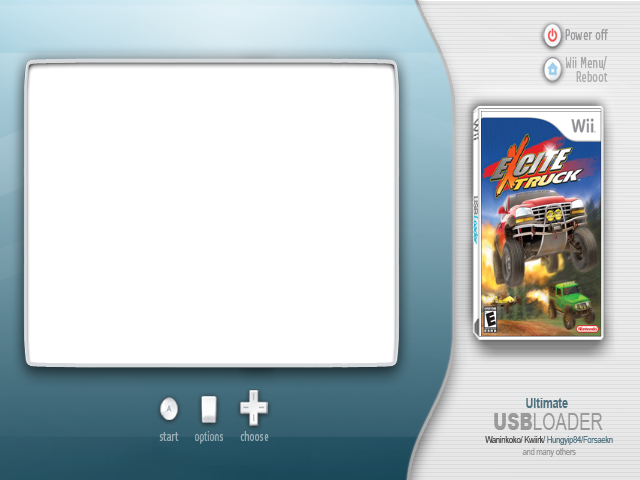
I've tweaked this BG so it will work well with v7 (4:3)
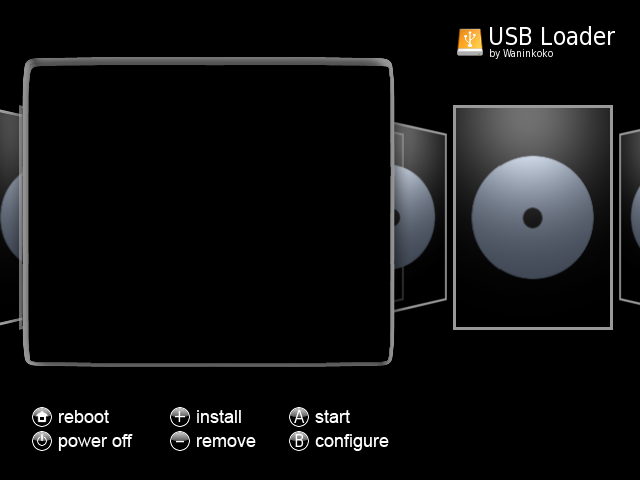
bg.png


Code:
console_coords=40,71,340,290
console_color=15,0
covers_coords=453,105
 
Now that 1.5 from waninkoko's usb loader is out, you'll be using that as base ground? Since it has a faster speed in installing discs and some other bug fixes.

Also is it possible to create a script/modification that it takes out the opening.bnr from the game iso and create a wad channel (which it also auto installs) (when installing a game or afterwards)?
smile.gif
 
Ok for anyone making widescreen backgrounds, I have found the perfect size to start out with, make your bg, then resize to 640x480. I have been trying it out for a few hours, making, resizing measuring boxes on my tv, but I finally found it. The size you want to start with is 800x480 If you want to test this for yourself here is my test pic http://img9.imageshack.us/img9/9862/800k.png turn off covers to measure boxes, they were perfect squares made in photoshop before the resize. The lines and numbers on the edges are showing how many pixels are being cut off (on my tv it cuts 16 from the top and 14 from the bottom) so try to keep important things out of the cut off area.

Again the size you want to start out with is 800x480, then make and complete your background, and then resize it to 640x480. Using these sizes you will get perfect aspect ratios!
 
hungyip84 said:
THitsu10 said:
yo hungyip....im using 7.3...and only bug ive noticed so far is... when widescreen was auto detected it wasn't forcing "ultimitew" settings...atleast for the cover cords. my config.txt is empty.....now with the exception of "layout = ultimatew"... just to get the covers in the right spot

Thanks! Yes, that's a bug.

actually i was just thinking........do we even need "ultimatew" as an option anymore? as long as when widescreen is detected/set and it uses the same ultimateW settings?
Isn't it the same thing? It hit me when I disabled widescreen....and left the layout as ultimateW....which i prob don't have to say... didn't look very good
wtf.gif
 
hungyip84 said:
SpaceJump said:
SpaceJump said:
I just downloaded a missing cover with 7.3 1.5 in widescreen mode, but it downloaded the normal 4x3 cover. hungyip, can you take a look at this?

Are both images_path and wimages_path needed for 7.3 1.5?
Fixed! I meant 7.3 1.5.

What is the game id?
RRDP69 (Rock Band Track Pack 2 PAL)
R2WPA4 (PES 2009 PAL)
 
Joesalad21 said:
I've tweaked this BG so it will work well with v7 (4:3)

bg.png


Code:
console_coords=40,71,340,290
console_color=15,0
covers_coords=453,105
i love this layout. anyone care to make a widescreen version?
 
Elfish said:
i'm getting an initialization network error too...
Any idea what's causing that? It seems like most users don't have that problem, but I have not been able to initialize the network since upgrading to the newest loader.
 
Tgrokz said:
Joesalad21 said:
I've tweaked this BG so it will work well with v7 (4:3)

bg.png


Code:
console_coords=40,71,340,290
console_color=15,0
covers_coords=453,105
i love this layout. anyone care to make a widescreen version?

Along with the 7.3 based on 1.5 this works a charme!!!
I love the work you all have been showing. Keep up that excellent work.

BTW: Wasn't there someone who was working on a cover-flow for the ultimate-loader?
That would rock!
 
strell said:
Elfish said:
i'm getting an initialization network error too...
Any idea what's causing that? It seems like most users don't have that problem, but I have not been able to initialize the network since upgrading to the newest loader.

i got that with the cIOS 36 rev 9 installer while selecting Network Installation, i resolved it by setting up a WiFi connection without protection.
 
Hi,
My Version is ready.

USB LOADER 7.3 mod 1 {Based on 7.3 and Brisma's Version}
- Download Update [OK!]
- Music Background [OK!]

--The updates will be downloaded from my personal space, but all can edited it from Sources.
|| Search: http://www.ddlfast.com in menu.c ||

-- The background music is off by default, but all can run it putting these lines in config.txt:
Code:
# music = [0] 1
#ÂÂ 0 => no background music
#ÂÂ 1 => music background

music = 1

I have tested all and i think that all work.

LINK WITH SOURCES: http://www.megaupload.com/?d=M4981J9G {Correct Version}

ALL FILES IN SD FOLDER MUST BE ON SD:/apps/usbloader/

Bye.
Anarchia.

P.S.: Sorry for my bad english.
 
What does the "based on 1.1" and "based on 1.4" mean ?

I currently have one of the earliest versions of this loader and am only running rev9 of the cIOS. Do I need to upgrade to rev10 to use the 1.4 one or something ?
 
Anarchia said:
My Version is ready.

USB LOADER 7.3 mod 1 {Based on 7.3 and Brisma's Version}

That's awesome! Was hoping you'd follow up with a version that would do auto-updates.... Going to load this up and report back with my findings.
 
hungyip84 said:
DarkunderdoG said:
So running the new 7.3_1.5 this is what i get.

Wrong default background with incorrect buttons (Language where Options should be)

Covers go over the templated space

IMG_3629.jpg

You are right. Use another background instead. I could not find a suitable background at this moment.


mmmmh well...

and this one from first page
6hnknk.png
 
Is the USB Loader releases page on the Wiki still updated? Someone seems to have deleted it from the "Wii" menu in the Wiki, but the page still exists.
 
I'm using v7.2 (1.4), since I can't find v7.3 anywhere in this thread. For some reason, when I boot this version, all the colors of the loader and cover are all messed up. I'll reboot, and then they're fine. I'm not sure what's causing this. My 8gb thumb drive is also freezing up for the first time, and I'm not sure if the timeout/wait for usb feature has been disabled in this release or not. (EDIT) When the loader boots with the wrong colors, pressing home on the wiimote will cause everything to freeze, but the remote vibrates when I move it around.
This is the background I'm using:
colorglitchnormal.png


And this is what happens about 50% of the time when I boot up:
colorglitch.jpg
 
dsfanatic5 said:
I'm using v7.2 (1.4), since I can't find v7.3 anywhere in this thread. For some reason, when I boot this version, all the colors of the loader and cover are all messed up. I'll reboot, and then they're fine. I'm not sure what's causing this. My 8gb thumb drive is also freezing up for the first time, and I'm not sure if the timeout/wait for usb feature has been disabled in this release or not.

Try my version based on 7.3 that you find one page ago...
 

Site & Scene News

Popular threads in this forum