Hacking USB LOADER 1.4

  • Thread starter Thread starter Skarface05
  • Start date Start date
  • Views Views 59,660
  • Replies Replies 141
Knolli said:
hm...usb loader doesn't show me any game covers, but i have them in root:\usb-loader\covers and named *GameID*.png =/
the images has to be 160x225 in dimension

dipswitch said:
QUOTE(leonhart83 @ Apr 13 2009, 05:36 AM) I am sure I have read this entire thread, and have read it a couple times but have not seen a reply with the answer.

Can you use the 1.4 loader without installing rev10?

THanks.

I tried using 1.4 without installing rev10 and the game would freeze with a black screen after the wiimote warning screen. After I installed rev10 they loaded up fine.

Correct me if I'm wrong but the covers should be in root:\images\

they should be in usb-loader\covers
 
I wonder if the dumping time increases, does the USB data loading time aswell?
Did someone tested a loading intensive game with the 1.4 release?
 
is there an "ultimate edition" usb loader (like the wiishizza version) in 1.4?
With language selection, ocarina cheat, video force etc?
 
thankyou!
but the 1st link doesn't seem to work (v6Beta made by hungyip84/forsaekn (13/04/09 )

Ok it's started
biggrin.gif
 
Does the loader block updates from Nintendo that are on the disc?

If not, is there some kind of warning if i install an iso which has an update on it?
 
geolyte said:
Does the loader block updates from Nintendo that are on the disc?

If not, is there some kind of warning if i install an iso which has an update on it?

All loaders(Gamma/Gecko OS, SoftChip, the usb loader) "block" updates. I doubt they even could install updates if they wanted too. Disc updates use IOS4 which works totally different from the other IOS.

And you are always asked if you want to update, so if you are unsure for example if your disc channel blocks updates, you can pop in every disc you want and if it prompts you to update, you can turn off the wii to avoid the update.
 
oboro muramasa (japan) doesnt work on my pal wii, works trough normal boot and gecko os, strange?

i get DRE's lately with some games, i use 4gb SDHC hoping that i could play off of that and wouldnt have to worry about DRE, anything im doing wrong or is usb loader not region free?

I also have a Wiikey in there.

im gonna try ultimate v6, maybe that will work
 
wiimano said:
on this newest loader, it tells me i need to format the drive, its already wbfs and i have a lot of games on it, do i need to start from scratch with the new loader?

I'm having a similar issue as well. It seems like 1.1 had less problems on my end although I don't get a prompt to format it just loads forever and my HDD flashes for a long time there is no time out error I just have to restart the Wii.

I don't think you or I would need to start over from scratch otherwise we would see it in the 1.4 release notes.

Just my thoughts on the situation.
 
TroyTheZombie said:
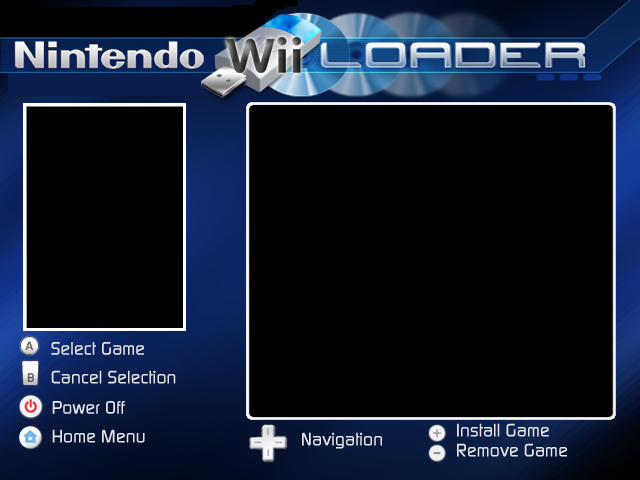
BackgroundTemplate for editing with photoshop (photoshop one has transparency for layers so your backgrounds will look much smoother)

Download links are below, i recommend not using the displayed one because of compression done by photobucket

backgroundTemplateforphotoshop.png


background Template for photoshop.png

Thanks for the template:) i used it to make this one.

USBLoader14background.png
 
Overload180 said:
TroyTheZombie said:
BackgroundTemplate for editing with photoshop (photoshop one has transparency for layers so your backgrounds will look much smoother)

Download links are below, i recommend not using the displayed one because of compression done by photobucket

backgroundTemplateforphotoshop.png


background Template for photoshop.png

Thanks for the template:) i used it to make this one.

USBLoader14background.png


No problem. Nice Background BTW.
 
TroyTheZombie said:
Overload180 said:
TroyTheZombie said:
BackgroundTemplate for editing with photoshop (photoshop one has transparency for layers so your backgrounds will look much smoother)

Download links are below, i recommend not using the displayed one because of compression done by photobucket

backgroundTemplateforphotoshop.png


background Template for photoshop.png

Thanks for the template:) i used it to make this one.

USBLoader14background.png


No problem. Nice Background BTW.


Thanks awesome.It will now be my background as well
smile.gif
 
Hey everybody, i tested out installing mariokart and some other games from USB loader 1.1 compared with SD/USB loader 1.4 and 1.1 installs considerabally faster. I dont know if this is a bug or not but for now im installing my games with 1.1. The difference for me was approx 30 mins compared with approx 90 mins. + has anybody had a similar issue etc?
 

Site & Scene News

Popular threads in this forum