Hacking ULTIMATE System Menu 4.0 Guide

  • Thread starter Thread starter assassda
  • Start date Start date
  • Views Views 468,748
  • Replies Replies 1,666
Status
Not open for further replies.
innercy said:
raphzthename said:
While installing cIOS36 rev9, I get the following error:

Code:
Mounting SD card... OK!
Reading "IOS36-64-v1042.wad", please wait... ERROR! (ret = -1)

Press any button to restart the Wii...

What steps do I need to take to fix this?

IOS36-64-v1042.wad need to be place in root of SD... plz read the manual carefully.

Stupid mistake on my part. I was able to figure out exactly what you just told me and the rest of the process went along silky smooth. I'm on 4.0U and everything seems to be working fine. I'm just looking for a little clarification as to how to run the WiiWare/VC wads straight off of the SD card. Here is what I'm doing:

1. Load game wad into wad folder on SD card.
2. Install game wad through WadManager
3. Go into Wii save data and copy installed game data to SD card
4. Go into SD channel and try to copied game

Is this the proper way of running game channels through the SD card? Because when I try this, the game channel doesn't show up on my SD card. Great guide through and through! Except for that minor hiccup, I was able to follow it all the way. All I'm missing is a step-by-step for the issue above!
yay.gif
 
so everything from first to last step is confirmed to be working now with no brick problems? i just wanna make sure that during the process, i dont get bricked and get all freaked out and stuff as the wii is like a precious console to me, heheh...
 
Macky said:
JimmyZ said:
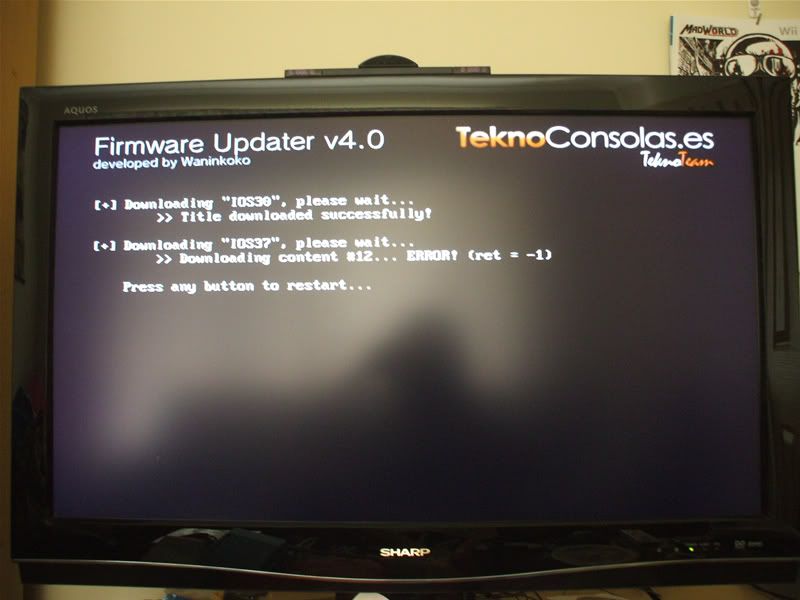
Macky could you give more detail? like a full screen dump, better you could remember what you've done to your wii

Ok ive done everything EXACTLY how it says but now I cant go any further...

DSCF1452.jpg


Other things ive done with my Wii is installed the BackUp Loader (latest version) following the instructions on this site.

it seems like a download issue, did you stuck here every time?
 
When I put my Wii in Sleep Mode, after awhile it starts making a clicking noise, and it won't turn on from the remote. I have to power it down, and then it works. This happened after I installed Preloader and 4.0. Is this something to do Preloader?

Any ideas on how to fix this?
 
so in summarizing my wii with wiikey is still at 3.2 with homebrew channel installed if i follow this guide everything should be sweet...
 
Reru said:
When I put my Wii in Sleep Mode, after awhile it starts making a clicking noise, and it won't turn on from the remote. I have to power it down, and then it works. This happened after I installed Preloader and 4.0. Is this something to do Preloader?

Any ideas on how to fix this?
I believe in preloader settings you have to turn on ignore standby settings or something along those lines..
 
can somebody just answer one question for me my wii is modded and you are saying it wont play any backups in the disc channel without installing cioscorp or is that only for soft modded wiis
 
I have a question, i followed the instructions by the book but now only my pal backups work,is there a way i can get both ntsc and pal backups to work in disc channel i have tried the preloader tweak for region free but it doesnt seem to have worked :S
 
I have a little problem with installing WADs.

A few days ago, I updated from 3.2E to 4.0E. I used IOS60 patcher and the Nintendo Update to upgrade. Everything was working fine, except the installation of preloader.
Preloader always told me that my IOS36 has the fakesign bug fixed.
Therefore, I ran IOS downgrader and was then able to install preloader.
But, I wasn't able to install WADs anymore.

So I downgraded to 3.2E and then upgraded again to 4.0E. The upgrade is always running fine and I am able to install preloader, but I can't install WADs anymore. I always get Error=-1017.

I downgraded and upgraded a few times now and WADs still don't work.

Does anyone have a solution to this problem?
 
I'm having some problems with PreLoader 0.29

I started off with 3.2U. I wanted to upgrade to 4.0 and followed these directions that I was given:

1)Install IOS60.wad
2)then System Menu WAD
3)then use the IOS 60 Patcher
4)Then run CIOS 61 and Shop Channel Installer

So I did that and everything worked great. I was running 4.0 with all homebrew features working.

Then I saw this thread and it said that it PreLoader was highly recommended to prevent bricks. So I decided to install that.

It installed no problem... but when I go to SystemMenu it gives me the corrupted data message. The letters are all messed up and I can barely read it.
I turned on the power(didnt hold reset) and preloader started just fine. SystemMenu still had error.
I turned on the power(Held reset this time) and preloader started just fine. SystemMenu still had error.
I turned on the power(Held reset again) and preloader started just fine. Opened up homebrew channel and installed preloader 0.29 again. Still same thing happened.
I installed sytem menu 4 wad again and everything was back to normal and working perfectly.

I took a look at this thread again and thought maybe I didnt Install the CIOSCORP WADs and the CIOS60BF.wad.
I installed preloader 0.29 again, installed those wads and then powered off the wii. When I booted the wii again it did not give me system menu corrupt error like the tutorial says. It started preloader with no problems. I did not have to hold reset. However when I select SystemMenu it says corrupt data again.

How do I get preloader to work for me?
 
I had SoftMii 2.1.1 installed on my Wii and when I went to configure my network settings in Wii settings I updated to 4.0

Can I just load the BackUp Launcher onto my SD card and run backups from the Homebrew Channel through it? Reason I updated was because I wanted to play online, please let me know ASAP!
 
mickthestud said:
can somebody just answer one question for me my wii is modded and you are saying it wont play any backups in the disc channel without installing cioscorp or is that only for soft modded wiis
chipped wiis dont need cIOSCORP

QUOTE(kersplatty @ Apr 10 2009, 08:17 AM) I have a question, i followed the instructions by the book but now only my pal backups work
try the latest hacks for preloader and make sure you enable region free and update blocker. other than that i dont know what to say

t4c: you need to install cIOS again to install WADs steps 1-3

ThaDraGun: Read the CIOSCORP section of my guide again steps 3-5

Sajiko: if you have cIOS36 installed you can use backup loader from the HBC
 
assassda said:
Sajiko: if you have cIOS36 installed you can use backup loader from the HBC

Thanks for the reply!!! When I installed the SoftMii package the cISOcorp that came with it installed for me CIOS36

So I guess it should work right?
 
assassda said:
chipped wiis dont need cIOSCORP

ThaDraGun: Read the CIOSCORP section of my guide again steps 3-5
I guess I didnt need to install cIOSCORP since my wii is chipped.


Sorry, I still dont know what I'm looking for in your instructions. I did everything that it says:
3) Install CIOS60BF.wad
Installed with no problems

4) Your system menu will now say "System Files Corrupt" but dont worry! just hold reset and launch the Homebrew Channel and install Preloader 0.29 AGAIN
I Don't need to hold reset button to get to Homebrew channel. I did install Preloader again. It still says system files corrupt.

5) Enable update blocker in preloader. Hold RESET and power on. Change preloader options and hacks
There is no difference if I hold down reset or not. Update blocker is enabled.
 
Earlier, you said chipped wiis dont need cIOSCORP. Is that the only section to miss out of your guide? ie do I just have to follow up to step 7 (installing preloader) and no more, or is there anything else I can do without?
 
JimmyZ said:
Macky said:
JimmyZ said:
Macky could you give more detail? like a full screen dump, better you could remember what you've done to your wii

Ok ive done everything EXACTLY how it says but now I cant go any further...

DSCF1452.jpg


Other things ive done with my Wii is installed the BackUp Loader (latest version) following the instructions on this site.

it seems like a download issue, did you stuck here every time?

I just stops randomly, sometimes on the 1st IOS and sometimes the 3rd...
Sometimes it freezes on the "Initializing Network" part it just sites there if I press anything it comes up with a bunch of numbers and says "Code Dump" or whatever then I have to hold the power button to turn it off.
And sometimes on the "Initializing Network" part it will also give an error and go back to the Wii Menu

I have checked if it was my wireless point cutting out so I played an online game on my DS while doing the 4.0 update and its not my Access Point, I also tried some Wii Channels like the Internet channel and it works perfectly so...I dont know whats wrong exactly...
 
Sajiko said:
When I installed the SoftMii package the cISOcorp that came with it installed for me CIOS36
yes but for backup loaders you need to install Waninkokos cIOS rev8 or rev9 using steps 1-3

ThaDraGun said:
I did everything that it says:
well if youre having problems you need to repeat the steps

3) Install CIOS60BF.wad
Do this AGAIN to install the correct hacked IOS

4) Your system menu will now say "System Files Corrupt" but dont worry! just hold reset and launch the Homebrew Channel and install Preloader 0.29 AGAIN
Install Preloader again to fix the system menu

If you STILL have an error after repeating those two steps then your only option is to downgrade to 3.2 using cIOS Downgrader and start from the beginning again

QUOTE(seejay01462 @ Apr 10 2009, 01:19 PM)
Earlier, you said chipped wiis dont need cIOSCORP. Is that the only section to miss out of your guide? ie do I just have to follow up to step 7 (installing preloader) and no more, or is there anything else I can do without?
Yes, in order to retain ability to install WADs and run hacked VC/WiiWare from the SD card you must run the other steps. preloader is highly recommended
Installing CIOSCORP with a mod chip is not recommended, it will not damage the system however some report problems with discs.

Macky: This is an internet issue. Ive had this problem please trust me. look into buying an ethernet adapter or try moving the wii to a different location before posting again
 
assassda said:
If you STILL have an error after repeating those two steps then your only option is to downgrade to 3.2 using cIOS Downgrader and start from the beginning again


Instead of trying over and over I just downgraded and started over like you said. Everything works ok now.
smile.gif
In the preloader hacks there is only the skip disk update check.. are there any other that should be in that list? If I open the hack file it looks like there are others but they arent listed in the menu.


EDIT: Nevermind, I found the 4.0 hacks. Damn this forum is so slow its hard to search and browse for stuff

** EDIT 2: **

I just noticed one problem. I'm not 100% what is causing it but this is whats happening:
WHen I Boot up wii the wii discs load just fine. However, whenever I go into the homebrew channel then exit out of it... when wii reboots the disc says 'this disc cannot be read'
I turn off the wii and turn it back on the disc reads just fine.
If I go into a game and then exit out of it the disc still reads fine.
It's only if I go into homebrew channel, then come back out without completely turning the power off then on again that it messes up. It does it for every game every single time.

I'm not sure if this was happening before I did this tutorial but I didnt notice it if it was. I think something went wrong and thats why theres the little bug.
Anyone else experience this and does anyone know how I can fix it?

Thanks
 
Status
Not open for further replies.

Site & Scene News

Popular threads in this forum