
- Joined
- Mar 26, 2014
- Messages
- 1,773
- Reaction score
- 1,841
- Trophies
- 2
- Age
- 26
- Location
- inside your fridge
- Website
- dochacknik.keybase.pub
- XP
- 2,254
- Country

Hackintosh Setup:
Have you ever wanted to Run Mac OSX on your Laptop or Desktop? Well you can!
These days it's way easier to setup a Hackintosh, the way i'll be showing you is rather simple;
So let's get started!
Things you Need:
Have you ever wanted to Run Mac OSX on your Laptop or Desktop? Well you can!
These days it's way easier to setup a Hackintosh, the way i'll be showing you is rather simple;
So let's get started!
Things you Need:
- A Computer with 2GB of RAM or Higher, and A 2.4GHZ or More CPU
- A Computer (Or Mac) to setup your USB Installer
- A Copy of OSX or a .ISO/.DMG (Do a Google Search); There are also Distro's (iATKOS/Niresh)
- A 8GB USB or More
- VirtualBox Installed (Or VMWare); And the ExtensionsPack
Now go and create a New Virtual Machine:
First Create a new Virtual Machine:
Type "Mac OSX [Version]";
After doing so, VB will Automatically select the Proper OS Settings!
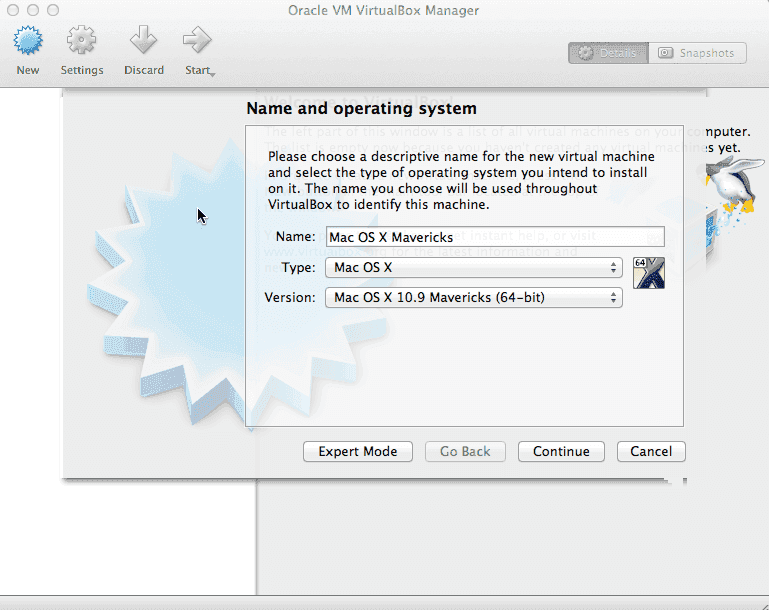
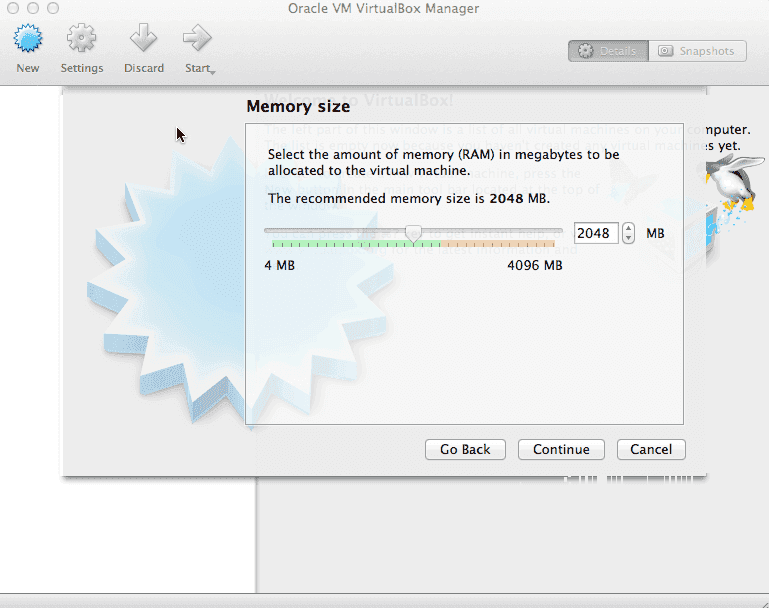
Then Select the Amount of RAM (Minimum 2GB or 2048MB)
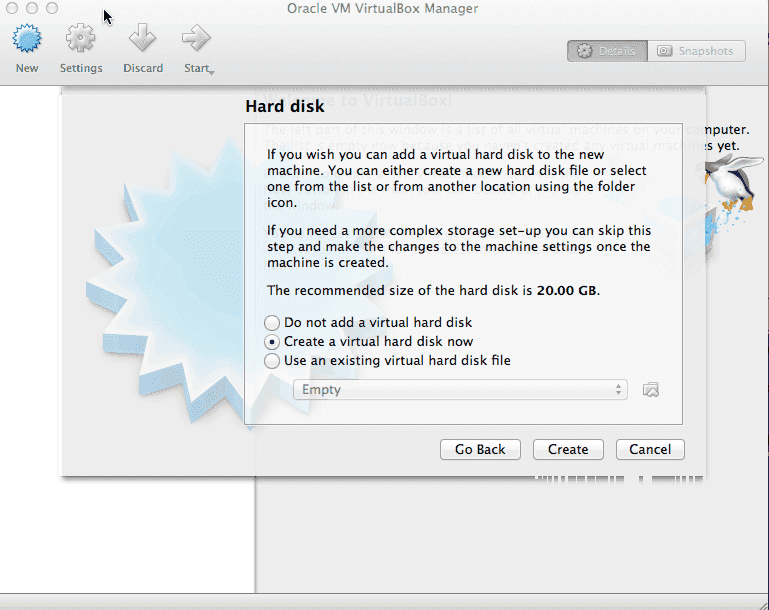
Select if you wish to create a New Virtual HDD or Not:
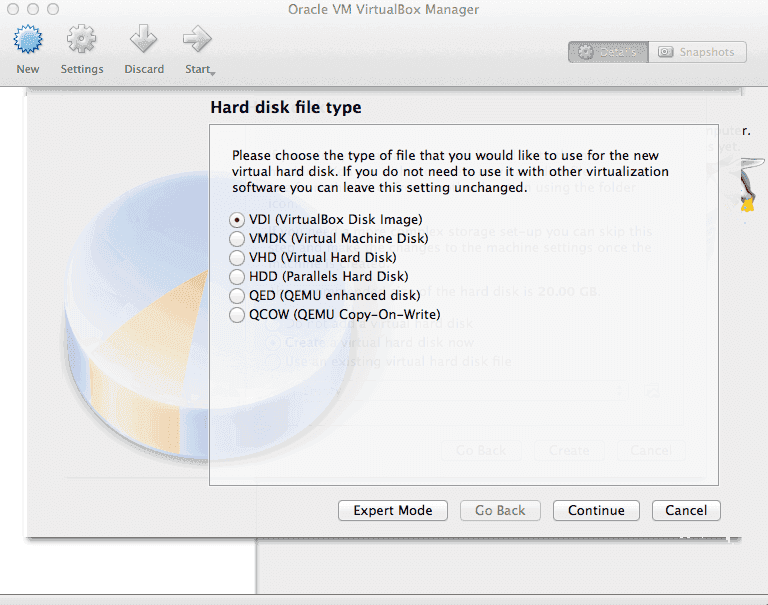
Then After Allocating RAM (2048MB Minimum) Choose HDD Type (VDI):
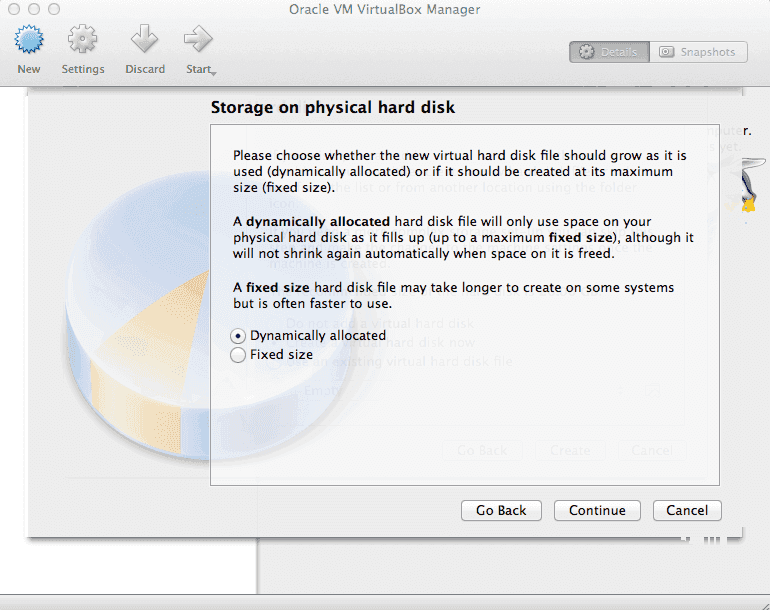
Then Choose HDD Style (Dynamic or Fixed):
Note: Dynamic will Expand the Virtual HDD File as Files are added;
But, Fixed will create a Virtual HDD File as a Fixed size (Ex: 128GB Selected, 128GB file Will be Made)
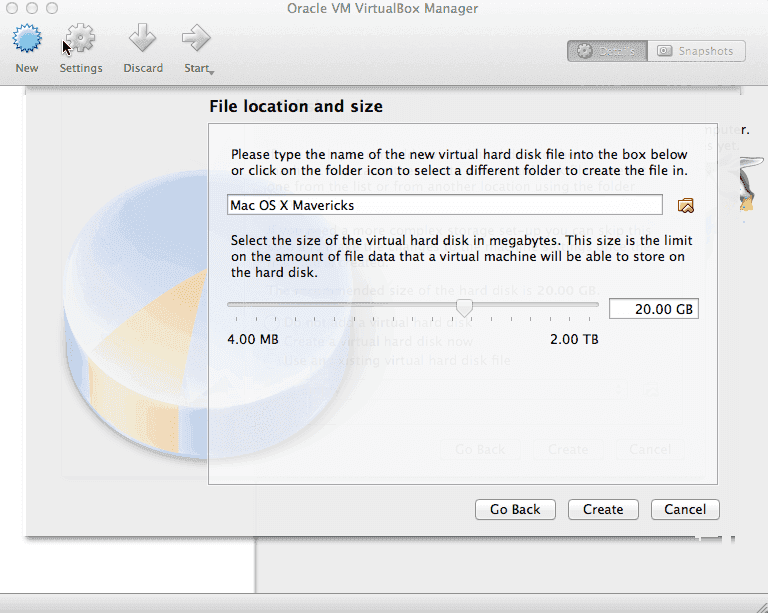
Now Select the Name & Storage Size:
Now we need to adjust some Virtual Machine Settings:
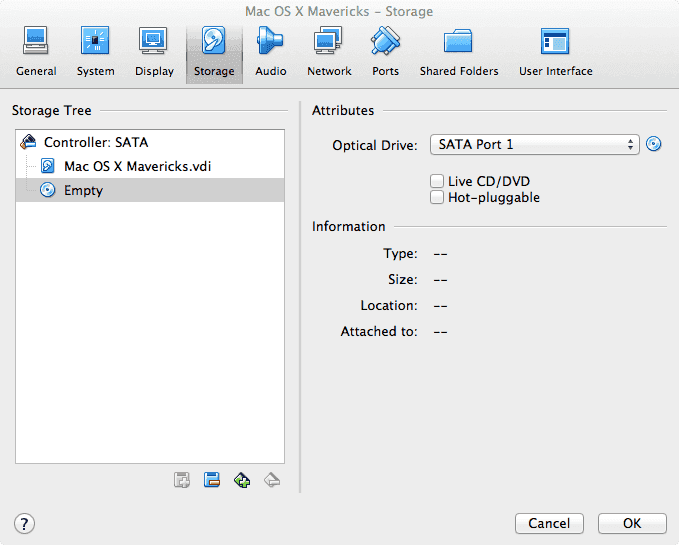
Fist off, go to Storage; Then select the Iteam that Says "Empty";
This is the Virtual CD/DVD Drive.
Then Change the Disk file to either: "A Disk Image (.iso/.dmg), or a Physical Disk Drive."
Then untick the option "Enable EFI";
And if you'd like, Change Pointing Device to "PS/2."
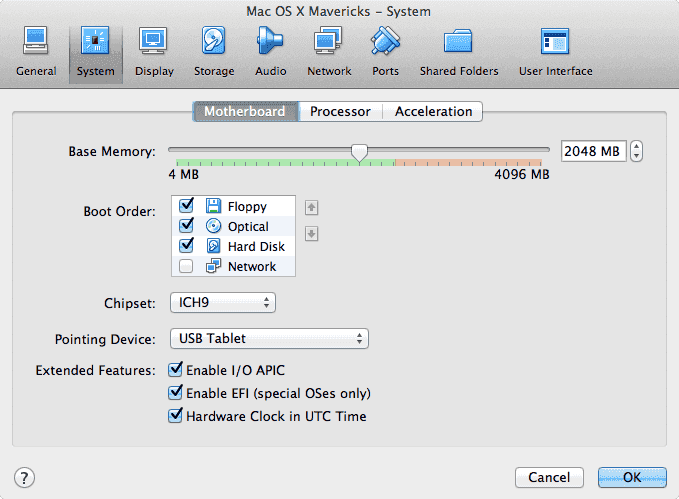
Now select the Amount of CPU Core's that'll be used:
(Ex: 2Cores if your On a Duo CPU, or 4Cores if your on a Quad CPU, etc.)
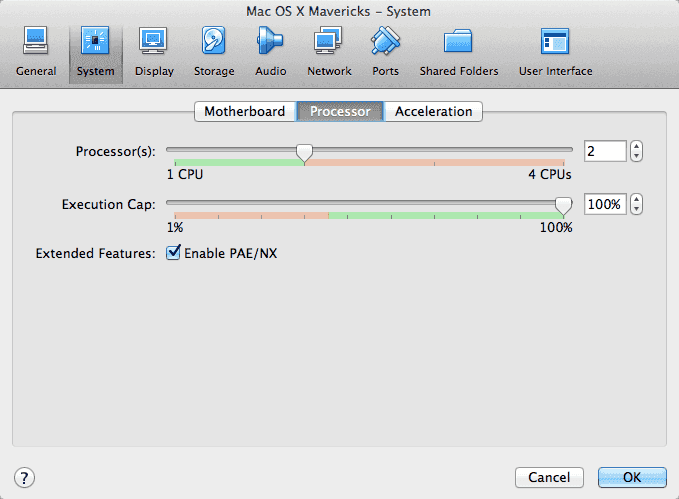
Then Click "Ok" to save the Changed Settings!
Note: Make sure you have your USB Mounted in Ports/USB!
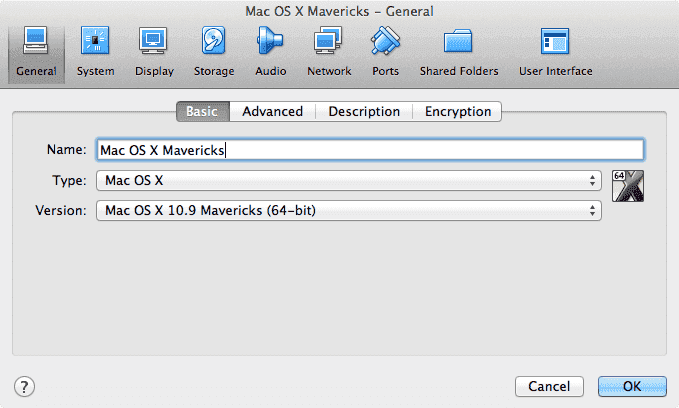
After all of that, go ahead and Startup the Virtual machine;
And follow the Onscreen Instructions:
Some Common Bootflags are:
"-v -x npci=0x2000 or 0x3000"
-v: Will boot the Installer in Verbose mode, it's basically a Debug Mode.
-x: Will boot the Installer in Safe Boot Mode, it's like Safe Mode in Windows;
Only loading Internal Drivers not any 3rd party or External one's.
npci=0x2000/0x3000: Can help with Hanging on PCI begin.
Now after a Successful install, we need to Setup our USB Drive:
First off we need to Open Disk Utility;
Make sure your USB is formatted as "Mac OS Extended Journeled", with "MBR" in Options.
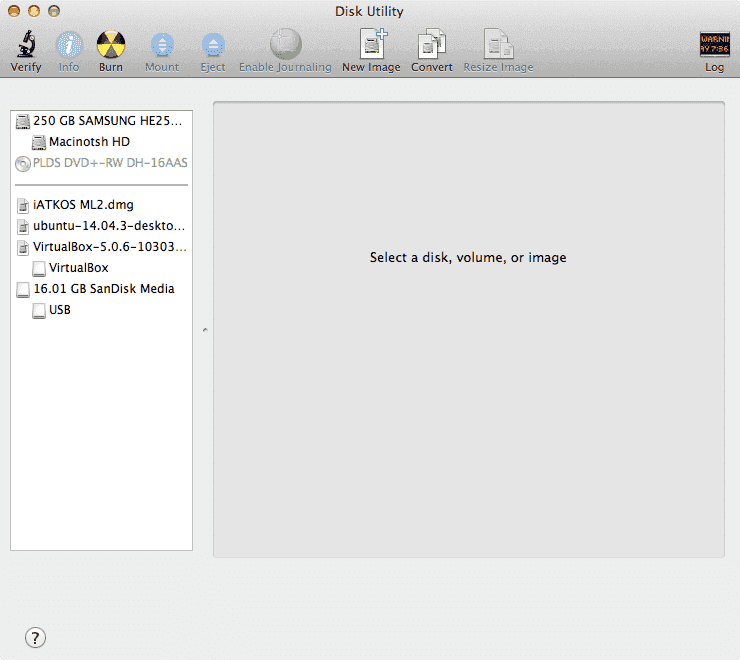
Next we need to Mount our '.dmg" file or our Disk:
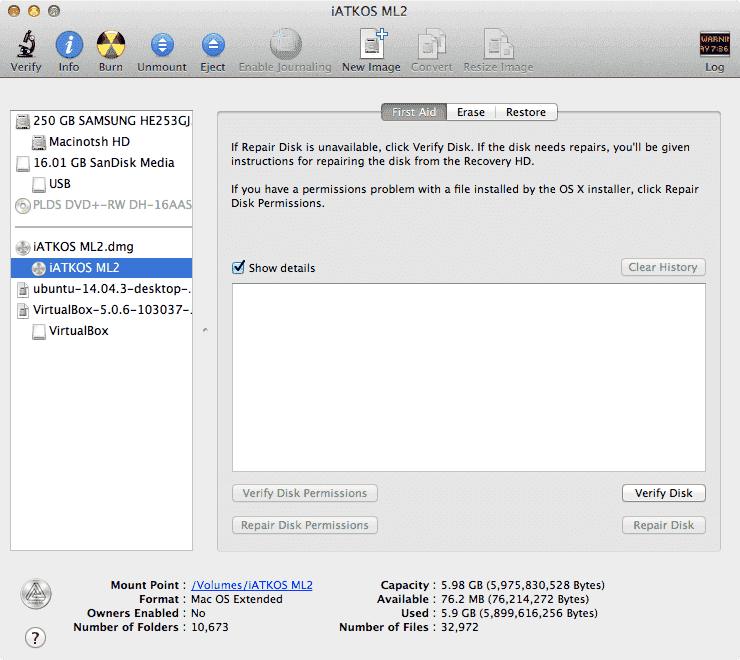
Next click the "Restore" Tab:
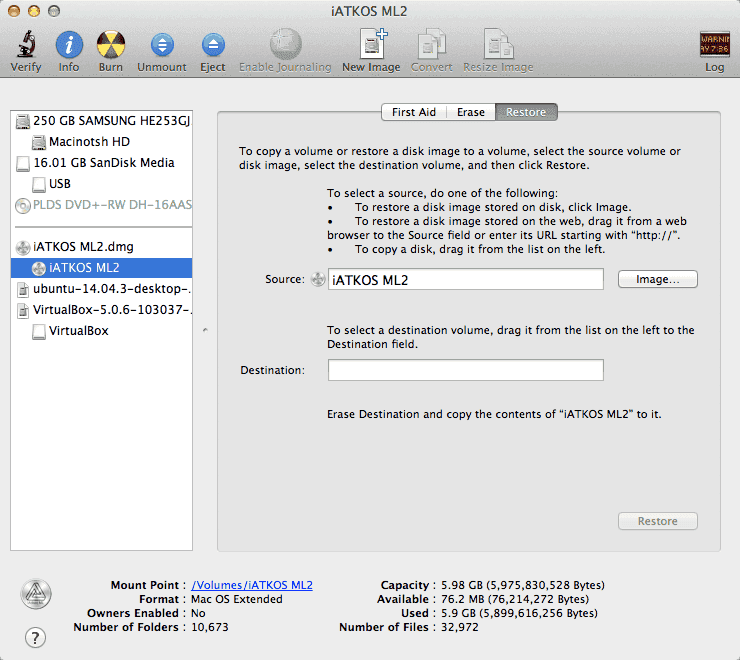
Now Click & Drag the USB Drive Partition:
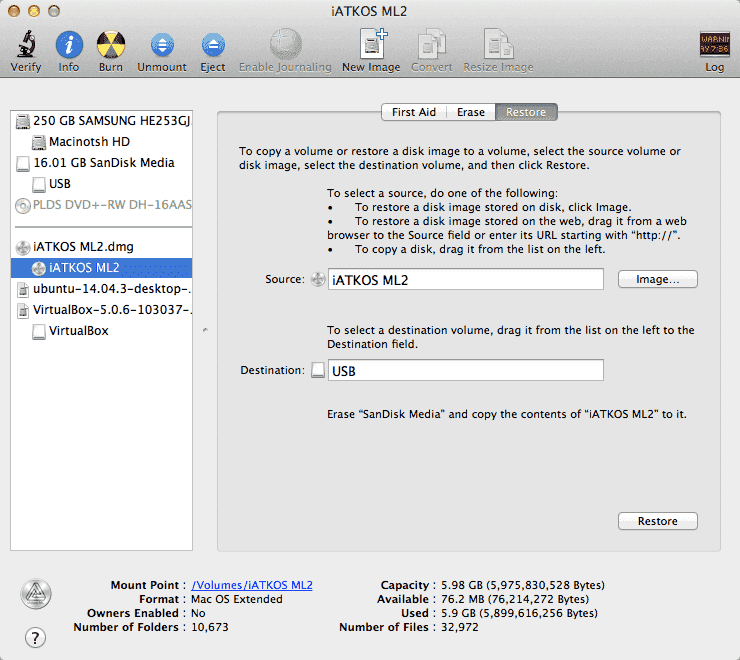
Now Click "Restore", enter your Password, and Sit-Back and Relax (Time: 24-40 Minutes)
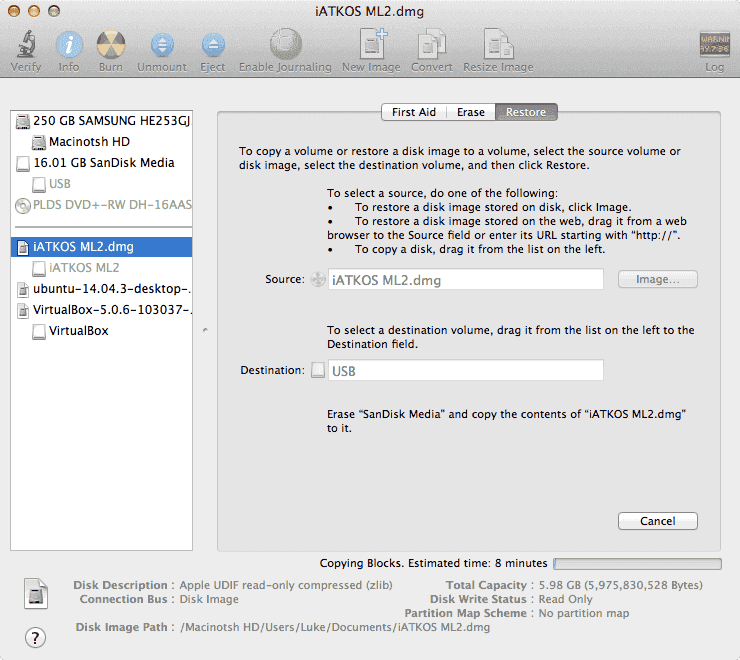
After The Restore, You may need to Install a Bootloader, Ex: "Chameleon, or Chimera. "
Now Reboot your Physical PC, and Go to your BIOS.
Make sure Booting From your USB Drive is Enabled!
And Select you F-Key boot Menu, and Select your USB (Ex: USB Storage Device, or USB: [Model Name])
Note: You can also Install OSX to an External HDD or SSD, i did so with my Fantom Green Drive 3 (1TB).
If you Encounter any issues during Setup, please Comment below!
First Create a new Virtual Machine:
Type "Mac OSX [Version]";
After doing so, VB will Automatically select the Proper OS Settings!
Then Select the Amount of RAM (Minimum 2GB or 2048MB)
Select if you wish to create a New Virtual HDD or Not:
Then After Allocating RAM (2048MB Minimum) Choose HDD Type (VDI):
Then Choose HDD Style (Dynamic or Fixed):
Note: Dynamic will Expand the Virtual HDD File as Files are added;
But, Fixed will create a Virtual HDD File as a Fixed size (Ex: 128GB Selected, 128GB file Will be Made)
Now Select the Name & Storage Size:
Now we need to adjust some Virtual Machine Settings:
Fist off, go to Storage; Then select the Iteam that Says "Empty";
This is the Virtual CD/DVD Drive.
Then Change the Disk file to either: "A Disk Image (.iso/.dmg), or a Physical Disk Drive."
Then untick the option "Enable EFI";
And if you'd like, Change Pointing Device to "PS/2."
Now select the Amount of CPU Core's that'll be used:
(Ex: 2Cores if your On a Duo CPU, or 4Cores if your on a Quad CPU, etc.)
Then Click "Ok" to save the Changed Settings!
Note: Make sure you have your USB Mounted in Ports/USB!
After all of that, go ahead and Startup the Virtual machine;
And follow the Onscreen Instructions:
Some Common Bootflags are:
"-v -x npci=0x2000 or 0x3000"
-v: Will boot the Installer in Verbose mode, it's basically a Debug Mode.
-x: Will boot the Installer in Safe Boot Mode, it's like Safe Mode in Windows;
Only loading Internal Drivers not any 3rd party or External one's.
npci=0x2000/0x3000: Can help with Hanging on PCI begin.
Now after a Successful install, we need to Setup our USB Drive:
First off we need to Open Disk Utility;
Make sure your USB is formatted as "Mac OS Extended Journeled", with "MBR" in Options.
Next we need to Mount our '.dmg" file or our Disk:
Next click the "Restore" Tab:
Now Click & Drag the USB Drive Partition:
Now Click "Restore", enter your Password, and Sit-Back and Relax (Time: 24-40 Minutes)
After The Restore, You may need to Install a Bootloader, Ex: "Chameleon, or Chimera. "
Now Reboot your Physical PC, and Go to your BIOS.
Make sure Booting From your USB Drive is Enabled!
And Select you F-Key boot Menu, and Select your USB (Ex: USB Storage Device, or USB: [Model Name])
Note: You can also Install OSX to an External HDD or SSD, i did so with my Fantom Green Drive 3 (1TB).
If you Encounter any issues during Setup, please Comment below!
Last edited by Dr.Hacknik,