Hacking [Tool] Joy-Con Toolkit

  • Thread starter Thread starter CTCaer
  • Start date Start date
  • Views Views 1,288,132
  • Replies Replies 1,757
  • Likes Likes 136
Joy-Con Toolkit v1.0

jc1.png

jc2.png


Since months ago, I bought yellow joy-con shells and modded my Joy-Cons. Then I found Shinyquagsire23 HID-Joy-Con-Whispering and changed my joy con colors and this reflected my new neon yellow color in-game.

I always wanted to make an easy tool for that, for the community. So here it is with some additional goodies.
Have fun creating funky combinations.

What it can currently do:
  • Change colors of your Joy-Con or Pro Controller
  • Backup your SPI flash
  • View S/N and MAC address
  • View Firmware version
Prerequisites:
  • .net framework v4.5.x
  • Bluetooth adapter
  • Windows PC
Changelog:
v1.0: Initial release

Before you do anything, make a backup of your SPI flash.
When you change colors, before 3.0.0 update you need to restart your Switch and then pair, for colors to take effect.
For 3.x.x just pair the controller with Switch.
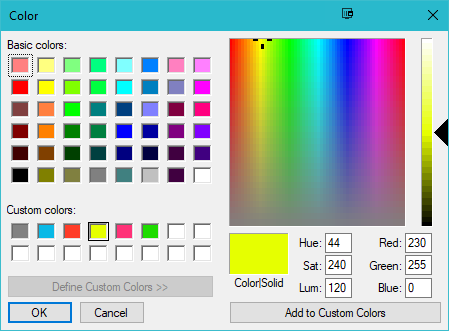
The custom colors in the color dialog are the retail ones.

Special thanks:
Everyone at Nintendo_Switch_Reverse_Engineering: General BT protocol usage
Shinyquagsire23: General hidapi and BT protocol usage
SciresM: General hidapi usage for windows

If someone knows any original retail color (like neon-yellow, splatoon, etc) please reply here with the hex code

You said easy, but this program it does not work, no matter what kind of .net framework v4.5.x i install or .DLL like vcruntime i look for, is not working easy for everybody as you said, all I got is the First Picture and then when I put the .dll file then I get the Second Picture, so any clue:::???

First Picture

upload_2017-7-24_22-56-2.png


Second Picture
upload_2017-7-24_22-56-45.png
 
  • Like
Reactions: Sergios
I think it's just the controller colors. There's not a lot else to change really
I thought they're may've been some extra data slots like the Wiimotes had. I'll open up a dump in a hex editor later and see what I can find.
 
Hey, I'm wondering if I can change it to colors other than retail colors. I have custom Joy-Con and I want to know if I can change the colors to the brown without hurting anything.
 
Hey, I'm wondering if I can change it to colors other than retail colors. I have custom Joy-Con and I want to know if I can change the colors to the brown without hurting anything.
Yeah, you can. I changed mine to a lavender color which isn't an official joycon color at all and it works. It shows the color perfectly fine and it hasn't messed anything up so it would definitely be safe to change it to brown.
 
To all that have crashes, install also visual c++ 2015 x86 redistributable.
If you installed any dll by hand, remove it.

Sorry about that. I updated OP.
 
Last edited by CTCaer,
Yeah, you can. I changed mine to a lavender color which isn't an official joycon color at all and it works. It shows the color perfectly fine and it hasn't messed anything up so it would definitely be safe to change it to brown.

Oh nice, can't wait to use it! Thanks so much :)
 
  • Like
Reactions: StonedPurple
One thing I noticed is that it doesn't save the custom colors I set in the extra boxes. The ability to save custom colors and have them still be there after you restart the program would be awesome.
I'd like this feature too. Hopefully more people request it so it can be added.
 
  • Like
Reactions: StonedPurple
What would be the best colour for these joy con skins? I'm thinking a gold and dark brown

41heRaDkzSL.jpg
That looks cool! I'd say dark brown for the buttons, gold for the body

For now I've got this going until I get a new set of not-grey joycons:
DFmBDP8V0AE92eH.jpg:large
Closest I could get to a Gamecube style
 
That looks cool! I'd say dark brown for the buttons, gold for the body

For now I've got this going until I get a new set of not-grey joycons:
DFmBDP8V0AE92eH.jpg:large
Closest I could get to a Gamecube style
Thanks, I just need to find the right shade...

That NGC coloring looks awesome
 
It looks very usefull but I can't use it: it crashes at startup.
I have Windows 8.1 x64
.net framework 4.5 is installed
C++ redist 2015 (x86) is also installed
I also tried to restart my computer.

Someone has an idea?
 
Cant do it :/ The tool keeps crashing ..

Edit: I did it! I now have Zelda Theme Joycons!
image8m5q27yoln.jpg
 
Last edited by GerBrew,
Is this program supposed to crash after you dump the SPI? Because right after dumping my left joy-con it crashed, Joy-con Toolkit.exe has stopped working. Did it dump correctly? It's a 512kb file.

--------------------- MERGED ---------------------------

Now, when ever I try to change my joycon colors right or left the program stops working after I choose the colors
 
Try WINE, you might be able to get it running through that

What Linux distro are you using? I might be able to test it.
Using Ubuntu 12.04
I Tried WINE and it crashes immediately. I've always had issues with WINE though so it may be an error on my end.
 

Site & Scene News

Popular threads in this forum