Switch OLED teardown V1/V2

  • Thread starter Thread starter grubgrub
  • Start date Start date
  • Views Views 261,048
  • Replies Replies 1,138
  • Likes Likes 10
Thanks for letting us know!

Nice, but in the end we still have to solder 6 wires.

PS for newbies like me: on the core installation there’s another step: fold the ribbon cable and connect the adapter - in which the 4 wires are soldered to - to the modchip motherboard.
Actually you only need 5 since the GND is already being "pulled" from the long CPU flat cable. ;)

Question...Can the SX Core be flashed with Spacecraft before it is installed? or does it need to be in the switch and powered on before it can be flashed?
Mine was updated before I install.
I used an original SX Lite updated with Spacecraft-NX 0.2.0.
 
  • Like
Reactions: lufeig and mattyv

Attachments

  • 207B2D79-59F2-4143-9C38-320BF87EDCFF.jpeg
    207B2D79-59F2-4143-9C38-320BF87EDCFF.jpeg
    479.5 KB · Views: 98
Oof, 43€, can't help but kinda really dislike hwfly since they appear to be incredibly motivated by greed. They obviously ripped TX's design, probably their bitstream and are now profiting hugely from TX's demise. One might wish the same upon them... but then we'd be left with nothing.
 
Can someone explain to me what these addon cable sets are for?

I thought you solder the 6 wires to the mainboard and the HWFly Chip and thats it.

What do I need these small addon cable/boards for?
 
If I have the SX Core or SX Lite, I would just stick with the SX firmware 1.3 and just use the SX Gear boot.dat file. It's much simpler that way.

I bought my HWFLY lite from this Ming store. He is overpriced. Buy from Taobao if you can for 1/20 the price.
 
Getting a red light on my HWFLY Lite - mine was the one that I damaged soldering so not sure if its red because there is a short or if the chip was damaged.

Anybody know how to tell?

Also, does the value of the DAT0 point matter on the Multimeter? Mine is like 1.650 or something like that... Sthetix was saying his was lower....
 
  • Like
Reactions: mvmiranda
Getting a red light on my HWFLY Lite - mine was the one that I damaged soldering so not sure if its red because there is a short or if the chip was damaged.

Anybody know how to tell?

Also, does the value of the DAT0 point matter on the Multimeter? Mine is like 1.650 or something like that... Sthetix was saying his was lower....
1650 is too high! It should be something between 500ish and 700ish.

Does it blink some times (blue or purple) then red light?
If so then your issue is your DAT0 connection.
 
I mean, the modchip is expensive but you can’t do it yourself at home

On the other hand, that ribbon cable set can be replaced by some enamel wires, fine soldering gig and technique.
 
  • Like
Reactions: mvmiranda
I mean, the modchip is expensive but you can’t do it yourself at home

On the other hand, that ribbon cable set can be replaced by some enamel wires, fine soldering gig and technique.
Also that ribbon cable literally only costs like under an actual dollar to produce
 
  • Like
Reactions: peteruk
AliExpress link for the set of ribbon cables for the OLED.

Extremely expensive considering what it is. 😳

https://a.aliexpress.com/_mqYdFPk
order bulk from taobao, its cheaper a lot. without the dat0 adapter, i think cost less than 5 usd each. even if u order the full package its like 10usd. paying 40usd i rather use more cables to solder.
 
  • Like
Reactions: mvmiranda
Also theres a new cable kit
Which doesn't include his v2 flex which tbf is just a material change nothing special.

Comes with a longer lite flex cable which is like 1cm+ too long lul

Oh and a new nand flex to solder to the chip.

Which is great because it's not like the lite already comes with one and you can just cut the flex for the same results.


Price £31

Screenshot_20211201-233337.png
 
Can someone explain to me what these addon cable sets are for?

I thought you solder the 6 wires to the mainboard and the HWFly Chip and thats it.

What do I need these small addon cable/boards for?

They are so you dont have to solder on the small points in the HWFLY/SX chip itself.
The new CPU cable is longer so can go directly into the HWFLY/SX chips.
The second smaller cable goes into the HWFLY/SX chip and has 4 solder points on the cable, so makes soldering much easlier.
You still have to solder a few points on the switch oled board, so just means you have like almost half the amount of soldering to do now.
Will be worth it once the cost comes down.
I dont have an OLED switch yet, was waiting for the zelda special edition OLED to come out.
Otherwise i might cave and get an OLED now and just do a motherboard swap once the special edition oleds come out.
 
  • Like
Reactions: jnl1
I asked the aliexpress seller if he can offer an option without the dat0 adaptor, hopefully he can make it happen
 
1650 is too high! It should be something between 500ish and 700ish.

Does it blink some times (blue or purple) then red light?
If so then your issue is your DAT0 connection.
It lights up brightly verrry briefly a single time in like a bright white-blue colour then transitions to red. No blinking. Almost like a camera flash for how fast it is.

Edit: just checked again and it’s 658 now and there doesn’t SEEM to be any shorts, however, some points give me a value of 28 (near the area where I did the initial damage) such as the leg of the black chip with the wire attached. Sort of at a loss now…
 
Last edited by Mulanzo,
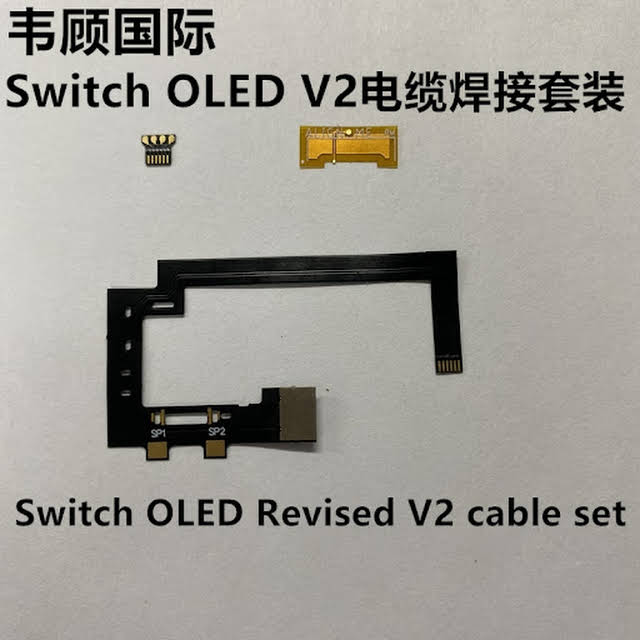
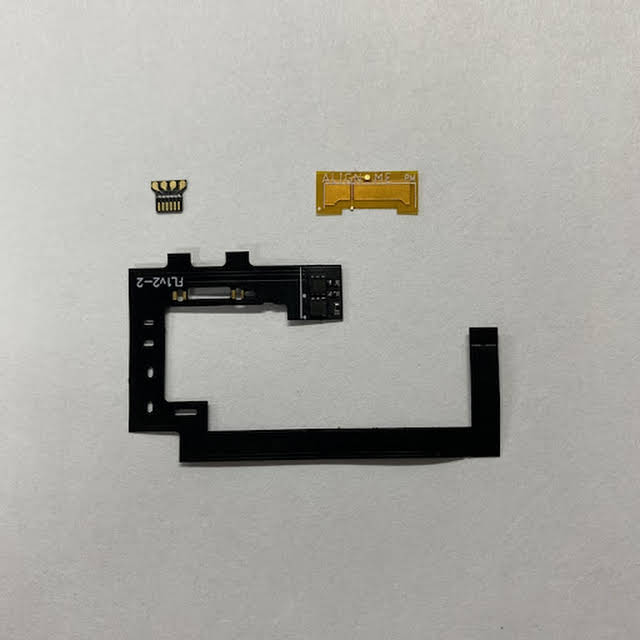
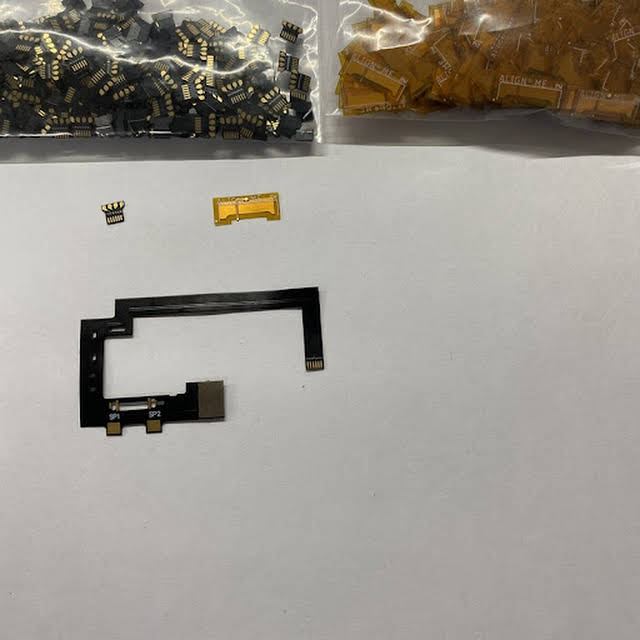
It seems like the HWFLY team has created a new OLED SoC cable and bundles it with the DAT0 adapter in a set.
It works on both the Lite and Core variant.

9eQaJ3C7La0T6z8q0FlYQRxkYONgaVNL-nHvfc4t__pXnIXZTrm06dSvdi0EMuNzQwfTTob_5jRP=s640-c-fcrop64=1,00000000ffffffff-nd-v1

gYaUTSRWxmxLVBBt49ClTKF0a7n7QuojlFqSfKyNK_4p0pNMpr21CCShYlMNITlYUOShWpI8KlH814g=s640-c-fcrop64=1,00000000ffffffff-nd-v1

VdZs976JGUPXUct-fn7pOaZeuVZCyAi5SJKLQicHFj6BWNDkl3Jy206_oaWbhrbTmiWcfCs6r7tqHQg=s640-c-fcrop64=1,00000000ffffffff-nd-v1

hRgxVamZYAYVmbQHVbZhEf8FQZVS0WAoHGUqpf3-MVgZogxcHDQE5HJXJjYaedeAhdyBIFQS_EV4=s640-c-fcrop64=1,00001ff1ffffe00e-nd-v1

JqwfF_21b_56iJF1WED9qfVBsQSIBGyNQQB8wZYR4Ukga-C7B9FAeCW-QqJPr0M661uF0NGTpQXr2A=s600-c-fcrop64=1,20000000dfffffff-nd-v1


As much as I would've wished for a revised PCB, this is probably better than nothing / as far as they will go.
If they would preinstall Spacecraft-NX 0.2 now on all units, we would be pretty much golden here.
This is lame, they don't even provide a dedicated flex for the remaining emmc points, you still have to use magnet wires for those. This is a half arsed job at best, I don't see the point in spending over $40 for this.
 
  • Like
Reactions: doom95
It lights up brightly verrry briefly a single time in like a bright white-blue colour then transitions to red. No blinking. Almost like a camera flash for how fast it is.

Edit: just checked again and it’s 658 now and there doesn’t SEEM to be any shorts, however, some points give me a value of 28 (near the area where I did the initial damage) such as the leg of the black chip with the wire attached. Sort of at a loss now…
Make sure if your using enamelled wire to fully take off the coating before soldering your connections otherwise it ain't gonna read the points properly, red almost always means a bad connection. I had 60 seconds flashing blue then to red and it was my dat0 connection was coming away as I put the board back in so had to improvise a bit. Once it was seated firmly, green lights everytime
 
  • Like
Reactions: kerelenko

Site & Scene News

Popular threads in this forum