Hacking Supercard DStwo plug-ins

  • Thread starter Thread starter alidsl
  • Start date Start date
  • Views Views 307,289
  • Replies Replies 868
  • Likes Likes 3
nathancnc said:
Can you make an ipod (not ipod touch) one of the same style.... I just want it for my lmp-player plugin......the current one is ugly

lmpng102.png
LMP-NG (App): Plugin / Program [DSL/DS]


I also made a couple of others.

beuplive07.png
Beup Live (App): Plugin / Program [DSL/DS]

bloxavoid.png
Bloxavoid (Game): Plugin / Program [DSL/DS]

colorsn.png
Colors (App): Plugin / Program [DSL/DS]

LMP-NG took the longest. I couldn't find an iPod sprite anywhere so I made my own. I just love pixels.


EDIT:
Okay, I made a mistake and don't feel like editing and re-uploading the files so listen carefully.
CHANGE THE CAPITALS IN THE .ini FILE TO LOWERCASE. I don't know why but it means the difference between them working and not.
 
_Chaz_ said:
EDIT:
Okay, I made a mistake and don't feel like editing and re-uploading the files so listen carefully.
CHANGE THE CAPITALS IN THE .ini FILE TO LOWERCASE. I don't know why but it means the difference between them working and not.
alidsl said:
@_chaz_: re-upload them or I will, you know that we'll get flamed if it doesn't workAgree - although it 's not all that clear to WHAT capitials you are referring to but I've noticed in your '*.ini' files you have
Code:
[Plug setting]
When in fact it should be
CODE
[plug setting]
(note the small 'p' in 'plug')
otherwise they won't be added to the Wiki (& I guess alidsl won't add them to first post either)

Oh & on the subject of the Wiki ..... What's this alidsl ??? - no link to it on first post - don't you want any1 to know about it
rofl.gif
wink2.gif
 
Sneeky... but reading #1 post makes it look as though offical plugins can also be found on the Wiki (well.... that's how it looks to me)

Perhaps this (or something similar) might be better
  • All plugins here can also be found on the Wiki, along with accompanying Icon graphics
Still it's up to you what you put
 
12882-appleassault-it.JPG
AppleAssault (Game) : Plugin / Program [DSL/DSi]

Oh & while checking out the Wii links are OK - I've found that 'TunaVid' plugin address is wrong, & it's alos wrong on first post

Should be http ://filetrip.net/file.php?id=12096 and not http ://filetrip.net/f11657-DSTwo-TextDS2-Plugin-2-41.html
 
alidsl said:
TunaviDS link works perfectly
blink.gif
Not on your first post - the plugin link goes to TextDS2 plugin page on Filetrip (I had already done the Wiki link when I posted)

Oh & here's other Plugins

12883-Lone%20Wolf%204.jpg
Lone Wolf: The Chasm Of Doom - Plugin / Program [DSL/DSi]
12884-Lone%20Wolf%205.jpg
Lone Wolf: Shadow On the Sand - Plugin / Program [DSL/DSi]
 
can anyone tell how to install lemmingsds

I know to put the bitmap, config sett, and nds file in the _dstwoplug folder,
but where do I put lemmingsDS and lemmingsds_config file??
I tried in the _dstwoplug folder and in root of micro sd, but it keep saying directory not found
should I open lemmingsDS and put those files in root??

plz help
 
RoMee said:
can anyone tell how to install lemmingsds....plz helpOK - Here's how it is set up on my card

On root
  • '/Lemmingds/' folder
    lemmingds_config.txt
In '/_dstwoplug/'
  • Put a copy of 'lemmingds_dldi.nds' (found in the '/Lemmingds/' folder ) into this folder
    Download,extract and copy the 'lemmingsds_dldi.bmp' and 'lemmingsds_dldi.ini' also into the '/_dstwoplug/' folder
That's it - it should now work - note it DOES take a while for it to load (2 white screens)

IF it is saying that folder cannot be found - check that the lines in 'lemmingsds_config.txt' below show EXACTLY the same path as where the folder is
CODELemmings DS Directory
/LemmingsDS
 
thanks cannonfoddr

but I do have one more question
plant vs zombie...the plugin image shows up as a "?" mark on the menu, it still load the game but it's a "?" instead of the image
 
Thanks for the re-upload, I was a bit busy studying for midterms this past week.
 
RoMee said:
plant vs zombie...the plugin image shows up as a "?" mark on the menu, it still load the game but it's a "?" instead of the image
That usually means you may have a missing ini or an ini is not the same name as the nds file

Make sure that you have 'PlantVsZombies.nds','PlantVsZombies.ini' and 'PlantVsZombies.bmp' in the '/_dstwoplug/' folder, and not something like
'Plant Vs Zombies.nds', 'PlantVsZombies.ini' and 'PlantVsZombies.bmp' (note the spaces in the nds file)

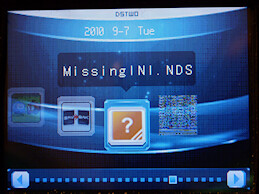
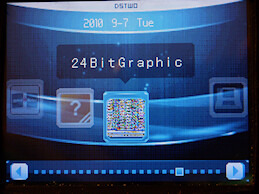
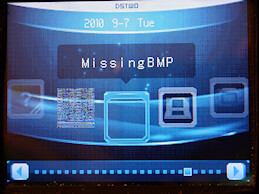
As an experiment I did 3 different possible (common) causes for Plugin not showing/working right

4968673136_36645da79e.jpg
4968673256_40abba9f72.jpg
4968673332_a4bbc5c08f.jpg


As you can see
  • IF the 'ini' is missing or is not the same name as the nds file you get the orange ' ?'
  • If the BMP file is the wrong bit-depth (i.e 24-bit & not 16-bit) you get 'garbage'
  • If you don't supply a BMP (or the BMP is named wrongly in the 'INI') you just get a 'blank' space
 
thanks again cannonfoddr
fixing the spaces in the nds file worked

I do want to add that apple assault works great on the dsi xl
 

Site & Scene News

Popular threads in this forum