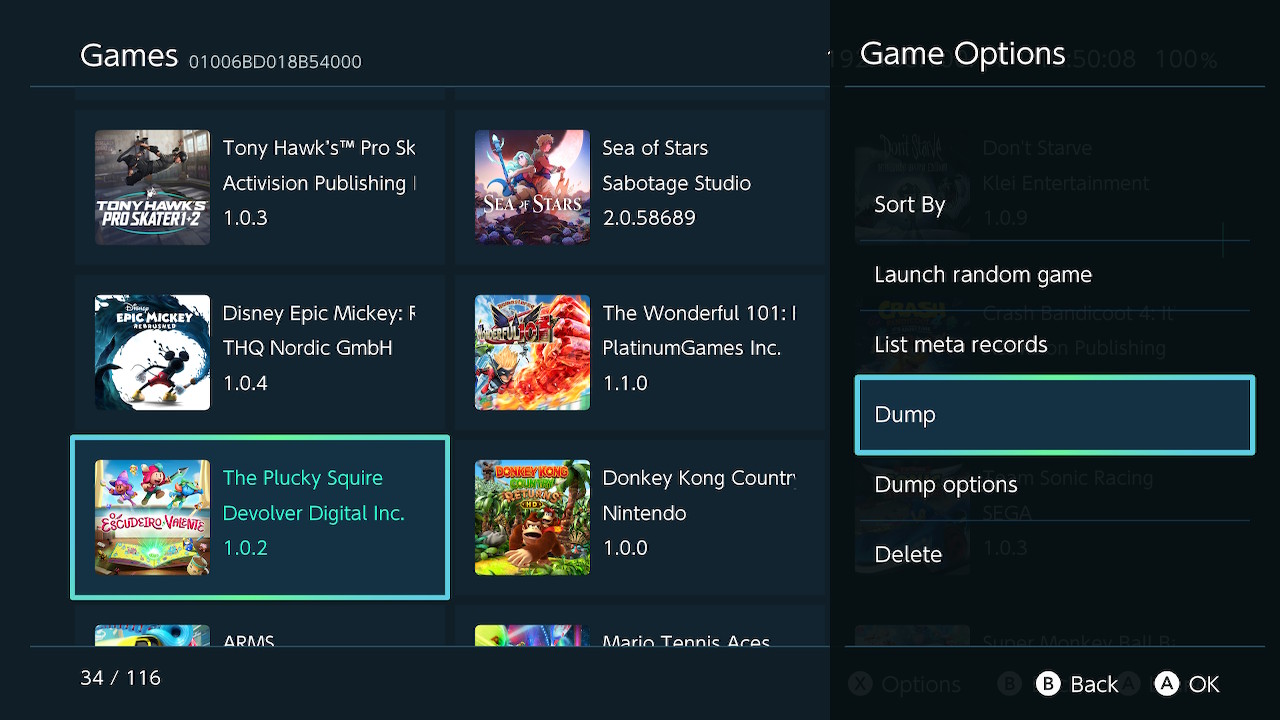
Sphaira - hbmenu replacement

Sphaira is hbmenu alternative. It currently has feature parity with hbmenu (that is, launches homebrew + nxlink) whilst adding quite a few features.


HomeBrew​

The main menu tab, it lists all the .nro found in "/switch/". From there, you can launch, sort, delete, create a forwarder etc.
You can navigate to the other menu tabs using "L" and "R", explained below.

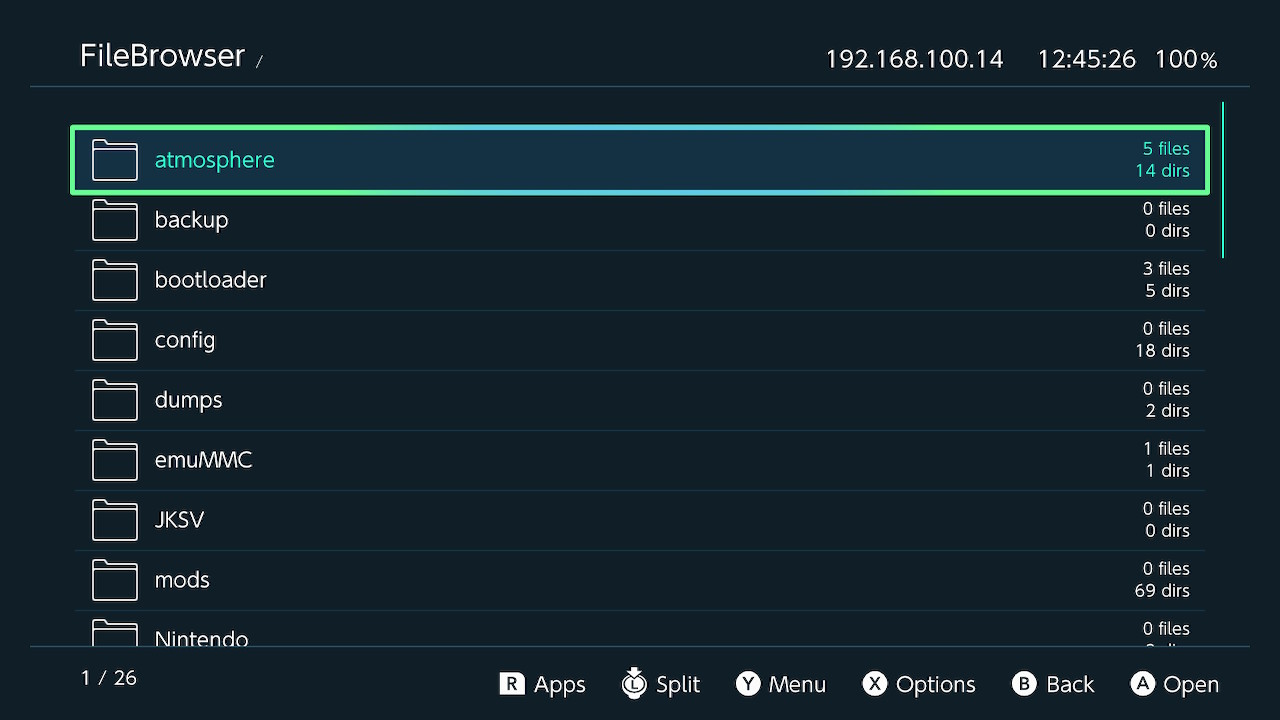
FileBrowser​

By pressing "L" from the main menu, you can access the file browser. You can Cut, Copy, Delete, Rename etc.
You can select multiple files / folders by using the "ZR" button and then se the above functions of that group of files.

Forwaders can be created if the selected file has a file assoc, see below for more details.

Appstore​

sphaira features an appstore, using the api from https://hb-app.store/switch. It can be navigated to by pressing "R" from the main menu.
The appstore is feature parity with hb-appstore app, as well as installing the manifests in the same folder as hb-appstore, in order to not break compatibility between the two.

Themes​

sphaira comes with 3 themes, abyss (default), black and white (unfinished).
custom themes can be added to "/config/sphaira/themes/", here is the abyss theme for example:
INI:
[meta]
name=Abyss
author=TotalJustice
version=1.0.0
; unused currently
preview=romfs:/theme/preview.jpg

[theme]
background=0x0f111aff
grid=0x0f115c30
selected=0x0f115cff
selected_overlay=0x529cffff
text=0xffbc41ff
text_selected=0x529cffff

icon_audio=romfs:/theme/icon_audio.png
icon_video=romfs:/theme/icon_video.png
icon_image=romfs:/theme/icon_image.png
icon_file=romfs:/theme/icon_file.png
icon_folder=romfs:/theme/icon_folder.png
icon_zip=romfs:/theme/icon_zip.png
icon_nro=romfs:/theme/icon_nro.png

music can be added to a theme, as long as the music is converted to bfstm format. simply add an entry like so: `music=/config/sphaira/themes/music/bgmusic_pcm.bfstm`

Forwaders​

sphaira can create and install forwarders for any .nro. It will use the icon of the .nro and the name + author.

It can also install forwarders for files that have a file assoc. For example, if mgba is installed and a game is located in "/roms/gba/game.gba", then the "Install Fowarder" option will appear. In this case, it will try to scrape the icon of the game, otherwise it will use the icon of the .nro and the name will be a combination of the .nro name and game name.

File Assoc​

file assoc is a way to associate file extensions (.gba, .nro etc) with a homebrew app. For example, clicking on rom.gbc that has an file assoc will bring up a list of all the applications that can handle it.
This can be used for emulators, media players, text editors etc...

custom file assoc should go in the folder "/config/sphaira/assoc/"

the format is *very* simple, here is an example of vgedit.ini
INI:
[config]
supported_extensions=txt|json|cfg|ini|md|log

and again for mgba.ini
INI:
[config]
supported_extensions=gba|gbc|sgb|gb
database=Nintendo - Game Boy|Nintendo - Game Boy Color|Nintendo - Game Boy Advance

"path": (optional) fullpath to the .nro. if not specified, it uses the name of the ini, ie, mgba.ini will use mgba.nro.
"supported_extensions": list of extensions the application supports, separated by |. plea
"database": (optional) name of the rom database to use defined by the left-side of this table <https://gist.github.com/ITotalJustice/d5e82ba601ca13b638af9b00e33a4a86>..

All of the retroarch cores has file assoc built into sphaira, so if you download retroarch using the appstore, and then navigate to "/roms/gbc/game.gbc", gambatte and mgba will be available to be selected.

Games can be kept in .zip format, sphaira will peek into the .zip and find the real extension and use that for displaying icons / file assoc.

Roms​

roms should be placed in "/roms/system_name/" where system name is defined by this table right-side entries <https://gist.github.com/ITotalJustice/d5e82ba601ca13b638af9b00e33a4a86>.
this is the same layout emulation station uses. the reason for forcing roms to be in specific folders is due to many roms for different systems using the same file extension, ie, .bin / .cue or .chd.

roms placed in subfolders are allowed, for example "/roms/psx/scooby-doo/scooby-doo.bin" is valid.

Themezer​

themes can be browsed and download by going Menu Options -> Misc -> Themezer. Themes will be downloaded to "/themes/sphaira/Theme Name - By Author/".
To install themes, launch "NXThemes Installer" and browse to the selected folder listed above.

Nxlink​

For homebrew developers, nxlink is built into sphaira. You do not have to press any special buttons, just do "nxlink *.nro" and send your nro like normal, console logging works to be using "nxlink -s *.nro"
By default, this is enabled in the background, to disable it: Menu Options -> Network -> Nxlink.


That's most of the features spahira has. If you enjoy it so much that you'd rather it be launched over regular hbmenu, you can enable the option in "Menu Options -> Replace hbmenu on exit" where it will do just that. It will create a backup of hbmenu in "/switch/hbmenu.nro" should you wish to swap back.
homebrew.jpg

games.jpg

appstore.jpg

appstore_page.jpg

file_browser.jpg

themezer.jpg

launch_options.jpg


Releases: https://github.com/ITotalJustice/sphaira/releases/
Bleeding-edge Releases: https://github.com/ITotalJustice/sphaira/actions
Source Code: https://github.com/ITotalJustice/sphaira
 
Last edited by Deleted member 413168,
using this i've been able to create psx forwarders with .chd roms and duckstation i believe, but when i select my chd files in sphaira i don't have an option to create a forwarder. would it be possible to add chd files to the possible forwarders?
 
TotalJustice, Isn't it possible to create a Launcher with the NSO GUI to launch Homebrew emulators, or the N64 homebrew ports for the Switch?
 
  • Like
Reactions: XenoFredo
using this i've been able to create psx forwarders with .chd roms and duckstation i believe, but when i select my chd files in sphaira i don't have an option to create a forwarder. would it be possible to add chd files to the possible forwarders?
You need to create a file assoc for duckstation, see the example in the main post or on the GitHub readme for how to do it :)

You just need to tell sphaira where duckstation is, what system it supports and what extensions it can handle. There are loads of retroarch examples in the romfs folder on GitHub
 
  • Love
Reactions: impeeza
You are looking for this: https://gbatemp.net/threads/cave-da...n64-genesis-switch-online-modding-app.551466/

As for ports, you can make a forwarder from any ROM or homebrew in sphaira already using the menu.
That's not it, what I thought was to create a homebrew that looks like NSO, but runs other emulators, I know that retroarch runs several emulators, but it doesn't have the NSO GUI and I've had a lot of problems with retroarch, it corrupted all my files even though the SD is in FAT32.
 
  • Like
Reactions: impeeza
Merry Christmas everyone! Version 0.5.0 is out.

Changes:
  • Add ftp server, uses ftpsrv. It listens on port 5000, no username or password required.
  • Add mtp server, uses haze from Atmosphere.
  • Add "stars" feature from hbmenu. To get that hbmenu look, set "Sort" to "Alphabetical (Star)".
  • Update Retroarch core file assoc.
  • Fix core3 being pinned due to nxlink polling too frequently (sorry about that...).
  • The install forwarder option is now disabled by default. It can be re-enabled via the advanced menu.
  • The install warning can now be disabled via the advanced menu.
  • The install location can be set in the advanced menu.
  • The language option "Auto" now actually works! Thanks to @shadow2560 for the fix.
  • Many missed strings for translations were added. Thanks to @Yorunokyujitsu.
  • Many translation patches, thank you so much to everyone that has contributed!
For the full changelog, check the release notes.

To update, either download the latest release from github and extract it to your sd card or launch sphaira (0.4.0 or later) and navigate to network options to download the latest update :)

2024122522410800-CA43EC7375AB1E2BC8AFC050C0941918.jpg
2024122522410100-CA43EC7375AB1E2BC8AFC050C0941918.jpg
 
Last edited by Deleted member 413168,
Merry Christmas everyone! Version 0.5.0 is out.

Changes:
  • Add ftp server, uses ftpsrv. It listens on port 5000, no username or password required.
  • Add mtp server, uses haze from Atmosphere.
  • Add "stars" feature from hbmenu. To get that hbmenu look, set "Sort" to "Alphabetical (Star)".
  • Update Retroarch core file assoc.
  • Fix core3 being pinned due to nxlink polling too frequently (sorry about that...).
  • The install forwarder option is now disabled by default. It can be re-enabled via the advanced menu.
  • The install warning can now be disabled via the advanced menu.
  • The install location can be set in the advanced menu.
  • The language option "Auto" now actually works! Thanks to @shadow2560 for the fix.
  • Many missed strings for translations were added. Thanks to @Yorunokyujitsu.
  • Many translation patches, thank you so much to everyone that has contributed!
For the full changelog, check the release notes.

To update, either download the latest release from github and extract it to your sd card or launch sphaira (0.4.0 or later) and navigate to network options to download the latest update :)

View attachment 477574View attachment 477575
Is there a difference in performance between ftpsrv in sphaira and ftpsrv in the app? Also, is it possible to share the configuration file? Similarly, is there a difference in performance with haze?
 
Is there a difference in performance between ftpsrv in sphaira and ftpsrv in the app? Also, is it possible to share the configuration file? Similarly, is there a difference in performance with haze?
If sphaira is idle, ie not downloading/installing a app from the store, then there won't be a performance difference between ftpsrv app and sphaira. Navigating menus, changing options etc won't effect performance either as it runs on a separate core(2).

As for haze, it should perform the same. Sphaira uses ~4% CPU in any given menu, so it's mostly idle. Haze is mostly idle as well as it waits between transfers until ready for the next one. All that is to say I couldn't notice a difference when testing a few months back.
 
  • Like
Reactions: HoRy205
Feature suggestion that I think would be quite handy: would there be a way to integrate the title update check that is available in the DBI tools? Maybe have the ability to run it on startup and have a notification if title updates are available?

See hereunder.

Thanks again for your efforts!

DBI-title-update-check.jpg
 
  • Like
Reactions: Grimwynn
I've added a github api downloader as a way to fetch apps that aren't on the appstore. the api is very simple, you just need to provide a name and a github url:

JSON:
{
    "name": "SwitchWave",
    "url": "https://github.com/averne/SwitchWave"
}

this will fetch all the downloads for the latest release.

you can also specify the name of the assets to display for download, this is useful if the app has multiple builds available for different platforms.
JSON:
{
    "name": "ftpsrv",
    "url": "https://github.com/ITotalJustice/ftpsrv",
    "assets": [
        {
            "name": "switch_application.zip"
        },
        {
            "name": "switch_sysmod.zip"
        }
    ]
}

you can also specify the output path. some apps don't push releases as a .zip, so it's its required to specify the output path:
JSON:
{
    "name": "dbi",
    "url": "https://github.com/rashevskyv/dbi",
    "assets": [
        {
            "name": "DBI.nro",
            "path": "/switch/DBI/DBI.nro"
        },
        {
            "name": "dbi.config",
            "path": "/switch/DBI/dbi.config"
        }
    ]
}

finally, you can specify an output path for a zip. this will prepend the path of all files within the zip.

json entries are to be placed in "/config/sphaira/github/". It will come bundled with a few entries for apps i have made, but won't include entries for apps that are piracy related.

No release for this yet, as there's a few more features i want to work on first, but you can try build in the github actions.

2024122618230800-CA43EC7375AB1E2BC8AFC050C0941918.jpg
2024122618231200-CA43EC7375AB1E2BC8AFC050C0941918.jpg
2024122618231700-CA43EC7375AB1E2BC8AFC050C0941918.jpg
 
I've added a github api downloader as a way to fetch apps that aren't on the appstore. the api is very simple, you just need to provide a name and a github url:

JSON:
{
    "name": "SwitchWave",
    "url": "https://github.com/averne/SwitchWave"
}

this will fetch all the downloads for the latest release.

you can also specify the name of the assets to display for download, this is useful if the app has multiple builds available for different platforms.
JSON:
{
    "name": "ftpsrv",
    "url": "https://github.com/ITotalJustice/ftpsrv",
    "assets": [
        {
            "name": "switch_application.zip"
        },
        {
            "name": "switch_sysmod.zip"
        }
    ]
}

you can also specify the output path. some apps don't push releases as a .zip, so it's its required to specify the output path:
JSON:
{
    "name": "dbi",
    "url": "https://github.com/rashevskyv/dbi",
    "assets": [
        {
            "name": "DBI.nro",
            "path": "/switch/DBI/DBI.nro"
        },
        {
            "name": "dbi.config",
            "path": "/switch/DBI/dbi.config"
        }
    ]
}

finally, you can specify an output path for a zip. this will prepend the path of all files within the zip.

json entries are to be placed in "/config/sphaira/github/". It will come bundled with a few entries for apps i have made, but won't include entries for apps that are piracy related.

No release for this yet, as there's a few more features i want to work on first, but you can try build in the github actions.

View attachment 477698View attachment 477699View attachment 477700
dope!

hey TotalJustice, do you plan to release a mtp xci/nsp install (over mtp or not) like dbi?
 
Wouldn't forwarders technically fall under that definition?
Not in the sense that it risks sphaira (or myself) getting sent a DMCA for circumventing any anti piracy measures put in place. It doesn't require keys too.

It does require patches to ldr and fs. This is why most communities will call forwarders piracy because it requires the use of piracy patches. And to Nintendo, a forwarder or a pirated game is indistinguishable, and will ban you for it.

My stance is that, if it poses a risk to the project, I won't add it. Forwarders are ban bait, but not DMCA bait 😄
 
I'm wanting to do some work making some themes.

I like how in the hbc theme you were able to use a png image as the grid.
Is there any way to make the selection a png file too? This way I can have a button change colour when selected rather than the whole area flash colours.

Thanks for your work on this, Sphaira is an excellent hbmenu replacement!
 
  • Like
Reactions: impeeza
I've added a github api downloader as a way to fetch apps that aren't on the appstore. the api is very simple, you just need to provide a name and a github url:

JSON:
{
    "name": "SwitchWave",
    "url": "https://github.com/averne/SwitchWave"
}

this will fetch all the downloads for the latest release.

you can also specify the name of the assets to display for download, this is useful if the app has multiple builds available for different platforms.
JSON:
{
    "name": "ftpsrv",
    "url": "https://github.com/ITotalJustice/ftpsrv",
    "assets": [
        {
            "name": "switch_application.zip"
        },
        {
            "name": "switch_sysmod.zip"
        }
    ]
}

you can also specify the output path. some apps don't push releases as a .zip, so it's its required to specify the output path:
JSON:
{
    "name": "dbi",
    "url": "https://github.com/rashevskyv/dbi",
    "assets": [
        {
            "name": "DBI.nro",
            "path": "/switch/DBI/DBI.nro"
        },
        {
            "name": "dbi.config",
            "path": "/switch/DBI/dbi.config"
        }
    ]
}

finally, you can specify an output path for a zip. this will prepend the path of all files within the zip.

json entries are to be placed in "/config/sphaira/github/". It will come bundled with a few entries for apps i have made, but won't include entries for apps that are piracy related.

No release for this yet, as there's a few more features i want to work on first, but you can try build in the github actions.

View attachment 477698View attachment 477699View attachment 477700
Does this mean that it will also be possible to update atmosphere using this method?
 
Could someone provide directions for creating a forwarder to start a specific game rom in an emulator? So for example, a forwarder to start Combat for the Atari 2600. I am confused as to how to do something like that.
 

Site & Scene News

Popular threads in this forum