Homebrew RetroArch Switch

stick267

Well-Known Member
Member
Joined
Dec 17, 2018
Messages
598
Trophies
0
Age
32
XP
1,157
Country
United States
Are you saying the actual filenames must match the thumbnails or the complete names that the playlist created must match the thumbnails? The thumbnail names don't match the actual zip file names I know. I'll check, but I thought the program did all of that correctly.
If your rom filename is:
Zelda - Majoras Mask [E] !.zip
(just a random example)

Then your thumbnail must be named:
Zelda - Majoras Mask [E] !.jpg

The thumbnail might not be a jpg but you catch my drift.
 

ils

Well-Known Member
Newcomer
Joined
Mar 8, 2008
Messages
83
Trophies
0
XP
398
Country
Indonesia
how do i load retroarch.nro with full RAM access?
i read the guide linked in page 1 but it seems it's now deprecated?

i tried pressing "R" in hbmenu while loading the RetroArch but it seems didn't work? it only detected 833MB

Thanks!
 

stick267

Well-Known Member
Member
Joined
Dec 17, 2018
Messages
598
Trophies
0
Age
32
XP
1,157
Country
United States
how do i load retroarch.nro with full RAM access?
i read the guide linked in page 1 but it seems it's now deprecated?

i tried pressing "R" in hbmenu while loading the RetroArch but it seems didn't work? it only detected 833MB

Thanks!
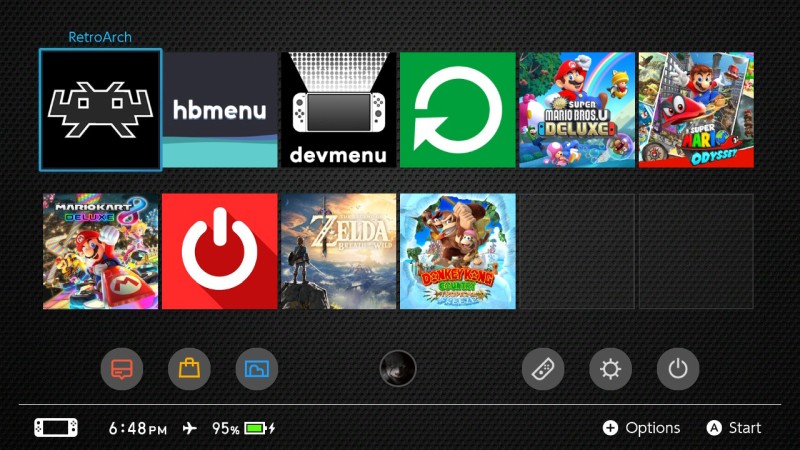
You have to press R on an installed game (BOTW, Odyssey, etc). That will then launch the HBMenu with full RAM access. Then you can launch RetroArch from there.
 

ils

Well-Known Member
Newcomer
Joined
Mar 8, 2008
Messages
83
Trophies
0
XP
398
Country
Indonesia
You have to press R on an installed game (BOTW, Odyssey, etc). That will then launch the HBMenu with full RAM access. Then you can launch RetroArch from there.

ah i see
Thank you for your information :)

okay, quick question :
does PCSX ReARM support high resolution render? (like 2x or 4x native resolution)
 
Last edited by ils,

notimp

Well-Known Member
Member
Joined
Sep 18, 2007
Messages
5,782
Trophies
1
XP
4,405
Country
Laos
Have you ever thought about looking into the emulator options, for a thing called resolution? Just a naive question...

(Emulator options, or better known as "core settings" are available under a menu called options, when a game is running (under quick menu, if you cant find it).)

edit: That said, it wasnt enabled, when psx-rearmed still had no dynarec support. Which it might not have until this day.... But there you'd normally set it.

It has been disabled, for when psx rearmed in the switch build only just ran on interpreter (?) with an overclock to 1200 Mhz to have games perform in native resolution, full speed.

Other platform builds have it enabled, and it can be set there. :)
 
Last edited by notimp,
  • Like
Reactions: ils

FanboyKilla

Well-Known Member
Member
Joined
Mar 9, 2019
Messages
288
Trophies
0
XP
1,084
Country
United States
Are you saying the actual filenames must match the thumbnails or the complete names that the playlist created must match the thumbnails? The thumbnail names don't match the actual zip file names I know. I'll check, but I thought the program did all of that correctly.

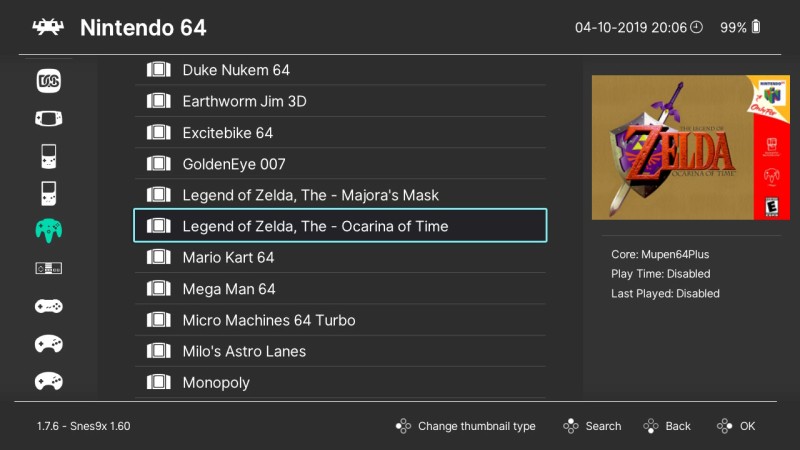
When you add thumbnails to RetroArch, they have to be added to a specific folder structure that corresponds to the name of your playlist file, and the filename of the "thumbnail" image, needs to be exactly the same as the filename of the "ROM".

For example: Zelda, Ocarina of Time

This ROM is located on my SD Card at...
/Games/Nintendo 64/Legend of Zelda, The - Ocarina of Time.z64

The thumbnail image is located on my SD Card at...
/retroarch/thumbnails/Nintendo - Nintendo 64/Named_Boxarts/Legend of Zelda, The - Ocarina of Time.png

The name of my Nintendo 64 playlist is "Nintendo - Nintendo 64.lpl" which is located at...
/retroarch/playlists/Nintendo - Nintendo 64.lpl

My Nintendo 64 thumbnails are located at...
/retroarch/thumbnails/Nintendo - Nintendo 64/Named_Boxarts/

Take note of how the folder name inside my thumbnails folder is the same as my "playlist" file, without the ".lpl" extension.
 
  • Like
Reactions: lordelan and notimp

Legend Of Kay

Well-Known Member
Member
Joined
Oct 12, 2018
Messages
230
Trophies
0
Age
31
XP
900
Country
Australia
So I know it’s not the recommended way to achieve full ram access, but I was thinking to use nro2nsp to have roms available on the homescreen as simple one-click launch. Does this method allow full ram access since it’s running from an installed nsp?
 

EmulateLife

Well-Known Member
Member
Joined
May 30, 2016
Messages
3,981
Trophies
0
Age
41
XP
1,872
Country
United States
So I know it’s not the recommended way to achieve full ram access, but I was thinking to use nro2nsp to have roms available on the homescreen as simple one-click launch. Does this method allow full ram access since it’s running from an installed nsp?

Yes but you still need to choose a non-Retroarch nsp (i.e. eshop or downloaded Switch nsp) to hold R on and start to get the full ram. Then the retroarch games you forwarded will work with full ram. You will have to do this only one time every time you power on your Switch.
 
Last edited by ,

ils

Well-Known Member
Newcomer
Joined
Mar 8, 2008
Messages
83
Trophies
0
XP
398
Country
Indonesia
Have you ever thought about looking into the emulator options, for a thing called resolution? Just a naive question...

(Emulator options, or better known as "core settings" are available under a menu called options, when a game is running (under quick menu, if you cant find it).)

edit: That said, it wasnt enabled, when psx-rearmed still had no dynarec support. Which it might not have until this day.... But there you'd normally set it.

It has been disabled, for when psx rearmed in the switch build only just ran on interpreter (?) with an overclock to 1200 Mhz to have games perform in native resolution, full speed.

Other platform builds have it enabled, and it can be set there. :)

yeah I did, I only found "enhanced resolution" but it seems didn't do anything. I just tried Retroarch for the 1st time on the Switch. and kinda confused with the menu.

then I ran the newly PPSSPP core and found the resolution option. then I realized PCSX core didn't support it yet :(

hopefully some day it'll enabled.
I really want to play old games in portable form but in enhanced resolution (if still native, I prefer using Vita)

Thanks :)
 

bird333

Well-Known Member
Member
Joined
Aug 13, 2018
Messages
101
Trophies
0
Age
54
XP
542
Country
United States
When you add thumbnails to RetroArch, they have to be added to a specific folder structure that corresponds to the name of your playlist file, and the filename of the "thumbnail" image, needs to be exactly the same as the filename of the "ROM".

For example: Zelda, Ocarina of Time

This ROM is located on my SD Card at...
/Games/Nintendo 64/Legend of Zelda, The - Ocarina of Time.z64

The thumbnail image is located on my SD Card at...
/retroarch/thumbnails/Nintendo - Nintendo 64/Named_Boxarts/Legend of Zelda, The - Ocarina of Time.png

The name of my Nintendo 64 playlist is "Nintendo - Nintendo 64.lpl" which is located at...
/retroarch/playlists/Nintendo - Nintendo 64.lpl

My Nintendo 64 thumbnails are located at...
/retroarch/thumbnails/Nintendo - Nintendo 64/Named_Boxarts/

Take note of how the folder name inside my thumbnails folder is the same as my "playlist" file, without the ".lpl" extension.
I think it might just be buggy. While I was changing the thumbnail setting, the 'settings' and 'import content' icons on the left side of the screen just disappeared. The only way to get them back was to reinstall. I did change the filename on a couple of thumbnails to match the rom zip file name but it didn't make any difference. One thing that is curious to me is why doesn't the 'playlist buddy' app make the thumbnail names match the rom names? It makes the thumbnail names match what was generated by the .XML file you point it to.
 

Legend Of Kay

Well-Known Member
Member
Joined
Oct 12, 2018
Messages
230
Trophies
0
Age
31
XP
900
Country
Australia
Yes but you still need to choose a non-Retroarch nsp (i.e. eshop or downloaded Switch nsp) to hold R on and start to get the full ram. Then the retroarch games you forwarded will work with full ram. You will have to do this only one time every time you power on your Switch.

So even though loading the the rom nsp I install will close the non-retroarch nsp I used I’ll still have full ram access for all homebrew until I turn my switch off?
 

EmulateLife

Well-Known Member
Member
Joined
May 30, 2016
Messages
3,981
Trophies
0
Age
41
XP
1,872
Country
United States
Yes, you'll know it worked because it will direct you to the homebrew menu instead of launching the game. Then you're good until your next boot doesn't matter how many games you play or retroarch games through nsp or whatever.
 
  • Like
Reactions: Legend Of Kay

FanboyKilla

Well-Known Member
Member
Joined
Mar 9, 2019
Messages
288
Trophies
0
XP
1,084
Country
United States
So I know it’s not the recommended way to achieve full ram access, but I was thinking to use nro2nsp to have roms available on the homescreen as simple one-click launch. Does this method allow full ram access since it’s running from an installed nsp?

That's how I do it and it works great! The only issue you will have by doing it like this is you won't be able to use the "Quit RetroArch" option in the RetroArch menu. If you do then it will crash and you will have to reboot. Instead, you just simply have to press the Home Button on your Switch and close it out manually. IMO, It's a small trade-off for having the RetroArch icon right there on your Home Screen.

Home-Screen.jpg


Yes but you still need to choose a non-Retroarch nsp (i.e. eshop or downloaded Switch nsp) to hold R on and start to get the full ram. Then the retroarch games you forwarded will work with full ram. You will have to do this only one time every time you power on your Switch.

No that's incorrect! If he creates an NSP using Nro2Nsp then he does NOT have hold R before launching the game. NSP's will launch with Full RAM Access automatically.

I think it might just be buggy. While I was changing the thumbnail setting, the 'settings' and 'import content' icons on the left side of the screen just disappeared. The only way to get them back was to reinstall. I did change the filename on a couple of thumbnails to match the rom zip file name but it didn't make any difference. One thing that is curious to me is why doesn't the 'playlist buddy' app make the thumbnail names match the rom names? It makes the thumbnail names match what was generated by the .XML file you point it to.

If it's "buggy" then it's just you because they are working great for me. What version of RA are you using?

So even though loading the the rom nsp I install will close the non-retroarch nsp I used I’ll still have full ram access for all homebrew until I turn my switch off?

No that's incorrect, see my response above.
 
Last edited by FanboyKilla,

EmulateLife

Well-Known Member
Member
Joined
May 30, 2016
Messages
3,981
Trophies
0
Age
41
XP
1,872
Country
United States
I've never heard of nro2nsps making your switch automatically have the extra ram, you may be right. But I just know what works for me. Holding R on a different game. It's not like it's hard to do so I just go with what works for me.
 

FanboyKilla

Well-Known Member
Member
Joined
Mar 9, 2019
Messages
288
Trophies
0
XP
1,084
Country
United States
I've never heard of nro2nsps making your switch automatically have the extra ram, you may be right. But I just know what works for me. Holding R on a different game. It's not like it's hard to do so I just go with what works for me.

It doesn't, that's just how the Switch handles NSP files in general. All Nro2Nsp does is create NSP files that FORWARD to an NRO file. So when you launch the NSP file that you create with Nro2Nsp, the Switch will automatically launch it will Full RAM Access because it's an NSP file.
 
  • Like
Reactions: Deleted User

bird333

Well-Known Member
Member
Joined
Aug 13, 2018
Messages
101
Trophies
0
Age
54
XP
542
Country
United States
What? I'm not sure what you mean. Can you post a screenshot?

Anyway, the rom names must match the thumbnail names (except the extension obviously) and the playlist names must match the folder names where the thumbnail subfolders are in.

This is what I mean.


retroarch screenshot.jpg


--------------------- MERGED ---------------------------

If it's "buggy" then it's just you because they are working great for me. What version of RA are you using?

I'm using 1.7.6. I don't get it then. I created an SD card at sdsetup.com. Installed everything. Then I used the app mentioned in the OP to create the playlist and download the thumbnails. Somethings got to be buggy because like I said at one point two menu items just disappeared and wouldn't come back. I had to reinstall from scratch. In addition, unless you have to rename every thumbnail to get them to show, that doesn't seem to work for me either.
 
Last edited by bird333,

FanboyKilla

Well-Known Member
Member
Joined
Mar 9, 2019
Messages
288
Trophies
0
XP
1,084
Country
United States
I'm using 1.7.6. I don't get it then. I created an SD card at sdsetup.com. Installed everything. Then I used the app mentioned in the OP to create the playlist and download the thumbnails. Somethings got to be buggy because like I said at one point two menu items just disappeared and wouldn't come back. I had to reinstall from scratch. In addition, unless you have to rename every thumbnail to get them to show, that doesn't seem to work for me either.

Did you actually turn the Thumbnails ON in the Settings?

Settings > User Interface > Appearance > Thumbnails > Boxarts

Also, I noticed in your screenshot that you're not actually browsing the Game Titles, you have move the cursor over to the RIGHT panel to select the Game Titles before the Thumbnails will show up.

Playlist-Thumbnails.jpg
 
Last edited by FanboyKilla,
D

Deleted User

Guest
Just to settle this after installing 300 nsp with nro to nsp some of them large mame games or intensive 64 games with hd texture etc fanboy killa is right. I would only add this is my experience with atmosphere and i cannot speak for reinx or sxos.
 

bird333

Well-Known Member
Member
Joined
Aug 13, 2018
Messages
101
Trophies
0
Age
54
XP
542
Country
United States
Did you actually turn the Thumbnails ON in the Settings?

Settings > User Interface > Appearance > Thumbnails > Boxarts

Also, I noticed in your screenshot that you're not actually browsing the Game Titles, you have move the cursor over to the RIGHT panel to select the Game Titles before the Thumbnails will show up.

Playlist-Thumbnails.jpg
How did you shrink the left panel to only show icons? Maybe the thumbnails are just off screen because the left menu and game titles are taking up my whole screen.
 
General chit-chat
Help Users
  • K3N1 @ K3N1:
    Well one you insert one PSU into the other one you get power
  • JuanMena @ JuanMena:
    It literally turns it on.
  • K3N1 @ K3N1:
    Yeah power supplies are filthy perverts
  • K3N1 @ K3N1:
    @Psionic Roshambo has a new friend
    +1
  • JuanMena @ JuanMena:
    It's Kyle, the guy that went to school to be a Certified man Kisser.
  • Psionic Roshambo @ Psionic Roshambo:
    Cartmans hand has taco flavored kisses
  • A @ abraarukuk:
    hi guys
  • Iron_Masuku @ Iron_Masuku:
    Hello
  • Vetusomaru @ Vetusomaru:
    @SylverReZ find me ONE community that is free of drama and politics. even video games forums (like this one) have politics section. and for some reason gamers still take consoles/brands wars seriously. even as a kid i never took the console wars bait despite being a nintendo kid.
  • Vetusomaru @ Vetusomaru:
    one of the reasons i deleted all my social media accounts, reddit account (although i was rarely using it) etc was to get away from this shit.
  • SylverReZ @ SylverReZ:
    @Vetusomaru, Sadly, not all communities like to play nice. Forums are pretty much dying despite Discord amongst other social media being available.
  • Vetusomaru @ Vetusomaru:
    i only kept my twitter accounts and only because many of the artists i like share their art only/mostly at twitter.
  • Vetusomaru @ Vetusomaru:
    lots of discord groups (even the big ones) are also dead for some reason.
  • SylverReZ @ SylverReZ:
    Twitter is way too shittier.
  • Vetusomaru @ Vetusomaru:
    that's why i added some firefox addons to block shit like twitter trends.
  • SylverReZ @ SylverReZ:
    Discord, on the other hand, moderation tends to not be very nice in video game communities from what I had experienced.
  • Vetusomaru @ Vetusomaru:
    nah, discord is also a shithole. discord is good only if you have your own community with your own rules. or if you re lucky to find some groups that arent shitholes.
  • Vetusomaru @ Vetusomaru:
    as about forums, when i recently revisited some old forums i used to be regular and seeing how immature most members still are i was like "Yeap. Nothing of value has been lost.". Unfortunately it's the good, comfy forums that ended up dead or shut down, especially because of internet centralization.
  • Skelletonike @ Skelletonike:
    I like being immature.
  • Skelletonike @ Skelletonike:
    Let be immature online ffs.
  • Skelletonike @ Skelletonike:
    As long as it's not resetera, anywhere is ok really.
  • Skelletonike @ Skelletonike:
    resetera is just... canerous
    Skelletonike @ Skelletonike: resetera is just... canerous