
Homebrew [Release] SocketPunch - FBI network CIA installer for Android & PC

  • Thread starter Thread starter Olmectron
  • Start date Start date
  • Views Views 430,321
  • Replies Replies 671
  • Likes Likes 54
Thank you for the updates

and here a little report from me:
It got slightly faster compared to previous version. From +/- 1.200 KB/s to +/- 1.350 KB/s
But it still have the same problem, it gives me an error / failure when i attempt to punch a CIA bigger than +/- 2.9 GB (i've tried to send BD & MGS both of them has size 3GB+ and both of them ended up a failure), i rly hope you could fix this little problem, anyway good job, thank you for your hard work
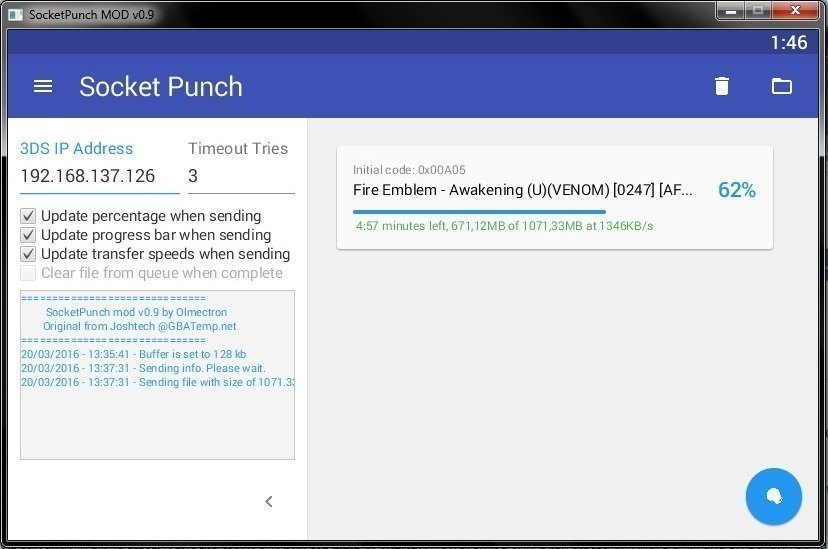
socket.jpg
 
I've been using the latest release (Which shows up as 0.9 for some reason, could've sworn I downloaded 1.0 :P )
And it's working GREAT. Not only is it now installing everything in the queue but it's automatically removing completed ones on the list. I'm getting 1,300 KBps which is the fastest I've seen yet with this. It helped me install a lot of cia's, this app is the future!

Edit: It worked for a long list of cia's, but out of the blue it would sometimes throw me an error on FBI, and when I press home it says the SD has been removed. I don't know if this is my SD card causing this, or FBI itself. But I've never seen this error in my life, and it happened twice. I just got this SD card too, it seems to work just fine though. For larger games, I use the old fashioned method.
 
Last edited by MattKimura,
I've been using the latest release (Which shows up as 0.9 for some reason, could've sworn I downloaded 1.0 :P )
And it's working GREAT. Not only is it now installing everything in the queue but it's automatically removing completed ones on the list. I'm getting 1,300 KBps which is the fastest I've seen yet with this. It helped me install a lot of cia's, this app is the future!

Edit: It worked for a long list of cia's, but out of the blue it would sometimes throw me an error on FBI, and when I press home it says the SD has been removed. I don't know if this is my SD card causing this, or FBI itself. But I've never seen this error in my life, and it happened twice. I just got this SD card too, it seems to work just fine though. For larger games, I use the old fashioned method.
I haven't found that error myself.

How many CIAs were you installing? I installed around 50 CIAs when testing it (in groups of 10) and everything went ok.

I would like to try to replicate the issue you described, I'd just need to know info on the selected options and on the size of the CIAs installed/to install.

By the way. I once experimented the issue telling me the micro SD was removed on my red N3DS. In the end It was that it wasn't set correctly on the micro SD pinouts. That was way last year, before I had even installed my first CIA (I downgraded with the January downgrade window).

Thank you!
 
Last edited by Olmectron,
Latest desktop build
March 20th, 2016: SocketPunch MOD v1.0.2

Standard multiplatform JAR
Native EXE Installer for Windows

  • This is embarrasing, but... String version fixed! It showed 0.9 in the last update, when it was actually the 1.0 release.
  • Added button for showing progress options, they're not shown in the side bar anymore.
  • Minor stability updates for improving the user experience. :D Now, seriously, I changed the socket transfer code a little bit, it should fix problems when the transfer hangs before finishing. Haven't tried on 2.5GB+ CIA sized files, though. If your transfers start hanging a lot more than before, please comment about it.

--------------------- MERGED ---------------------------

Nice work! Ive been looking for something like this.
I'll try the android version later!

Edit:
Tested on my N7105 with CM12.1 and it worked fine! The file was not big (less than 1mb)
Thanks! :)
Thanks for commenting. It should work even with bigger files, and since it creates a background task, you shouldn't be worried about closing the app, or sleeping your phone while the transfer is still ongoing.

I recommend using WiFi tethering from your Android phone, it should get better speeds that way. Although it works on a local WiFi router, too.

--------------------- MERGED ---------------------------

Is there a way to access a NAS drive on the droid app? I store all my .CIAs on a network drive so if not a current feature, please consider it.
I'll look into it. Don't have a NAS device right now for testing, but I could use FreeNAS for that.

--------------------- MERGED ---------------------------

Thank you for the updates

and here a little report from me:
It got slightly faster compared to previous version. From +/- 1.200 KB/s to +/- 1.350 KB/s
But it still have the same problem, it gives me an error / failure when i attempt to punch a CIA bigger than +/- 2.9 GB (i've tried to send BD & MGS both of them has size 3GB+ and both of them ended up a failure), i rly hope you could fix this little problem, anyway good job, thank you for your hard work


View attachment 42985
Thanks for sharing! I haven't tried with any bigger than 2.5 GB file, but I'll try, and see if it's a issue that can be fixed.
 
  • Like
Reactions: qlm2009
By the way, Is there any option to read/send files from my external sdcard?
If not, can you implement it?
 
What's your phone model?

How big is the internal storage?
I have a Samsung Galaxy Note 2 LTE SM-N7105 with 16GB internal Storage.
But mostly i store my important things on my External SD thats the reason why i asked.

If it is important i have CM 12.1 installed.
 
  • Like
Reactions: Olmectron
I have a Samsung Galaxy Note 2 LTE SM-N7105 with 16GB internal Storage.
But mostly i store my important things on my External SD thats the reason why i asked.

If it is important i have CM 12.1 installed.
Alright. I'll look into It. Maybe even allow to select source for if your phone accepts micro USB storage.
 
Alright. I'll look into It. Maybe even allow to select source for if your phone accepts micro USB storage.
Thanks that would be awesome! :)
My phone supports OTG it would be a nice option to use my OTG to install my Games, no need to mess my Phone storage with such things! :)
 
New desktop release build

March 21th, 2016: SocketPunch MOD v1.0.3

Standard multiplatform JAR
Native EXE Installer for Windows

  • Added in-app updater for both JAR and Windows native versions. The app will check automatically for updates on startup, or you can check if there are updates by clicking on the Updates option from the context menu that shows when pressing the upper-left menu button.
  • Added Chinese (simplified) thanks to user @qlm2009
 
  • Like
Reactions: qlm2009 and Real.96
Hey guys I need some help, I'm a noob but I'm trying to understand this program, so here I go:

I've installed the latest version of socketpunch and have the latest FBI version as well. But whenever I punch a queue list, I always get this error:

1029682e050f3184096c1e6a3ac98387.jpg


I don't know if it should be posted here, but I'm able to install CIAS through the SD card, but unable via wifi.

Thanks for your help.
 
Hey guys I need some help, I'm a noob but I'm trying to understand this program, so here I go:

I've installed the latest version of socketpunch and have the latest FBI version as well. But whenever I punch a queue list, I always get this error:

1029682e050f3184096c1e6a3ac98387.jpg


I don't know if it should be posted here, but I'm able to install CIAS through the SD card, but unable via wifi.

Thanks for your help.
Are you using the recommended FBI build posted in the OP? It's not the same as the latest. It fixes the error you're showing.

--------------------- MERGED ---------------------------

While any recent FBI build has the network features, I recommend using this FBI build:
Recommended FBI build from @wjchen (this build fixes the problem with big files stopping midway when transferring)

The build in that link, @morrisonian
 
Are you using the recommended FBI build posted in the OP? It's not the same as the latest. It fixes the error you're showing.

--------------------- MERGED ---------------------------


The build in that link, @morrisonian
Alright thanks mate. I'll check it when I arrive home.

Edit: I'm sorry but how do I change the fbi build?
 
Last edited by morrisonian,
I want to try this one, but I first have to replace the installed FBI CIA with the above mentioned recommended version. However, I can't find the install data on my CIA (un)installers, Big Blue Menu and FBI-Homebrewmenu-app. Neither the ID or the Raw code show up. So I am thinking, can I just install the here recommended FBI on top of the already exixting one (they both have the same ID)?

Edit: issue solved, I had forgotten that I injected the FBI CIA through the Safety Warning app.
 
Last edited by retroguy,
Yes. It will override your actual version, @retroguy

--------------------- MERGED ---------------------------

Alright thanks mate. I'll check it when I arrive home.

Edit: I'm sorry but how do I change the fbi build?
Install the CIA from another CIA installer (Big Blue Menu, Dev Menu).
 

Site & Scene News

Popular threads in this forum