Hacking [RCM Payload] Hekate - CTCaer mod

  • Thread starter Thread starter CTCaer
  • Start date Start date
  • Views Views 1,195,274
  • Replies Replies 3,331
  • Likes Likes 128
FUCK YEAH!
@XaneTenshi @yacepi15 A big thanks to you both!
I restored my Nand and the Boot1/Boot0. It booted.
Now i need to do that firmware update guide again.

Btw, how could i extract my Octopath Save from the "bricked" NandBackup?

Edit: Only first boot worked. wtf. Whyyyyyy.
Edit2: 3. Boot worked. WTTTTTF.
Edit4: it looks like it only doesnt boot if i let the usb c cable plugged in after the inject.
Ok, i maybe want to try something:
I will now copy the "bricked" nand and boot1/0 and will try it again.
 
Last edited by pandavova,
FUCK YEAH!
@XaneTenshi @yacepi15 A big thanks to you both!
I restored my Nand and the Boot1/Boot0. It booted.
Now i need to do that firmware update guide again.

Btw, how could i extract my Octopath Save from the "bricked" NandBackup?

Edit: Only first boot worked. wtf. Whyyyyyy.
Edit2: 3. Boot worked. WTTTTTF.
Edit4: it looks like it only doesnt boot if i let the usb c cable plugged in after the inject.
Ok, i maybe want to try something:
I will now copy the "bricked" nand and boot1/0 and will try it again.

I doubt trying to restore the Switch using a bricked Nand will work, but you can try. Also, don't know why the Switch wouldn't boot if the USB C cable is attached after the Payload has been sent, but there is no need to keep it attached once the Payload is successfully received by the Switch anyway.

There may be another way to restore your savefile, but that might be a little daunting, depending on how you updated your Switch firmware. READ the below paragraph in caps first before you try this!!

If you followed the guide here https://gbatemp.net/threads/how-to-...nofficially-without-burning-any-fuses.507461/ and used ChoiDujour (not the NX version, which is a HomeBrew) then you might still be able to mount the Nand backup on you PC using Rajkostos "HacDiskMount" tool, found here: https://switchtools.sshnuke.net/. The step that you need to follow, loosely, since your kinda doing the opposite, is step 8.8, but like I said, read the ENTIRE thing, before you do it.

If your PC can still recognize the bricked Nand, you can mount the partition to your PC and access it like it was a HDD. Then copy the contents of the USER folder and save it on your PC. Then either use HacDiskMount to mount the Unbricked Nand and copy over the USER folder or connect the Switch itself to your PC, mount the right partition and paste over the USER folder.

FOR THE RECORD, IF YOU HAVEN'T USED THE REGULAR VERSION OF CHOIDUJOUR TO UPDATE YOUR SWITCH FIRMWARE, I STRONGLY RECOMMEND YOU READ THE ENTIRE GUIDE TO KNOW WHAT YOU ARE GETTING INTO. ALSO, DEPENDING ON WHAT BRICKED YOUR SWITCH IN THE FIRST PLACE, PASTING THE USER FOLDER FROM THE BRICKED NAND TO THE UNBRICKED ONE COULD BRICK THAT ASWELL, SO MAKE SURE YOU EITHER MAKE A COPY OF YOUR UNBRICKED NAND BACKUP, OR PERFORM THE OPERATION ON THE SWITCH ITSELF, SO THAT YOU ARE NOT TOUCHING YOUR UNBRICKED NAND BACKUP.

 
Last edited by XaneTenshi,
  • Like
Reactions: pandavova
  • Like
Reactions: pandavova
FUCK YEAH!
@XaneTenshi @yacepi15 A big thanks to you both!
I restored my Nand and the Boot1/Boot0. It booted.
Now i need to do that firmware update guide again.

Btw, how could i extract my Octopath Save from the "bricked" NandBackup?

Edit: Only first boot worked. wtf. Whyyyyyy.
Edit2: 3. Boot worked. WTTTTTF.
Edit4: it looks like it only doesnt boot if i let the usb c cable plugged in after the inject.
Ok, i maybe want to try something:
I will now copy the "bricked" nand and boot1/0 and will try it again.
I wouldn't use that type-C cable again. That's not normal. And if another cable doesn't fix it, there's something weird hardware-related in your switch...

PS: What cfw are you using? ReiNX (Not raj, have not tried) works perfectly even without disconnecting the cable.
 
Last edited by yacepi15, , Reason: Typo
I wouldn't use that type-C cable again. That's not normal. And if another cable doesn't fix it, there's something weird hardware-related in your switch...

PS: What cfw are you using? ReiNX (Not raj, have not tried) works perfectly even without disconnecting the cable.
im using an anker cable with an anker usb-c to micro-b adapter.
i was using SdFilesSwitch "cfw" (kip1=modules/newfirm/loader.kip, kip1=modules/newfirm/sm.kip) to use the homebrew with holding r on the album.
 
it's probably a kip that does this and hangs at logo. The cable is only needed until you see the screen light up

EDIT:
Try booting stock or stock with nogc (depending on what you want to do). This should have 100% success.
 
Last edited by CTCaer,
This can happen if you use nsp installers also. So be careful.
But to be true, I never heard of working and not working between reboots.
 
i never used an nsp installer, only started the homebrew launcher some times (with holding r on the album).
well my "bricked" nandbackup is restoring, I will tell what happend later this day.
 
i never used an nsp installer, only started the homebrew launcher some times (with holding r on the album).
well my "bricked" nandbackup is restoring, I will tell what happend later this day.
With your "bricked" nand, did you try to boot OFW?
 
Ok. Its really the USB-C Cable. Thats... strange i guess.
So maybe if someone has this issue, maybe tell them to unplug the cable after injecting the payload?
 
Ok. Its really the USB-C Cable. Thats... strange i guess.
So maybe if someone has this issue, maybe tell them to unplug the cable after injecting the payload?
._.

So, you lost tons of time just for a USB cable... But... I would try to find another one. That's not normal and you may have more serious problems in the future.
 
  • Like
Reactions: pandavova
So, you lost tons of time just for a USB cable... That's not normal and you may have more serious problems in the future.
Yes... I hope not...

Edit:
Ok, i tried now a different usb cable with the adapter and the issue is still there.
I will ask someone i know for an usb a to c cable. hmmmmm...

(Could theoretically be code implemented that automatically disables the usb c port via software after injecting? or would that be too big for the payload size?)
 
Last edited by pandavova,
Yes... I hope not...

Edit:
Ok, i tried now a different usb cable with the adapter and the issue is still there.
I will ask someone i know for an usb a to c cable. hmmmmm...

(Could theoretically be code implemented that automatically disables the usb c port via software after injecting? or would that be too big for the payload size?)
This will not help you.
The connection is actually stopped after the injection.
But if the adapter is faulty, that can happen.

Because of the nature of RCM exploit, we can't check the received data integrity. So if some parts of the payload got corrupted, you'll know this from its weird/undefined behavior after injection.
 
weird/undefined behavior after injection.
So pretty though...

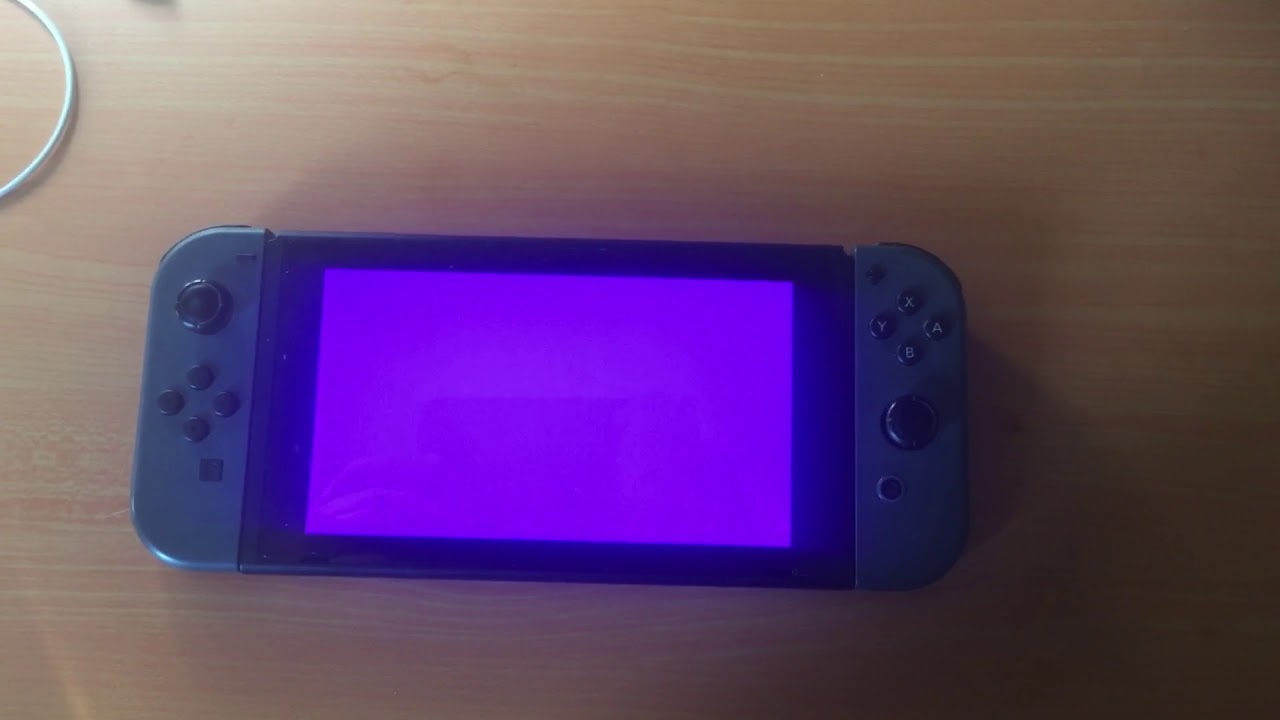
maxresdefault.jpg
 
Beautiful!

BTW, that's pink or purple (in case camera did an auto white balance)?
Not my image, had to find one on webz, but I've had this happen twice now and iirc it was a little less purple than the image but not quite pink.
Then again color is subjective isn't it? https://en.wikipedia.org/wiki/The_dress
 
Not my image, had to find one on webz, but I've had this happen twice now and iirc it was a little less purple than the image but not quite pink.
Then again color is subjective isn't it? https://en.wikipedia.org/wiki/The_dress
These can happen from unaligned access to mem, or from kips or using an incorrect boot0 (so keygen generates the wrong keys).
 

Site & Scene News

Popular threads in this forum