Hacking QUICK/NEWBIE QUESTIONS here!

  • Thread starter Thread starter OSW
  • Start date Start date
  • Views Views 608,343
  • Replies Replies 4,024
  • Likes Likes 7
Regarding your first suggestion, there's already this
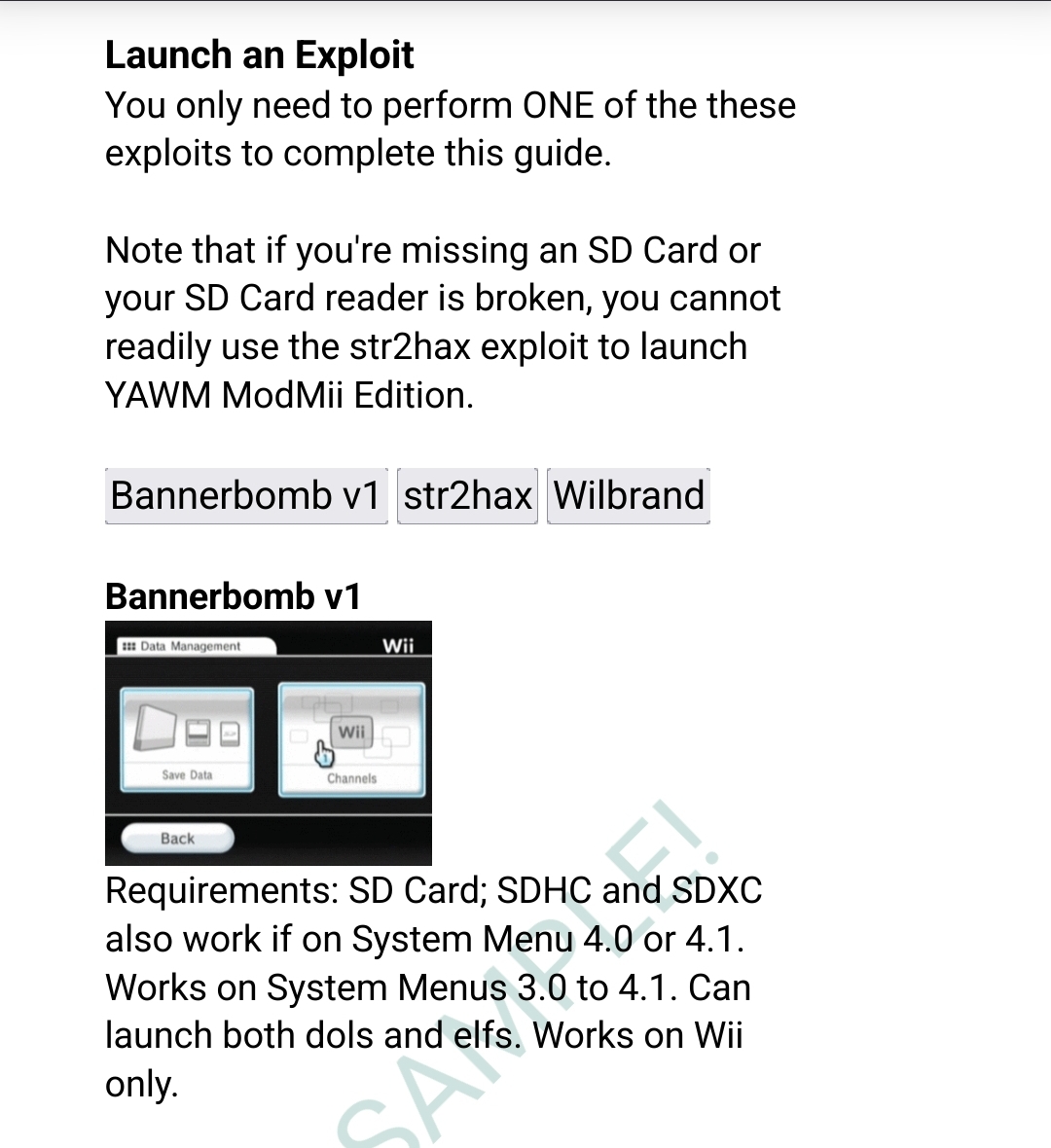
1753083471322.jpeg


I like your 2nd and 3rd suggestions though and will probably address them in the next update.

Regarding your questions:
1) definitely check out modmii classic's file cleanup feature, should be exactly what the doctor ordered it the console is being used by young kids. You could also configure priiloader to avoid the system menu altogether and boot and return to usbloader gx, which has a bunch of parental control options baked in. But to answer your Q, you should be fine for most things without an SD card. Mainly it's only necessary to access bootmii to make or restore a nand backup. There may be some other things too but less important (ie. Game dlc often must go on an SD card, like additional guitar hero tracks for example)

2. I'm not sure tbh, I don't do gamecube that much personally

3. The latest working nand backup if working would likely be most preferred. It would mean u don't need to repeat the steps again taken between the 2 nand backups should you ever do a restore. But having either/or is fine from a brick recovery perspective.
 
Thanks!

I am aware of the information you posted on the screenshot.
But, during the process of following the guide I have encountered the problem of using a 8GB and 64GB MicroSD cards and failed to run the bannerbobm v1 exploit as the card could not be read by the system.
Most people are unaware of the differences between SD, SDSC, SDHC, SDXC and while they have read the information on the screenshot, they will not know the practical implications.
Therefore, I have suggested adding a sentence or two, explicitly informing the users they should use a 1 or 2 GB card if their system menu is lower than 4.0.

My own experience lead to the suggestion as I tried 2 different cards, 2 different SD adapter, formatted the cards several time with different clusters until I understood the issue was using cards with larger capacitance of 2GB.
If from the start I would have known and understood to use a 1 or 2 GB card, it would have been nice and the suggestion is for future users.

~~~ ~~~

I ran the file cleanup from the ModMii.exe.
It deleted ALL files from the SD. At the end of the process, the SD card was completely empty. Including the NAND backup files.
Luckily, as I was unsure what the cleanup will do, I have transferred all the SD content to a backup folder on the computer.
Was the cleanup suppose to delete all SD content?
If so, how in the future will the ModMii will identify a need to update components?

I'll look into your suggestion:
configure priiloader to avoid the system menu altogether and boot and return to usbloader gx, which has a bunch of parental control options baked in
I assume that in order to load priiloader I'll need to put it back onto the SD. Create an "apps" folder and into that folder the priiloader one.
I probably won't understand all the parental control options, but, I'll have a look.

Thank you!
 
File cleanup shouldn't delete everything, it should tell you exactly what it will delete before it does anything, and give u the option to remove things from the list. The bootmii folder can be retrieved later easily, but the nand.bin and keys.bin should not have been touched. Can you show screenshots of before and after?

To load priiloader you can hold reset when powering on the console, or use the load priiloader app. Priiloader itself should still be installed on the console. How to configure it to autoboot something is described in your guide (basically install the IDCL forwarder dol as a file in priiloader and adjust its boot settings to use the installed file)

edit:
Depending on what was initially saved to the sd card, it may have removed everything, but nothing should be removed that wasn't listed beforehand. ModMii should only offer to clean the items listed here: https://github.com/modmii/modmii.github.io/blob/master/Support/subscripts/CleanList.txt

Plus the items listed here but ONLY if their hashes match known gamesave exploits (i.e. it won't touch anyone's personal gamesave backups): https://github.com/modmii/modmii.github.io/blob/master/Support/subscripts/GamesaveExploits.txt

I just double checked, and this is behaving as expected for me
 
Last edited by XFlak,
  • Like
Reactions: jeannotte
The wizard did list what would be deleted. Was not sure how to remove from the list, but honestly, I did not care as I had a backup.
The nand.bin & keys.bin were also deleted from the MicroSD card.

I'll be glad to upload a screenshot, but I'm not sure what screen exactly you are interested in.

Regarding what you wrote after "edit:" -
The MicroSD card had ONLY files created by the MiiMod wizard, I transferred the content of the "save to sd" folder as-is.
After following the generated guide, more files were added to the card by the console, e.g. nand backup files & file in the bootmii folder, Maybe more files, I have no idea.
Anyway, I did not add any files and no games were played so of course no gamesave backups.

Thank you!
 
  • Like
Reactions: XFlak
I’m using the Dolphin emulator and although it has a fair amount of gecko codes, and some action replay codes, a lot of games have no codes. Is there a site where you can download an entire database of Gecko or AR games, as opposed to individual games? Thanks.
 
The wizard did list what would be deleted. Was not sure how to remove from the list, but honestly, I did not care as I had a backup.
The nand.bin & keys.bin were also deleted from the MicroSD card.

I'll be glad to upload a screenshot, but I'm not sure what screen exactly you are interested in.

Regarding what you wrote after "edit:" -
The MicroSD card had ONLY files created by the MiiMod wizard, I transferred the content of the "save to sd" folder as-is.
After following the generated guide, more files were added to the card by the console, e.g. nand backup files & file in the bootmii folder, Maybe more files, I have no idea.
Anyway, I did not add any files and no games were played so of course no gamesave backups.

Thank you!
Is it possible that before running ModMii's file cleanup feature you had manually moved the nand.bin & keys.bin files elsewhere? This is often done by many and is even mentioned in guides, and would explain why it wasn't saved to the SD anymore without having anything to do with ModMii directly.

Can you try and see if you can replicate the issue again? i.e. place nand.bin, keys.bin and a bootmii folder on the root of your sd card and run the file cleanup feature again. ModMii should only remove the files it says it will (e.g. bootmii folder, assuming you did not tell ModMii to skip it) but should leave your nand.bin and keys.bin untouched. I just triple checked, this time using a SD\USB instead of just a COPY_TO_SD folder, and it's working as expected for me. It should tell you what will be removed before it does anything (FYI, to skip any items from the list just enter its corresponding #), then after you confirm you want to proceed, it should report onscreen everything it is deleting.

I anticipate you'll come back confirming that it didn't touch your bin backup files, but if it did for some reason, it might be helpful if you can share before and after screenshots of your SD card (ensure "hide extensions for known file types" is unchecked in Windows Explorer's view options) as well as screenshots of what ModMii says it will clean and what it reports was actually cleaned ( you'll have to be quick to capture this last one, you can pause ModMii Classic should you need to by selecting any block of text [even whitespace] or by entering Ctrl+C )
I’m using the Dolphin emulator and although it has a fair amount of gecko codes, and some action replay codes, a lot of games have no codes. Is there a site where you can download an entire database of Gecko or AR games, as opposed to individual games? Thanks.
This is what is available in ModMii; blackb0x helped put this together, but it's still a work in progress (some codes may be missing or broken). There are plans to eventually assemble a better repository on github
https://raw.githubusercontent.com/modmii/modmii.github.io/master/temp/txt.zip
 
  • Like
Reactions: Prior22
Sorry for my late response, busy times.

Is it possible that before running ModMii's file cleanup feature you had manually moved the nand.bin & keys.bin files elsewhere?
Anything is possible. I highly doubt that I did it, there was no reason for me to do such a thing. But, I can't rule out that I did.

Can you try and see if you can replicate the issue again?
Just tried. As you anticipated - it didn't touch bin backup files.

As I don't have an SD card available, I made a copy of "COPY_TO_SD" including the NAND backup on the root of D drive on the PC. Ran the ModMii wizard, chose FC. The process did not touch the backup files, it did delete the entire "bootmii" folder.


I remembered 2 more suggestions.
a. In the guide generated by ModMii, once the WADs are installed, the user is told to reenable the 7 hacks in priiloader.
After that, there is no mention what to do on the console. I would suggest adding how to reboot the wii / go back to the main wii screen and write in the guide - "You are all set, enjoy your modded mii and I would love if you'd buy me a coffee".

b. In the ModMii wizard, when going through the File Clean option, I found it extremely difficult to read the RED text over the BLUE window. I would suggest using a brighter option like green, orange, yellow.
 
That's a relief. It's pretty impossible for ModMii to delete anything that isn't in the cleanlist I linked to before, so I'm going to chalk that up to user error (no offence, happens to the best of us at times). nand.bin backups can take up a fair amount of space on a SD card (especially if it's a small one) so it's not that unusual to move it to a dif location.

Regarding A), the last step may be different depending on the users selection, but immediately after the last step, whatever it is, you should see a section "After Modding your Wii\vWii\WiiU" or something like that, indicating that you've reached the end of the process. Although I do like your idea of mentioning donations in this section 🤣

B) I have no issue with this, maybe it's your screen? But I'll let you in on an easter egg. From ModMii classic's main menu, enter "red2cyan" or "red2[colour]", to revert you can enter "red2red" (or restore default settings). You can also toggle background changes with "back2black" or similar. And I'm in a good mood today, so I'll share yet another easter egg just for fun. From the same place enter "music" for some nostalgic wii scene tunes

I appreciate the feedback, I've already incorporated some of your earlier suggestions into my private beta. I hope to push a ModMii v8.0.5 update soon
 
Hi, please be gentle with me, I’m recovering from a stroke and simple mental tasks are fairly impossible right now!

I got an old wii and soft modded using the ModMii guide. All good up to that point. I tried to boot a .wbfs of wii sports to test it, but can’t get GX loader to find it. I’ve tried putting in the root and different folders.

I’m guessing this is down to how the file is named. The game ID is RSPE01 and the file is labelled as NTSC (I have region free enabled.) I just keep meeting a mental block when I’m trying to rename the file. Could someone do me the honours and I’m sure I can work out the others based on this one. Thanks.

Don’t recommend having a stroke at all. It’s like being on LSD, but without any of the fun stuff!
 
Hi, please be gentle with me, I’m recovering from a stroke and simple mental tasks are fairly impossible right now!

I got an old wii and soft modded using the ModMii guide. All good up to that point. I tried to boot a .wbfs of wii sports to test it, but can’t get GX loader to find it. I’ve tried putting in the root and different folders.

I’m guessing this is down to how the file is named. The game ID is RSPE01 and the file is labelled as NTSC (I have region free enabled.) I just keep meeting a mental block when I’m trying to rename the file. Could someone do me the honours and I’m sure I can work out the others based on this one. Thanks.

Don’t recommend having a stroke at all. It’s like being on LSD, but without any of the fun stuff!
Hey, wishing you all the best for your health first :)
The WBFS files need to be in a special folder structure, use Wii Backup Manager or TinyWiiBackupManager to transfer them from your pc to your hdd/sdcard :) Both will automatically rename the files and place it in the right directory. Let me know if you need further help!
 
Hey, wishing you all the best for your health first :)
The WBFS files need to be in a special folder structure, use Wii Backup Manager or TinyWiiBackupManager to transfer them from your pc to your hdd/sdcard :) Both will automatically rename the files and place it in the right directory. Let me know if you need further help!
Amazing, I think I can manage that. Thanks so much.
 
what exactly do i do? as i'm sorta new to this and read other places that one would need csm, or NUS
Install Modmii on your PC, open the application ==> type "I accept" ==> type 3=theme enter, and from there choose your theme according to your Wii version. ;)
 
Hi, after many years I'm finally activating my Wii on a Sony Trinitron TV and I'm researching RetroArch, custom MAME 2003 cores, and how to integrate them. I have many questions and a lot of research to do. Cheers!
 
  • Like
Reactions: jeannotte
My USB Loader GX is not working anymore. After I tried to update it to version 1283, it starts downloading, but when it goes into SD mode, it stays on a white screen without loading the full USB Loader menu.
 
I'm a little bit slow learner and I need some help. I have checked countless videos on youtube before asking this question here, however, everyone says something different and there are a lot of failed attempt posts under the tutorial videos. Because of this reason I came here to ask the question bymyself. If you don't want to help, please just ignore my post without verbally assaulting or suggesting unrelated things. Thank you for your time.

I have a modded wii and I have been using it for fore than 15 years. It's the black model with gamecube ports. Everything works but my system is very outdated. I want to update or reinstall everything to the latest and most stable version, however I can't remember anything about it right now. It shows me to update something but I didn't do it before asking it in here. I used to update wads and intall software but right now I can't recall anything.

I have my wii, a usb hdd for wii games and a 2 GB sd card which includes some arcade, snes and gensis games on it. I want o focus on old 2d games with emulation (arcade, snes and genesis) however, I still want that usb loader thing. I have a 32 gb sd card and I want to reinstall everything (but new versions) on it and also I want to put a couple of wii games (mostly arcade compilations) and run everything through that SD card. I have seen new nice wiiflow videos with arcade emulation support, I wish to have an interface like that (I also currently have that for wii games). I wish to know which emulator should I focus (right now I have a very old retroarch), can I get everything with wiiflow? or anything else?

Please direct me a very recent and trusty tutorial for my situation and please answer my qestions if possible. And again, you don't need to bash me, just ignore my post if you don't like to answer.

Thank you.
 

Attachments

  • WhatsApp Image 2026-01-16 at 17.33.38.jpeg
    WhatsApp Image 2026-01-16 at 17.33.38.jpeg
    167.6 KB · Views: 12
  • WhatsApp Image 2026-01-16 at 17.33.382.jpeg
    WhatsApp Image 2026-01-16 at 17.33.382.jpeg
    203.5 KB · Views: 22
  • WhatsApp Image 2026-01-16 at 17.33.383.jpeg
    WhatsApp Image 2026-01-16 at 17.33.383.jpeg
    129.9 KB · Views: 24

Site & Scene News

Popular threads in this forum