Hacking Question about loading modes

  • Thread starter Thread starter R2DJ
  • Start date Start date
  • Views Views 1,612
  • Replies Replies 7

R2DJ

Well-Known Member
Member
Joined
Jan 30, 2008
Messages
1,898
Solutions
1
Reaction score
17
Trophies
1
Location
London
XP
865
Country
Now that there is a new DMA mode in 1.7, along with Old DMA and QuickSave DMA mode, I'm just curious about some things:

1. What exactly is the "yellow DMA" mode? How does it differ from the other 2 modes?
2. Does the new DMA mode offer better battery life for the DS?
3. It is already said in the front page news that this new DMA mode increases the efficiency of microSDs, but has anyone actually felt that everything has become better in terms of performance?

I wanted to make this topic as I had problems with all of my save files since upgrading to 1.7. I've formatted my card, checked for errors, re-downloaded everything, set save types, etc.
 
The new yellow DMA mode seems to be causing problems for people, but I'm sure normatt had a good reason to code it in. Maybe it does increase efficiency but isn't perfected yet. I really can't be sure.

Works good for me though.
 
R2DJ said:
I wanted to make this topic as I had problems with all of my save files since upgrading to 1.7. I've formatted my card, checked for errors, re-downloaded everything, set save types, etc.

What did you upgrade from?

Could be a problem with the file extension, AKAIO 1.7 wants lowercase .sav extensions. If you have save files with .SAV file extension, it may not see them.

You could try using this to rename them
http://www.themolehole.eclipse.co.uk/renamesav3.exe let me know if that program works though.
 
tk_saturn said:
R2DJ said:
I wanted to make this topic as I had problems with all of my save files since upgrading to 1.7. I've formatted my card, checked for errors, re-downloaded everything, set save types, etc.
What did you upgrade from?

Could be a problem with the file extension, AKAIO 1.7 wants lowercase .sav extensions. If you have save files with .SAV file extension, it may not see them.

You could try using this to rename them
http://www.themolehole.eclipse.co.uk/renamesav3.exe let me know if that program works though.
All of my saves have been using the .sav (lowercase) extension ever since I got into the flash cart scene. And no, even my backed-up versions of the saves don't work anymore
frown.gif
 
1. you can convert your saves directly in akaio menu
(show all files (or show nds+sav) - choose save to convert - properties - and there youll see left button)

Didnt tested if there will be any trouble converting SAV to SAV. Tested only convert SAV to NDS.SAV and NDS.SAV to SAV.

2. DMA are only TWO. YELLOW and RED.
Yellow is instead of GREEN, RED is still RED, and BLUE doesnt exist anymore.
It is good to have only TWO options to choose from
biggrin.gif
 
penthaler said:
1. you can convert your saves directly in akaio menu
(show all files (or show nds+sav) - choose save to convert - properties - and there youll see left button)

Didnt tested if there will be any trouble converting SAV to SAV. Tested only convert SAV to NDS.SAV and NDS.SAV to SAV.

2. DMA are only TWO. YELLOW and RED.
Yellow is instead of GREEN, RED is still RED, and BLUE doesnt exist anymore.
It is good to have only TWO options to choose from
biggrin.gif
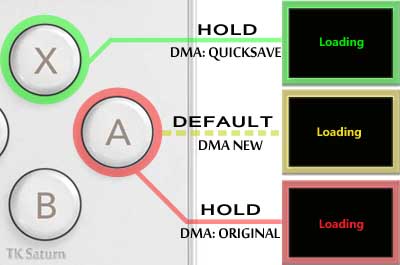
There is still three options, Yellow, Red and Green. Blue was non dma mode and was removed. Yellow uses faster saving functions but might be less compatible with future arm7 binaries than the other modes.
 
yes green DMA mode is still there , you activate it by pressing X while loading , and the red DMA mode is activated now by pressing A while loading
 
shineek said:
yes green DMA mode is still there , you activate it by pressing X while loading , and the red DMA mode is activated now by pressing A while loading
I have an easier way to put that, it's from my guide.

dma2.jpg
 

Site & Scene News

Popular threads in this forum