Tutorial  Updated

Posting a System Check

Users can link to this guide so they don't have to write instructions on posting a SysCheck over and over. This is not a place to post your SysChecks, it's just a guide.

Creating a SysCheck.
  1. Extract the contents of SysCheckME.zip to the apps folder on your SD card or USB Hard Drive.
  2. Insert your SD card or USB Hard Drive into your Wii and turn it on.
    1. If you don't have an SD card or USB, you can still launch SysCheck as long as the Wii has WiFi. Just open SysCheck's boot.dol with ModMii (e.g. drag and drop syscheck's boot.dol onto ModMii.exe)
  3. Load the Homebrew Channel.
  4. Launch SysCheck ModMii Edition and choose to scan all IOS's.
  5. If SysCheck is stuck on one IOS for more than 5 seconds, it's frozen. Make not of the number it froze on and see Troubleshooting.
  6. Once it's done, press HOME to exit.
    1. Or Press A to upload your syscheck to the cloud. This is useful if you don't have an SD card or USB Hard Drive.
Posting your SysCheck.
  1. Turn off your Wii and put your SD card or USB Hard Drive into your computer.
  2. Open up "device:\syscheck.csv" with notepad
  3. Press Ctrl+A to select everything. Now press Ctrl+C to copy everything.
  4. Make a new post (in the appropriate thread) and create spoiler tags. Click between the "][" like so:
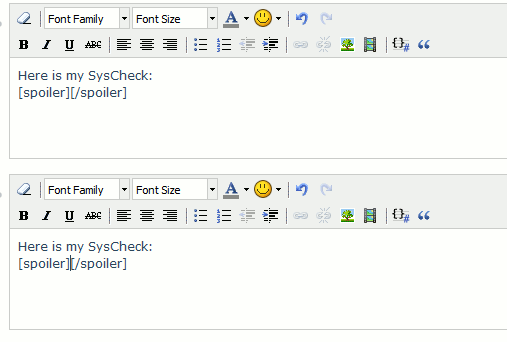
    SysCheckSpoilersNew.gif

  5. Press Ctrl+V to paste the contents of syscheck.csv between the spoiler tags.
  6. Save your post.
Troubleshooting
  1. Open up the SysCheck ModMii Edition meta.xml file with a text editor, preferably Notepad++ or Wordpad.
  2. Look for the "<arg>--skipIOS=0</arg>" line near the bottom of the file.
  3. Change the "0" to the IOS SysCheck HDE froze on.
  4. Save your changes and try running it again. If you are prompted about loosing format changes, save anyway.
  5. If it freezes on another IOS, duplicate the previously mentioned line in meta.xml and add the new IOS number.
Credits
Thanks to the following:
  • God for always being there for me.
  • The makers of SysCheck and SysCheck HDE, which SysCheck ModMii Edition is based on.
  • Stomp_442's SysCheck guide, which this is based on.
  • Mountain Dew for making me immortal (untested).
  • Team Twiizers for the HBC.
 
Last edited by XFlak,
Thank you for creating this thread OP!

Here's my issue: when I open USB Loader Gx it displays my games w/box art, etc. However, when I try to play anything the screen goes black and I get booted back to the homebrew channel. My syscheck results are below. Any assistance would be appreciated:)

SysCheck HDE v2.4.0 HacksDen Edition by JoostinOnline, Double_A, R2-D2199, and Nano
...runs on IOS58 (rev 6176).
Region: NTSC-U
System Menu 4.3U (v513)
Drive date: 12.18.2008
Homebrew Channel 1.1.0 running on IOS58
Hollywood v0x21
Console ID: 148322588
Console Type: Wii
Shop Channel Country: United States (49)
Boot2 v4
Found 90 titles.
Found 46 IOS on this console. 17 of them are stubs.
IOS3 (rev 65280): Stub
IOS4 (rev 65280): Stub
IOS9 (rev 1034): No Patches
IOS10 (rev 768): Stub
IOS11 (rev 256): Stub
IOS12 (rev 526): No Patches
IOS13 (rev 1032): No Patches
IOS14 (rev 1032): No Patches
IOS15 (rev 1032): No Patches
IOS16 (rev 512): Stub
IOS17 (rev 1032): No Patches
IOS20 (rev 256): Stub
IOS21 (rev 1039): No Patches
IOS22 (rev 1294): No Patches
IOS28 (rev 1807): No Patches
IOS30 (rev 2816): Stub
IOS31 (rev 3608): No Patches
IOS33 (rev 3608): No Patches
IOS34 (rev 3608): No Patches
IOS35 (rev 3608): No Patches
IOS36 (rev 3608): No Patches
IOS37 (rev 5663): No Patches
IOS38 (rev 4124): No Patches
IOS40 (rev 3072): Stub
IOS41 (rev 3607): No Patches
IOS43 (rev 3607): No Patches
IOS45 (rev 3607): No Patches
IOS46 (rev 3607): No Patches
IOS48 (rev 4124): No Patches
IOS50 (rev 5120): Stub
IOS51 (rev 4864): Stub
IOS52 (rev 5888): Stub
IOS53 (rev 5663): No Patches
IOS55 (rev 5663): No Patches
IOS56 (rev 5662): No Patches
IOS57 (rev 5919): No Patches
IOS58 (rev 6176): USB 2.0
IOS60 (rev 6400): Stub
IOS61 (rev 5662): No Patches
IOS70 (rev 6912): Stub
IOS80 (rev 6944): No Patches
IOS222 (rev 65280): Stub
IOS223 (rev 65280): Stub
IOS249 (rev 65280): Stub
IOS250 (rev 65280): Stub
IOS254 (rev 65281): BootMii
BC v6
MIOS v10
Report generated on 05/09/2011.
 
@Morrell
IOS222 (rev 65280): Stub
IOS223 (rev 65280): Stub
IOS249 (rev 65280): Stub
IOS250 (rev 65280): Stub
or any ios above 200 and below 253 should be cios (not stub) to run a backup either hermes or d2x or ciosx, it means custom ios.
usb loader is just a directive menu, it needs the system to be patched.
patching the ioses above 200 (just not 254) should do no harm since they're not used by nintendo.
there are more than one way to to patch the system (better said, more than one base ios to use) each diffent patch has advantages none is perfect.
there are 3 differnt wii types though, each only workt with cioses for the type of wii:
wii: d2x-cios or/and hermes
wiiu: vwii edition
wii mini: d2XL-cios
might need ios 236 (easy setup) to be able to install said cios
 
Last edited by Deleted member 301661,
  • Like
Reactions: Alexander1970
Thank you for creating this thread OP!

Here's my issue: when I open USB Loader Gx it displays my games w/box art, etc. However, when I try to play anything the screen goes black and I get booted back to the homebrew channel. My syscheck results are below. Any assistance would be appreciated:)

SysCheck HDE v2.4.0 HacksDen Edition by JoostinOnline, Double_A, R2-D2199, and Nano
...runs on IOS58 (rev 6176).
Region: NTSC-U
System Menu 4.3U (v513)
Drive date: 12.18.2008
Homebrew Channel 1.1.0 running on IOS58
Hollywood v0x21
Console ID: 148322588
Console Type: Wii
Shop Channel Country: United States (49)
Boot2 v4
Found 90 titles.
Found 46 IOS on this console. 17 of them are stubs.
IOS3 (rev 65280): Stub
IOS4 (rev 65280): Stub
IOS9 (rev 1034): No Patches
IOS10 (rev 768): Stub
IOS11 (rev 256): Stub
IOS12 (rev 526): No Patches
IOS13 (rev 1032): No Patches
IOS14 (rev 1032): No Patches
IOS15 (rev 1032): No Patches
IOS16 (rev 512): Stub
IOS17 (rev 1032): No Patches
IOS20 (rev 256): Stub
IOS21 (rev 1039): No Patches
IOS22 (rev 1294): No Patches
IOS28 (rev 1807): No Patches
IOS30 (rev 2816): Stub
IOS31 (rev 3608): No Patches
IOS33 (rev 3608): No Patches
IOS34 (rev 3608): No Patches
IOS35 (rev 3608): No Patches
IOS36 (rev 3608): No Patches
IOS37 (rev 5663): No Patches
IOS38 (rev 4124): No Patches
IOS40 (rev 3072): Stub
IOS41 (rev 3607): No Patches
IOS43 (rev 3607): No Patches
IOS45 (rev 3607): No Patches
IOS46 (rev 3607): No Patches
IOS48 (rev 4124): No Patches
IOS50 (rev 5120): Stub
IOS51 (rev 4864): Stub
IOS52 (rev 5888): Stub
IOS53 (rev 5663): No Patches
IOS55 (rev 5663): No Patches
IOS56 (rev 5662): No Patches
IOS57 (rev 5919): No Patches
IOS58 (rev 6176): USB 2.0
IOS60 (rev 6400): Stub
IOS61 (rev 5662): No Patches
IOS70 (rev 6912): Stub
IOS80 (rev 6944): No Patches
IOS222 (rev 65280): Stub
IOS223 (rev 65280): Stub
IOS249 (rev 65280): Stub
IOS250 (rev 65280): Stub
IOS254 (rev 65281): BootMii
BC v6
MIOS v10
Report generated on 05/09/2011.
Hello,

I advise you to reinstall your cios, either with Modmii ==>https://gbatemp.net/threads/modmii-for-windows-official-support-topic.207126/

OR this guide ==>https://wii.guide/cios

Then install Priiloader to counter the updates ==>https://wii.guide/priiloader.html

Then test your games again
 
Thank you Jaap and Jean for your replies! I patched the ioses recommended by Jaap and everything is working perfectly now:)

I keep my Wii offline except when I need to update HBC, but I will install Priiloader.
 
Thank you Jaap and Jean for your replies! I patched the ioses recommended by Jaap and everything is working perfectly now:)

I keep my Wii offline except when I need to update HBC, but I will install Priiloader.
glad everything works, have a nice game and have a nice day
 
  • Like
Reactions: Alexander1970
Hi, I do syscheck after updating with modmii.

SysCheck HDE v2.4.0 HacksDen Edition by JoostinOnline, Double_A, R2-D2199, and Nano
...runs on IOS58 (rev 6176).
Region: NTSC-U
System Menu 4.2U (v481)
Priiloader installed
Drive date: 02.13.2007
Homebrew Channel 1.1.2 running on IOS58
Hollywood v0x11
Console ID: 51233502
Console Type: Wii
Shop Channel Country: United States (49)
Boot2 v4
Found 102 titles.
Found 56 IOS on this console. 3 of them are stubs.
IOS4 (rev 65280): Stub
IOS9 (rev 1034): No Patches
IOS10 (rev 768): Stub
IOS11 (rev 16174): Trucha Bug, NAND Access
IOS12 (rev 526): No Patches
IOS13 (rev 1032): No Patches
IOS14 (rev 1032): No Patches
IOS15 (rev 1032): No Patches
IOS16 (rev 54321): Trucha Bug, ES Identify, Flash Access, NAND Access
IOS17 (rev 1032): No Patches
IOS20 (rev 16174): Trucha Bug, NAND Access
IOS21 (rev 1039): No Patches
IOS22 (rev 1294): No Patches
IOS28 (rev 1807): No Patches
IOS30 (rev 16174): Trucha Bug, NAND Access
IOS31 (rev 3608): No Patches
IOS33 (rev 3608): No Patches
IOS34 (rev 3608): No Patches
IOS35 (rev 3608): No Patches
IOS36 (rev 3608): No Patches
IOS37 (rev 5663): No Patches
IOS38 (rev 4124): No Patches
IOS40 (rev 16174): Trucha Bug, NAND Access
IOS41 (rev 3607): No Patches
IOS43 (rev 3607): No Patches
IOS45 (rev 3607): No Patches
IOS46 (rev 3607): No Patches
IOS48 (rev 4124): No Patches
IOS50 (rev 16174): Trucha Bug, NAND Access
IOS51 (rev 4864): Stub
IOS52 (rev 16174): Trucha Bug, NAND Access
IOS53 (rev 5663): No Patches
IOS55 (rev 5663): No Patches
IOS56 (rev 5662): No Patches
IOS57 (rev 5919): No Patches
IOS58 (rev 6176): USB 2.0
IOS59 (rev 9249): No Patches
IOS60 (rev 16174): Trucha Bug, NAND Access
IOS61 (rev 5662): No Patches
IOS62 (rev 6430): No Patches
IOS70 (rev 16174): Trucha Bug, NAND Access
IOS80 (rev 16174): Trucha Bug, NAND Access
IOS90 (rev 54321): Trucha Bug
IOS202[60] (rev 65535, Info: hermesrodries-v6): Trucha Bug, NAND Access, USB 2.0
IOS222[38] (rev 4, Info: hermes-v4): Trucha Bug, ES Identify, NAND Access, USB 2.0
IOS223[38+37] (rev 4, Info: hermes-v4): Trucha Bug, ES Identify, NAND Access, USB 2.0
IOS224[57] (rev 65535, Info: hermesrodries-v6): Trucha Bug, NAND Access, USB 2.0
IOS236 (rev 54321): Trucha Bug, ES Identify, NAND Access, Beer Ticket
IOS245[37] (rev 21008, Info: d2x-v8final): Trucha Bug, NAND Access, USB 2.0
IOS246[38] (rev 21008, Info: d2x-v8final): Trucha Bug, ES Identify, NAND Access
IOS247[53] (rev 21008, Info: d2x-v8final): Trucha Bug, NAND Access, USB 2.0
IOS248[55] (rev 21008, Info: d2x-v8final): Trucha Bug, NAND Access, USB 2.0
IOS249[56] (rev 21008, Info: d2x-v8final): Trucha Bug, NAND Access, USB 2.0
IOS250[57] (rev 21008, Info: d2x-v8final): Trucha Bug, NAND Access, USB 2.0
IOS251[58] (rev 21008, Info: d2x-v8final): Trucha Bug, NAND Access, USB 2.0
IOS254 (rev 65281): BootMii
BC v6
MIOS v10
Report generated on 08/22/2020.

Is there anything to update? I always have problem with freeze games. I have installed usb loader, cfg usb loader, wiiflow and still freeze.. This is my last try... anyone can help?
 
Hi, I do syscheck after updating with modmii.

SysCheck HDE v2.4.0 HacksDen Edition by JoostinOnline, Double_A, R2-D2199, and Nano
...runs on IOS58 (rev 6176).
Region: NTSC-U
System Menu 4.2U (v481)
Priiloader installed
Drive date: 02.13.2007
Homebrew Channel 1.1.2 running on IOS58
Hollywood v0x11
Console ID: 51233502
Console Type: Wii
Shop Channel Country: United States (49)
Boot2 v4
Found 102 titles.
Found 56 IOS on this console. 3 of them are stubs.
IOS4 (rev 65280): Stub
IOS9 (rev 1034): No Patches
IOS10 (rev 768): Stub
IOS11 (rev 16174): Trucha Bug, NAND Access
IOS12 (rev 526): No Patches
IOS13 (rev 1032): No Patches
IOS14 (rev 1032): No Patches
IOS15 (rev 1032): No Patches
IOS16 (rev 54321): Trucha Bug, ES Identify, Flash Access, NAND Access
IOS17 (rev 1032): No Patches
IOS20 (rev 16174): Trucha Bug, NAND Access
IOS21 (rev 1039): No Patches
IOS22 (rev 1294): No Patches
IOS28 (rev 1807): No Patches
IOS30 (rev 16174): Trucha Bug, NAND Access
IOS31 (rev 3608): No Patches
IOS33 (rev 3608): No Patches
IOS34 (rev 3608): No Patches
IOS35 (rev 3608): No Patches
IOS36 (rev 3608): No Patches
IOS37 (rev 5663): No Patches
IOS38 (rev 4124): No Patches
IOS40 (rev 16174): Trucha Bug, NAND Access
IOS41 (rev 3607): No Patches
IOS43 (rev 3607): No Patches
IOS45 (rev 3607): No Patches
IOS46 (rev 3607): No Patches
IOS48 (rev 4124): No Patches
IOS50 (rev 16174): Trucha Bug, NAND Access
IOS51 (rev 4864): Stub
IOS52 (rev 16174): Trucha Bug, NAND Access
IOS53 (rev 5663): No Patches
IOS55 (rev 5663): No Patches
IOS56 (rev 5662): No Patches
IOS57 (rev 5919): No Patches
IOS58 (rev 6176): USB 2.0
IOS59 (rev 9249): No Patches
IOS60 (rev 16174): Trucha Bug, NAND Access
IOS61 (rev 5662): No Patches
IOS62 (rev 6430): No Patches
IOS70 (rev 16174): Trucha Bug, NAND Access
IOS80 (rev 16174): Trucha Bug, NAND Access
IOS90 (rev 54321): Trucha Bug
IOS202[60] (rev 65535, Info: hermesrodries-v6): Trucha Bug, NAND Access, USB 2.0
IOS222[38] (rev 4, Info: hermes-v4): Trucha Bug, ES Identify, NAND Access, USB 2.0
IOS223[38+37] (rev 4, Info: hermes-v4): Trucha Bug, ES Identify, NAND Access, USB 2.0
IOS224[57] (rev 65535, Info: hermesrodries-v6): Trucha Bug, NAND Access, USB 2.0
IOS236 (rev 54321): Trucha Bug, ES Identify, NAND Access, Beer Ticket
IOS245[37] (rev 21008, Info: d2x-v8final): Trucha Bug, NAND Access, USB 2.0
IOS246[38] (rev 21008, Info: d2x-v8final): Trucha Bug, ES Identify, NAND Access
IOS247[53] (rev 21008, Info: d2x-v8final): Trucha Bug, NAND Access, USB 2.0
IOS248[55] (rev 21008, Info: d2x-v8final): Trucha Bug, NAND Access, USB 2.0
IOS249[56] (rev 21008, Info: d2x-v8final): Trucha Bug, NAND Access, USB 2.0
IOS250[57] (rev 21008, Info: d2x-v8final): Trucha Bug, NAND Access, USB 2.0
IOS251[58] (rev 21008, Info: d2x-v8final): Trucha Bug, NAND Access, USB 2.0
IOS254 (rev 65281): BootMii
BC v6
MIOS v10
Report generated on 08/22/2020.

Is there anything to update? I always have problem with freeze games. I have installed usb loader, cfg usb loader, wiiflow and still freeze.. This is my last try... anyone can help?
Hello,

Your syscheck report is correct.

You have the version of the cios d2x final 8. You can try the version of the cios d2x v10 beta 52 and test, you can always install the version of the cios d2x that suits you best or works best.

Do not use usb keys for games (often black screen or does not start)

RECOMMEND ==> FAT 32 external hard drive and use "" wii backup manager "" to manage the games
 
Last edited by jeannotte,
Users can link to this guide so they don't have to write instructions on posting a SysCheck over and over. This is not a place to post your SysChecks, it's just a guide.

Creating a SysCheck.
  1. Extract the contents of SysCheckHDE.zip to the apps folder on your SD card (USB is not supported for saving the SysCheck).
  2. Insert your SD card into your Wii and turn it on.
  3. Load the Homebrew Channel.
  4. Launch SysCheck HacksDen Edition and choose to scan all IOS's.
  5. If SysCheck is stuck on one IOS for more than 5 seconds, it's frozen. Make not of the number it froze on and see Troubleshooting.
  6. Once it's done, press HOME to exit.
Posting your SysCheck.
  1. Turn off your Wii and put your SD card into your computer.
  2. Open up "sd:\syscheck.csv" with WordPad
  3. Press Ctrl+A to select everything. Now press Ctrl+C to copy everything.
  4. Make a new post (in the appropriate thread) and create spoiler tags. Click between the "][" like so:
    SysCheckSpoilersNew.gif
  5. Press Ctrl+V to paste the contents of syscheck.csv between the spoiler tags.
  6. Save your post.
Troubleshooting
  1. Open up the SysCheck HDE meta.xml file with a text editor, preferably Wordpad.
  2. Look for the "<arg>--skipIOS=0</arg>" line near the bottom of the file.
  3. Change the "0" to the IOS SysCheck HDE froze on.
  4. Save your changes and try running it again. If you are prompted about loosing format changes, save anyway.
  5. If it freezes on another IOS, duplicate the previously mentioned line in meta.xml and add the new IOS number.
Credits
Thanks to the following:
  • God for always being there for me.
  • The makers of SysCheck, which SysCheck HDE is based on.
  • Stomp_442's SysCheck guide, which this is based on.
  • Mountain Dew for making me immortal (untested).
  • Team Twiizers for the HBC.

Hello.:)

@JoostinOnline
Only to report,the Download Link is not working and the whole Page is not reachable at the Moment.

Thank you.:)
 
  • Like
Reactions: XFlak
Last edited by XFlak,
Hi all.. not sure if this is the right place to post but could do with some help, so excuse me if it isn't!
I'm a newby at this but managed to make the wii play games via cfg-usb-loader... couldn't get wii flow or usb loader to work. Anyway, one of my kids accidentally deleted the cfg-usb app, so I managed to get an sd card and thought this time I'll do it properly (before had 2 usb drives and no sd card) Anyway long story short, I removed apps, formatted and may have accidentally updated after installing HBC because now, no matter what I do, I can't get the games to run from usb anymore. I've tried all of the above 3 usb loaders at 249/250 & 251. Also I installed priiloader and when I load it from boot, it merely blinks then loads the wii as norm. Syscheck below - can anyone confirm that I did download wii update file which are blocking 249/250 usb loaders?
If yes, what are my options?

Thanks

SysCheck HDE v2.4.0 HacksDen Edition by JoostinOnline Double_A R2-D2199 and Nano
...runs on IOS58 (rev 6176).
Region: PAL
System Menu 4.3E (v514)
Priiloader installed
Drive date: 12.18.2008
Homebrew Channel 1.1.2 running on IOS58
Hollywood v0x21
Console ID: xxxxxxxxxx
Console Type: Wii
Shop Channel Country: United Kingdom (110)
Boot2 v4
Found 86 titles.
Found 48 IOS on this console. 16 of them are stubs.
IOS3 (rev 65280): Stub
IOS4 (rev 65280): Stub
IOS9 (rev 1034): No Patches
IOS10 (rev 768): Stub
IOS11 (rev 256): Stub
IOS12 (rev 526): No Patches
IOS13 (rev 1032): No Patches
IOS14 (rev 1032): No Patches
IOS15 (rev 1032): No Patches
IOS16 (rev 512): Stub
IOS17 (rev 1032): No Patches
IOS20 (rev 256): Stub
IOS21 (rev 1039): No Patches
IOS22 (rev 1294): No Patches
IOS28 (rev 1807): No Patches
IOS30 (rev 2816): Stub
IOS31 (rev 3608): No Patches
IOS33 (rev 3608): No Patches
IOS34 (rev 3608): No Patches
IOS35 (rev 3608): No Patches
IOS36 (rev 3608): No Patches
IOS37 (rev 5663): No Patches
IOS38 (rev 4124): No Patches
IOS40 (rev 3072): Stub
IOS41 (rev 3607): No Patches
IOS43 (rev 3607): No Patches
IOS45 (rev 3607): No Patches
IOS46 (rev 3607): No Patches
IOS48 (rev 4124): No Patches
IOS50 (rev 5120): Stub
IOS51 (rev 4864): Stub
IOS52 (rev 5888): Stub
IOS53 (rev 5663): No Patches
IOS55 (rev 5663): No Patches
IOS56 (rev 5662): No Patches
IOS57 (rev 5919): No Patches
IOS58 (rev 6176): USB 2.0
IOS60 (rev 6400): Stub
IOS61 (rev 5662): No Patches
IOS62 (rev 6430): No Patches
IOS70 (rev 6912): Stub
IOS80 (rev 6944): No Patches
IOS222 (rev 65280): Stub
IOS223 (rev 65280): Stub
IOS249[57] (rev 65535 Info: d2x-v10beta52): Trucha Bug NAND Access USB 2.0
IOS250[56] (rev 65535 Info: d2x-v10beta52): Trucha Bug NAND Access USB 2.0
IOS251[38] (rev 65535 Info: d2x-v10beta52): Trucha Bug ES Identify NAND Access
IOS254 (rev 65280): Stub
BC v6
MIOS v10
Report generated on 06/21/2021.
 
Hi all.. not sure if this is the right place to post but could do with some help, so excuse me if it isn't!
I'm a newby at this but managed to make the wii play games via cfg-usb-loader... couldn't get wii flow or usb loader to work. Anyway, one of my kids accidentally deleted the cfg-usb app, so I managed to get an sd card and thought this time I'll do it properly (before had 2 usb drives and no sd card) Anyway long story short, I removed apps, formatted and may have accidentally updated after installing HBC because now, no matter what I do, I can't get the games to run from usb anymore. I've tried all of the above 3 usb loaders at 249/250 & 251. Also I installed priiloader and when I load it from boot, it merely blinks then loads the wii as norm. Syscheck below - can anyone confirm that I did download wii update file which are blocking 249/250 usb loaders?
If yes, what are my options?

Thanks

SysCheck HDE v2.4.0 HacksDen Edition by JoostinOnline Double_A R2-D2199 and Nano
...runs on IOS58 (rev 6176).
Region: PAL
System Menu 4.3E (v514)
Priiloader installed
Drive date: 12.18.2008
Homebrew Channel 1.1.2 running on IOS58
Hollywood v0x21
Console ID: xxxxxxxxxx
Console Type: Wii
Shop Channel Country: United Kingdom (110)
Boot2 v4
Found 86 titles.
Found 48 IOS on this console. 16 of them are stubs.
IOS3 (rev 65280): Stub
IOS4 (rev 65280): Stub
IOS9 (rev 1034): No Patches
IOS10 (rev 768): Stub
IOS11 (rev 256): Stub
IOS12 (rev 526): No Patches
IOS13 (rev 1032): No Patches
IOS14 (rev 1032): No Patches
IOS15 (rev 1032): No Patches
IOS16 (rev 512): Stub
IOS17 (rev 1032): No Patches
IOS20 (rev 256): Stub
IOS21 (rev 1039): No Patches
IOS22 (rev 1294): No Patches
IOS28 (rev 1807): No Patches
IOS30 (rev 2816): Stub
IOS31 (rev 3608): No Patches
IOS33 (rev 3608): No Patches
IOS34 (rev 3608): No Patches
IOS35 (rev 3608): No Patches
IOS36 (rev 3608): No Patches
IOS37 (rev 5663): No Patches
IOS38 (rev 4124): No Patches
IOS40 (rev 3072): Stub
IOS41 (rev 3607): No Patches
IOS43 (rev 3607): No Patches
IOS45 (rev 3607): No Patches
IOS46 (rev 3607): No Patches
IOS48 (rev 4124): No Patches
IOS50 (rev 5120): Stub
IOS51 (rev 4864): Stub
IOS52 (rev 5888): Stub
IOS53 (rev 5663): No Patches
IOS55 (rev 5663): No Patches
IOS56 (rev 5662): No Patches
IOS57 (rev 5919): No Patches
IOS58 (rev 6176): USB 2.0
IOS60 (rev 6400): Stub
IOS61 (rev 5662): No Patches
IOS62 (rev 6430): No Patches
IOS70 (rev 6912): Stub
IOS80 (rev 6944): No Patches
IOS222 (rev 65280): Stub
IOS223 (rev 65280): Stub
IOS249[57] (rev 65535 Info: d2x-v10beta52): Trucha Bug NAND Access USB 2.0
IOS250[56] (rev 65535 Info: d2x-v10beta52): Trucha Bug NAND Access USB 2.0
IOS251[38] (rev 65535 Info: d2x-v10beta52): Trucha Bug ES Identify NAND Access
IOS254 (rev 65280): Stub
BC v6
MIOS v10
Report generated on 06/21/2021.
Hello,

Your syscheck report is correct.

install "" configurable loader v70 "" on your SD card with this ==>https://wiidatabase.de/downloads/usb-und-disk-loader/configurable-usb-loader-mod/

try to install "wiiflow lite 5.4.9" and "usb loader gx 1271".

your problem comes from your USB keys (often black screen or never starts) ==>:hateit:

Prefer an external hard drive FAT32 and you will have better results ==> see formidable :yaywii: , have a look on other messages to post on this forum, concerning the USB keys, ==> you will form an opinion
 
  • Like
Reactions: Alexander1970
Hello,

Your syscheck report is correct.

install "" configurable loader v70 "" on your SD card with this ==>

try to install "wiiflow lite 5.4.9" and "usb loader gx 1271".

your problem comes from your USB keys (often black screen or never starts) ==>:hateit:

Prefer an external hard drive FAT32 and you will have better results ==> see formidable :yaywii: , have a look on other messages to post on this forum, concerning the USB keys, ==> you will form an opinion


Thanks a lot jeannotte - I'll research usb keys. Strange why priiloader won't boot on wii shutdown though. I'll check if I have an up to date version. Thank again :D

Update: Well, I installed the versions you said with no joy - then thought I'd try with one of the flash drives in wbsf format and it worked. Then formatted western digital to fat32 & ntfs but that wouldn't work. Then tried an older but same cable with the western digital & it worked!
 
Last edited by pr0c3ss,
Hello there. I want to post my syscheck log because my Wii takes too long to load some channels or homebrew apps I have installed, to the point that dies frozen
The thing is that my Wii's SD card slot is broken, and SysCheck apparently does not like exporting the log to USB, and when I pick the option for posting the log,
it actually posts nothing, the website returns "SysCheck does not exist!"

What I can do to dump my SysCheck log?
 
Do I need to do the Dop-Mii if neither of the previous scans don't freeze?

Update: I went ahead and ran it, because I figured you meant that I should run it even if the Wii doesn't freeze on the previous 2 scans.
no
 

Site & Scene News

Popular threads in this forum