Tutorial  Updated

Posting a System Check

Users can link to this guide so they don't have to write instructions on posting a SysCheck over and over. This is not a place to post your SysChecks, it's just a guide.

Creating a SysCheck.
  1. Extract the contents of SysCheckME.zip to the apps folder on your SD card or USB Hard Drive.
  2. Insert your SD card or USB Hard Drive into your Wii and turn it on.
    1. If you don't have an SD card or USB, you can still launch SysCheck as long as the Wii has WiFi. Just open SysCheck's boot.dol with ModMii (e.g. drag and drop syscheck's boot.dol onto ModMii.exe)
  3. Load the Homebrew Channel.
  4. Launch SysCheck ModMii Edition and choose to scan all IOS's.
  5. If SysCheck is stuck on one IOS for more than 5 seconds, it's frozen. Make not of the number it froze on and see Troubleshooting.
  6. Once it's done, press HOME to exit.
    1. Or Press A to upload your syscheck to the cloud. This is useful if you don't have an SD card or USB Hard Drive.
Posting your SysCheck.
  1. Turn off your Wii and put your SD card or USB Hard Drive into your computer.
  2. Open up "device:\syscheck.csv" with notepad
  3. Press Ctrl+A to select everything. Now press Ctrl+C to copy everything.
  4. Make a new post (in the appropriate thread) and create spoiler tags. Click between the "][" like so:
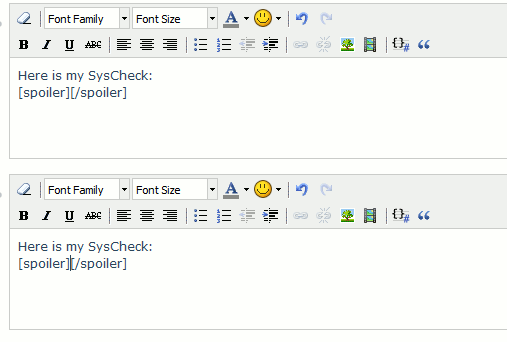
    SysCheckSpoilersNew.gif

  5. Press Ctrl+V to paste the contents of syscheck.csv between the spoiler tags.
  6. Save your post.
Troubleshooting
  1. Open up the SysCheck ModMii Edition meta.xml file with a text editor, preferably Notepad++ or Wordpad.
  2. Look for the "<arg>--skipIOS=0</arg>" line near the bottom of the file.
  3. Change the "0" to the IOS SysCheck HDE froze on.
  4. Save your changes and try running it again. If you are prompted about loosing format changes, save anyway.
  5. If it freezes on another IOS, duplicate the previously mentioned line in meta.xml and add the new IOS number.
Credits
Thanks to the following:
  • God for always being there for me.
  • The makers of SysCheck and SysCheck HDE, which SysCheck ModMii Edition is based on.
  • Stomp_442's SysCheck guide, which this is based on.
  • Mountain Dew for making me immortal (untested).
  • Team Twiizers for the HBC.
 
Last edited by XFlak,
Do I need to do the Dop-Mii if neither of the previous scans don't freeze?

Update: I went ahead and ran it, because I figured you meant that I should run it even if the Wii doesn't freeze on the previous 2 scans.
 
jcsaxx said:
Do I need to do the Dop-Mii if neither of the previous scans don't freeze?

Update: I went ahead and ran it, because I figured you meant that I should run it even if the Wii doesn't freeze on the previous 2 scans.
No, you only have to do one. If the first one doesn't freeze, it says to skip to "Posting your SysCheck".
 
tueidj said:
Has posting a syscheck ever actually helped anyone?
I believe yes as people tend to forget what IOS/cIOS they installed and sysCheck is the best way to tell whats inside your Wii. Especially usefull for people who let others mod their Wii and therefore have no clue what files have been installed.
 
JoostinOnline said:
Shano56 said:
Hm I think it worked for me when I tried it once. but okay
smile.gif
I know it works for most people. It worked for me before changing some cIOS's. As far as I know, b9 works fine for everyone.

Alright whatever works
nyanya.gif
 
New syscheck is out, maybe this is stable:

SUNDAY, JULY 31, 2011

sysCheck 2.1.0 b12
by Erik Spyder, Double_A, R2-D2199
Homebrew application which does several checks on installed IOS and custom IOS:
- IOS Stub;
- Fake signature (aka Trucha Bug);
- ES_DiVerify (aka ES_Identify);
- Flash Access;
- NAND Access;
- Boot2 Access;
- USB 2.0

sysCheck generates a report on the root of the SD card (sd:/sysCheck.csv).

CHANGELOG
=========
* The Base IOS detection has been improved (including support for more Pimp My Wii IOS), thanks Black.Pearl
* The bug has been fixed HW_AHBPROT, thanks davebaol
* The "Priiloader NAND Access Bug" was fixed, thanks BöhserOnkel
* The update function has been added
* Using a USB Gecko is now obtained debugging information
 
shyam513 said:
Thanks for the post, this was really helpful. I lost track of a few Cios' somewhere along the way, so this was just what I needed.
No problem.
smile.gif


I just made a small update. The meta.xml file was messed up (I reported it on googlecode already), but I fixed it and re-uploaded the files.
 
I've been having issues getting a usable system check. Both versions of SysCheck run fine, but give an error about not being able to mount the sd card. It shows and option to display on screen, but my controllers lose sync and won't reconnect so that I can push A. I ran Dop-Mii and got a file with a bunch of gibberish, mostly ÿ, in it. Any suggestions?
 

Site & Scene News

Popular threads in this forum