
Hardware Oldies N64 (HDMI) Video Glitches

  • Thread starter Thread starter Gallaer
  • Start date Start date
  • Views Views 2,341
  • Replies Replies 10

Gallaer

Well-Known Member
Member
Joined
Apr 28, 2021
Messages
161
Reaction score
33
Trophies
0
XP
1,174
Country
United States
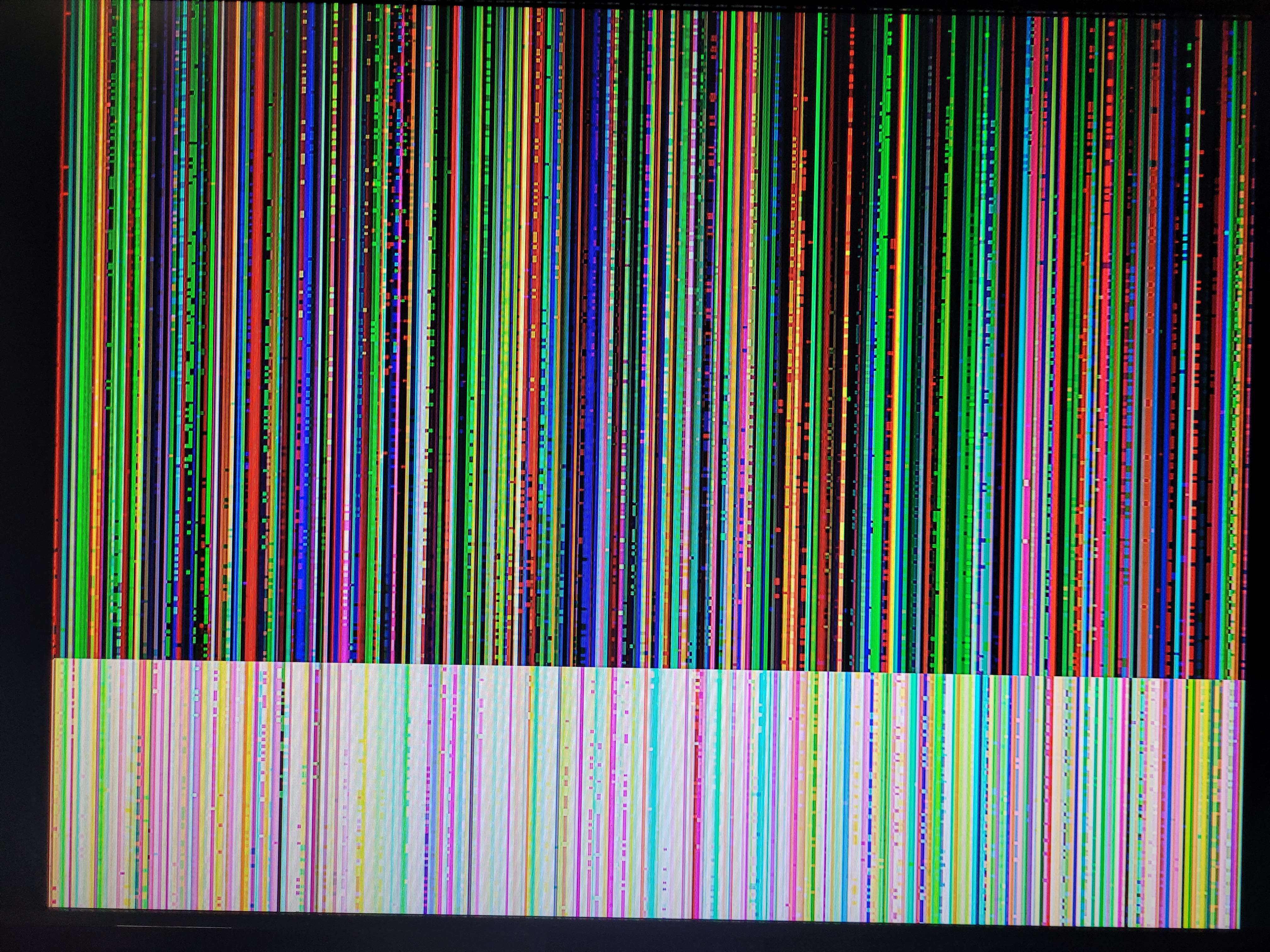
So I have a HDMI modded N64 and it works great. However occasionally the bottom of screen for basically every game might occasionally quickly flash for like half a second with a little glitchy bit. However, I just got some new games recently and its worse for two of them. Star Fox and Beetle Adventure Racing. Star Fox is pretty bad as shown here. I have cleaned the cartridge pins for both games. Beetle is far worse than Star Fox is however. Now when a game isn't put in properly, it just shows this error glitchy screen. My best assumption is the problem is the cartridge reader itself, but that doesn't explain the inconsistency between games. Any ideas to why this is happening would be greatly appreciated.
20230913_194801.jpg
 
Does this happen in composite mode as well?

Which HDMI kit are you using? UltraHDMI, Gamebox Systems, Hispeedido, or just a generic A/V to HDMI converter?
 
Does this happen in composite mode as well?

Which HDMI kit are you using? UltraHDMI, Gamebox Systems, Hispeedido, or just a generic A/V to HDMI converter?
Using Gamebox's mod. This never happened with composite, no.
Post automatically merged:

HDMI cable might be failing. StarFox is more graphics-intensive (don't know about beetle racing) so the cable would finick out more
If that was the case, wouldn't games like Conker or Banjo have the same levels? Cause they weirdly don't. Maybe its optimization of the games themselves that make the difference?
 
Using Gamebox's mod. This never happened with composite, no.
Post automatically merged:


If that was the case, wouldn't games like Conker or Banjo have the same levels? Cause they weirdly don't. Maybe its optimization of the games themselves that make the difference?
In my professional opinion, you'll get much better customer support if you talked to them since it's their product.

Although chances are they'll just tell you to check your wiring.
 
In my professional opinion, you'll get much better customer support if you talked to them since it's their product.

Although chances are they'll just tell you to check your wiring.

All things considered, Gamebox is in a rough position (for technical support and similar) right now since a key member passed away recently.
 
Last edited by Kioku,
  • Like
Reactions: Gallaer
Using Gamebox's mod. This never happened with composite, no.
Post automatically merged:


If that was the case, wouldn't games like Conker or Banjo have the same levels? Cause they weirdly don't. Maybe its optimization of the games themselves that make the difference?
Do you happen to know what firmware you are on? Also, how is the soldering? Did you do the install or have someone install it for you?
 
Do you happen to know what firmware you are on? Also, how is the soldering? Did you do the install or have someone install it for you?
I had someone else do it for me as there was no way I could do it myself. However the joints from the pictures seemed solid and I checked it myself. It's V1.6.4.

Also its mostly fine for every game besides those two that I mentioned earlier. Its just like a small fraction of the bottom of the screen that flickers for half a second like once in a while. Like maybe 10 minutes or more.

Just tested the HDMI cable and it seems super sensitive.
 

Site & Scene News

Popular threads in this forum
