Make a Unity game for Wii U

Hi !
I'm proud to announce that the tutorial is finished !
There is the tutorial with installation of all software programs, build the game and install it to a Wii U Unit

Here is the Google Drive link : Unity Wii U Tutorial

The 2 parts are available in English and French.

The Tutorial for Wii U Cafe SDK Deluxe (my tool to convert Wii U Dev files to normal Wii U unit) is here : GBATemp Thread

Note : Just one little thing, the v1.3.0 of Wii U Cafe SDK is not released (yet) but there is the automated installation tutorial, but all other things are the same. I will tell when the v1.3.0 will be available

I'm available by PM or here for any questions !

- RetroAndDev

Known Issues :
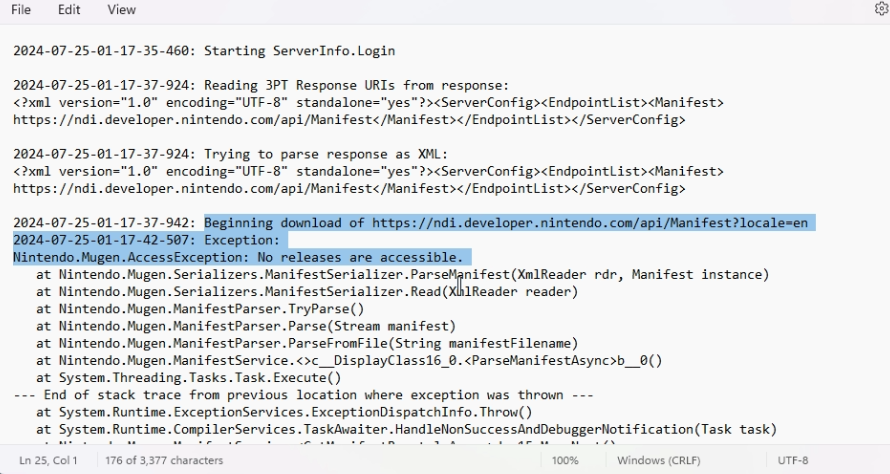
#1 : The NDI display an error when log in
Screenshots :
screenshot-106-png.449104
screenshot-107-png.449105

Fix :

Can you log in on developer.nintendo.com, and to your profile (top right corner with your username, and "manage account").
Scroll down to the bottom, and check your developer roles. If the section doesn't appear or is empty, you need to add the roles to yourself

Option 1 :
If you have an edit button on the page, use it

Option 2 : (For team more than 1 dev/users)
Go to "Admin" (next to Getting Started and others), "Users Management" on the left, and select your account. Go to the bottom and click "Edit"

In both options, you need to be the company admin (you are if you're the only member) on the DP (Developer Portail), if you're not, contact it to do this.

From the page, you will be able to scroll down again and add the 3DS and Wii U Roles. ("Company 3DS User" and " Company Wii U User")
After that, login on the NDI and follow the tutorial like normal


Original Post

Hello,
Today I am proud to introduce my first part of the tutorial about making a Wii U Game with Unity.

This tutorial will be divided in multiple parts and will be available in English and French.
And today, I release the first part of him.

Here is the link to the folder with the PDFs and required files : Google Drive Link

The Tutorial for Wii U Cafe SDK Deluxe is here : GBATemp Thread

It's all for today.
Have a nice week and happy coding your Unity Wii U Game !
 
Last edited by RetroAndDev,
Today I will start writing the second part about the Unity Setup (In project), Builds and Documentation.
I think I will release it the next week or the first week of June.


Envoyé de mon iPhone en utilisant Tapatalk
 
Hello,
Today I am proud to introduce my first part of the tutorial about making a Wii U Game with Unity.

This tutorial will be divided in multiple parts and will be available in English and French.
And today, I release the first part of him.

Here is the link to the folder with the PDFs and required files : Google Drive Link

The Tutorial for Wii U Cafe SDK Deluxe is here : GBATemp Thread

It's all for today.
Have a nice week and happy coding your Unity Wii U Game !
Hello. I’m in the Wii U community this time for a game development in Unity for Baldi’s Basics.

I’m using the already decompiled version of the Baldi’s Basics.
I got everything. The Cafe SDK, Unity for the Wii U, the Baldi’s Basics that is in Unity 2018 1.1f1, and the Nintendo Dev Interface.
However, look how many compile errors I get when I try to build it for the Wii U version:
And this is supposed to be used for my Wii U NAND for the WUP installer:

What needs to be done here? Thank you!
 

Attachments

  • image 4.jpg
    image 4.jpg
    1.8 MB · Views: 188
  • image 2.jpg
    image 2.jpg
    2.4 MB · Views: 218
  • image 3.jpg
    image 3.jpg
    1.7 MB · Views: 179
  • image.jpg
    image.jpg
    2 MB · Views: 162
  • Like
Reactions: Rikea7
First, your Wii U Cafe SDK Deluxe Folder is not the right place. He needs to be inside your build folder and inside your version Folder :
Ex : If your build folder is /UnityProject/Build and your bersion is VersionA, the tool must be a /UnityProject/Build/VersionA
Also, your build settings are not good. To install it to a NAND you need to make BOOT MODE as NAND.
For the errors, use a different version of Unity and Unity Wii U. Follow my tutorial. And for Wii U Cafe SDK Deluxe tutorial also
 
Yeah, for sure. Inside make a Version folder with your name of your version and install Wii U Cafe SDK Deluxe inside like that for a version named "VersionA" :
/UnityProject/Builds/VersionA/WiiUCafeSDKDeluxe
In Unity you will build as UNPACKED and boot mode as NAND inside VersionA folder.

Follow this tutorial of Wii U Cafe SDK Deluxe
 
Also when I added the Wii U support that was in the 2017 version to my Unity 2018 1.1f1, the Wii U build in the build settings didn’t show up.
 
Normal.
I recommend to you to use Unity 2017.1.2p3 from Internet Archive : https://archive.org/details/unityforwiiu40120171205
To make the Wii U Build option appear, you need to enter the licence key from the description of the archive.
My tutorial only support this specific version of Unity because I was not able to make newer Unity Version working
 
I still get this error. Is there anything else that needs to be done?:
 

Attachments

  • image.jpg
    image.jpg
    2.4 MB · Views: 171
  • image.jpg
    image.jpg
    3.9 MB · Views: 172
  • image.jpg
    image.jpg
    2.3 MB · Views: 184
Seems strange. What version you currently use ? 2017.1.2p3 ? Or any other ? What version of the build module you used ?
I recommend to you to start an empty project and follow my tutorial about making a Unity Wii U Game and the Wii U Cafe SDK Tutorial.

If you have any other questions about my tutorial or my tool. Contact me by PM.

Remember to activate the licence to have the Wii U Build support, Build mode as NAND and (sorry about that, I checked) and build output as Download image....
And tell me
 
This version of the decompiled Baldi’s Basics was from Unity 2018 1.1f1 something and I’m using the Unity 2017 1.2p3 for the Wii U like you told me to. I guess need to convert the Baldi’s Basics version to the 1.2p3. Because I tried using the Unity 2018 and adding the Wii U support from the 2017 version, but the Wii U build doesn’t appear.
Post automatically merged:

And what I’m really trying to do is to port Baldi’s Basics on the Wii U by using Unity.
Post automatically merged:

Hello?
 
Last edited by _RedFire,
Alright, so I made my own game for Windows. Now I’m exporting this to the Wii U. But first, the gamepad, Wii U controller, and remotes need to be done.
By the way, I have an error for the gamepad, not just, but all the rest of the Wii U packages for the controller inputs and others:
Post automatically merged:

So in this game, you turn left to walk and right to walk, you press to jump.
This will have these kinds of controls for both of the Wii remote, controller, and the gamepad.

For Wii remote, press A to jump, and the button left and right.
For the gamepad, use the control sticks to move left and right, and press A to jump.
Also the same thing for the Wii U controller just like the gamepad controls. Alright, so I made my own game for Windows. Now I’m exporting this to the Wii U. But first, the gamepad, Wii U controller, and remotes need to be done.
By the way, I have an error for the gamepad, not just, but all the rest of the Wii U packages for the controller inputs and others:
Post automatically merged:

and finally, the buttons quit and start. The Wii cursor is needed for this.
 

Attachments

  • image.jpg
    image.jpg
    2.8 MB · Views: 186
  • image.jpg
    image.jpg
    5.1 MB · Views: 159
Last edited by _RedFire,
I'm sorry, but I don't know the Unity JavaScript. I make my games in C# from 2017.
Here is the code I used in C# to have the touch :

C#:
using UnityEngine.WiiU; //Need to access to Wii U features

GamePad gamepad;
GamePadTouch gamepadTouch;

void Awake()
{
    gamepad = new GamePad();
    gamepadTouch = new GamePadTouch();
}

void Update()
{
    //Check if the gamepad is connected or not
    if (gamepad.error == GamePadError.None)
    {
       CheckGamepadtouch();
    }
    else
    {
        Debug.LogWarning("Error with Gamepad check it (error: " + gamepad.error + ")");
    }
}

void CheckGamepadtouch()
{
       float touchX = Input.mousePosition.x;
    float touchY = Input.mousePosition.y;
    Vector3 mouseLoc = new Vector3(touchX, touchY);

    Camera gamePadCam = GameObject.FindGameObjectWithTag("GamePadCam").GetComponent<Camera>();
    if (gamePadCam != null)
    {
        Ray ray = gamePadCam.ScreenPointToRay(new Vector3(touchX, touchY));
        RaycastHit2D hit = Physics2D.Raycast(ray.origin, ray.direction);
        if (Input.GetMouseButton(0))
        {
            if (hit.transform != null)
            {
                 Debug.Log("Hit Obj Name : " + hit.transform.name + " / mouseX: " + touchX + " / mouseY: " + touchY);
                 if (hit.transform == transform)
                 {
                      //The object with the script was touched on the GamePad Screen
                 }
             }
         }
      }
}


I recommend you to switching to C# and Unity 2017.1.2p3 with Unity Wii U Build support from Internet Archive. When I made my research for my tutorial, I was not able to make working the Wii U Input Package due to the error you mentioned
 
I'm sorry, but I don't know the Unity JavaScript. I make my games in C# from 2017.
Here is the code I used in C# to have the touch :

C#:
using UnityEngine.WiiU; //Need to access to Wii U features

GamePad gamepad;
GamePadTouch gamepadTouch;

void Awake()
{
    gamepad = new GamePad();
    gamepadTouch = new GamePadTouch();
}

void Update()
{
    //Check if the gamepad is connected or not
    if (gamepad.error == GamePadError.None)
    {
       CheckGamepadtouch();
    }
    else
    {
        Debug.LogWarning("Error with Gamepad check it (error: " + gamepad.error + ")");
    }
}

void CheckGamepadtouch()
{
       float touchX = Input.mousePosition.x;
    float touchY = Input.mousePosition.y;
    Vector3 mouseLoc = new Vector3(touchX, touchY);

    Camera gamePadCam = GameObject.FindGameObjectWithTag("GamePadCam").GetComponent<Camera>();
    if (gamePadCam != null)
    {
        Ray ray = gamePadCam.ScreenPointToRay(new Vector3(touchX, touchY));
        RaycastHit2D hit = Physics2D.Raycast(ray.origin, ray.direction);
        if (Input.GetMouseButton(0))
        {
            if (hit.transform != null)
            {
                 Debug.Log("Hit Obj Name : " + hit.transform.name + " / mouseX: " + touchX + " / mouseY: " + touchY);
                 if (hit.transform == transform)
                 {
                      //The object with the script was touched on the GamePad Screen
                 }
             }
         }
      }
}


I recommend you to switching to C# and Unity 2017.1.2p3 with Unity Wii U Build support from Internet Archive. When I made my research for my tutorial, I was not able to make working the Wii U Input Package due to the error you mentioned
I already have one.
Also I get this error:
Assets/Scripts/Gamepad.cs(3,0): error CS1525: Unexpected symbol `GamePad'
I'm using the Unity 2017 1.2p3 with the Unity Wii U build support. What do I do?
 
Last edited by _RedFire,
Interesting... Do you have activated the licence key to get access to the Wii U Support ? Follow my tutorial to activate it (page 17 in the attached PDF). After go to File > Build Settings and if you are not targeting the Wii U you will not have access to Wii U specific features. If you're not targeting Wii U select it from the list and do "Switch support" or something like that under the list.
And from now you will be able to use the features from UnityEngine.WiiU

Note :
The script I give you is not correct, it's an example to work you will need this version :

C#:
using System.Collections;
using System.Collections.Generic;
using UnityEngine;
using UnityEngine.WiiU;
using UnityEngine.EventSystems;

public class GamePadTouch : MonoBehaviour {

    GamePad gamepad;
    GamePadTouch gamepadTouch;
    
    void Awake()
    {
        gamepad = new GamePad();
        gamepadTouch = new GamePadTouch();
    }

    void Update()
    {
        if (gamepad.error == GamePadError.None)
        {
            CheckGamepadtouch();
        }
        else
        {
            Debug.LogWarning("Error with Gamepad check it (error: " + gamepad.error + ")");
        }
    }

    void CheckGamepadtouch()
    {
        float touchX = Input.mousePosition.x;
        float touchY = Input.mousePosition.y;
        Vector3 mouseLoc = new Vector3(touchX, touchY);

        Camera gamePadCam = GameObject.FindGameObjectWithTag("GamePadCam").GetComponent<Camera>();
        if (gamePadCam != null)
        {
            Ray ray = gamePadCam.ScreenPointToRay(new Vector3(touchX, touchY));
            RaycastHit2D hit = Physics2D.Raycast(ray.origin, ray.direction);
            if (Input.GetMouseButton(0))
            {
                if (hit.transform != null)
                {
                    Debug.Log("Hit Obj Name : " + hit.transform.name + " / mouseX: " + touchX + " / mouseY: " + touchY);
                    if (hit.transform == transform)
                    {
                        //Do anything
                    }
                }
            }
        }
    }
}
 

Attachments

Site & Scene News

Popular threads in this forum